INVITE-ONLY SCRIPT
已更新 RPPI Futures & Indices Strategy Tester [SS Premium]
Hello everyone,
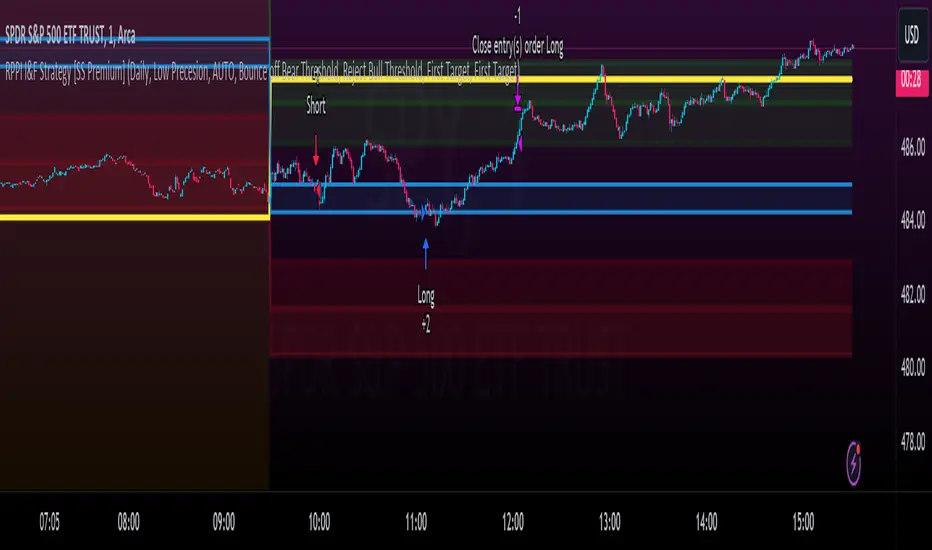
As promised, here is the strategy companion to the RPPI Futures & Indicies Indicator.
It contains all of the models of the RPPI but the functionality is all about back-testing the strategy. As such, you cannot use this to run probabilities, run autoregression assessments, or do any of the advanced RPPI features, this is solely to allow you to develop and implement a sustainable strategy in your trading using the RPI.
When you launch the indicator, in the settings menu, you will see toggles to customize the strategy you would like to apply:

You can customize your short and long entries and your short and long exits and then review the backtest results of these various combinations.
From there, you can open up tradingview's strategy tester to see the immediate success of the strategy. If you want to test how effective your strategy is further back, you can make use of Tradingview's "Deep Backtesting" option. This allows you to select a start date way in the past, and back-test over numerous months / years, to see if the strategy has been sustainable in the long term.
To read more about the RPPI, you can check out its own page which lists the details of the indicator, how it works and how to use it. As a synopsis, the RPPI is a compendium indicator that contains various models of multiple futures and stocks. This is to attempt to accurately forecast daily, weekly, monthly, 3 month and annual moves on various futures and indices.
This strategy companion will help you hone in on ideal entries and exits and allow you to tailor them to each ticker that you are interested in trading, on whichever timeframe you are interested in trading.
Some important notes when applying the back-testing results:
1. If you are back-testing daily levels, it is recommended to use the 1 to 5-minute chart max.
2. iF you are back-testing weekly levels, it is recommended to use at least 15 to 30 minutes, up to 60 minute candles.
3. Monthly levels, its best to use 1 hour and up.
4. Greater than monthly, its best to use 3 to 4 hours, to daily candles and up.
As always, feel free to leave your questions or suggestions below.
Thank you for reading and, as always, safe trades!
As promised, here is the strategy companion to the RPPI Futures & Indicies Indicator.
It contains all of the models of the RPPI but the functionality is all about back-testing the strategy. As such, you cannot use this to run probabilities, run autoregression assessments, or do any of the advanced RPPI features, this is solely to allow you to develop and implement a sustainable strategy in your trading using the RPI.
When you launch the indicator, in the settings menu, you will see toggles to customize the strategy you would like to apply:
You can customize your short and long entries and your short and long exits and then review the backtest results of these various combinations.
From there, you can open up tradingview's strategy tester to see the immediate success of the strategy. If you want to test how effective your strategy is further back, you can make use of Tradingview's "Deep Backtesting" option. This allows you to select a start date way in the past, and back-test over numerous months / years, to see if the strategy has been sustainable in the long term.
To read more about the RPPI, you can check out its own page which lists the details of the indicator, how it works and how to use it. As a synopsis, the RPPI is a compendium indicator that contains various models of multiple futures and stocks. This is to attempt to accurately forecast daily, weekly, monthly, 3 month and annual moves on various futures and indices.
This strategy companion will help you hone in on ideal entries and exits and allow you to tailor them to each ticker that you are interested in trading, on whichever timeframe you are interested in trading.
Some important notes when applying the back-testing results:
1. If you are back-testing daily levels, it is recommended to use the 1 to 5-minute chart max.
2. iF you are back-testing weekly levels, it is recommended to use at least 15 to 30 minutes, up to 60 minute candles.
3. Monthly levels, its best to use 1 hour and up.
4. Greater than monthly, its best to use 3 to 4 hours, to daily candles and up.
As always, feel free to leave your questions or suggestions below.
Thank you for reading and, as always, safe trades!
發行說明
Added more backtest conditions that will permit you to modify the strategy in many, many more ways! 發行說明
Coding error in a long condition發行說明
Updated with new model revisions. 僅限邀請腳本
僅作者批准的使用者才能訪問此腳本。您需要申請並獲得使用許可,通常需在付款後才能取得。更多詳情,請依照作者以下的指示操作,或直接聯絡Steversteves。
TradingView不建議在未完全信任作者並了解其運作方式的情況下購買或使用腳本。您也可以在我們的社群腳本中找到免費的開源替代方案。
作者的說明
To access this indicator, please contact the author or visit http://www.patreon.com/steversteves

Get:
- Live Updates,
- Discord access,
- Access to my Proprietary Merlin Software,
- Access to premium indicators,
patreon.com/steversteves
Now on X!
- Live Updates,
- Discord access,
- Access to my Proprietary Merlin Software,
- Access to premium indicators,
patreon.com/steversteves
Now on X!
免責聲明
這些資訊和出版物並非旨在提供,也不構成TradingView提供或認可的任何形式的財務、投資、交易或其他類型的建議或推薦。請閱讀使用條款以了解更多資訊。
僅限邀請腳本
僅作者批准的使用者才能訪問此腳本。您需要申請並獲得使用許可,通常需在付款後才能取得。更多詳情,請依照作者以下的指示操作,或直接聯絡Steversteves。
TradingView不建議在未完全信任作者並了解其運作方式的情況下購買或使用腳本。您也可以在我們的社群腳本中找到免費的開源替代方案。
作者的說明
To access this indicator, please contact the author or visit http://www.patreon.com/steversteves
Get:
- Live Updates,
- Discord access,
- Access to my Proprietary Merlin Software,
- Access to premium indicators,
patreon.com/steversteves
Now on X!
- Live Updates,
- Discord access,
- Access to my Proprietary Merlin Software,
- Access to premium indicators,
patreon.com/steversteves
Now on X!
免責聲明
這些資訊和出版物並非旨在提供,也不構成TradingView提供或認可的任何形式的財務、投資、交易或其他類型的建議或推薦。請閱讀使用條款以了解更多資訊。