PROTECTED SOURCE SCRIPT
ALGOME - Standard Parabolic SAR + SuperTrend_V22.2.0
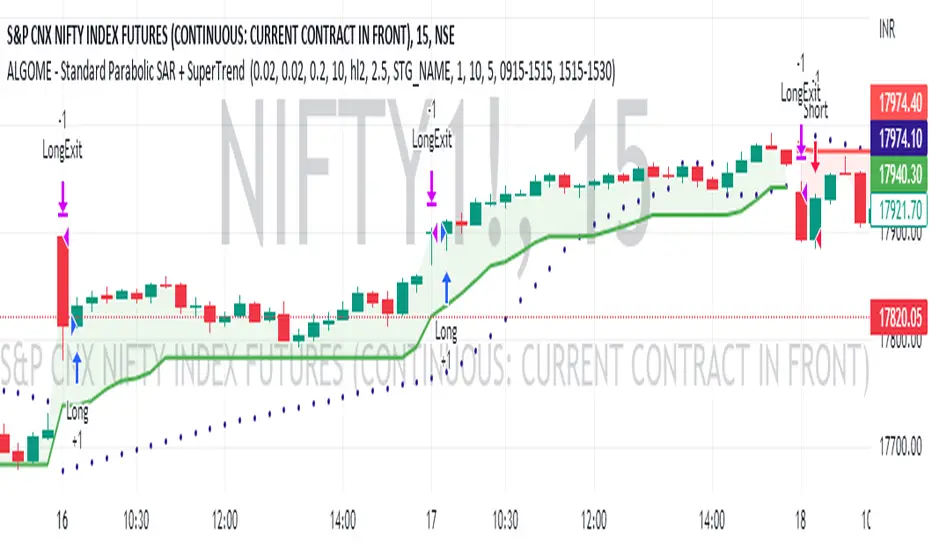
SuperTrend and Parabolic SAR (Stop And Reverse) combination can be an exciting technical analysis tool for trend-following indication.
About SuperTrend:
tradingview.com/chart/?solution=43000634738
About Parabolic SAR:
tradingview.com/support/solutions/43000502597-parabolic-sar-sar/
Directional Indication:
Useful Parameters & Settings:
Alert Message:
Type in the alert message as "{{strategy.order.alert_message}}"
How To Access, Setup, Integrate & Execute Live Alerts?
algome.in/post/how-to-setup-strategy-create-alerts-on-tradingview
About SuperTrend:
tradingview.com/chart/?solution=43000634738
About Parabolic SAR:
tradingview.com/support/solutions/43000502597-parabolic-sar-sar/
Directional Indication:
- Enter LONG position when SuperTrend + Parabolic SAR changes direction from down-trend to up-trend
- Enter SHORT position when SuperTrend + Parabolic SAR changes direction from up-trend to down-trend
Useful Parameters & Settings:
- Set Start, Increment, Max Value, ATR Period, ATR Multiplier & Time Frame values that best suits
- To trade on the Real-time bar, Go to Strategy Settings >> Properties >> Recalculate and select the "On Every Tick" option.
- Untick the "Signal Labels" option from Settings >> Style property window for a clean chart view.
Alert Message:
Type in the alert message as "{{strategy.order.alert_message}}"
How To Access, Setup, Integrate & Execute Live Alerts?
algome.in/post/how-to-setup-strategy-create-alerts-on-tradingview
受保護腳本
此腳本以閉源形式發佈。 不過,您可以自由使用,沒有任何限制 — 點擊此處了解更多。

免責聲明
這些資訊和出版物並非旨在提供,也不構成TradingView提供或認可的任何形式的財務、投資、交易或其他類型的建議或推薦。請閱讀使用條款以了解更多資訊。
免責聲明
這些資訊和出版物並非旨在提供,也不構成TradingView提供或認可的任何形式的財務、投資、交易或其他類型的建議或推薦。請閱讀使用條款以了解更多資訊。