AIO Oscillator SuiteOverview
The AIO Oscillator Suite is a comprehensive, all-in-one technical analysis tool designed to declutter your chart and streamline your workflow. Instead of constantly adding, removing, and re-configuring different oscillators, this script allows you to switch between 30+ of the most popular and effective momentum, trend, and volatility indicators from a single dropdown menu.
Whether you are a trend follower, a mean-reversion trader, or a volatility analyst, this suite provides instant access to the tools you need without consuming multiple indicator slots on your chart.
Features & Included Indicators
This suite includes a vast array of oscillators, meticulously coded to match standard calculations. You can instantly toggle between:
Momentum & Trend : RSI, Stochastic, Stoch RSI, MACD, PPO, TSI, Williams %R, Momentum (ROC), Ultimate Oscillator, CMO, Connors RSI.
Volatility : ATR, Bollinger %b, Choppiness Index.
Volume-Based : Money Flow Index (MFI), Chaikin Money Flow (CMF), Chaikin Oscillator, Force Index, Ease of Movement (EOM), OBV Oscillator, ADX/DMI.
Advanced/Specialized : TRIX, KST, Aroon, Fisher Transform, Cyber Cycle, Vortex, Balance of Power (BOP), Relative Vigor Index (RVI), Detrended Price Oscillator (DPO).
How It Works
Dynamic Plotting: The script intelligently adjusts the plotting style based on your selection. It automatically renders upper/lower bands (e.g., 70/30 for RSI), midlines (0 lines for MACD), histograms, or signal lines depending on the specific requirements of the chosen indicator.
Clean Interface: To keep your chart pristine, all input parameters (lengths, sources, smoothing factors) are hidden from the status line. You only see the current value of the indicator, ensuring a distraction-free analysis environment.
Customization: Every indicator retains its full set of customizable settings. You can tweak lengths, smoothing types (RMA, SMA, EMA, WMA), and sources within the settings menu.
Level Overrides: By default, the script uses standard levels for each indicator (e.g., 70/30 for RSI, 100/-100 for CCI). However, you can enable the "Override Default Levels" option in the settings to manually define your own Upper, Lower, and Midline values for any indicator.
How to Use
Add the indicator to your chart.
Open the Settings menu.
Under the "Main Settings" group, use the dropdown menu to select your desired indicator (default is RSI).
Adjust the specific parameters for that indicator in the sections below if necessary.
(Optional) To set custom overbought/oversold levels, check the "Override Default Levels?" box and enter your preferred values.
Benefits for Traders
Efficiency: Save time by not having to search for and load different scripts for every analysis technique.
Space Saving: TradingView limits the number of indicators per chart based on your plan. This script counts as only one indicator but functions as thirty.
Comparative Analysis: Quickly cycle through different oscillators to confirm signals. For example, if you see a divergence on RSI, you can instantly check if the same divergence exists on the Stochastic or TSI without leaving the screen.
Disclaimer
This tool is for informational and educational purposes only. It does not constitute financial advice or a recommendation to trade. Technical indicators should be used as part of a comprehensive trading strategy. Past performance is not indicative of future results. Always practice proper risk management.
Open Source
The code is published as open-source to allow the community to verify calculations, learn from the logic, and customize it further if needed.
AIO

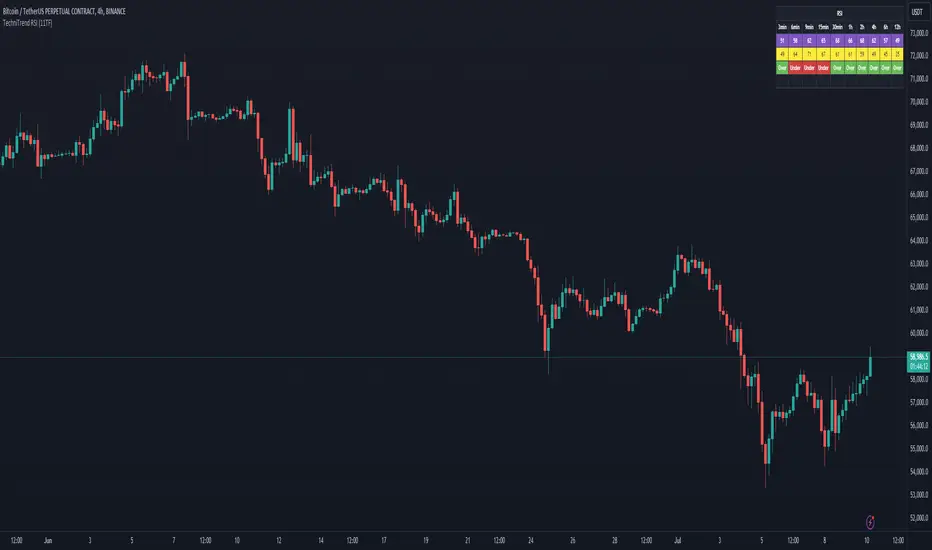
TechniTrend RSI (11TF)Multi-Timeframe RSI Indicator
Overview
The Multi-Timeframe RSI Indicator is a sophisticated tool designed to provide comprehensive insights into the Relative Strength Index (RSI) across 11 different timeframes simultaneously. This indicator is essential for traders who wish to monitor RSI trends and their moving averages (MA) to make informed trading decisions.
Features
Multiple Timeframes: Displays RSI and RSI MA values for 11 different timeframes, allowing traders to have a holistic view of the market conditions.
RSI vs. MA Comparison: Indicates whether the RSI value is above or below its moving average for each timeframe, helping traders to identify bullish or bearish momentum.
Overbought/Oversold Signals:
Marks "OS" (OverSell) when RSI falls below 25, indicating a potential oversold condition.
Marks "OB" (OverBuy) when RSI exceeds 75, signaling a potential overbought condition.
Real-Time Updates: Continuously updates in real-time to provide the most current market information.
Usage
This indicator is invaluable for traders who utilize RSI as part of their technical analysis strategy. By monitoring multiple timeframes, traders can:
Identify key overbought and oversold levels to make entry and exit decisions.
Observe the momentum shifts indicated by RSI crossing above or below its moving average.
Enhance their trading strategy by integrating multi-timeframe analysis for better accuracy and confirmation.
How to Interpret the Indicator
RSI Above MA: Indicates a potential bullish trend. Traders may consider looking for long positions.
RSI Below MA: Suggests a potential bearish trend. Traders may look for short positions.
OS (OverSell): When RSI < 25, the market may be oversold, presenting potential buying opportunities.
OB (OverBuy): When RSI > 75, the market may be overbought, indicating potential selling opportunities.