channeller proChanneller Pro - Statistical Price Channel Detection
What This Script Does
Channeller Pro identifies and draws price channels using pivot points, linear regression, and quality filters. It detects bullish and bearish channels and draws support/resistance lines with quality metrics.
Originality & Methodology
This script combines:
Pivot Point Detection: Uses TradingView's ta.pivothigh() and ta.pivotlow() with configurable left/right lookback to identify swing highs and lows.
Linear Regression Analysis: Fits a least-squares regression line through detected pivot points to determine channel slope and intercept.
R² Quality Scoring: Calculates the coefficient of determination (R²) to measure regression fit quality. R² values closer to 1.0 indicate stronger linear alignment of pivots. Channels below the minimum R² threshold are filtered out.
Pattern Validation:
Bullish channels require higher lows (ascending pivot lows)
Bearish channels require lower highs (descending pivot highs)
This ensures channels align with trend structure
ADX Trend Filter: Uses Average Directional Index (ADX) to show channels only when trend strength exceeds a threshold, reducing false signals in choppy markets.
Volume Confirmation (optional): Filters channels based on volume exceeding a moving average threshold.
Dynamic Channel Width: Calculates channel width by finding the maximum deviation from the regression line within the pivot range, then draws parallel support/resistance lines.
Channel Invalidation Logic: Tracks bounces and pierces. Channels are invalidated after multiple pierces through support/resistance, ensuring only active channels are displayed.
How It Works
Detection Process:
Identifies pivot highs/lows using the specified lookback periods
Stores recent pivots in arrays (configurable max count)
When minimum pivot count is reached, calculates linear regression through pivot points
Validates the channel by checking:
R² score meets minimum threshold (default 0.7)
Slope direction matches trend (positive for bullish, negative for bearish)
Pattern structure (higher lows for bullish, lower highs for bearish)
ADX exceeds threshold (if enabled)
Volume confirmation (if enabled)
If valid, draws support/resistance lines parallel to the regression line
Continuously monitors for channel breaks and invalidates when pierced multiple times
Mathematical Foundation:
Linear regression uses least squares: y = slope × x + intercept
R² calculation: R² = 1 - (SS_res / SS_tot) where SS_res is residual sum of squares and SS_tot is total sum of squares
Channel width = maximum price deviation from regression line within pivot range
How to Use
Basic Setup:
Apply the indicator to your chart
Adjust "Pivot Lookback Left/Right" to control pivot sensitivity (default 10 bars each)
Set "Min Pivots for Channel" (default 3) - higher values require more confirmation but reduce false signals
Configure "Min R² Score" (default 0.7) - higher values show only the best-fitting channels
Filter Configuration:
ADX Filter: Enable to show channels only during trending conditions (ADX > threshold)
Volume Filter: Enable to require volume confirmation for channel formation
HL/LH Pattern: Keep enabled to ensure channels follow proper trend structure
Trading Applications:
Support/Resistance: Use channel boundaries as dynamic support/resistance levels
Trend Following: Trade bounces off channel boundaries in the direction of the trend
Breakout Trading: Monitor for channel breaks as potential trend reversal signals
Channel Quality: Higher R² scores (displayed in labels) indicate stronger, more reliable channels
Display Options:
Toggle channel fills, mid-lines, pivot markers, and labels
Adjust projection length to extend channels into the future
Customize colors for bullish/bearish channels
Alerts:
The script includes alerts for:
New channel formation
Channel break/invalidation
New pivot detection
Important Notes
Channels are statistical constructs based on historical pivot points and do not guarantee future price action
R² scores indicate fit quality, not trading performance
Channels may be invalidated as market conditions change
Past channel performance does not predict future results
Always use proper risk management and combine with other analysis methods
Technical Details
Built-in Pine Script v6
Uses arrays for pivot storage and management
Implements custom linear regression calculation
Real-time channel validation and invalidation
Configurable quality thresholds and filters
下降通道

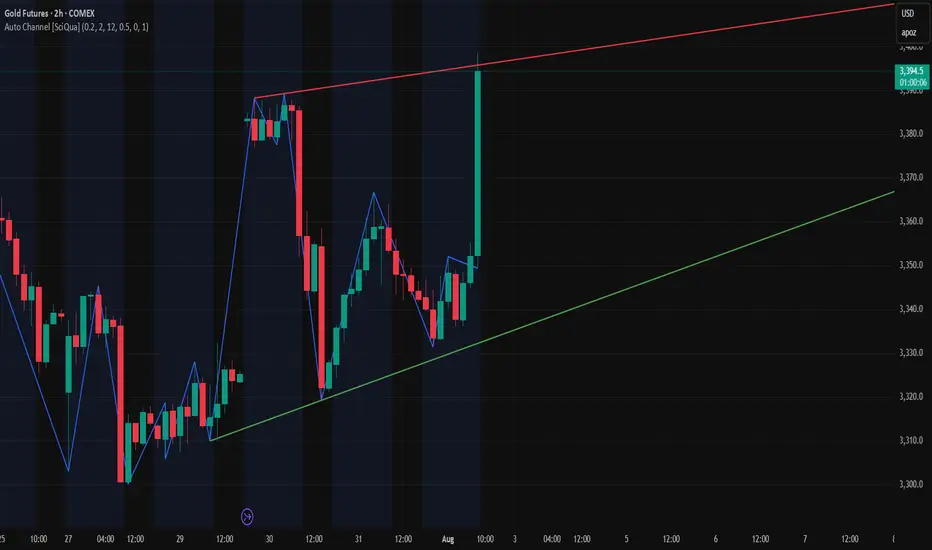
Auto Channel [SciQua]Auto Channel
Purpose
Auto Channel finds the single best parallel price channel from recent price action and keeps it updated in real time. It uses ZigZag pivots to build candidate channels, scores each candidate for quality, then plots the winner. When price closes outside the channel, the script flags a breakout and can fire alerts.
How it works
1. ZigZag pivots
The script uses TradingView’s TradingView/ZigZag/7 library to generate a stream of swing highs and lows based on a percentage reversal threshold and a leg depth. These pivots are the only points the channel logic evaluates, which keeps the search fast and focused on structure rather than noise.
2. Channel candidates
From the most recent pivots, the script forms all combinations of two swing highs and two swing lows.
It computes a slope for the high line and a slope for the low line and requires that they be nearly parallel within a user-defined tolerance.
3. Quality scoring and selection
For every valid candidate, the script checks the recent pivot segments against the trial channel and computes:
Inside ratio: fraction of tested pivots that sit fully inside the channel after applying the tolerance buffer.
Violation sum: total magnitude of the breaches for any pivots outside the channel.
Current width: distance between upper and lower lines at the current bar.
The “best” channel is chosen by:
1. highest inside ratio
2. then widest current width
3. then smallest violation sum
4. Plot and projection
The upper and lower lines are anchored to the chosen pivot pairs and extend to the left. The script also projects each line to the current bar to compute the live upper and lower channel prices. Those levels drive the breakout checks and alerts.
5. Breakouts and alerts
A breakout is detected when the bar closes above the projected upper line or closes below the projected lower line, after applying the tolerance buffer. Triangle markers highlight fresh breakouts, and you can enable alert conditions to automate notification or strategy handoff.
Inputs:
ZigZag
Price deviation for reversals (%)
Default 0.2. Larger values produce fewer, larger swings. Smaller values produce more, smaller swings.
Pivot legs
Default 2. Controls the lookback depth ZigZag uses to confirm pivots.
ZigZag Color
Visual only.
Tip: If you are not seeing a stable channel, increase the ZigZag percentage to reduce minor swings.
Channel search
Number of recent pivots to consider
Default 12. Higher values search more history and try more channel combinations. Lower values make the search faster and more reactive.
Max slope difference for parallel
Default 0.0005. Maximum allowed difference between the upper and lower line slopes. Smaller values enforce stricter parallelism.
Max price tolerance outside channel
Default 0.0. A buffer added to the channel boundaries during validation and breakout checks. Use this to ignore tiny wicks that poke the lines.
Minimum inside to outside pivots ratio for valid channel (0.00–1.00)
Default 1.00. Require that at least this fraction of checked pivots lie inside the channel. For a more permissive fit, try 0.60 to 0.85.
Styling
Upper Line Color
Lower Line Color
Breakout Above Color
Breakout Below Color
Plots and visuals
Upper channel line
Lower channel line
Triangle markers on the bar that first confirms a close outside the channel, above or below.
Lines extend left from their pivot anchors. Projection to the current bar is used internally to test for breakouts and to set alerts.
Alerts
The script defines two alert conditions:
Close Above Channel
Triggers when the bar closes above the projected upper line plus tolerance.
Close Below Channel
Triggers when the bar closes below the projected lower line minus tolerance.
Practical usage
Trend channels
In a steady trend, a high inside ratio with a moderate width often highlights the dominant channel. Consider trend entries near the lower line in an uptrend or near the upper line in a downtrend, with exits or stops beyond the opposite boundary.
Breakout trades
Combine the channel breakout alert with volume or a separate momentum filter. The tolerance input helps avoid false triggers from small wicks.
Tuning for timeframe and symbol
• Faster markets or lower timeframes usually benefit from a larger ZigZag percentage and a smaller pivot count.
• Slower markets or higher timeframes can use more pivots and a tighter slope difference to enforce cleaner geometry.
Notes and limitations
Channels are derived from ZigZag pivots. If your ZigZag settings change, the detected channel will also change.
The script plots only the single best channel at any time to keep the chart clean.
Breakout markers appear on confirmed bars. For historical bars, markers appear only where a breakout would have been confirmed at that time.
Lines extend left from their anchors. The script projects the lines internally to the current bar for checks and alerts.
License and attribution
License
Creative Commons Attribution-NonCommercial 4.0 International (CC BY-NC 4.0).
Open source for educational and personal use only. Commercial use requires written permission.
Attribution
© 2025 SciQua — Joshua Danford
Libraries
Uses TradingView/ZigZag/7.
Changelog
v1.0
Initial release. Automatic parallel channel detection from ZigZag pivots, quality scoring, live plotting, and close-based breakout alerts.
FAQ
Why do I not see any channel sometimes?
There may not be a valid pair of highs and lows that pass the slope, inside ratio, and tolerance checks. Loosen the constraints by increasing Max slope difference, lowering Minimum inside ratio, or increasing the ZigZag percentage.
The channel looks too narrow or too wide?
Adjust Number of recent pivots and Minimum inside ratio. A higher inside ratio tends to favor cleaner, sometimes wider channels. A lower ratio may admit narrower, more reactive channels.
How can I reduce false breakout alerts?
Increase Max price tolerance outside channel to ignore small wicks. Add a volume or momentum confirmation in your personal alert workflow.
Thank you for using Auto Channel . Feedback and improvements are welcome.