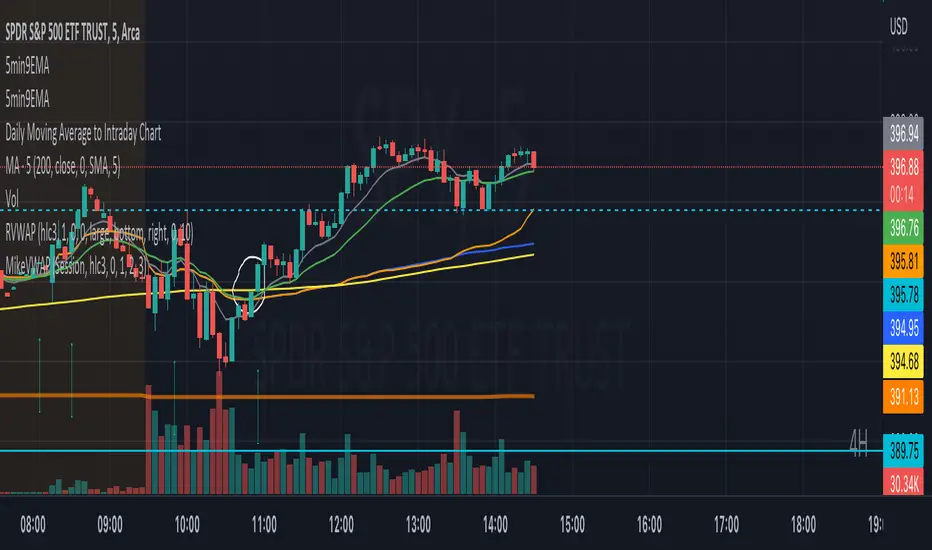
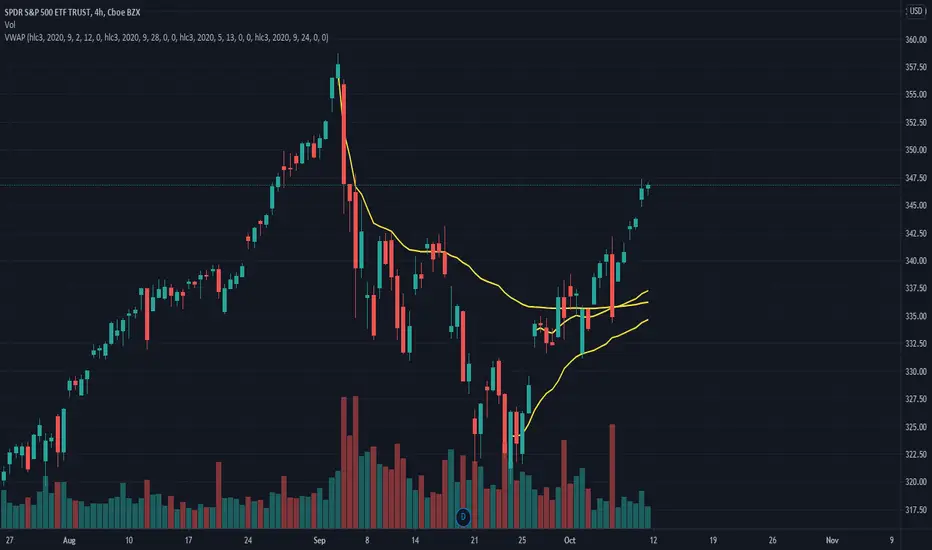
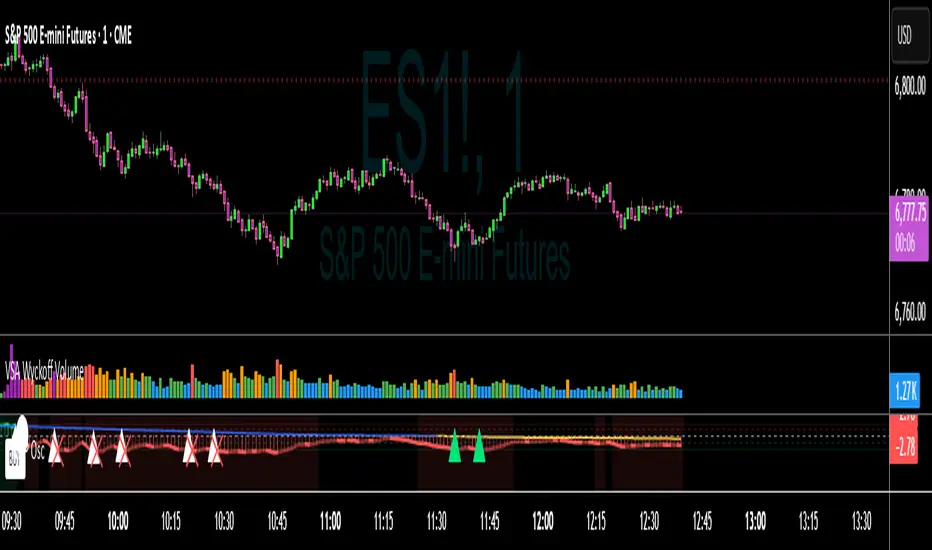
Mike's VWAP Pop/Crack StratWill signal based on the VWAP Pop and Crack strategy. You can change the time frame -- default is set to current chart -- to 5 minute if you wish to use 5 minute alerts on a 1 minute, 15-second, etc. chart. Pine Script®指標由Scott_II提供50
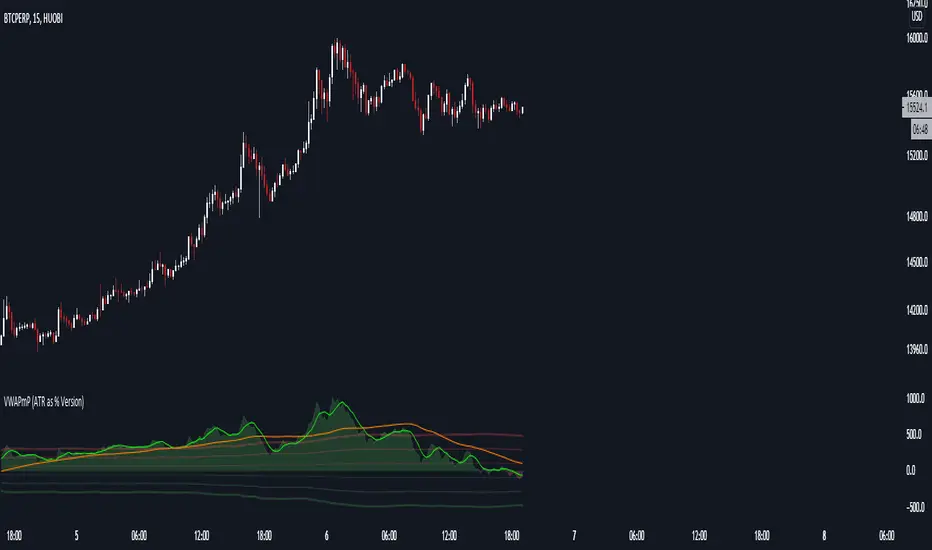
VWAPmP (ATR as % Version)This indicator displays a histogram for the distance of closing price from a VWAP value. The VWAP length is rolling and its value is user defined. Additionally, there are 3 bands which are based on the %-value of the underlying ATR. The ATR's length can be chosen by the user, and the distance multipliers may also be chosen. Lastly, there are two simple moving averages which have user-defined lengths and are based on the histograms value.Pine Script®指標由king_mob提供66147
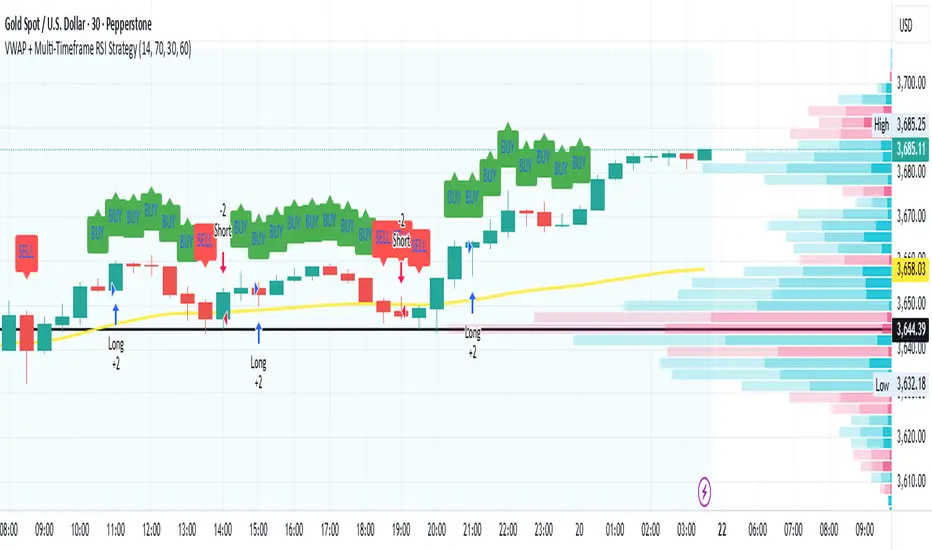
VWAP + Multi-Timeframe RSI StrategyThis strategy combines VWAP trend direction with confirmation from RSI on a higher timeframe. The idea is to only take trades when both intraday momentum and higher-timeframe trend are aligned, increasing accuracy. LONG Entry: Price above VWAP (bullish environment). RSI on the current timeframe is below overbought (room to rise). RSI on the higher timeframe (default H1) is above 50 (bullish confirmation). SHORT Entry: Price below VWAP (bearish environment). RSI on the current timeframe is above oversold (room to fall). RSI on the higher timeframe is below 50 (bearish confirmation). Exit Rule: Stop-loss near VWAP. Take-profit at ~2x risk or when major levels are reached. Best Timeframes: Use 15m or 30m chart with H1 RSI for intraday trading. Use 1H chart with Daily RSI for swing trading. ⚡ The higher-timeframe RSI filter reduces false signals and aligns trades with institutional flow.Pine Script®策略由dreamflysec提供24
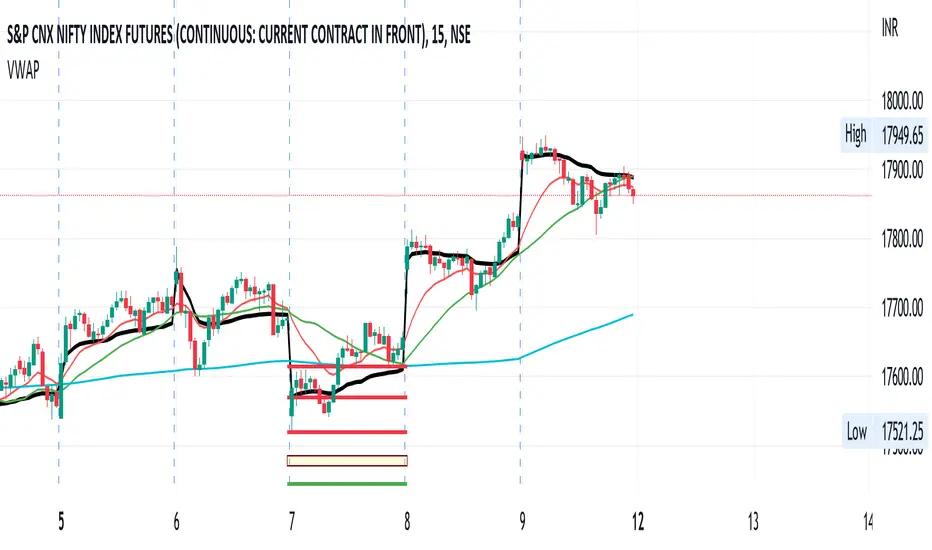
VWAP+SMA+EMAThis is the only indicator combing the results of VWAP + 2 SMAs + 2 EMAs. This is a free indicator. Enjoy using it. Kunal JainPine Script®指標由copperkunal提供33123
VWAP - Standard + 3 multi periodThis script combines the standard VWAP with 3 additional period-dependent VWAPs (originally coded by Neolao). Pine Script®指標由Investaholic提供56
rth vwap and midMidpoint and VWAP are often important inflection points in daytrading. I managed to find a script providing me with a 24 hour session midline by NorthStarDayTrading and a RTH VWAP script by LDBC. So I decided to merge those two to get a RTH mid and vwap.Pine Script®指標由mgruner提供3358
Rumpy's Donchian Anchored VWAPUses donchian points to anchor VWAPs (start a new VWAP interval). The defaults are set up for a 1H chart, with lookback periods of 1 day, 2 days, 1 week, 2 weeks and 4 weeks for the anchor points. Green : upper donchian AVWAPs, Red : lower donchian AVWAPS, thin/1day to thickest/4 week. Option to test whether a new point should be formed from a high or low exceeding the historical high/low over a lookback length or using a closes that exceed the historical high/low. -------------------------------------- If you find it useful please consider a tip/donation : BTC - 3BMEXEDyWJ58eXUEALYPadbn1wwWKmf6sA Pine Script®指標由rumpypumpydumpy提供22228
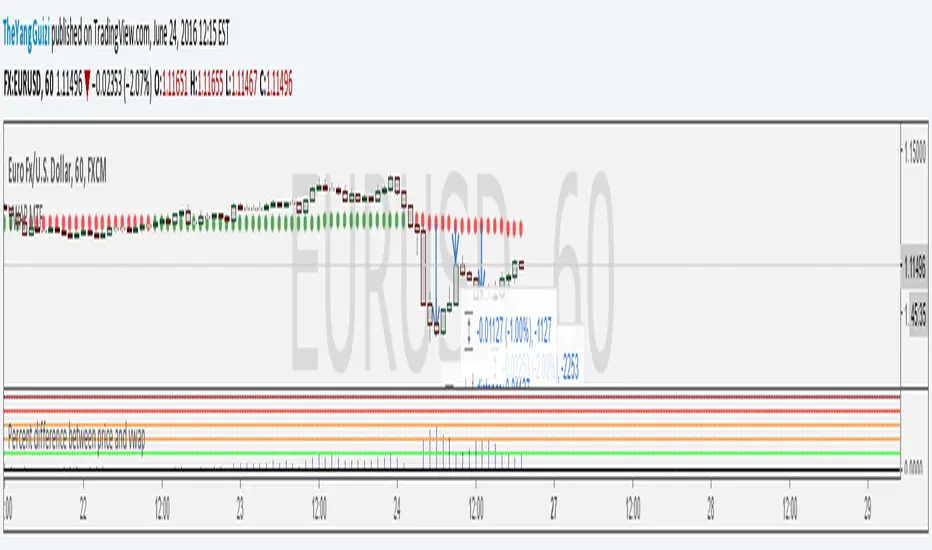
Percent Difference Between VWAP and Price MTFShows the difference between vwap and price in percent. You can can choose between multiple timeframe vwap. Default is normal daily. The levels on the indicator can be changed to whatever you want to. In the chart above we can see eurusd reverting up at 3% below monthly vwap, after the brexit dip, It then turns down again at 1% from monthly and lastly it turns up again at 2% from monthly. Script is a small modification of this: Pine Script®指標由TheYangGuizi提供22486
VWAP Session and NY CashAuto Anchored VWAPs with Label options Session starts at 1800 EST Cash Open or NY Session starts 0930 ESTPine Script®指標由cylum88提供已更新 124
Nic's Anchored VWAP 4Poor mans anchored vwap. Allows you to identified the volume weighted average price from 4 specific points in time. Best used on key pivot point high's and lows'Pine Script®指標由NicTheMajestic提供33205
Difference % between PRICE and VWAP V2Shows difference between price and daily/weekly/monthly/hourly/whatever VWAP. In v2: option to color bars average percentual difference of custom period histogram changes color depending on which levels it's at Levels/period/color etc can be customized. Use these inputs in the timeframe box: M - month W - week D - day 2D (or 3W or 2M or whatever) = 2 Days (or three week or 2 months and so on) 60= 1 H 240= 4 H 5 = 5 min and so on. btw, vaguely remembering reading somewhere that the big players like to make their entry at 4% difference.Pine Script®指標由TheYangGuizi提供66 1.7 K
Dual Session VWAPs by GK snipervwaps automatically for london new york session easy will remove automatically next dayPine Script®指標由gkocak提供12
VWAP-Anchored MACD [BOSWaves]VWAP-Anchored MACD - Volume-Weighted Momentum Mapping With Zero-Line Filtering Overview The VWAP-Anchored MACD delivers a refined momentum model built on volume-weighted price rather than raw closes, giving you a more grounded view of trend strength during sessions, weeks, or months. Instead of tracking two EMAs of price like a standard MACD, this tool reconstructs the MACD engine using anchored VWAP as the core input. The result is a momentum structure that reacts to real liquidity flow, filters out weak crossovers near the zero line, and visualizes acceleration shifts with clear, high-contrast gradients. This indicator acts as a precise momentum map that adapts in real time. You see how weighted price is accelerating, where valid crossovers form, and when trend conviction is strong enough to justify execution. It uses gradient line coloring to show bullish or bearish momentum, histogram shading to highlight energy shifts, cross dots to mark valid crossovers, optional buy/sell diamonds for execution cues, and candle coloring to display trend strength at a glance. Theoretical Foundation Traditional MACD compares the difference between two exponential moving averages of price. This variant replaces price with anchored VWAP, making the calculation sensitive to actual traded volume across your chosen period (Session, Week, or Month). Three principles drive the logic: Anchored VWAP Momentum : Price is weighted by volume and aggregated across the selected anchor. The fast and slow VWAP-EMAs then expose how liquidity-corrected momentum is expanding or contracting. Zero-Line Distance Filtering : Crossover signals that occur too close to the zero line are removed. This eliminates the common MACD problem of generating weak, directionless signals in choppy phases. Directional Visualization : MACD line, signal line, histogram, candle colors, and optional diamond markers all react to shifts in VWAP-momentum, giving you a clean structural read on market pressure. Anchoring VWAP to session, weekly, or monthly resets creates a systematic framework for tracking how capital flow is driving momentum throughout each trading cycle. How It Works The core engine processes momentum through several mapped layers: VWAP Aggregation : Price × volume is accumulated until the anchor resets. This creates a continuous, liquidity-corrected VWAP curve. MACD Construction : Fast and slow VWAP-EMAs define the MACD line, while a smoothed signal line identifies edges where momentum shifts. Zero-Line Distance Filter : MACD and signal must both exceed a threshold distance from zero for a crossover to count as valid. This prevents fake crossovers during compression. Visual Momentum Layers : It uses gradient line coloring to show bullish or bearish momentum, histogram shading to highlight energy shifts, cross dots to mark valid crossovers, optional buy/sell diamonds for execution cues, and candle coloring to display trend strength at a glance. This layered structure ensures you always know whether momentum is strengthening, fading, or transitioning. Interpretation You get a clean, structural understanding of VWAP-based momentum: Bullish Phases : MACD > Signal, histogram expands, candles turn bullish, and crossovers occur above the threshold. Bearish Phases : MACD < Signal, histogram drives lower, candles shift bearish, and downward crossovers trigger below the threshold. Neutral/Compression : Both lines remain near the zero boundary, histogram flattens, and signals are suppressed to avoid noise. This creates a more disciplined version of MACD momentum reading - less noise, more conviction, and better alignment with liquidity. Strategy Integration Trend Continuation : Use VWAP-MACD crossovers that occur far from the zero line as higher-conviction entries. Zero-Line Rejection : Watch for histogram contractions near zero to anticipate flattening momentum and potential reversal setups. Session/Week/Month Anchors : Session anchor works best for intraday flows. Weekly or monthly anchor structures create cleaner macro momentum reads for swing trading. Signal-Only Execution : Optional buy/sell diamonds give you direct points to trigger trades without overanalyzing the chart. This indicator slots cleanly into any momentum-following system and offers higher signal quality than classic MACD variants due to the volume-weighted core. Technical Implementation Details VWAP Reset Logic : Session (D), Week (W), or Month (M) Dynamic Fast/Slow VWAP EMAs : Fully configurable lengths, smoothing and anchor settings MACD/Signal Line Framework : Traditional structure with volume-anchored input Zero-Line Filtering : Adjustable threshold for structural confirmation Dual Visualization Layers : MACD body + histogram + crosses + candle coloring Optimized Performance : Lightweight, fast rendering across all timeframes Optimal Application Parameters Timeframes: 1- 15 min : Short-term momentum scalping and rapid trend shifts 30- 240 min : Balanced momentum mapping with clear structural filtering Daily : Macro VWAP regime identification Suggested Configuration: Fast Length : 12 Slow Length : 26 Signal Length : 9 Zero Threshold : 200 - 500 depending on asset range These suggested parameters should be used as a baseline; their effectiveness depends on the asset volatility, liquidity, and preferred entry frequency, so fine-tuning is expected for optimal performance. Performance Characteristics High Effectiveness: Assets with strong intraday or session-based volume cycles Markets where volume-weighted momentum leads price swings Trend environments with strong acceleration Reduced Effectiveness: Ultra-choppy markets hugging the VWAP axis Sessions with abnormally low volume Ranges where MACD naturally compresses Disclaimer The VWAP-Anchored MACD is a structural momentum tool designed to enhance directional clarity - not a guaranteed predictor. Performance depends on market regime, volatility, and disciplined execution. Use it alongside broader trend, volume, and structural analysis for optimal results. Pine Script®指標由BOSWaves提供已更新 2020 1.5 K
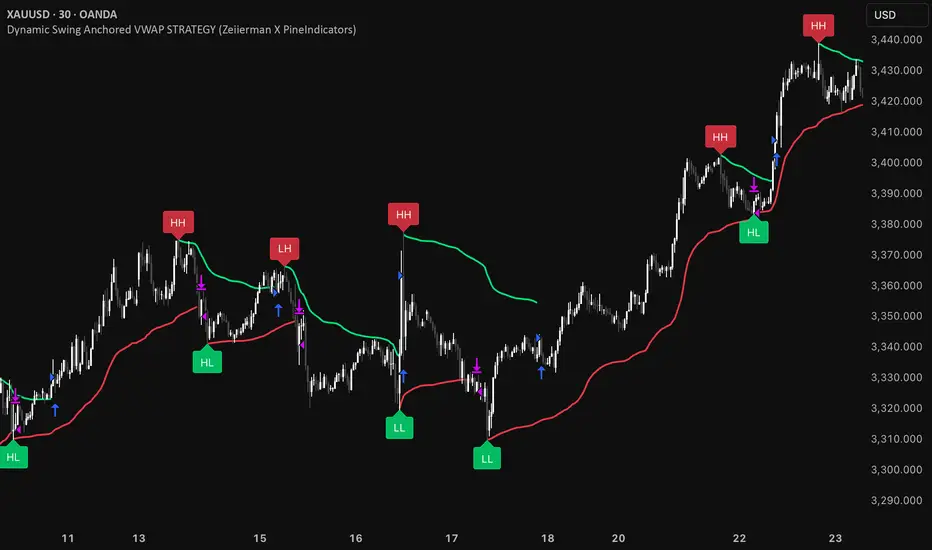
Dynamic Swing Anchored VWAP STRAT (Zeiierman/PineIndicators)Dynamic Swing Anchored VWAP STRATEGY — Zeiierman × PineIndicators (Pine Script v6) A pivot-to-pivot Anchored VWAP strategy that adapts to volatility, enters long on bullish structure, and closes on bearish structure. Built for TradingView in Pine Script v6. Full credits to zeiierman. Repainting notice: The original indicator logic is repainting. Swing labels (HH/HL/LH/LL) are finalized after enough bars have printed, so labels do not occur in real time. It is not possible to execute at historical label points. Treat results as educational and validate with Bar Replay and paper trading before considering any discretionary use. Concept The script identifies swing highs/lows over a user-defined lookback ( Swing Period ). When structure flips (most recent swing low is newer than the most recent swing high, or vice versa), a new regime begins. At each confirmed pivot, a fresh Anchored VWAP segment is started and updated bar-by-bar using an EWMA-style decay on price×volume and volume. Responsiveness is controlled by Adaptive Price Tracking (APT) . Optionally, APT auto-adjusts with an ATR ratio so that high volatility accelerates responsiveness and low volatility smooths it. Longs are opened/held in bullish regimes and closed when the regime turns bearish. No short positions are taken by design. How it works (under the hood) Swing detection: Uses ta.highestbars / ta.lowestbars over prd to update swing highs (ph) and lows (pl), plus their bar indices (phL, plL). Regime logic: If phL > plL → bullish regime; else → bearish regime. A change in this condition triggers a re-anchor of the VWAP at the newest pivot. Adaptive VWAP math: APT is converted to an exponential decay factor ( alphaFromAPT ), then applied to running sums of price×volume and volume, producing the current VWAP estimate. Rendering: Each pivot-anchored VWAP segment is drawn as a polyline and color-coded by regime. Optional structure labels (HH/HL/LH/LL) annotate the swing character. Orders: On bullish flips, strategy.entry("L") opens/maintains a long; on bearish flips, strategy.close("L") exits. Inputs & controls Swing Period (prd) — Higher values identify larger, slower swings; lower values catch more frequent pivots but add noise. Adaptive Price Tracking (APT) — Governs the VWAP’s “half-life.” Smaller APT → faster/closer to price; larger APT → smoother/stabler. Adapt APT by ATR ratio — When enabled, APT scales with volatility so the VWAP speeds up in turbulent markets and slows down in quiet markets. Volatility Bias — Tunes the strength of APT’s response to volatility (above 1 = stronger effect; below 1 = milder). Style settings — Colors for swing labels and VWAP segments, plus line width for visibility. Trade logic summary Entry: Long when the swing structure turns bullish (latest swing low is more recent than the last swing high). Exit: Close the long when structure turns bearish. Position size: qty = strategy.equity / close × 5 (dynamic sizing; scales with account equity and instrument price). Consider reducing the multiplier for a more conservative profile. Recommended workflow Apply to instruments with reliable volume (equities, futures, crypto; FX tick volume can work but varies by broker). Start on your preferred timeframe. Intraday often benefits from smaller APT (more reactive); higher timeframes may prefer larger APT (smoother). Begin with defaults ( prd=50, APT=20 ); then toggle “Adapt by ATR” and vary Volatility Bias to observe how segments tighten/loosen. Use Bar Replay to watch how pivots confirm and how the strategy re-anchors VWAP at those confirmations. Layer your own risk rules (stops/targets, max position cap, session filters) before any discretionary use. Practical tips Context filter: Consider combining with a higher-timeframe bias (e.g., daily trend) and using this strategy as an entry timing layer. First pivot preference: Some traders prefer only the first bullish pivot after a bearish regime (and vice versa) to reduce whipsaw in choppy ranges. Deviations: You can add VWAP deviation bands to pre-plan partial exits or re-entries on mean-reversion pulls. Sessions: Session-based filters (RTH vs. ETH) can materially change behavior on futures and equities. Extending the script (ideas) Add stops/targets (e.g., ATR stop below last swing low; partial profits at k×VWAP deviation). Introduce mirrored short logic for two-sided testing. Include alert conditions for regime flips or for price-VWAP interactions. Incorporate HTF confirmation (e.g., only long when daily VWAP slope ≥ 0). Throttle entries (e.g., once per regime flip) to avoid over-trading in ranges. Known limitations Repainting: Swing labels and pivot confirmations depend on future bars; historical labels can look “perfect.” Treat them as annotations, not executable signals. Execution realism: Strategy includes commission and slippage fields, yet actual fills differ by venue/liquidity. No guarantees: Past behavior does not imply future results. This publication is for research/education only and not financial advice. Defaults (backtest environment) Initial capital: 10,000 Commission value: 0.01 Slippage: 1 Overlay: true Max bars back: 5000; Max labels/polylines set for deep swing histories Quick checklist Add to chart and verify that the instrument has volume. Use defaults, then tune APT and Volatility Bias with/without ATR adaptation. Observe how each pivot re-anchors VWAP and how regime flips drive entries/exits. Paper trade across several symbols/timeframes before any discretionary decisions. Attribution & license Original indicator concept and logic: Zeiierman — please credit the author. Strategy wrapper and publication: PineIndicators . License: CC BY-NC-SA 4.0 (Attribution-NonCommercial-ShareAlike). Respect the license when forking or publishing derivatives. Pine Script®策略由PineIndicators提供99 2 K
Anchored VWAP by Fin VirajSimple Anchored VWAP with Directional Colors 📊 Overview A clean and efficient Anchored VWAP (Volume Weighted Average Price) indicator with dynamic directional coloring. This indicator provides traders with a reliable reference point for price action analysis based on volume-weighted calculations from specific anchor points. ✨ Key Features 🎯 Multiple Anchor Types Session: Anchors to daily trading session start Day: Resets at the beginning of each trading day Week: Weekly anchor points for swing trading Month: Monthly anchors for longer-term analysis Manual Date: Set custom anchor date for specific events 🌈 Directional Color System 🟢 Green: Price above VWAP with upward momentum 🔴 Red: Price below VWAP with downward momentum 🔵 Blue: Neutral/transitional conditions 📏 Standard Deviation Bands Customizable multipliers (default: 1.0 and 2.0) Toggle on/off as needed Support and resistance levels based on statistical deviation Filled area between bands for better visualization 🔧 Settings & Customization Input Parameters Anchor Type: Choose from 5 different anchor methods Manual Anchor Date: Set specific date for manual anchoring Reset Anchor Point: Manual reset button Show Standard Deviation Bands: Toggle bands visibility Band Multipliers: Adjust band distance (1σ and 2σ) VWAP Line Width: Customize line thickness (1-4) Color Customization Bullish Color: Customize uptrend color Bearish Color: Customize downtrend color Neutral Color: Customize neutral state color Band Color: Customize standard deviation bands color 📈 How to Use For Day Trading Set anchor type to "Session" or "Day" Use VWAP as dynamic support/resistance Green color = bullish bias, Red color = bearish bias For Swing Trading Set anchor type to "Week" or "Month" Longer-term VWAP acts as major S/R level Standard deviation bands show potential reversal zones For Event-Based Analysis Set anchor type to "Manual Date" Choose significant event date (earnings, news, etc.) Analyze price behavior relative to that anchor point 🎨 Visual Interpretation VWAP Line Colors Bright Green: Strong bullish momentum (price above rising VWAP) Bright Red: Strong bearish momentum (price below falling VWAP) Blue: Neutral conditions or transitional phase Standard Deviation Bands Upper Bands: Potential resistance levels Lower Bands: Potential support levels Band Touches: Often indicate reversal or continuation points 💡 Trading Applications Support & Resistance VWAP acts as dynamic support in uptrends VWAP acts as dynamic resistance in downtrends Standard deviation bands provide additional S/R levels Trend Analysis Price consistently above VWAP = bullish trend Price consistently below VWAP = bearish trend Color changes help identify trend shifts Entry & Exit Points Use VWAP reclaims for potential long entries Use VWAP breaks for potential short entries Standard deviation bands for profit-taking levels ⚙️ Technical Details Pine Script Version: v6 Overlay: Yes (plots on price chart) Calculation: Volume-weighted average price from anchor point Standard Deviation: Statistical measure of price dispersion Performance: Optimized for real-time calculation 🔄 Anchor Reset Logic The indicator automatically resets based on selected anchor type: Session/Day: Resets at market open Week: Resets at week start Month: Resets at month start Manual: Resets from chosen date Manual Reset: Override button for immediate reset 📋 Best Practices Choose appropriate timeframe for your anchor type Combine with volume analysis for better confirmation Use multiple timeframes for comprehensive analysis Consider market context when interpreting signals Test on demo before live trading ⚠️ Disclaimer This indicator is for educational and informational purposes only. Always conduct your own analysis and risk management before making trading decisions.Pine Script®指標由FinViraj6提供116
VWAP Periodic Close [LuxAlgo]The VWAP Periodic Close script offers an advanced tool for analyzing the Volume Weighted Average Price (VWAP) across various timeframes. This tool enables traders to visualize VWAP close levels for daily, weekly, monthly, quarterly, and yearly periods, offering a comprehensive view of price behavior across different time frames. It helps in identifying key levels where the VWAP closes at the end of each specified period. 🔶 USAGE This script is designed to enhance your trading strategy by plotting VWAP close levels on your chart for different time periods. This helps traders easily identify historical VWAP levels and analyze price action relative to these levels, particularly useful for identifying key support and resistance levels providing insights into potential future price behavior. Supports VWAP closes for multiple timeframes, including historical periods (e.g., 3 months back, 3 quarters back, 3 years back). The labels provide context and detailed information about the VWAP close at a specific point in time and enhance the clarity and usefulness of the VWAP data presented on the chart. Users can toggle the display of VWAP lines for different periods and customize the colors for each timeframe (e.g., distinct colors for monthly, quarterly, and yearly closes). 🔶 SETTINGS The script offers a range of customizable settings to tailor the analysis to your trading needs. 🔹 Volume Weighted Average Price (VWAP) VWAP Close Level: Toggle the display of VWAP levels at the end of each period (daily, weekly, monthly, quarterly, yearly). VWAP Origin: Toggle the display of the VWAP line for each period. VWAP Source: Choose the data source for VWAP calculations (default is HLC3). Historical Closes: Define the number of historical VWAP levels to plot. Line/Label Offset: Adjust the offset for positioning lines and labels on the chart. 🔹 Themes Theme Selection: Choose between "Day," "Night," or "Custom" themes to adjust the color scheme of VWAP lines and labels. Pine Script®指標由LuxAlgo提供已更新 99 4.6 K
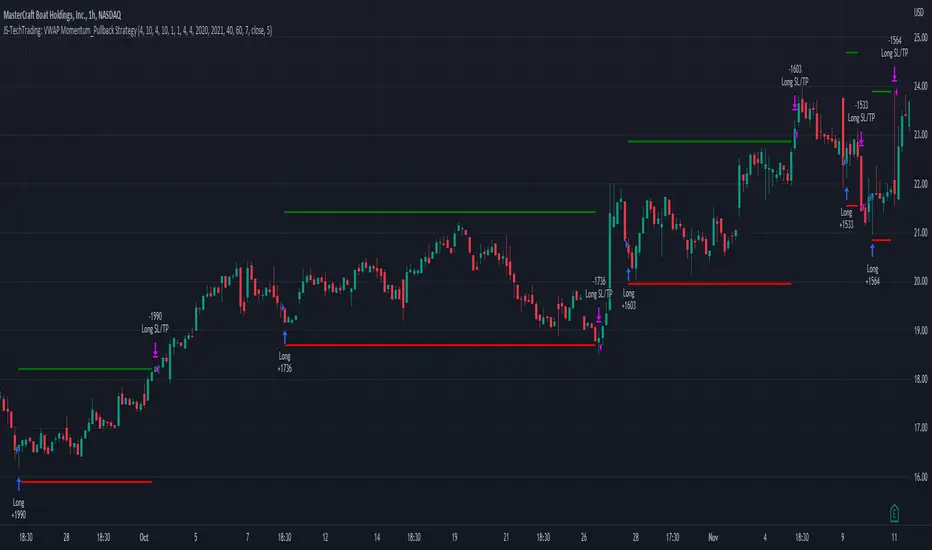
JS-TechTrading: VWAP Momentum_Pullback StrategyGeneral Description and Unique Features of this Script Introducing the VWAP Momentum-Pullback Strategy (long-only) that offers several unique features: 1. Our script/strategy utilizes Mark Minervini's Trend-Template as a qualifier for identifying stocks and other financial securities in confirmed uptrends. NOTE: In this basic version of the script, the Trend-Template has to be used as a separate indicator on TradingView (Public Trend-Template indicators are available on TradingView – community scripts). It is recommended to only execute buy signals in case the stock or financial security is in a stage 2 uptrend, which means that the criteria of the trend-template are fulfilled. 2. Our strategy is based on the supply/demand balance in the market, making it timeless and effective across all timeframes. Whether you are day trading using 1- or 5-min charts or swing-trading using daily charts, this strategy can be applied and works very well. 3. We have also integrated technical indicators such as the RSI and the MA / VWAP crossover into this strategy to identify low-risk pullback entries in the context of confirmed uptrends. By doing so, the risk profile of this strategy and drawdowns are being reduced to an absolute minimum. Minervini’s Trend-Template and the ‘Stage-Analysis’ of the Markets This strategy is a so-called 'long-only' strategy. This means that we only take long positions, short positions are not considered. The best market environment for such strategies are periods of stable upward trends in the so-called stage 2 - uptrend. In stable upward trends, we increase our market exposure and risk. In sideways markets and downward trends or bear markets, we reduce our exposure very quickly or go 100% to cash and wait for the markets to recover and improve. This allows us to avoid major losses and drawdowns. This simple rule gives us a significant advantage over most undisciplined traders and amateurs! 'The Trend is your Friend'. This is a very old but true quote. What's behind it??? • 98% of stocks made their biggest gains in a Phase 2 upward trend. • If a stock is in a stable uptrend, this is evidence that larger institutions are buying the stock sustainably. • By focusing on stocks that are in a stable uptrend, the chances of profit are significantly increased. • In a stable uptrend, investors know exactly what to expect from further price developments. This makes it possible to locate low-risk entry points. The goal is not to buy at the lowest price – the goal is to buy at the right price! Each stock goes through the same maturity cycle – it starts at stage 1 and ends at stage 4 Stage 1 – Neglect Phase – Consolidation Stage 2 – Progressive Phase – Accumulation Stage 3 – Topping Phase – Distribution Stage 4 – Downtrend – Capitulation This strategy focuses on identifying stocks in confirmed stage 2 uptrends. This in itself gives us an advantage over long-term investors and less professional traders. By focusing on stocks in a stage 2 uptrend, we avoid losses in downtrends (stage 4) or less profitable consolidation phases (stages 1 and 3). We are fully invested and put our money to work for us, and we are fully invested when stocks are in their stage 2 uptrends. But how can we use technical chart analysis to find stocks that are in a stable stage 2 uptrend? Mark Minervini has developed the so-called 'trend template' for this purpose. This is an essential part of our JS-TechTrading pullback strategy. For our watchlists, only those individual values that meet the tough requirements of Minervini's trend template are eligible. The Trend Template • 200d MA increasing over a period of at least 1 month, better 4-5 months or longer • 150d MA above 200d MA • 50d MA above 150d MA and 200d MA • Course above 50d MA, 150d MA and 200d MA • Ideally, the 50d MA is increasing over at least 1 month • Price at least 25% above the 52w low • Price within 25% of 52w high • High relative strength according to IBD. NOTE: In this basic version of the script, the Trend-Template has to be used as a separate indicator on TradingView (Public Trend-Template indicators are available in TradingView – community scripts). It is recommended to only execute buy signals in case the stock or financial security is in a stage 2 uptrend, which means that the criteria of the trend-template are fulfilled. This strategy can be applied to all timeframes from 5 min to daily. The VWAP Momentum-Pullback Strateg y For the JS-TechTrading VWAP Momentum-Pullback Strategy, only stocks and other financial instruments that meet the selected criteria of Mark Minervini's trend template are recommended for algorithmic trading with this startegy. A further prerequisite for generating a buy signals is that the individual value is in a short-term oversold state (RSI). When the selling pressure is over and the continuation of the uptrend can be confirmed by the MA / VWAP crossover after reaching a price low, a buy signal is issued by this strategy. Stop-loss limits and profit targets can be set variably. Relative Strength Index (RSI) The Relative Strength Index (RSI) is a technical indicator developed by Welles Wilder in 1978. The RSI is used to perform a market value analysis and identify the strength of a trend as well as overbought and oversold conditions. The indicator is calculated on a scale from 0 to 100 and shows how much an asset has risen or fallen relative to its own price in recent periods. The RSI is calculated as the ratio of average profits to average losses over a certain period of time. A high value of the RSI indicates an overbought situation, while a low value indicates an oversold situation. Typically, a value > 70 is considered an overbought threshold and a value < 30 is considered an oversold threshold. A value above 70 signals that a single value may be overvalued and a decrease in price is likely , while a value below 30 signals that a single value may be undervalued and an increase in price is likely. For example, let's say you're watching a stock XYZ. After a prolonged falling movement, the RSI value of this stock has fallen to 26. This means that the stock is oversold and that it is time for a potential recovery. Therefore, a trader might decide to buy this stock in the hope that it will rise again soon. The MA / VWAP Crossover Trading Strategy This strategy combines two popular technical indicators: the Moving Average (MA) and the Volume Weighted Average Price (VWAP). The MA VWAP crossover strategy is used to identify potential trend reversals and entry/exit points in the market. The VWAP is calculated by taking the average price of an asset for a given period, weighted by the volume traded at each price level. The MA, on the other hand, is calculated by taking the average price of an asset over a specified number of periods. When the MA crosses above the VWAP, it suggests that buying pressure is increasing, and it may be a good time to enter a long position. When the MA crosses below the VWAP, it suggests that selling pressure is increasing, and it may be a good time to exit a long position or enter a short position. Traders typically use the MA VWAP crossover strategy in conjunction with other technical indicators and fundamental analysis to make more informed trading decisions. As with any trading strategy, it is important to carefully consider the risks and potential rewards before making any trades. This strategy is applicable to all timeframes and the relevant parameters for the underlying indicators (RSI and MA/VWAP) can be adjusted and optimized as needed. Backtesting Backtesting gives outstanding results on all timeframes and drawdowns can be reduced to a minimum level. In this example, the hourly chart for MCFT has been used. Settings for backtesting are: - Period from April 2020 until April 2021 (1 yr) - Starting capital 100k USD - Position size = 25% of equity - 0.01% commission = USD 2.50.- per Trade - Slippage = 2 ticks Other comments • This strategy has been designed to identify the most promising, highest probability entries and trades for each stock or other financial security. • The RSI qualifier is highly selective and filters out the most promising swing-trading entries. As a result, you will normally only find a low number of trades for each stock or other financial security per year in case you apply this strategy for the daily charts. Shorter timeframes will result in a higher number of trades / year. • As a result, traders need to apply this strategy for a full watchlist rather than just one financial security. Pine Script®策略由JS_TechTrading提供33 1.4 K
Premium / Discount Screener for Range today with VWAPPremium / Discount Screener – Today’s Range Midpoint + VWAP Deviation This open-source overlay indicator is a clean, real-time visual screener that shows whether current price is trading at a **premium** (overvalued relative to today's range + VWAP) or **discount** (undervalued), helping traders quickly assess intraday location bias. Core Concept Intraday traders often use the developing daily range and VWAP as reference points for value: - Price significantly above the midpoint of today's high/low → premium zone → potential mean-reversion sells or overextended rallies - Price significantly below the midpoint → discount zone → potential mean-reversion buys or oversold bounces - VWAP deviation adds context (institutional fair value proxy) This script combines both references and flags extreme deviations with color-coded labels and background tint. How It Works 1. Tracks today's high/low (resets at new day) 2. Calculates midpoint = (Today's High + Today's Low) / 2 3. Tracks session VWAP (hlc3-based, resets daily) 4. Computes two deviation percentages: - Distance from midpoint (%) - Distance from VWAP (%) 5. Classifies status based on user-defined threshold (default 0.5% from midpoint): - Premium (red): close > midpoint + threshold - Discount (green): close < midpoint – threshold - Fair/Neutral (gray): within threshold band Visual Output - Last-bar label (toggleable) showing: - Status: PREMIUM / DISCOUNT / FAIR - % distance from midpoint - % distance from VWAP - Background tint: - Light red → premium zone - Light green → discount zone - No tint → neutral/fair Why this is useful - Provides instant visual context for bias without needing complex zone drawing - Helps filter entries: e.g., look for longs in discount + bullish structure, shorts in premium + bearish structure - VWAP deviation adds institutional reference — price far from VWAP often signals exhaustion or absorption - Lightweight and non-repainting — ideal for fast decision-making on lower timeframes How to Use - Best on **5m–1h timeframes** for intraday trading (forex majors, indices, gold, futures, high-volume stocks) - Recommended symbols: EURUSD, GBPUSD, XAUUSD, NAS100, ES1!, NQ1!, SPY - Typical workflow: 1. Wait for price to reach deep discount/premium zone 2. Confirm with price action, structure (BOS/CHOCH), or order blocks 3. Avoid trading near "Fair" zone unless strong catalyst/breakout - Tune threshold: - Lower (0.2–0.4%) for very volatile instruments (crypto, gold) - Higher (0.6–1.0%) for less volatile pairs (EURUSD, major indices) Inputs - Show Premium/Discount Label: toggle last-bar text label - Alert Threshold % from Midpoint: default 0.5% (sensitivity for premium/discount classification) Publishing Recommendation - Publish with a clean chart (e.g., 15m–1h XAUUSD, EURUSD or NQ during active session) - Show a period where price moves into premium and discount zones (label + background tint visible) - No extra indicators/drawings needed for basic use This is a simple, educational location bias tool — fully open-source. It highlights relative value zones — not trade signals. Trading involves significant risk of loss. Use discretion and proper risk management. Feedback welcome — especially suggestions for adding PD high/low lines or session open!Pine Script®指標由uzair2join提供1
VWAP Momentum Oscillator How It Works Core Calculation Method The oscillator combines four key market measurements into a single, normalized reading: 1. Price-VWAP Deviation: `(Close - VWAP) / VWAP × 100` 2. VWAP-MA Momentum: `(VWAP - MovingAverage) / MovingAverage × 100` 3. Anchored VWAP Strength: Average of high/low anchor deviations from rolling VWAP 4. Range Position: `(Close - PeriodLow) / (PeriodHigh - PeriodLow) × 100 - 50` Dynamic Signal Line The signal line uses an EMA that automatically adjusts its length based on your chart timeframe: - Futures: Always covers 23 hours of trading (1,380 minutes) - Stocks: Always covers 6.5 hours of trading (390 minutes) - Examples: 276 periods on 5-min futures chart, 1,380 periods on 1-min futures chart Trading Signals 🟢 Buy Signals - Condition: Main oscillator crosses above signal line while below zero - Logic: Momentum turning bullish from oversold conditions - Visual: Green "BUY" label below price action 🔴 Sell Signals - Condition: Main oscillator crosses below signal line while above zero - Logic: Momentum turning bearish from overbought conditions - Visual: Red "SELL" label above price action ⚠️ Extreme Warnings - Extreme Overbought: Red triangle when oscillator crosses above +4.0 - Extreme Oversold: Green triangle when oscillator crosses below -4.0 - Purpose: Risk management alerts, not entry/exit signals Oscillator Zones Interpretation Guide - Above +2.0: Strong bullish momentum zone (green background) - 0 to +2.0: Mild bullish territory - 0 to -2.0: Mild bearish territory - Below -2.0: Strong bearish momentum zone (red background) - Above +4.0: Extreme overbought (caution advised) - Below -4.0: Extreme oversold (potential reversal zone) Customization Options Moving Average Settings - EMA/SMA Toggle: Choose between exponential or simple moving average - Color Customization: Adjust MA line color and width Visual Controls - Bullish/Bearish Colors: Customize momentum zone colors - Signal Line: Toggle visibility and adjust color - Line Widths: Control thickness of all plot lines Anchor Modes - NY Session Only: Anchors reset at NY market open (9:30 AM ET) - 24H NY Day: Anchors reset at NY calendar day change (midnight ET) Best Practices Timeframe Selection - Scalping: 1-5 minute charts for quick momentum changes - Day Trading: 5-15 minute charts for clearer trend signals - Swing Trading: 1-4 hour charts for major momentum shifts Signal Confirmation - Wait for crossovers: Don't trade on oscillator position alone - Respect extreme levels: Exercise caution above +4 or below -4 - Use with price action: Combine with support/resistance levels Risk Management - Extreme zones: Reduce position size when oscillator is extended - Failed signals: Exit quickly if momentum doesn't follow through - Market context: Consider overall trend direction and market volatility Technical Specifications Calculation Components - Base Length: 1,380 periods (futures) / 390 periods (stocks) - Signal Line: Dynamic EMA covering one full trading day - Smoothing: 3-period SMA on raw oscillator (adjustable) - Update Frequency: Real-time on every price tick Performance Notes - Resource Efficient: Optimized calculations minimize CPU usage - Memory Friendly: Uses incremental VWAP calculations - Fast Loading: Minimal historical data requirements Version History & Development This oscillator evolved from advanced VWAP overlay strategies, transforming complex multi-line analysis into a single, actionable momentum gauge. The indicator maintains the sophistication of institutional VWAP analysis while providing the clarity needed for retail trading decisions. Core Philosophy Traditional VWAP indicators show where price is relative to volume-weighted averages, but they don't quantify momentum or provide clear entry/exit signals. This oscillator solves that problem by normalizing all VWAP relationships into a single, bounded indicator that works consistently across all timeframes and asset classes. --- Open Source License: This indicator is provided free for the TradingView community. Feel free to modify and enhance according to your trading needs. Pine Script®指標由PrestigeWorldwideTradingCo提供已更新 97
Neural Adaptive VWAPNeural Adaptive VWAP with ML Features is an advanced trading indicator that enhances traditional Volume Weighted Average Price (VWAP) calculations through machine learning-inspired adaptive algorithms and predictive volume modeling. 🌟 Key Features: 🧠 Machine Learning-Inspired Adaptation Dynamic weight adjustment system that learns from prediction errors Multi-feature volume prediction using time-of-day patterns, price momentum, and volatility Adaptive learning mechanism that improves accuracy over time 📊 Enhanced VWAP Calculation Combines actual and predicted volume for forward-looking VWAP computation Session-based reset with proper daily anchoring Confidence bands based on rolling standard deviation for dynamic support/resistance 🎯 Advanced Signal Generation Volume-confirmed crossover signals to reduce false entries Color-coded candle visualization based on VWAP position Multi-level strength indicators (strong/weak bullish/bearish zones) ⚙️ Intelligent Feature Engineering Normalized volume analysis with statistical z-score Time-series pattern recognition for intraday volume cycles Price momentum and volatility integration Sigmoid activation functions for realistic predictions 📈 How It Works: The indicator employs a sophisticated feature engineering approach that extracts meaningful patterns from: Volume Patterns: Normalized volume analysis and historical comparisons Temporal Features: Time-of-day and minute-based cyclical patterns Market Dynamics: Price momentum, volatility, and rate of change Adaptive Learning: Error-based weight adjustment similar to neural network training Unlike static VWAP indicators, this system continuously adapts its calculation methodology based on real-time market feedback, making it more responsive to changing market conditions while maintaining the reliability of traditional VWAP analysis. 🔧 Customizable Parameters: VWAP Length (1-200 bars) Volume Pattern Lookback (5-50 periods) Learning Rate (0.001-0.1) for adaptation speed Prediction Horizon (1-10 bars ahead) Adaptation Period for weight updates 📊 Visual Elements: Blue Line: Adaptive VWAP with predictive elements Red/Green Bands: Dynamic confidence zones Colored Candles: Position-based strength visualization Signal Arrows: Volume-confirmed entry points Info Table: Real-time performance metrics and weight distribution 🎯 Best Use Cases: Intraday Trading: Enhanced execution timing with volume prediction Institutional-Style Execution: Improved VWAP-based order placement Trend Following: Adaptive trend identification with confidence zones Support/Resistance Trading: Dynamic levels that adjust to market conditionsPine Script®指標由shui2967提供11101
VWAP Direction HistogramThe ** VWAP Direction Histogram ** indicator is a powerful tool for traders looking to gauge the directional bias of the Volume Weighted Average Price (VWAP). VWAP is a critical metric that combines price and volume to provide a weighted average price, often used to identify institutional trading activity and support/resistance levels. This indicator builds upon the traditional VWAP by calculating its directional changes over a customizable lookback period, providing clear visual cues to traders through a color-coded histogram. By identifying whether VWAP is rising or falling over the specified lookback period, this indicator helps traders determine the prevailing trend bias in the market. A positive VWAP direction suggests upward momentum and a bullish trend bias, while a negative direction indicates downward momentum and bearish sentiment. This information is further reinforced by coloring the chart candles based on the VWAP trend, enabling quick visual analysis and enhancing decision-making for trend-following strategies. Whether you're trading intraday or longer-term, the ** VWAP Direction Histogram ** offers an intuitive and effective way to align your trades with market trends.Pine Script®指標由LuxmiAI提供66163
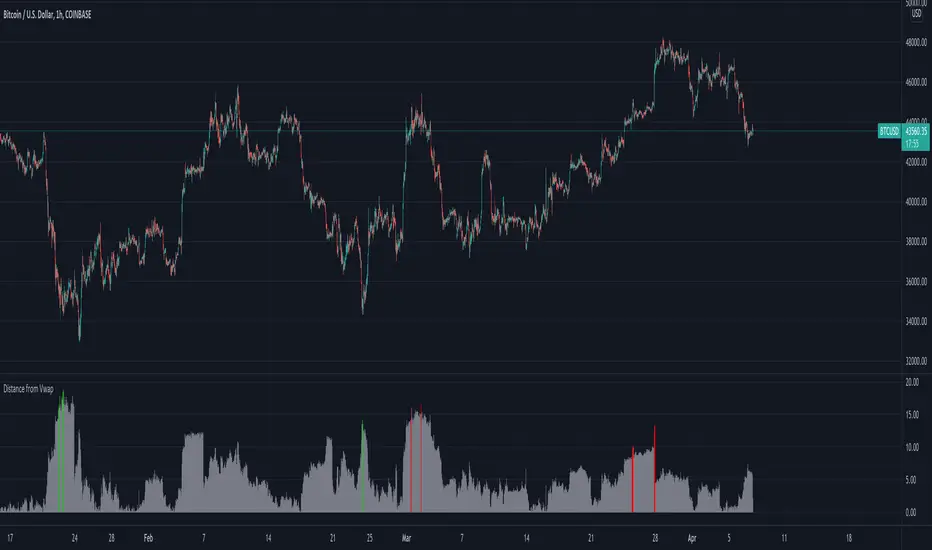
Distance from Vwap// How it Works \\ Measuring the distance of the close price from a higher timeframe VWAP - Volume Weighted Average Price There is a threshold which is calculated by looking back at the previous x amount of bars and storing the highest/lowest values If the distance from the vwap stretches above that threshold, the histogram will go green if price is above VWAP and red if its below the vwap If the distance from the vwap reaches below the low threshold you will see the histogram flashes orange // Settings \\ In the settings you have the ability to change what timeframe the indicator is calculated on, as well as this you can change the timeframe the VWAP is calculated on. I always recommend using a higher timeframe vwap as they tend to me more respected e.g on the hourly timeframe, I use the weekly VWAP, on 1 minute timeframe you may want to use 4 hour timeframe but obviously feel free to experiment // Use Case \\ When histogram is flashing green, prices is pulling far away from the vwap, obviously you don't want to be buying a falling knife but if you have levels of confluence this can help spot reversals. I personally wait until the first candle after its been green to get confirmation of the fall weakening. Vica versa for reds and shorts/sells. When you see orange flashes, this shows that price has been consolidating and the price is very close to the higher time frame VWAP which could be considered a safe entry point as they tend to lead to a big move to follow // Suggestions \\ Happy for anyone to make any suggestions on changes which could improve the script, // Terms \\ Feel free to use the script, If you do use the script could you please just tag me as I am interested to see how people are using it. Good Luck!Pine Script®指標由TradingWolf提供77317
VWAP Multiple [Huntersull]This is a VWAP/Price multiple analysis, in the same vein as something like the Mayer multiple. It finds the VWAP of price and volume starting at the bar you choose when initiating the script (You can also drag the starting point line on the chart to change it later), and calculates the running VWAP total for every following bar until the current bar. It then takes the hlc3 of price for each bar and divides it by the VWAP value of that bar, giving a multiple over VWAP price. This is then charted with your choice of an SMA, EMA, or WMA using VWAP as the source, and a default length of 200, which is also modifiable. When VWAP is over the moving average, it is filled green. When VWAP is below the moving average, it is filled red. -------------------------------------------- This is not meant to be a trading indicator, but a tool for general bull/bear market and trend analysis. Use at your own risk.Pine Script®指標由HunterSull提供23