Visual Trend IndicatorVisual Trend Indicator v1
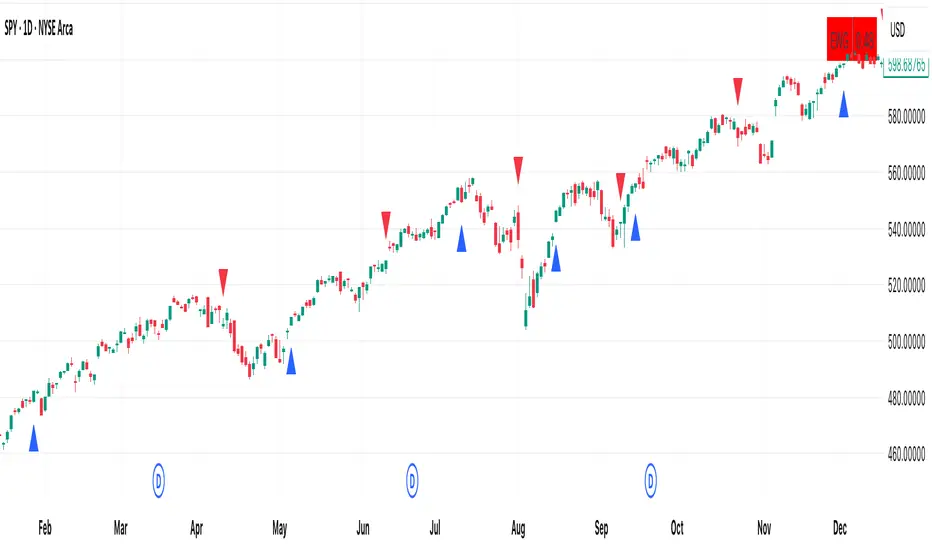
Combines SuperTrend + EMA Trend Score into a visual color-based overlay for candlestick charts.
Arrows appear when RSI(2) and SlowStochastic(8,3) are countertrend signals and represent good odds to buy the dip / sell the rip.
在腳本中搜尋"supertrend"

Hyper Strength Index | QuantLapse🧠 Hyper Strength Index (HSI) | QuantLapse
Overview:
The Hyper Strength Index (HSI) is a composite momentum oscillator designed to unify multiple strength measures into a single, adaptive framework. It combines the Relative Strength Index (RSI), Chande Momentum Oscillator (CMO), Money Flow Index (MFI), and Stochastic RSI to deliver a refined, multidimensional view of market momentum and overbought/oversold conditions.
Unlike traditional oscillators that rely on a single formula, the HSI averages four distinct momentum perspectives — price velocity, directional conviction, volume participation, and stochastic behavior — offering traders a more balanced and noise-resistant reading of market strength.
⚙️ Calculation Logic:
The Hyper Strength Index is computed as the normalized average of:
📈 RSI — classic measure of relative momentum.
💪 CMO — captures directional bias and intensity of moves.
💵 MFI — integrates volume and money flow pressure.
🔄 Stochastic RSI (K-line) — identifies momentum extremes and short-term turning points.
This fusion creates a smoother, more comprehensive signal, mitigating the weaknesses of any single oscillator.
🎯 Interpretation:
Overbought Zone (Default: > 75):
Indicates potential exhaustion of bullish momentum — a cooling phase or reversal may follow.
Oversold Zone (Default: < 7):
Suggests bearish exhaustion — a rebound or accumulation phase may emerge.
Neutral Zone (Between 7 and 75):
Represents balanced market conditions or trend continuation phases.
Visual cues highlight key conditions:
🔺 Red Highlights — Overbought regions or downward inflection points.
🔻 Green Highlights — Oversold regions or upward inflection points.
Neutral zones are shaded with subtle gray backgrounds for clarity.
💡 Key Features:
🔹 Multi-factor strength analysis (RSI + CMO + MFI + StochRSI).
🔹 Adaptive overbought/oversold detection.
🔹 Visual alerts via colored backgrounds and bar markers.
🔹 Customizable smoothing and length parameters for fine-tuning sensitivity.
🔹 Intuitive visualization ideal for both short-term scalping and swing trading setups.
🧭 Usage Notes:
Works best as a momentum confirmation tool — pair with trend filters like EMA, SuperTrend, or ADX.
In trending markets, use crossovers from extreme zones as potential continuation or exhaustion signals.
In ranging markets, exploit overbought/oversold reversals for high-probability mean reversion trades.
📘 Summary:
The Hyper Strength Index | QuantLapse distills multiple dimensions of market strength into a single, cohesive oscillator. By merging price, volume, and directional momentum, it provides traders with a more robust, responsive, and context-aware perspective on market dynamics — a next-generation evolution beyond the limitations of RSI or CMO alone.

ADOLFO'S NINJA TURTLE SOUPThis indicator signals when there is a turtle soup of m30 in the NY session following the trend of a supertrend indicator in a 1-hour time interval, being excellent for taking RR trades 1 to 1. Created by Engineer Adolfo Pérez Espinoza.

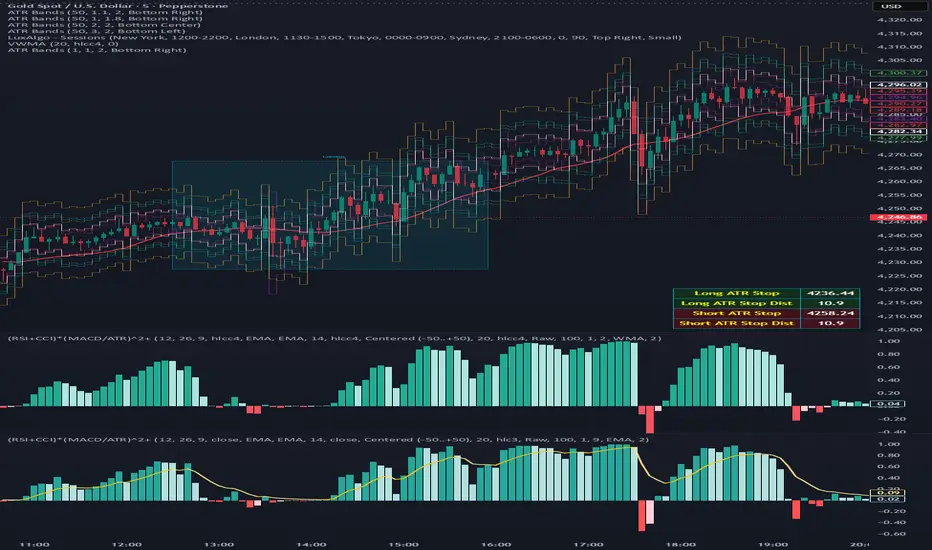
(RSI + CCI) × (MACD/ATR)^2⚙️ (RSI + CCI) × (MACD / ATR)² Composite — Normalized, Compressed, Dynamic Colors
This advanced composite oscillator merges three powerful momentum indicators — RSI, CCI, and MACD — into one normalized and volatility-adjusted signal that reacts smoothly across all markets.
By dividing MACD by ATR (Average True Range), the indicator self-scales for different symbols, and an optional tanh-like compression prevents extreme spikes while keeping the movement fluid and responsive.
🧩 Core Formula
(RSI + CCI) × (MACD / ATR)²
(optionally passed through a tanh compression for stability)
RSI and CCI are normalized (RSI ÷ 50, CCI ÷ 100) → roughly −2 to +2 range.
MACD is volatility-adjusted by ATR → scale-independent between assets.
The result is centered around 0 for clear bullish/bearish momentum comparison.
🎨 Visual Features
🟢🔴 Dynamic 4-Color Histogram
Positive + Rising = Strong Teal
Positive + Falling = Light Teal
Negative + Falling = Strong Red
Negative + Rising = Light Red
🟡⚫ 4-Color Smoothing Line
Positive & Rising = Bright Yellow
Positive & Falling = Soft Yellow
Negative & Rising = Grey
Negative & Falling = Dark Grey
Zero-centered layout for intuitive bullish/bearish visualization.
⚙️ Adjustable Parameters
Individual RSI, CCI, and MACD lengths and sources.
ATR length for volatility normalization.
Optional tanh-style compression with adjustable gain (to keep values in ±1 range).
Fully customizable colors and line widths for both bars and smoothing line.
🔔 Alerts
Triggered automatically when the composite crosses above or below zero, signaling potential trend reversals or momentum shifts.
💡 How to Use
Composite > 0 → Bullish momentum ↑
Composite < 0 → Bearish momentum ↓
A brightening line or bar = momentum accelerating.
A fading color = momentum weakening or reversal forming.
Combine with higher-timeframe trend filters (EMA, VWAP, Supertrend) for confirmation.
Bollinger RSI + SuperTrend TrailingBollinger Band RSI buy and sell signals with a super trend trailing stop

⚡ Elite Momentum Pro🎯 Key Features
1. Smart Signal Engine
3 Signal Modes: Aggressive, Balanced, Conservative
7-Point Scoring System - Ensures high-quality signals
Anti-Flip Protection - Prevents rapid signal changes
Multiple confirmations: Supertrend, MACD, RSI, EMA alignment, momentum
2. Advanced Risk Management
3 Take Profit Levels (TP1, TP2, TP3) for scaling out
ATR-Based Dynamic Stops - Adapts to volatility
Customizable Risk:Reward (default 2.5:1)
Visual stop and target levels
3. Clean Visual Design
Color-coded price bars based on trend strength
EMA Ribbon (9, 21, 50, 200) for trend clarity

CUBE's V17CUBE’s V15.1 — Sparkles ⚡ + Cubes 🟨 + Smart/LC 🟫 + Golden ✨ (multi-signal scalper & trend helper)
CUBE’s V15.1 is a multi-module toolkit for intraday momentum and quick-scalp decision making. It blends a trend engine, VWAP/EMA50 band logic, CRT + Volume pair detection, weighted divergence, OBV-MACD regime flips, and “Sparkles” presets—then fuses them into readable Cube labels and higher-conviction Golden combos.
What it prints (signal taxonomy)
🟨 Cube ++ Incoming — pre-signal when price enters VWAP/EMA50 “yellow” bands with trend alignment.
🟨 Cube’s Buy ++ / Sell ++ — the “plus-plus” confirmations after CRT context; gated to avoid spam.
🟫 Last Chance → 🟫 Last Chance ++ — RSI + divergence-weighted follow-through (waits for a tiny UT flip).
🟪 Smart Cube — post-Cube, waits for KC(1.2) location + OBV presence + divergence stack (more selective).
✨ Golden (Sparkles + Cube) — objective confluence labels that require Sparkles (preset wins) plus a Cube event inside a short window. Comes in Golden-2 (2+ sparkles in 3 bars) and Golden-1 (tight 0–1 bar proximity).
Each label automatically shows “(Quick Scalp)” when price is inside the careful bands, so you know when to downshift risk.
The engines (under the hood)
Trend: Pivot-Point SuperTrend (PPST 2/10/3) drives bullish/bearish context (invertible).
Bands: 5-minute VWAP + EMA50 zones with symbol-aware tolerances (majors/ETFs/crypto/megacaps tuned).
CRT + Volume Spike Pair: detects recent hammer/shooter + volume conditions and uses them to gate higher tiers.
Weighted Divergence: RSI / Stoch (weighted) / CCI / MOM / OBV (weighted) / CMF / MFI (and more) with CRT-recency gates to keep it relevant.
UT micro-flips: tiny ATR trail crosses used to “arm” Last Chance ++ entries.
OBV-MACD regime: structural flips for the Super7 and Smart Cube filters.
Super7 Sparkles: five presets (4/8/15/24/40 bars) that score 9 modules; you can show compact ✨ icons or 9/9 text.
Quick start (60 seconds)
Add to a 1–5m chart of your instrument.
Leave defaults on; optionally toggle “Sparkle Settings” (the presets are already on).
Watch for:
✨ Golden Buy/Sell → higher-quality scalp setups.
🟨 Cube’s Buy/Sell ++ → momentum continuation outside the yellow bands.
🟪 Smart Cube → selective continuation after a Cube with KC/OBV/div confluence.
Use the built-in alerts (see list below) to automate.
Inputs & customization highlights
Invert Trend Logic — flips bull/bear interpretation (useful in range regimes).
Reference TF label anchoring — place labels using a reference timeframe; optional “(tf)” tag.
Careful (Quick-Scalp) palettes — swap label colors when inside bands; hide/show quick-scalp labels per mode.
Duplicate filters — suppress Cube repeats within a window.
Session tools — optional 6:00 PM 5m “reset” box (purple) and 9:30 AM 1m NY Open box (yellow).
Backgrounds — optional ST(10,1) 0.5–0.7 ATR ribbons for context.
Presets — five Sparkle presets with per-side alternation and wipe logic.
Alerts (names as they appear in TradingView)
⬜ Cube’s Buy / Sell (or 🟨 Incoming if trend is inverted)
🟨 CUBE’S BUY ++ / CUBE’S SELL ++ (or “Cube’s … ++” if inverted)
🟫 Buy Last Chance / 🟫 Incoming (Sell Last Chance)
🟫 Cube’s Last Chance Buy ++ / Cube’s Last Chance Sell
🟪 Smart Cube’s Buy / Smart Cube’s Sell
🔔 ALL Cube Alerts (one catch-all)
✨ G✨lden Buy/Sell (Sparkles+Cube) and G✨lden-1/2 variants
Tip: Set close-bar alerts for most signals; if you want early heads-up, allow “once per bar” but expect more noise.
Reading the labels
“(Quick Scalp)” suffix = price inside the VWAP/EMA50 careful bands; tighten targets/size.
Some labels include indicator names + a weighted count (e.g., “Hist RSI MOM 3”) to hint at divergence depth.
Star ⭐ near a label means a CRT+VOL pair was detected within the recent window.
Golden text shows the most recent cube subtype (“Cube ++”, “Smart Cube”, etc.) that satisfied the window rule.
Recommended markets & timeframes
Built-in tuning for: NQ/ES/RTY/YM, GC/CL, XAU/XAG, FX majors, BTC/ETH/SOL, SPY/QQQ/IWM/DIA, and mega-caps (AAPL, MSFT, NVDA, etc.).
Best experience on 1m–5m for intraday. Works on higher TFs but is designed around the 5-minute VWAP/EMA50 backbone.
Best practices
Confluence over single prints: Use ✨ Golden or 🟪 Smart Cube + trend + structure.
Location matters: Prefer signals near session boxes, prior day H/L, and liquidity pools.
Risk first: Size down in (Quick Scalp) zones and during lunch hours/illiquid sessions.
Avoid double-counting: The script already suppresses blatant duplicates—don’t force extra alerts.
Repainting & transparency
Core signals evaluate on confirmed bars; major request.security calls use lookahead_off.
The 1m open/6pm boxes use alignment tricks for placement; they don’t feed signal logic.
As with any multi-TF logic, real-time bars can update intra-bar—use “on close” alerts for strict confirmation.
Disclaimer
This script is for educational purposes. It’s not financial advice and does not guarantee results. Markets carry risk—always test on replay/paper first, know your instrument’s tick/fee structure, and use hard stops.

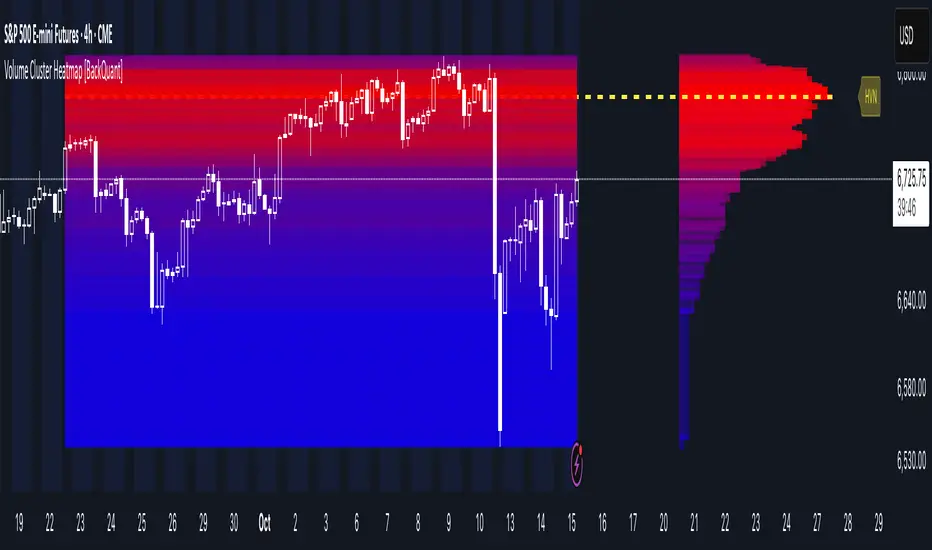
Volume Cluster Heatmap [BackQuant]Volume Cluster Heatmap
A visualization tool that maps traded volume across price levels over a chosen lookback period. It highlights where the market builds balance through heavy participation and where it moves efficiently through low-volume zones. By combining a heatmap, volume profile, and high/low volume node detection, this indicator reveals structural areas of support, resistance, and liquidity that drive price behavior.
What Are Volume Clusters?
A volume cluster is a horizontal aggregation of traded volume at specific price levels, showing where market participants concentrated their buying and selling.
High Volume Nodes (HVN) : Price levels with significant trading activity; often act as support or resistance.
Low Volume Nodes (LVN) : Price levels with little trading activity; price moves quickly through these areas, reflecting low liquidity.
Volume clusters help identify key structural zones, reveal potential reversals, and gauge market efficiency by highlighting where the market is balanced versus areas of thin liquidity.
By creating heatmaps, profiles, and highlighting high and low volume nodes (HVNs and LVNs), it allows traders to see where the market builds balance and where it moves efficiently through thin liquidity zones.
Example: Bitcoin breaking away from the high-volume zone near 118k and moving cleanly through the low-volume pocket around 113k–115k, illustrating how markets seek efficiency:
Core Features
Visual Analysis Components:
Heatmap Display : Displays volume intensity as colored boxes, lines, or a combination for a dynamic view of market participation.
Volume Profile Overlay : Shows cumulative volume per price level along the right-hand side of the chart.
HVN & LVN Labels : Marks high and low volume nodes with color-coded lines and labels.
Customizable Colors & Transparency : Adjust high and low volume colors and minimum transparency for clear differentiation.
Session Reset & Timeframe Control : Dynamically resets clusters at the start of new sessions or chosen timeframes (intraday, daily, weekly).
Alerts
HVN / LVN Alerts : Notify when price reaches a significant high or low volume node.
High Volume Zone Alerts : Trigger when price enters the top X% of cumulative volume, signaling key areas of market interest.
How It Works
Each bar’s volume is distributed proportionally across the horizontal price levels it touches. Over the lookback period, this builds a cumulative volume profile, identifying price levels with the most and least trading activity. The highest cumulative volume levels become HVNs, while the lowest are LVNs. A side volume profile shows aggregated volume per level, and a heatmap overlay visually reinforces market structure.
Applications for Traders
Identify strong support and resistance at HVNs.
Detect areas of low liquidity where price may move quickly (LVNs).
Determine market balance zones where price may consolidate.
Filter noise: because volume clusters aggregate activity into levels, minor fluctuations and irrelevant micro-moves are removed, simplifying analysis and improving strategy development.
Combine with other indicators such as VWAP, Supertrend, or CVD for higher-probability entries and exits.
Use volume clusters to anticipate price reactions to breaking points in thin liquidity zones.
Advanced Display Options
Heatmap Styles : Boxes, lines, or both. Boxes provide a traditional heatmap, lines are better for high granularity data.
Line Mode Example : Simplified line visualization for easier reading at high level counts:
Profile Width & Offset : Adjust spacing and placement of the volume profile for clarity alongside price.
Transparency Control : Lower transparency for more opaque visualization of high-volume zones.
Best Practices for Usage
Reduce the number of levels when using line mode to avoid clutter.
Use HVN and LVN markers in conjunction with volume profiles to plan entries and exits.
Apply session resets to monitor intraday vs. multi-day volume accumulation.
Combine with other technical indicators to confirm high-probability trading signals.
Watch price interactions with LVNs for potential rapid movements and with HVNs for possible support/resistance or reversals.
Technical Notes
Each bar contributes volume proportionally to the price levels it spans, creating a dynamic and accurate representation of traded interest.
Volume profiles are scaled and offset for visual clarity alongside live price.
Alerts are fully integrated for HVN/LVN interaction and high-volume zone entries.
Optimized to handle large lookback windows and numerous price levels efficiently without performance degradation.
This indicator is ideal for understanding market structure, detecting key liquidity areas, and filtering out noise to model price more accurately in high-frequency or algorithmic strategies.
Tweezer & Kangaroo Zones [WavesUnchained]Tweezer & Kangaroo Zones
Pattern Recognition with Supply/Demand Zones
Indicator that detects tweezer and kangaroo tail (pin bar) reversal patterns and creates supply and demand zones. Includes volume validation, trend context, and confluence scoring.
What You See on Your Chart
Pattern Labels:
"T" (Red) - Tweezer Top detected above price → Bearish reversal signal
"T" (Green) - Tweezer Bottom detected below price → Bullish reversal signal
"K" (Red) - Kangaroo Bear (Pin Bar rejection from top) → Bearish signal
"K" (Green) - Kangaroo Bull (Pin Bar rejection from bottom) → Bullish signal
Label Colors Indicate Pattern Strength:
Dark Green/Red - Strong pattern (score ≥8.0)
Medium Green/Red - Good pattern (score ≥6.0)
Light Green/Red - Valid pattern (score <6.0)
Zone Boxes:
Red Boxes - Supply Zones (resistance, potential short areas)
Green Boxes - Demand Zones (support, potential long areas)
White Border - Active zone (fresh, not tested yet)
Gray Border - Inactive zone (expired or invalidated)
Pattern Detection
Tweezer Patterns (Classic Double-Top/Bottom):
Flexible Lookback - Detects patterns up to 3 bars apart (not just consecutive)
Precision Matching - 0.2% level tolerance for high-quality signals
Wick Similarity Check - Both candles must show similar rejection wicks
Volume Validation - Second candle requires elevated volume (0.8x average)
Pattern Strength Score - 0-1 quality rating based on level match + wick similarity
Optional Trend Context - Can require trend alignment (default: OFF for more signals)
Kangaroo Tail / Pin Bar Patterns:
No Pivot Delay - Instant detection without waiting for pivot confirmation
Body Position Check - Body must be at candle extremes (30% tolerance)
Volume Spike - Rejection must occur with volume (0.9x average)
Rejection Strength - Scores based on wick length (0.5-0.9 of range)
Optional Trend Context - Bearish in uptrends, Bullish in downtrends (default: OFF)
Zone Management
Auto-Created Zones - Every valid pattern creates a supply/demand zone
Overlap Prevention - Zones too close together (50% overlap) are not duplicated
Lifetime Control - Zones expire after 400 bars (configurable)
Smart Invalidation - Zones invalidate when price closes through them
Styling Options - Choose between Solid, Dashed, or Dotted borders
Border Width - 2px width for better visibility
Confluence Scoring System
Multi-factor confluence scoring (0-10 scale) with configurable weights:
Regime (EMA+HTF) - Trend alignment across timeframes (Weight: 2.0)
HTF Stack - Multi-timeframe trend confluence (Weight: 3.0)
Structure - Higher lows / Lower highs confirmation (Weight: 1.0)
Relative Volume - Volume surge validation (Weight: 1.0)
Chop Advantage - Favorable market conditions (Weight: 1.0)
Zone Thinness - Tight zones = better R/R (Weight: 1.0)
Supertrend - Trend indicator alignment (Weight: 1.0)
MOST - Moving Stop alignment (Weight: 1.0)
Pattern Strength - Quality of detected pattern (Weight: 1.5)
Zone Retest Signals
Signals generated when zones are retested:
BUY Signal - Price retests demand zone from above (score ≥4.5)
SELL Signal - Price retests supply zone from below (score ≥5.5)
Normalized Score - Displayed as 0-10 for easy interpretation
Optional Trend Gate - Require trend alignment for signals (default: OFF)
Alert Ready - Built-in alertconditions for automation
Additional Features
Auto-Threshold Tuning - Adapts to ATR and Choppiness automatically
Session Profiles - Different settings for RTH vs ETH sessions
Organized Settings - 15+ input groups for easy configuration
Optional Panels - HTF Stack overview and performance metrics (default: OFF)
Data Exports - Hidden plots for strategy/library integration
RTA Health Monitoring - Built-in performance tracking
Setup & Configuration
Quick Start:
1. Apply indicator to any timeframe
2. Patterns and zones appear automatically
3. Adjust pattern detection sensitivity if needed
4. Configure zone styling (Solid/Dashed/Dotted)
5. Set up alerts for zone retests
Key Settings to Adjust:
Pattern Detection:
• Min RelVolume: Lower = more signals (0.8 Tweezer, 0.9 Kangaroo)
• Require trend context: Enable for stricter, higher-quality patterns
• Check wick similarity: Ensures proper rejection structure
Zone Management:
• Zone lifetime: How long zones remain active (default: 400 bars)
• Invalidate on close-through: Remove zones when price breaks through
• Max overlap: Prevent duplicate zones (default: 50%)
Scoring:
• Min Score BUY/SELL: Higher = fewer but better signals (default: 4.5/5.5)
• Component weights: Customize what factors matter most
• Signals require trend gate: OFF = more signals, ON = higher quality
Visual Customization
Zone Colors - Light red/green with 85% transparency (non-intrusive)
Border Styles - Solid, Dashed, or Dotted
Label Intensity - Darker greens for better readability
Clean Charts - All panels OFF by default
Understanding the Zones
Supply Zones (Red):
Created from bearish patterns (Tweezer Tops, Kangaroo Bears). Price made a high attempt to push higher, but was rejected. These become resistance areas where sellers may step in again.
Demand Zones (Green):
Created from bullish patterns (Tweezer Bottoms, Kangaroo Bulls). Price made a low with strong rejection. These become support areas where buyers may step in again.
Zone Quality Indicators:
• White border = Fresh zone, not tested yet
• Gray border = Zone expired or invalidated
• Thin zones (tight range) = Better risk/reward ratio
• Thick zones = Less precise, wider stop required
Trading Applications
Reversal Trading - Enter at pattern detection with tight stops
Zone Retest Trading - Wait for retests of established zones
Trend Confluence - Trade only when patterns align with trend
Risk Management - Use zone boundaries for stop placement
Target Setting - Opposite zones become profit targets
Pro Tips
Best signals occur when pattern + zone retest + trend all align
Lower timeframes = more signals but more noise
Higher timeframes = fewer but more reliable signals
Start with default settings, adjust based on your market
Combine with other analysis (structure, key levels, etc.)
Use alerts to avoid staring at charts all day
Important Notes
Not all patterns will lead to successful trades
Use proper risk management and position sizing
Patterns work best in trending or range-bound markets
Very choppy conditions may produce lower-quality signals
Always confirm with your own analysis before trading
Technical Specifications
• Pine Script v6
• RTA-Core integration
• RTA Core Library integration
• Maximum 200 boxes, 500 labels
• Auto-tuning based on ATR and Choppiness
• Session-aware threshold adjustments
• Memory-optimized zone management
What's Included
Tweezer Top/Bottom detection
Kangaroo Tail / Pin Bar detection
Automatic supply/demand zone creation
Volume validation system
Pattern strength scoring
Zone retest signals
Multi-factor confluence scoring
Optional HTF Stack panel
Optional performance metrics
Session profile support
Auto-threshold tuning
Alert conditions
Data exports for strategies
Author Waves Unchained
Version 1.0
Status Public Indicator
Summary
Reversal pattern detection with zone management, volume validation, and confluence scoring for tweezer and kangaroo tail patterns.
---
Disclaimer: This indicator is for educational and informational purposes only. Trading involves risk. Past performance does not guarantee future results. Always practice proper risk management.

[ZP] Fixed v6 testDISCLAIMER:
This indicator in Pine V6 as my first ever Tradingview indicator, has been developed for my personal trading analysis, consolidating various powerful indicators that I frequently use. A number of the embedded indicators within this tool are the creations of esteemed Pine Script developers from the TradingView community. In recognition of their contributions, the names of these developers will be prominently displayed alongside the respective indicator names. My selection of these indicators is rooted in my own experience and reflects those that have proven most effective for me. Please note that the past performance of any trading system or methodology is not necessarily indicative of future results. Always conduct your own research and due diligence before using any indicator or tool.
===========================================================================
Introducing the ultimate all-in-one DIY strategy builder indicator, With over 30+ famous indicators (some with custom configuration/settings) indicators included, you now have the power to mix and match to create your own custom strategy for shorter time or longer time frames depending on your trading style. Say goodbye to cluttered charts and manual/visual confirmation of multiple indicators and hello to endless possibilities with this indicator.
Available indicators that you can choose to build your strategy, are coded to seamlessly print the BUY and SELL signal upon confirmation of all selected indicators:
EMA Filter
2 EMA Cross
3 EMA Cross
Range Filter (Guikroth)
SuperTrend
Ichimoku Cloud
SuperIchi (LuxAlgo)
B-Xtrender (QuantTherapy)
Bull Bear Power Trend (Dreadblitz)
VWAP
BB Oscillator (Veryfid)
Trend Meter (Lij_MC)
Chandelier Exit (Everget)
CCI
Awesome Oscillator
DMI ( Adx )
Parabolic SAR
Waddah Attar Explosion (Shayankm)
Volatility Oscillator (Veryfid)
Damiani Volatility ( DV ) (RichardoSantos)
Stochastic
RSI
MACD
SSL Channel (ErwinBeckers)
Schaff Trend Cycle ( STC ) (LazyBear)
Chaikin Money Flow
Volume
Wolfpack Id (Darrellfischer1)
QQE Mod (Mihkhel00)
Hull Suite (Insilico)
Vortex Indicator

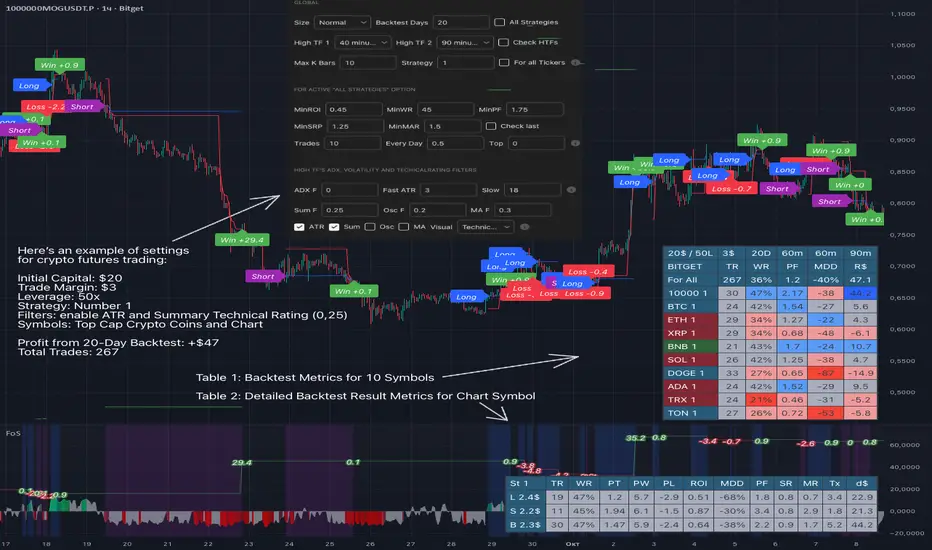
Force of Strategy (FoS, Multi TF/TA, Backtest, Alerts)Introducing the FoS Trading System
A comprehensive and innovative solution designed for both novice and experienced traders to enhance their intraday trading.
The basic idea of creating this script is to stay profitable in any market
Key Features:
There are over 25 no-repaint strategies for generating buy and sell signals to choose from
10 symbols for simultaneous trading
Webhook alerts in TTA format (tradingview to anywhere) pre-configured to send messages for trading cross-margin futures on major Crypto Exchanges: Binance, Bitget, BingX, Bybit, GateIO and OKX
A unique automated "Strategy switcher" feature for backtesting and live trading—not just a specific strategy, but the logic behind choosing a trading one or another strategy based on backtesting data obtained in real time
Advanced risk management options and backtest result metrics
Higher Timeframe filters (Technical Rating, ADX, Volatility) and ability for check backtest results with 9 main higher timeframes
Buy and sell signals are generated using TradingView Technical Ratings, indicators with adaptive length algorithms and various classic indicators with standard settings to avoid overfitting
Next, I will describe in detail what this script does and what settings it operates with:
"All Strategies" off
- In the global settings block, as shown in the main chart screenshot, you select how long the script will perform backtests in days, with a limitation on the number of bars for calculations. This limitation is necessary to maintain an acceptable calculation speed. You also choose which two higher timeframes we will use for signal and filters when confirming the opening of trades
- With "All Strategies" off - as in the example on the main chart screenshot, trading is carried out by strategy #1 on 10 selected tickers simultaneously. By default, I selected the 9 top-capitalized cryptocurrencies on the Bitget exchange and the chart symbol. You can change that choice of 9 non chart opened instruments and # strategy for each them
- The first row in the table 1 shows some of the main choosen script settings, in attached example: initial capital 20$, leverage 50L, 20 backtest days, 3$ is invest in one deal, 60m - is chart timeframe, next 60m is higher timeframe 1 and last 90m is higher timeframe 2. In first column you see shortened to 5 characters ticker names
- The exchange name in the second row determines the alert messages format
I've attached another example of trading with setting "All strategies" off in the image below. In this example, trading 10 standard symbols on an hourly timeframe, 2 coins from 10: 1000SATS and DOGE have generated a profit of over $65 over the past 20 days using strategy #4
Can you browse a wide range of trading instruments and select the 10 best strategies and settings for future trading? Of course, trading is what this script is do!
The parameters in the table 1 mean the following:
TR - count of closed trading deals
WR - Winning Rate, PF - Profit Factor
MDD - Max Draw Down for all calculated time from initial capital
R$ - trading profit result in usd
The parameters in the table 2 is just more metrics for chart symbol:
PT - result in usd Per one Trade
PW - result Per Win, PL - result Per Lose
ROI - Rate of Investments
SR - Sharpe Ratio, MR - CalMAR ration
Tx - Commision Fee in Usd
R$ - trading profit result in usd again
Table 2 separate trade results of backtesting for longs and shorts. In first column you see how many USD were invested in one trade, taking into account possible position splitting (will be discussed in more detail in the risk management section)
Settings:
"All Strategies" on, "Check Last" off
When "All Strategies" is active, trading changed from 10 symbols and one strategy to all strategies and one chart symbol. If option "Check Last" is inactive you will see backtest results for each of strategy in backtest setting days. This is useful, for example, if you want to see backtest results under different settings over a long period of time for calibrating risk management or entry rules
"All Strategies" on, "Check Last" on
- If "All Strategies" and "Check Last" is active trading will occur on the chart symbol only for those strategies that meet the criteria of the settings block for the enabled "All Strategies" option. For example your criteria is: for last 5 trades for all strategies, open next trade only on strategy which reached ROI 25% and WinRate 50%. When strategy with this setting criteria receive Buy or Sell Signal this trade will be opened, and when trade will be close "check last" will repeat. This feature i called "Strategy switcher"
-In Table 1 if strategy meet criteria you will see "Ok" label, if strategy meet criteria and have maximum from other reached ROI they labeled "Best". Chart strategy labeled "Chart", Chart and Ok labels in one time is "Chart+", "Chart" and "Best" is labeled "Best+"
- The color in the first column of table 1 indicates that the strategy is currently in an open position: green means an open long position, red means an open short position.
In picture bellow you will see good example for trading with check results for last 10 trades, and make desicion for trading when criteries 0.25 ROI and WinRate 50% reached for Top 2 by ROI strategies from all list of them. This example of trading logic in last 20 days (include periods when strategy don't arise 10 trades) give a profit $30+. At the bottom of the screen, you can see Labels with the numbers of the strategies that opened the trades. In this example, trades were primarily opened using strategy number 2, and the second most effective strategy after the 20-day backtest was strategy number 9
Who can promise you'll make a profit of $30 in the next 20 days with a drawdown of no more than $8 from the initial $20 with invest in one trade just 2.7$? No one. But this script guarantees that in the future it will repeat the same logic of switching trading strategies that brought profit over the last 20 days
Risk management options
- When a buy or sell trade is opened, you'll see three lines on the chart: a red stop-loss line (SL), a green take-profit line (TP), and a blue line representing the entry price. The trade will be closed if the high price or low price reaches the line TP or SL (no wait for bar close) and alert will be triggered once per bar when script recalculates
- Several options are available to control the behavior of SL/TP lines, such as stop-loss by percentage, ATR, or Highest High (HH) and Lowest Low (LL). Take Profit can be in percent, ATR or in Risk Reward ratio. There some Trailing Stop with start trail trigger options, like ATR, percent or HH / LL
- Additionally, in risk managment settings a function has been implemented for adding a position when the breakeven level expressed in the current ROI is reached for opened trade (splitting position). The position is added within the bar.
- Webhook alerts in TTA format with message contained next info : Buy / Sell or adding Quantity, Leverage, SL price, TP price and close trade
Keep in mind if the stop-loss changed when adding a position, the stop-loss will not be able to be higher than the current bar's low price, regardless of your settings, as backtest trades do not use intra-bar data, in this situation SL will be correct at next bar (but alert message don't be sended twice). And please note that this script does not have an option to simultaneously open trades in different directions. Only 1 trade can be opened for 1 trading instrument at a time
Backtest Engine
Backtest is a very important part of this script. Here describe how its calculate:
- Profit or Loss is USD: close trade price * open trade quantity - open trade price * open trade quantity - open trade quantity * (open trade price + close trade price)/2 * commision fee
Possible slippage or alert sending delay needed to be include in commission % which you will set in risk managment settings block, default settings is 0.15% (0,06% for open, 0,06% for close and 0,03% for possible slippage or additional fees)
- Maximum Draw Down: Drawdown = (peak - current equity) / peak * 100 ;
Drawdown > maxDrawdown ? maxDrawdown = Drawdown
- ROI: profit result in USD / sum of all positions margin
- CalMAR Ratio: ROI / (-MaxDrawDown)
- Sharpe Ratio: ROI / standard deviation for (Sum of all Profits and Loses) / (Sum of all Position Margins)
This description was added because in metrics i don't use parameters like "The risk-free rate of return". Keep in mind how exactly this script calculate profit and perfomance when adjusting key criteria in the strategy switching parameters block of script settings
Strategies itself
For trading, you can enable or disable various Higher Timeframes Filters (ADX, volatility, technical rating).
With filters enabled, trades will only open when the setting parameters are reached
- Strategy number 1, 2 and 3: is Higher Timeframe TradingView Technical Ratings itself, 1 is summary total rating, 2 is oscillators and 3 is moving averages. When TR filter cross filter levels trade will be open at chart bar close. By Default on chart you see Summary Technical Rating oscillator, but here the options for change it to Oscillator TR or Moving Average TR
- Strategy number 4, 5 and 6: is Chart TimeFrame TR. Trades will open when its values (Summary, Oscillators and Moving Averages) reached setting buy sell level
- Strategy number 7, 8 and 9: is Alternative buy sell logic for Chart TimeFrame TR, trades will open when counting rising or falling values will be reached
- Strategies with number from 10 to 18: is chosen by user adaptive moving averages and oscillators indicators. There in settings you will see many different adaptive length algorithms for trading and different types of moving averages and oscillators. In tooltips in settings you will find very more information, and in settings you will see list of all indicators and algorithms (more than 30 variations). All adaptive strategies have their options in settings for calibrating and plotting
- Strategies with number from 19: its can't be chosen or calibarted, this is needed for avoid overfitting, i try to found mostly time worked strategies and use its with standard settings. In future it's possible to changing current or adding additional strategies. At the time of publication this script uses: Dynamic Swing HH LL (19), Composite indicator (20), %R Exhausting with different signals (21,22,23), Pivot Point SuperTrend (24), Ichimoku Cloud (25), TSI (26), Fib Level RSI (27). I don't plot classic strategies in this script
Let me explain, the value of this script is not in the strategies it includes, but in how exactly it collects the results of their work, how it filters the opening of trades, what risk management it applies and what strategy switching logic it performs. The system itself that you are now reading about represents the main value of this script
Finally if you get access for this script
- You will see many other not described options and possibilities like Kelly position or list of settings for adaptive strategies, also i added many usefull tooltips in script settings
Happy trading, and stay tuned for updates!
DISCLAIMER: No sharing, copying, reselling, modifying, or any other forms of use are authorized for this script, and the information published with them. This script is strictly for individual use. No one know future and Investments are always made at your own risk. I am not responsible for any losses you may incur. Please before investment make sure that chosen logic is enaugh profitable on virtual demo account.
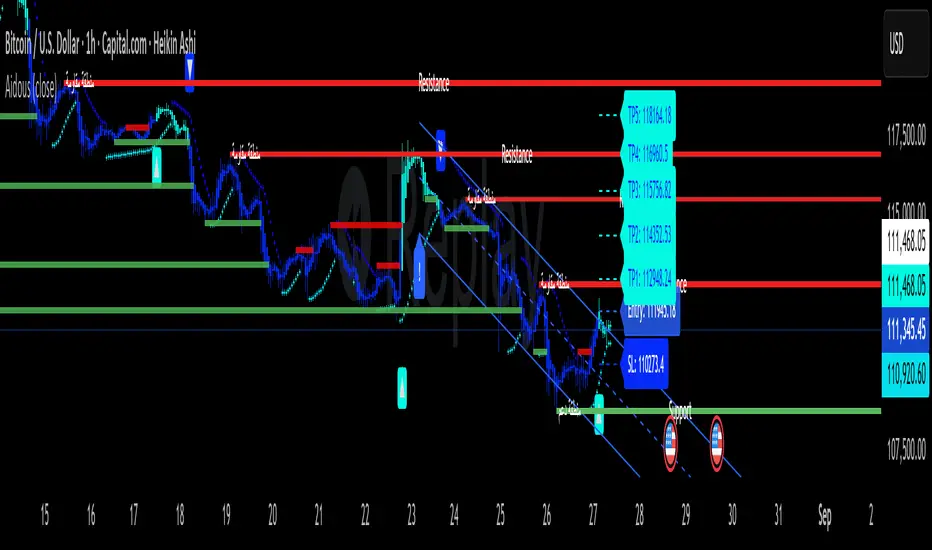
Aidous IndicatorAidous Indicator – Multi-Framework Trend & Liquidity Suite
The Aidous Indicator is a comprehensive, multi-layered technical analysis tool built for traders seeking precision, adaptability, and clarity across all timeframes. It combines several advanced methodologies into a single, cohesive framework that dynamically adjusts to market conditions.
🔧 Key Features
Adaptive Trend Detection
Utilizes a custom momentum-weighted smoothing algorithm enhanced by volatility and strength filters (ATR, ADX) to identify reliable trend shifts.
Trade Management System
Automatically plots entry, stop-loss, and five take-profit levels based on dynamic volatility metrics, with real-time updates and visual cues.
Liquidity Line Extension
Tracks volume at key price levels and extends lines when price interacts with previously identified zones, helping visualize market interest.
Support & Resistance Zones
Detects swing highs/lows and plots non-overlapping zones with optional bilingual labeling for broader accessibility.
Fibonacci Projection Tool
Integrates ZigZag pivots to project Fibonacci levels with customizable display options, including value and percentage formats.
Linear Regression Channel
Automatically adjusts lookback periods based on timeframe and plots trend channels with breakout detection and directional labeling.
Parabolic SAR Overlay
Optional PSAR component for additional trend confirmation, plotted with intuitive color coding.
Secondary Buy/Sell Signal Engine
A custom supertrend logic enhanced by EMA crossover validation to highlight high-probability trade entries.
🧠 How It Works
The indicator is built using modular logic and timeframe-aware parameters. It leverages:
Custom smoothing and momentum calculations
Volatility and volume filters
Dynamic plotting of trade zones and trend signals
Visual enhancements for clarity and usability
Real-time alerts for actionable signals
This tool is suitable for scalping, intraday, swing, and long-term strategies, offering traders a versatile and visually rich experience.
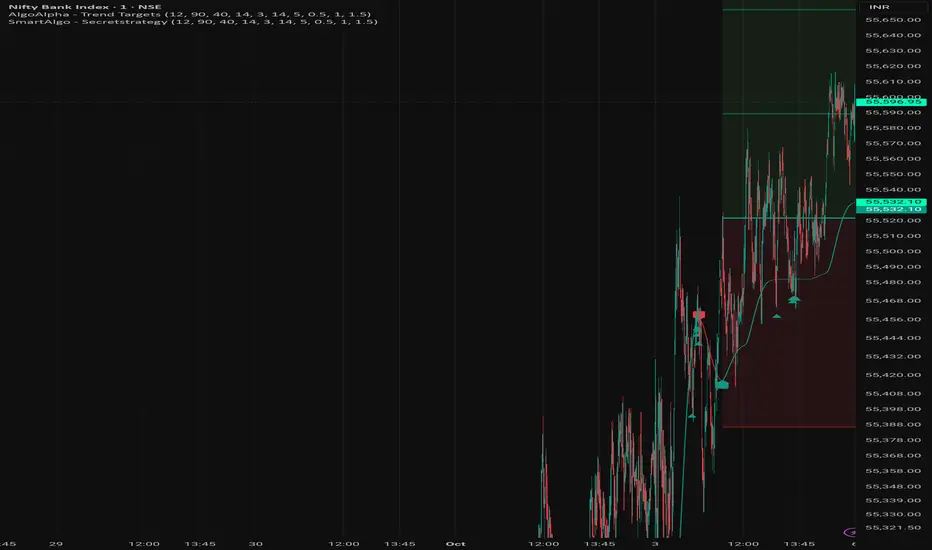
Secret strategy[Smartalgo]We are revealing our secret trading strategy through Tradingview indicator
FEATURES
Trend Detection: Automatically identifies trend direction using a smoothed Supertrend (WMA + EMA), with shape markers on trend shifts and color-coded bars for clarity.
snapshot
Rejection Signals: Detects price rejections at the trend line after a user-defined number of consolidation bars; plots ▲/▼ icons to highlight strong continuation setups.
snapshot
Target Projection: On trend confirmation, plots entry, stop-loss (ATR-based), and three dynamic take-profit levels based on customizable
snapshot
multiples.
Dynamic Updates: All levels (entry, SL, TP1–TP3) auto-adjust based on volatility and are labeled in real time on the chart.
Customization: Users can tweak trend parameters, rejection confirmation count, SL/TP ratios, smoothing lengths, and appearance settings.
Alerts: Built-in alerts for trend changes, rejection events, and when TP1, TP2, or TP3 are reached.
Chart Overlay: Plots directly on price chart with minimal clutter and clearly labeled levels for easy trading.
Syed Shams - PSX Dashboard v2.0A compact dashboard that summarizes trend/strength context for Pakistan stocks and indices. It normalizes signals from widely-used tools into a single table so you can triage symbols quickly—no alerts, no buy/sell calls.
What’s inside (columns):
------------------------------
- Scrip / Price / Δ%: Symbol, last price, and percent change vs the previous bar close on the active timeframe (e.g., on 1D it’s vs prior daily close).
- LMH / LML / LWH / LWL: Last Month/Week High & Low. Optional setting to use closed prior M/W bars.
- EMAs 5/9/21/44/100/200: Six mini-squares. Green = price ≥ that EMA, Red = below.
- RS5 / RS21 (vs KSE100): Arrows show out/under-performance over two user-set return windows.
- RSI: Text = RSI value with slope arrow; Blue fill when RSI > its EMA (bullish bias), Red fill when below.
- OBV: Blue/Red fill for OBV vs its EMA; slope arrow uses the global Slope Lookback.
- MACD (M A C D): 4 tiny histogram bars colored by quadrant/acceleration for quick trend read.
- ADX / DMI: ADX value (color-coded: >50 red, 25–50 green, 20–25 orange, <20 red) + slope arrow. +DI / −DI arrows with neutral/green/red fill when +DI dominates/equals/−DI dominates.
- ST 5,1 / ST 8,2: Green/Red dots for SuperTrend state.
- Ichimoku: Cell fill for price vs cloud (above/inside/below). “Laser” dash appears on fresh HH/LL checks.
- BB Zone: Uses BB(20,1/2/3).
• price ≥ U2 → “BB3” (Dark Blue text, Light Blue fill)
• U1 < price < U2 → “BB2” (Dark Blue / Light Blue)
• L1 ≤ price ≤ U1 → “BB1” (Dark Green / Light Green)
• L2 < price < L1 → “BB2” (Dark Red / Light Red)
• price ≤ L2 → “BB3” (Dark Red / Light Red)
Also shows BB3 upper-band slope using the global lookback: “+” widening, “−” contracting, “=” flat.
- Grade (A/B/C/D): Optional composite score; rows sort by score when enabled.
Grade scoring:
------------------
Price ≥ each EMA +1 (max +6) · RS5>idx +2, RS21>idx +1 · OBV>EMA +2, OBV-EMA↑ +1 · RSI>50 +2, RSI>EMA +1, RSI slope↑ +2 / ↓ −2 · MACD hist: ≥0&rising +2, ≥0&falling +1, <0&falling −2, <0&rising −1 · +DI>−DI +1, +DI slope↑ +1 · ADX: >50 −2, 25–50 +2, 20–25 +1, ADX slope↑ +1 · ST(5,1) +1, ST(8,2) +1 · Ichimoku: above cloud +1, below −1, HH “laser” +2 / LL −2 · BB zone: inside BB1 +1; above BB1 +2; BB3 widening +2; shrinking −2; flat 0.
Controls & workflow:
-------------------------
- Universe selector (incl. sector lists and Custom Watchlist).
- Show KSE index rows (off by default).
- Slope Lookback (arrows): one control for RSI/ADX/DMI/OBV/BB3 slope checks.
- Closed bars for LM/LW H/L (off by default).
- Dark Mode (off by default): optimized table contrast for black charts.
- Show Grades toggle.
How to use:
---------------
1) Pick your universe and timeframe.
2) Adjust Slope Lookback (default 1) if you want a stricter/looser slope test.
3) Sort by Grade (on) to find leaders/laggards, then open charts for entries/exits using your own process.
Notes:
--------
- Timeframe-aware: all calculations—including Δ% and RS windows—use the active chart TF.
- Educational research tool. Not investment advice. No alerts.

BTC Pro – Modular v6 (Final Version with Clean Labels)A complete Bitcoin charting toolkit built for clarity and decision-making.
✅ EMA levels (21, 50, 200, 800)
✅ Daily EMA 50 (constant across timeframes)
✅ SuperTrend for directional bias
✅ Liquidity zones based on ±2×ATR around SMA50
✅ On-Balance Volume (manual calculation)
✅ ADX trend strength with threshold labeling
✅ RSI divergence detection (bullish/bearish)
✅ Market structure: HH/LL breaks
✅ Entry zones with auto-generated SL/TP boxes
✅ Clean right-side labels (stacked)
✅ Modular toggles for full control via settings
Created by WhyPhy – modular, readable, and ready for live use.

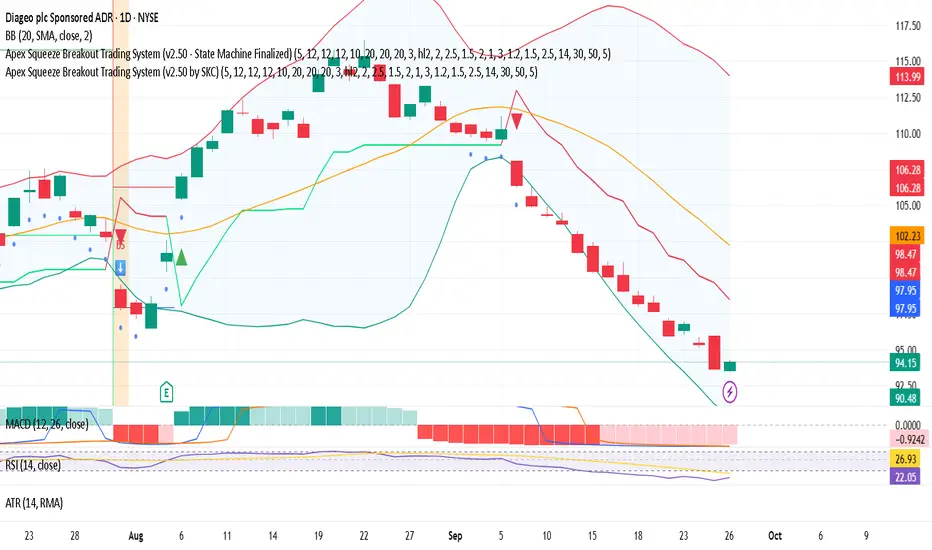
Apex Squeeze Breakout Trading System (by SKC)Apex Squeeze Breakout Trading System (by SKC)
This system is designed to detect high-probability squeeze breakout opportunities using a hybrid scoring model of momentum, volume, volatility, and trend confirmation. It includes:
SuperTrend-based trend shifts
Breakout detection using Bollinger/Keltner channel compression
Volume spike filters
RSI-based recovery signals
Dynamic ATR-based SL and TP levels (T1 & T2)
Trade state management with label journaling
Configurable for Day Trading or Swing setups
Visuals: Buy/Sell markers, Entry/SL/TP levels, Squeeze dots, PS/SS markers
Perfect for traders seeking clear, structured entries with defined risk and multiple profit targets.
Developed & finalized by SKC.
Let me know if you want a more technical, shorter, or fun version.
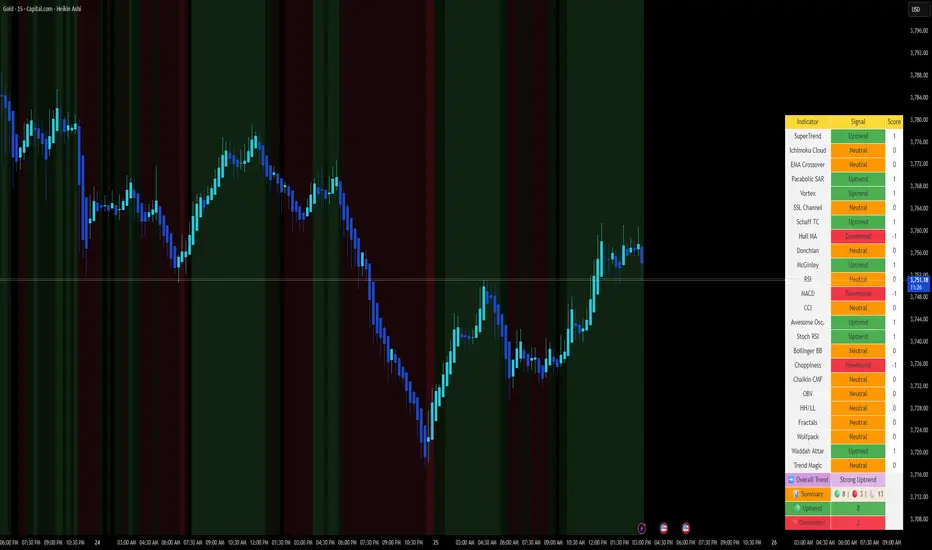
📈 Aidous-Comprehensive Trend Signal Matrix📈 Aidous-Comprehensive Trend Signal Matrix
A powerful, multi-dimensional trend analysis tool that aggregates signals from 24+ technical indicators across 6 key categories:
Pure Trend Indicators (SuperTrend, Ichimoku, EMA Crossover, Parabolic SAR, etc.)
Momentum Oscillators (RSI, MACD, CCI, Stochastic RSI, Awesome Oscillator)
Volatility-Based Tools (Bollinger Bands, Choppiness Index)
Volume & Flow Indicators (Chaikin Money Flow, OBV)
Price Action Filters (Higher Highs/Lower Lows, Fractals)
Custom & Proprietary Logic (Wolfpack ID, Waddah Attar Explosion, Trend Magic)
This indicator doesn’t just show one signal—it synthesizes 24 independent trend signals into a unified matrix, giving you a holistic view of market direction. The Overall Trend is dynamically classified as:
Strong Uptrend (≥ +5 net bullish signals)
Uptrend (+1 to +4)
Neutral (balanced or conflicting signals)
Downtrend (–1 to –4)
Strong Downtrend (≤ –5 net bearish signals)
📊 Interactive Table Display
Choose between Full Table (detailed per-indicator breakdown) or Compact Summary mode. Customize position and size to fit your chart layout.
🎨 Visual Feedback
Background color changes based on overall trend strength
Color-coded signal cells (green = bullish, red = bearish, orange = neutral)
Real-time signal counts for quick sentiment assessment
💡 How to Use:
Use the Overall Trend for high-level market bias
Drill into the table to identify which indicators are driving the signal
Combine with your own strategy for confluence-based entries/exits
⚠️ Disclaimer:
This script is provided "as is" without warranty of any kind. Past performance is not indicative of future results. Always conduct your own analysis and risk management.
Staolin Trade maxx V1This script is a custom TradingView indicator named "Staolin Trade maxx V1". It overlays on price charts and includes features for visualizing support and resistance zones, trendlines, EMA-based trend fills, higher high/lower low labels, range boxes, Supertrend buy/sell signals, risk management lines with SL/TP levels, and customizable moving averages. Inputs allow toggling elements like trendlines, EMA trends, labels, ranges, and levels, as well as adjusting lengths, colors, sensitivities, signal strengths, and risk-reward ratios. Zones appear as gradient-filled bands (red for upper, green for lower), trendlines as extending lines (teal up, red down), EMA fills as translucent ribbons (green up, red down), labels as triangles (green HH, red LL), ranges as colored boxes (blue unbroken, green/red broken), signals as labels (green buy, red sell), SL/TP as extending lines with emoji-labeled tags (blue entry, red SL, green TPs), and MAs as lines (blue 5, red 13, green 20).

Ameebha D Equities Buy IndicatorShows Buy Decision and key metrics (RS, EMA, Supertrend, Close Price)

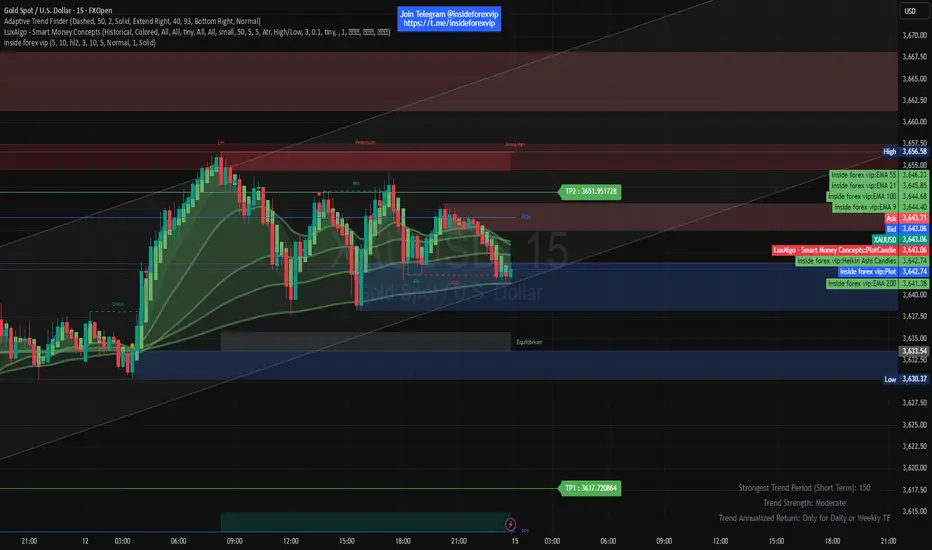
inside forex vip📌 SuperTrend
Based on:
ATR Period (default 10).
Multiplier ATR (default 3).
Calculates the trend direction (upward/downward).
Generates buy/sell signals:
Buy: Positive crossover with EMA color matching (bullish).
Sell: Negative crossover with EMA color matching (bearish).
[DEM] Other Asset Predicting Indicator Other Asset Predicting Indicator is a cross-asset signal generator that uses technical signals from one market to predict price movements in the current chart's asset, based on the correlation between the two instruments. The indicator allows users to select from a comprehensive list of assets including major indices, sector ETFs, cryptocurrencies, forex pairs, country ETFs, and commodities, then applies one of four technical signal methods (Supertrend, Parabolic SAR, EMA Cross, or MACD Crossover) to generate buy and sell signals from the selected reference asset. A key feature is the built-in correlation analysis that calculates a rolling correlation coefficient between the current asset and the reference asset, displayed in a color-coded table where green indicates positive correlation (above 0.5) and red shows negative correlation (below 0.5). The indicator includes an option to invert signals for negatively correlated assets, making it particularly useful for identifying intermarket relationships and leveraging leading indicators from related markets to anticipate price movements in the current instrument.
Multi-Strategy Trading Screener SummaryI only combined famous scripts, all thanks to wonderful scripts and community out there .
ThankYou !
------
Core Architecture
Multi-Symbol Analysis: Tracks up to 5 configurable tickers simultaneously
Multi-Timeframe Support: Each symbol can use different timeframes
Real-Time Dashboard: Color-coded table displaying all signals and analysis
Trend Validation: All signals include trend alignment confirmation
Integrated Trading Strategies
1. Breaker Blocks (Order Blocks)
Detects institutional order blocks using swing analysis
Tracks when blocks are broken and become "breaker blocks"
Monitors retests of broken levels
Shows trend alignment (✓ aligned, ⚠️ misaligned)
2. Chandelier Exit
ATR-based trend-following exit system
Provides BUY/SELL signals based on dynamic stop levels
Uses configurable ATR multiplier and lookback period
3. Smart Money Breakout
Channel breakout detection with volatility normalization
Identifies accumulation/distribution phases
Generates persistent BUY/SELL signals on breakouts
4. Trendline Breakout
Dynamic trendline detection using pivot highs/lows
Calculates trendline slopes and breakout points
Provides BUY signals on upward breaks, SELL on downward breaks
Dashboard Columns Explained
Symbol: Ticker being analyzed
Trend: Overall SuperTrend direction (🟢 UP / 🔴 DOWN / ⚪ FLAT)
Timeframe: Analysis timeframe with clock icon
Breaker Block: Type (Bullish/Bearish) with trend alignment indicator
Status: Price position relative to breaker block (Inside/Approaching/Far)
Retests: Number of times the broken level was retested (indicates level strength)
Volume: Volume associated with the order block formation
Chandelier: BUY/SELL signals from Chandelier Exit strategy
Smart Money: BUY/SELL signals from breakout detection
Trendline: BUY/SELL signals from trendline breakouts
Key Features
No HOLD States: All signals show definitive BUY (🟢) or SELL (🔴) only
Persistent Signals: Signals remain active until opposite conditions trigger
Color Coding: Visual distinction between bullish (green) and bearish (red) signals
Trend Alignment: Enhanced accuracy through trend confirmation logic
This screener provides a comprehensive view of market conditions across multiple strategies, helping identify high-probability trading opportunities when signals align.

APO Channel // SuperTrend Optimized📌 Complete Long Description (Final Version)
APO Channel – Adaptive Breakout Detection
🔹 How it works
The originality of this script lies in the combination of two complementary approaches:
An adaptive channel, whose responsiveness is based on fractal dimension and volatility.
A breakout & candle confirmation system, providing clear visual trade signals.
Unlike standard channels (e.g., Bollinger Bands), which use a fixed deviation or multiplier, the APO Channel dynamically adjusts its baseline (Filt) and bands (Filt1, Filt2) in real time. This ensures that signals are not only adaptive to market conditions but also reinforced when both indicators align simultaneously, filtering out false moves and highlighting stronger trade opportunities.
🔹 Why this combination matters
By merging an adaptive volatility channel with a breakout confirmation system, the script provides traders with a more reliable view of momentum shifts.
The channel identifies when markets are consolidating versus expanding.
The breakout signals confirm actual momentum surges.
When both conditions trigger together, the likelihood of a meaningful move increases, making signals clearer and more robust than using either tool alone.
🔹 Visual signals
The script offers optional candle coloring and breakout labels:
Bullish signals are shown when price breaks above the adaptive upper band.
Bearish signals appear when price breaks below the adaptive lower band.
For clearer visualization, traders can activate the blue, green, and gray candles by clicking on the channel bands.
👉 This makes simultaneous signals and the prevailing trend much more visible, helping traders quickly spot alignment between the adaptive channel and breakout confirmation.
🔹 Optimized Default Settings
Channel Length: 26
Bands Distance: 1
ATR Period: 1
Source: (High + Low)/2
ATR Multiplier: 2
These parameters have been optimized for balanced responsiveness across assets.
👉 Signals are particularly relevant for scalping entries on the 3-minute timeframe, where quick detection of breakouts provides a trading edge.
The indicator works seamlessly on futures, crypto, forex, stocks, and most other instruments, making it a versatile tool for traders across markets.
🔹 How to use
Use breakouts above the channel as a potential entry signal for bullish momentum trades.
Use breakouts below the channel as a potential entry signal for bearish momentum trades.
When both the breakout signal and candle confirmation occur simultaneously, consider it a stronger trading signal.
Activate candle coloring on the channel bands to make signals and trend more visible.
Combine with other tools (volume, higher timeframe bias) for additional confirmation.
✅ Why this script adds value
Most breakout tools rely on static measures (fixed standard deviation, moving average envelopes, etc.). The APO Channel introduces an adaptive filter based on fractal dimension analysis, while also reinforcing signals through dual confirmation (channel breakouts + candle regime).
This makes it a versatile tool for traders seeking adaptive, visually clear, and reliable breakout detection across multiple markets and timeframes.
