PROTECTED SOURCE SCRIPT
Session Indicator by FlipPoint
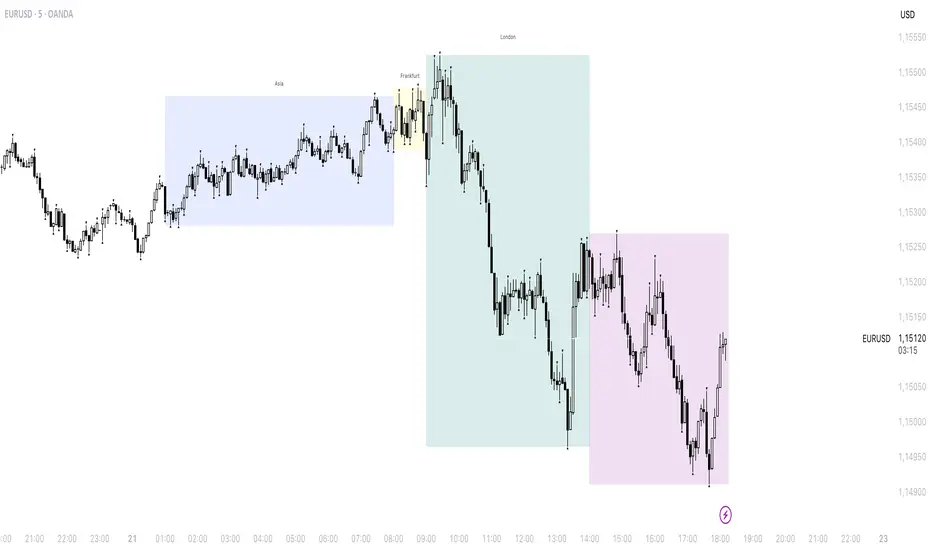
The indicator is designed to display trading sessions on a TradingView chart. It highlights the time ranges of major sessions such as Frankfurt, London, New York, and Asia, providing the ability to analyze price behavior during different periods of the trading day.
Functional settings
1. Show history
Enables or disables the display of sessions on historical parts of the chart. If disabled, only today's sessions are shown.
2. Show Frankfurt / London / New York / Asia
Each parameter is responsible for displaying the corresponding trading session. When enabled, a highlighted zone appears on the chart, representing the time boundaries of that session.
3. Show titles
Displays text labels with the name of each session.
4. Color settings
Determines the fill color of the highlighted zones for the respective sessions.
5. Label text color
Defines the color of the session title labels.
6. PDH / PDL parameters
Show PDH — displays the previous day’s high (Previous Day High).
Show PDL — displays the previous day’s low (Previous Day Low).
PDH/PDL lines color — sets the color of the lines representing these levels.
Time zone alignment
The indicator is automatically aligned with the time zone set in the TradingView chart settings. The time boundaries of the sessions adjust to the selected time zone without requiring manual adjustments. This ensures accurate session display regardless of the user’s local time.
Functional settings
1. Show history
Enables or disables the display of sessions on historical parts of the chart. If disabled, only today's sessions are shown.
2. Show Frankfurt / London / New York / Asia
Each parameter is responsible for displaying the corresponding trading session. When enabled, a highlighted zone appears on the chart, representing the time boundaries of that session.
3. Show titles
Displays text labels with the name of each session.
4. Color settings
Determines the fill color of the highlighted zones for the respective sessions.
5. Label text color
Defines the color of the session title labels.
6. PDH / PDL parameters
Show PDH — displays the previous day’s high (Previous Day High).
Show PDL — displays the previous day’s low (Previous Day Low).
PDH/PDL lines color — sets the color of the lines representing these levels.
Time zone alignment
The indicator is automatically aligned with the time zone set in the TradingView chart settings. The time boundaries of the sessions adjust to the selected time zone without requiring manual adjustments. This ensures accurate session display regardless of the user’s local time.
受保護腳本
此腳本以閉源形式發佈。 不過,您可以自由使用,沒有任何限制 — 點擊此處了解更多。

免責聲明
這些資訊和出版物並非旨在提供,也不構成TradingView提供或認可的任何形式的財務、投資、交易或其他類型的建議或推薦。請閱讀使用條款以了解更多資訊。
免責聲明
這些資訊和出版物並非旨在提供,也不構成TradingView提供或認可的任何形式的財務、投資、交易或其他類型的建議或推薦。請閱讀使用條款以了解更多資訊。