INVITE-ONLY SCRIPT
CSI Indicator
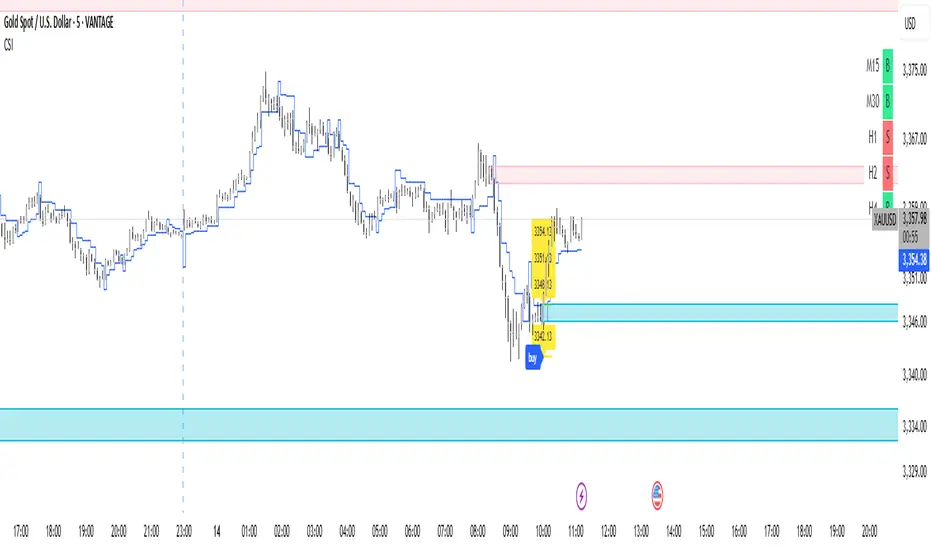
This script provides a visual trend dashboard that may assist scalpers and day traders in identifying potential setups by aligning multiple timeframes.
✅ Trend Dashboard
Located at the top-right corner of the chart, the dashboard includes two key components:
1. CMP (Current Market Price) :
Shows the primary trend signal and current directional bias.
2. VCS (Verified Confirmation Signal) :
Confirms the trend's strength and alignment across higher timeframes.
✅ Basic Entry Rules For :
1. Scalper Trader
* CMP timeframe: M15
* VCS timeframe: M30
* Only enter when CMP = VCS
* If not aligned: Follow display on M15
2. Day Trader
* CMP timeframe: H1
* VCS timeframe: H2
* Only enter when CMP = VCS
* If not aligned: Follow display on H1
✅ Risk Management & Stop Loss (SL)
* Use the blue line as a dynamic SL.
* Consider not placing SL too close, as the line adapts dynamically to price action.
✅ Customize Chart With Optional Tools
* Tiered Take Profit Level
* Custom Stop Loss Level
* Display Order Block Zone
✅ Trend Dashboard
Located at the top-right corner of the chart, the dashboard includes two key components:
1. CMP (Current Market Price) :
Shows the primary trend signal and current directional bias.
2. VCS (Verified Confirmation Signal) :
Confirms the trend's strength and alignment across higher timeframes.
✅ Basic Entry Rules For :
1. Scalper Trader
* CMP timeframe: M15
* VCS timeframe: M30
* Only enter when CMP = VCS
* If not aligned: Follow display on M15
2. Day Trader
* CMP timeframe: H1
* VCS timeframe: H2
* Only enter when CMP = VCS
* If not aligned: Follow display on H1
✅ Risk Management & Stop Loss (SL)
* Use the blue line as a dynamic SL.
* Consider not placing SL too close, as the line adapts dynamically to price action.
✅ Customize Chart With Optional Tools
* Tiered Take Profit Level
* Custom Stop Loss Level
* Display Order Block Zone
僅限邀請腳本
僅作者批准的使用者才能訪問此腳本。您需要申請並獲得使用許可,通常需在付款後才能取得。更多詳情,請依照作者以下的指示操作,或直接聯絡nusantaraacademy。
TradingView不建議在未完全信任作者並了解其運作方式的情況下購買或使用腳本。您也可以在我們的社群腳本中找到免費的開源替代方案。
作者的說明
Got a question? Reach out to us at:
media.nusantaraacademy@gmail.com

免責聲明
這些資訊和出版物並非旨在提供,也不構成TradingView提供或認可的任何形式的財務、投資、交易或其他類型的建議或推薦。請閱讀使用條款以了解更多資訊。
僅限邀請腳本
僅作者批准的使用者才能訪問此腳本。您需要申請並獲得使用許可,通常需在付款後才能取得。更多詳情,請依照作者以下的指示操作,或直接聯絡nusantaraacademy。
TradingView不建議在未完全信任作者並了解其運作方式的情況下購買或使用腳本。您也可以在我們的社群腳本中找到免費的開源替代方案。
作者的說明
Got a question? Reach out to us at:
media.nusantaraacademy@gmail.com
免責聲明
這些資訊和出版物並非旨在提供,也不構成TradingView提供或認可的任何形式的財務、投資、交易或其他類型的建議或推薦。請閱讀使用條款以了解更多資訊。