OPEN-SOURCE SCRIPT
已更新 Current Candle
### Overview
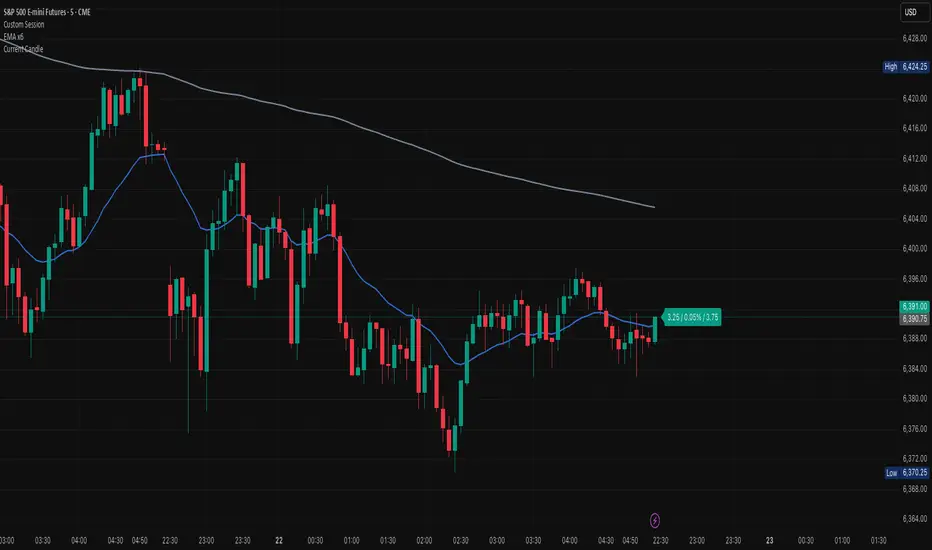
The **Current Candle** indicator displays live information about the active bar. It shows the price change, percentage change, and candle range (high–low), conveniently placed to the right of the current candle.
### Features
• Shows absolute price change from the previous close
• Shows percentage change (%)
• Shows candle range (high–low)
• Customizable bull and bear colors (default TradingView candle colors: green = rgb(8,153,129), red = rgb(242,54,44))
• Toggle on/off Value, Percentage, and Range individually
• Always updates on the latest candle only, keeping charts clean
### How to Use
1. Add the indicator to your chart.
2. Adjust the “Right offset (bars)” to position the label.
3. Enable or disable Value, Percentage, or Range via checkboxes.
4. Customize bull/bear colors to match your chart theme if desired.
### Notes
• Label is plotted only on the latest candle (`barstate.islast`) to avoid clutter.
• Colors cannot be automatically synced to your TradingView chart theme — use the color inputs to match them manually.
• This script is designed for clarity and quick reference without altering your chart’s candles.
---
*Stay focused on the current candle — see change, percentage, and range at a glance.*
The **Current Candle** indicator displays live information about the active bar. It shows the price change, percentage change, and candle range (high–low), conveniently placed to the right of the current candle.
### Features
• Shows absolute price change from the previous close
• Shows percentage change (%)
• Shows candle range (high–low)
• Customizable bull and bear colors (default TradingView candle colors: green = rgb(8,153,129), red = rgb(242,54,44))
• Toggle on/off Value, Percentage, and Range individually
• Always updates on the latest candle only, keeping charts clean
### How to Use
1. Add the indicator to your chart.
2. Adjust the “Right offset (bars)” to position the label.
3. Enable or disable Value, Percentage, or Range via checkboxes.
4. Customize bull/bear colors to match your chart theme if desired.
### Notes
• Label is plotted only on the latest candle (`barstate.islast`) to avoid clutter.
• Colors cannot be automatically synced to your TradingView chart theme — use the color inputs to match them manually.
• This script is designed for clarity and quick reference without altering your chart’s candles.
---
*Stay focused on the current candle — see change, percentage, and range at a glance.*
發行說明
### OverviewThe **Current Candle** indicator displays live information about the active bar. It shows the price change, percentage change, and candle range (high–low), conveniently placed to the right of the current candle.
### Features
• Shows absolute price change from the previous close
• Shows percentage change (%)
• Shows candle range (high–low)
• Customizable bull and bear colors (default TradingView candle colors: green = rgb(8,153,129), red = rgb(242,54,44))
• Toggle on/off Value, Percentage, and Range individually
• Always updates on the latest candle only, keeping charts clean
### How to Use
1. Add the indicator to your chart.
2. Adjust the “Right offset (bars)” to position the label.
3. Enable or disable Value, Percentage, or Range via checkboxes.
4. Customize bull/bear colors to match your chart theme if desired.
### Notes
• Label is plotted only on the latest candle (`barstate.islast`) to avoid clutter.
• Colors cannot be automatically synced to your TradingView chart theme — use the color inputs to match them manually.
• This script is designed for clarity and quick reference without altering your chart’s candles.
---
*Stay focused on the current candle — see change, percentage, and range at a glance.*
發行說明
### OverviewThe **Current Candle** indicator displays live information about the active bar. It shows the price change, percentage change, and candle range (high–low), conveniently placed to the right of the current candle.
### Features
• Shows absolute price change from the previous close
• Shows percentage change (%)
• Shows candle range (high–low)
• Customizable bull and bear colors (default TradingView candle colors: green = rgb(8,153,129), red = rgb(242,54,44))
• Toggle on/off Value, Percentage, and Range individually
• Always updates on the latest candle only, keeping charts clean
### How to Use
1. Add the indicator to your chart.
2. Adjust the “Right offset (bars)” to position the label.
3. Enable or disable Value, Percentage, or Range via checkboxes.
4. Customize bull/bear colors to match your chart theme if desired.
### Notes
• Label is plotted only on the latest candle (`barstate.islast`) to avoid clutter.
• Colors cannot be automatically synced to your TradingView chart theme — use the color inputs to match them manually.
• This script is designed for clarity and quick reference without altering your chart’s candles.
---
*Stay focused on the current candle — see change, percentage, and range at a glance.*
發行說明
### OverviewThe **Current Candle** indicator displays live information about the active bar. It shows the price change, percentage change, and candle range (high–low), conveniently placed to the right of the current candle.
### Features
• Shows absolute price change from the previous close
• Shows percentage change (%)
• Shows candle range (high–low)
• Customizable bull and bear colors (default TradingView candle colors: green = rgb(8,153,129), red = rgb(242,54,44))
• Toggle on/off Value, Percentage, and Range individually
• Always updates on the latest candle only, keeping charts clean
### How to Use
1. Add the indicator to your chart.
2. Adjust the “Right offset (bars)” to position the label.
3. Enable or disable Value, Percentage, or Range via checkboxes.
4. Customize bull/bear colors to match your chart theme if desired.
### Notes
• Label is plotted only on the latest candle (`barstate.islast`) to avoid clutter.
• Colors cannot be automatically synced to your TradingView chart theme — use the color inputs to match them manually.
• This script is designed for clarity and quick reference without altering your chart’s candles.
---
*Stay focused on the current candle — see change, percentage, and range at a glance.*
開源腳本
秉持TradingView一貫精神,這個腳本的創作者將其設為開源,以便交易者檢視並驗證其功能。向作者致敬!您可以免費使用此腳本,但請注意,重新發佈代碼需遵守我們的社群規範。

免責聲明
這些資訊和出版物並非旨在提供,也不構成TradingView提供或認可的任何形式的財務、投資、交易或其他類型的建議或推薦。請閱讀使用條款以了解更多資訊。
開源腳本
秉持TradingView一貫精神,這個腳本的創作者將其設為開源,以便交易者檢視並驗證其功能。向作者致敬!您可以免費使用此腳本,但請注意,重新發佈代碼需遵守我們的社群規範。
免責聲明
這些資訊和出版物並非旨在提供,也不構成TradingView提供或認可的任何形式的財務、投資、交易或其他類型的建議或推薦。請閱讀使用條款以了解更多資訊。