OPEN-SOURCE SCRIPT
Session highlighter [Digit23]
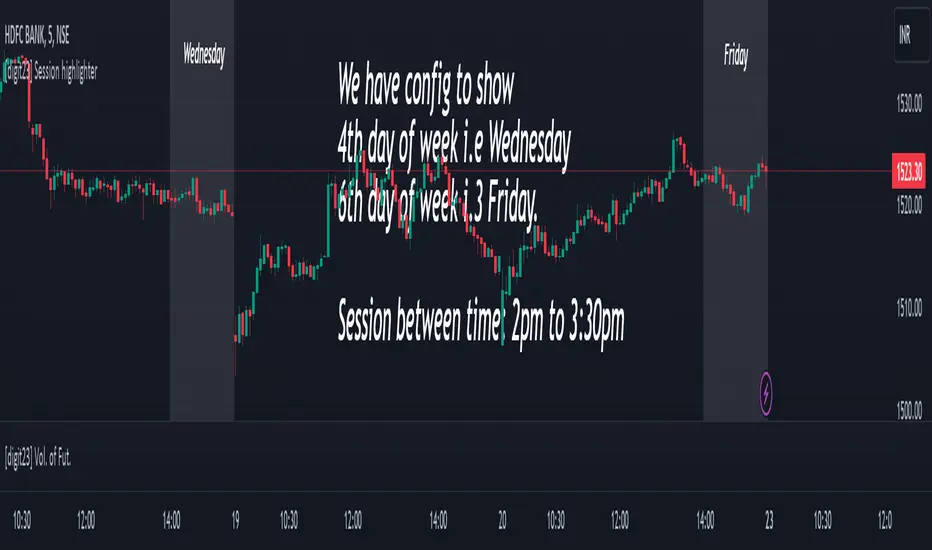
This Pine Script indicator, crafted by Digit23, serves as a session highlighter to enrich your TradingView trading experience. It offers a visual representation of a specified trading session, aiding traders in identifying and concentrating on pivotal time intervals.
Key Features:
User-Defined Session: Tailor the trading session by setting specific start and end times, allowing traders to align the indicator with their preferred timeframes.
Day of Week Filter: Optionally, refine the highlighted session by selecting a specific day of the week, providing flexibility to accommodate diverse trading strategies.
Visual Clarity: The indicator employs a customizable background color during the defined trading session, ensuring quick recognition and differentiation of the highlighted timeframe.
How to Use:
Session Configuration: Adjust the start and end times to define your preferred trading session.
Day of Week Filter (Optional): Fine-tune the indicator by specifying a particular day of the week to apply the session highlight.
Visual Enhancement: The indicator visually highlights the specified trading session, offering a clear and intuitive representation on your TradingView chart.

Compatibility:
This indicator seamlessly integrates with all markets and timeframes available on TradingView, providing versatility for traders across different instruments.
Note:
Use this indicator alongside other technical analysis tools for a comprehensive trading strategy.
This indicator is shared for educational and informational purposes only. Trading involves risk, and it's crucial to conduct thorough research and analysis before making trading decisions.
Disclaimer: This script is provided for educational and informational purposes only. Trading involves risk, and it is essential to conduct thorough research and analysis before making trading decisions.
Key Features:
User-Defined Session: Tailor the trading session by setting specific start and end times, allowing traders to align the indicator with their preferred timeframes.
Day of Week Filter: Optionally, refine the highlighted session by selecting a specific day of the week, providing flexibility to accommodate diverse trading strategies.
Visual Clarity: The indicator employs a customizable background color during the defined trading session, ensuring quick recognition and differentiation of the highlighted timeframe.
How to Use:
Session Configuration: Adjust the start and end times to define your preferred trading session.
Day of Week Filter (Optional): Fine-tune the indicator by specifying a particular day of the week to apply the session highlight.
Visual Enhancement: The indicator visually highlights the specified trading session, offering a clear and intuitive representation on your TradingView chart.
Compatibility:
This indicator seamlessly integrates with all markets and timeframes available on TradingView, providing versatility for traders across different instruments.
Note:
Use this indicator alongside other technical analysis tools for a comprehensive trading strategy.
This indicator is shared for educational and informational purposes only. Trading involves risk, and it's crucial to conduct thorough research and analysis before making trading decisions.
Disclaimer: This script is provided for educational and informational purposes only. Trading involves risk, and it is essential to conduct thorough research and analysis before making trading decisions.
開源腳本
秉持TradingView一貫精神,這個腳本的創作者將其設為開源,以便交易者檢視並驗證其功能。向作者致敬!您可以免費使用此腳本,但請注意,重新發佈代碼需遵守我們的社群規範。

免責聲明
這些資訊和出版物並非旨在提供,也不構成TradingView提供或認可的任何形式的財務、投資、交易或其他類型的建議或推薦。請閱讀使用條款以了解更多資訊。
免責聲明
這些資訊和出版物並非旨在提供,也不構成TradingView提供或認可的任何形式的財務、投資、交易或其他類型的建議或推薦。請閱讀使用條款以了解更多資訊。