OPEN-SOURCE SCRIPT
已更新 Sector/Industry
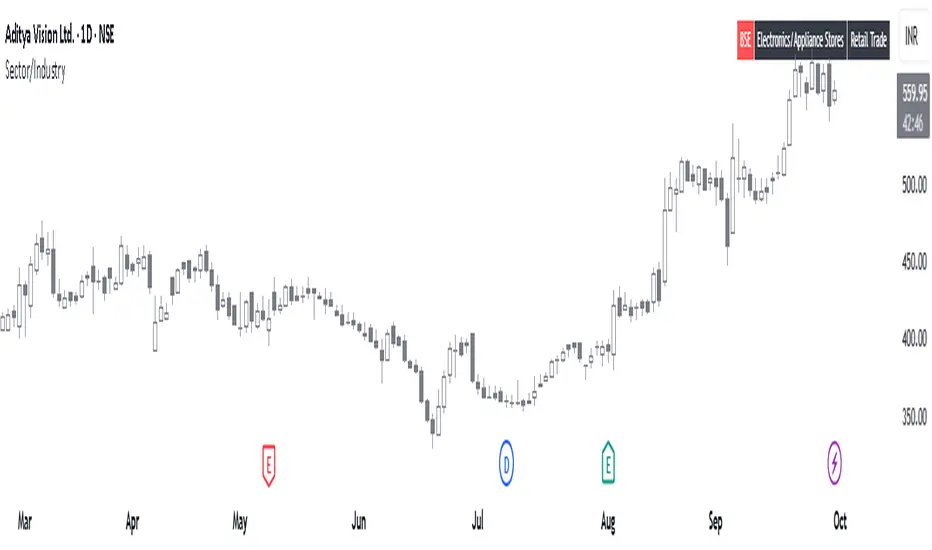
This is a simple script that displays a symbol's sector and industry in a table at bottom right area of the chart.
發行說明
Added options to customize table on the chart as per preference.The position of table on the chart can be changed.
The background color and text color can be changed.
The text size can be changed.
The layout of the table can be changed now to Vertical or Horizontal.
發行說明
📊 Sector/Industry Info with BSE Listing CheckThis Pine Script displays the sector and industry of a stock directly on the chart, along with a smart check to identify old BSE-listed stocks newly available on NSE, which are often misidentified as IPOs.
🔍 Key Features:
Sector & Industry Panel: Shows classification for quick reference.
BSE Listing Detection: Flags stocks that were previously BSE-only and are now trading on NSE — helping avoid false IPO assumptions.
Customizable Table: Choose layout, position, text size, and colors.
Perfect for traders analyzing newly listed stocks and wanting accurate context.
開源腳本
秉持TradingView一貫精神,這個腳本的創作者將其設為開源,以便交易者檢視並驗證其功能。向作者致敬!您可以免費使用此腳本,但請注意,重新發佈代碼需遵守我們的社群規範。

免責聲明
這些資訊和出版物並非旨在提供,也不構成TradingView提供或認可的任何形式的財務、投資、交易或其他類型的建議或推薦。請閱讀使用條款以了解更多資訊。
開源腳本
秉持TradingView一貫精神,這個腳本的創作者將其設為開源,以便交易者檢視並驗證其功能。向作者致敬!您可以免費使用此腳本,但請注意,重新發佈代碼需遵守我們的社群規範。
免責聲明
這些資訊和出版物並非旨在提供,也不構成TradingView提供或認可的任何形式的財務、投資、交易或其他類型的建議或推薦。請閱讀使用條款以了解更多資訊。