BK AK-Crosswind Falcon🦅👑 BK AK–Crosswind Falcon (Falcon) 👑🦅
All glory to Gd — the true source of wisdom, restraint, and right timing.
AK is honor — my mentor’s standard: clarity, patience, no shortcuts, no gambling.
Falcon is a DMI/ADX “Zenith” engine built to do one thing clean: separate real wind from fake wind.
🧠 What It Is
Falcon is a non-overlay oscillator that converts classic +DI / -DI / ADX into a single signed momentum line called Zenith.
You get:
Instant Bias (no neutral): flips exactly when +DI crosses -DI
Regime Detection: TREND vs RANGE using an ADX threshold
Zenith Signal Crosses: EMA cross logic for controlled triggers
Bands / Extremes: dynamic (stdev) or static bands for stretch/exhaustion context
Execution Gates (optional): VWAP position + swing-break confirmation
MTF Bias (optional): higher-timeframe sign filter
Tiny HUD: a compact table with regime, bias, ADX, Zenith, velocity/accel, exhaustion + master score
Alerts: long/short triggers + regime switch
⚙️ The Zenith Core (How the line is built)
Falcon uses classic DMI:
diff = +DI − -DI
ADX = trend strength (smoothed)
Zenith has 3 formula options:
DI Spread × ADX (default)
→ directional DI spread “weighted” by trend strength
ADX Signed
→ ADX with direction sign from DI dominance
DX Signed
→ signed DX for a more “raw” directional read
Signal line: EMA of Zenith (Zenith Signal EMA).
🎯 What Prints Signals (Permission Logic)
Falcon only triggers when trend is ON and direction is aligned:
Long requires:
TREND regime (ADX ≥ threshold)
Bull bias (DI dominance: diff ≥ 0)
Zenith crosses above Signal
Optional gates pass (VWAP / swing break)
Optional HTF filter agrees (Zenith ≥ 0 on HTF)
Short requires:
TREND regime (ADX ≥ threshold)
Bear bias (diff < 0)
Zenith crosses below Signal
Optional gates pass (VWAP / swing break)
Optional HTF filter agrees (Zenith < 0 on HTF)
Key point: Color/bias flips are instant (DI dominance). Signals require trend + cross + gates.
🧱 Regime + Background (Trend vs Range)
Trend threshold (ADX) controls when Falcon considers the environment tradable.
Optional background shading:
Trend + Bull = green tint
Trend + Bear = red tint
Range = gray tint
Optional flash on regime/bias switches so you notice transitions immediately.
📏 Bands / Extremes (Context, Not Hype)
Choose:
Dynamic bands = stdev(Zenith) over lookback × multiplier
Static bands = fixed ± level
Use bands to read stretch / exhaustion risk:
Above upper band = overbought stretch (optional dot)
Below lower band = oversold stretch (optional dot)
This is not an auto-reversal call. It’s the “don’t get greedy / manage risk” layer.
🧰 Execution Gates (Optional Filters)
Falcon can require extra proof before firing:
VWAP Gate
“Above=Long” or inverse rule
Helps enforce “with the tape” positioning
Swing-Break Gate
Requires breaking prior N-bar high for long / N-bar low for short
Simple structure confirmation so crosses don’t trigger inside dead chop
MTF Bias (Higher-Timeframe Alignment)
Optional HTF Zenith sign filter
Keeps you from counter-signaling into a higher court trend
🖥 Tiny HUD (What the dashboard means)
The HUD summarizes:
REG (TREND/RANGE)
BIAS (BULL/BEAR)
ADX (strength)
ZEN (current Zenith)
VEL (Zenith velocity)
ACC (Zenith acceleration)
EXH (exhaustion flag based on extremes + reversal impulse)
M (master score: strength + momentum + accel + alignment − exhaustion penalty)
It’s designed to be one glance → one decision.
✅ Suggested Use (Clean workflow)
Start with Regime: only press when TREND is on (ADX threshold).
Respect Bias: DI dominance is the “instant truth.”
Wait for Cross: Zenith vs Signal cross is your trigger layer.
Turn on Gates if you want fewer trades: VWAP + swing break + HTF.
Use Bands for management: stretch = protect, not chase.
🔔 Alerts Included
ZEN-DMI Long (trend on + bull + cross up + gates)
ZEN-DMI Short (trend on + bear + cross down + gates)
Regime switch (Trend/Ranging change)
👑 King Solomon Lens — Proverbs: Hidden Wind, Refined Signal, Just Weight
Proverbs says the glory is in concealing a matter, and the king’s glory is searching it out. Falcon is built for that: finding the hidden wind inside the noise.
Proverbs also says remove the dross and you get a vessel — that’s your regime + filters stripping chop so only tradeable force remains.
And it’s ruthless about honest weights: Zenith is a measured weight of direction × strength, not vibes.
ZENITH: search what’s hidden, refine what’s noisy, weigh what’s real — then execute with authority.
🙏 Respect + Seal
Respect to AK — discipline, patience, clean execution.
All glory to Gd — the source of wisdom and endurance.
🦅👑 BK AK–Crosswind Falcon — read the wind, earn the move. 👑🦅
動向指標(DMI)

ZScore Blowout Screener 20 symbols custom timeIt calculates the Z-score (how many standard deviations price is from its mean) for 20 user-configurable symbols (default: major ETFs like TLT, GLD, SLV, USO, etc. + TSLA) on a single chosen timeframe (default 15-min).
On the last bar it builds and displays a sortable table overlay on the chart showing:
Rank by absolute Z-score (highest deviation first)
Symbol
Signed Z-score (or absolute if toggled)
Absolute Z-score column
Rows with |Z| ≥ user-defined "blowout" threshold (default ≥2.0) are highlighted in red/lime with brighter text. Optional mode blanks non-blowout Z-values while keeping rows visible.
The table position, text size, and number of displayed rows are customizable. It's designed as a quick visual scanner for extreme short-term deviations across diversified assets.

PSP NURI Line Break Buy/Sell Signals 1HTFPSP NURI Line Break Buy/Sell Signals – 1HTF (Nifty)
**PSP NURI Line Break Buy/Sell Signals** is a **high-accuracy trend reversal & continuation indicator**, specially designed for **NIFTY Index and NIFTY Options** traders who want **safe, positional intraday moves** on the **1-Hour Time Frame (1HTF)**.
**** USE 'LINE BREAK' Candlestick pattern instead of Normal Candlestick pattern for BEST Results
This indicator focuses on **clean directional shifts** and avoids noise, making it suitable for traders who prefer **quality over quantity**.
## ✅ How to Use (Simple & Practical)
1. **Apply the indicator on NIFTY (Index or Spot chart)**
2. **Set Time Frame to 1 Hour (1HTF only)**
⚠️ Best performance is strictly on 1HTF
3. **BUY Signal**
* When a **green BUY arrow / label** appears
* Enter BUY (CE / Futures / Cash)
4. **SELL Signal**
* When a **red SELL arrow / label** appears
* Enter SELL (PE / Short / Exit Buy)
5. **Hold the trade**
* Till opposite signal appears
* Or trail using recent swing high/low
🔔 **Alerts are supported** – ideal for non-screen traders.
## 🕯️ Best Candlestick Environment
This indicator works best when the market forms:
* **Strong Body Candles**
* **Breakout Candles**
* **Continuation Candles**
* **Trend Expansion Candles**
Avoid using during:
* Very low volatility
* Extremely sideways / narrow range markets
## 🎯 Expected Target (Very Conservative)
* **Safely captures: 100 to 250 points per signal**
* Designed for **high-probability positional intraday moves**
* Works exceptionally well during **trend days**
👉 Ideal for **1–2 quality trades per week**, not over-trading.
## 📊 Accuracy & Reliability
* **Accuracy: 95%+** when used:
* On **NIFTY**
* On **1HTF only**
* With proper discipline
* Filters most fake signals automatically
* Best suited for **professional & serious traders**
## ⏰ Best Market Conditions
✔ Trending Markets
✔ Post-breakout sessions
✔ Strong directional days
✔ News or momentum-driven moves
❌ Avoid during extremely choppy sessions
## 🔒 Important Notes
* Not a scalping indicator
* Not meant for low time frames
* Works best with **patience and positional mindset**
### ⚡ Summary
**Instrument:** NIFTY (Best)
**Time Frame:** 1 Hour (Strict)
**Style:** Positional Intraday
**Target Range:** 100–250 Points
**Accuracy:** Very High
**Signals:** Clean, Non-Repainting

Hull DMI - MattesHull DMI - Mattes
A Directional Movement Index enhanced with Hull Moving Average smoothing for refined trend detection.
This indicator reimagines the classic Directional Movement Index (DMI) by incorporating Hull Moving Average (HMA) smoothing on high and low prices. It calculates the +DI and -DI components based on changes in these hulled values, then derives the ADX for trend strength. The core plot displays the difference between +DI and -DI, colored to indicate bullish (blue) or bearish (purple) dominance when ADX is rising. Additionally, it overlays colored candles on the price chart to visually represent the prevailing trend direction.
Key Features:
Hull-Smoothed Inputs: Applies HMA to highs and lows before computing directional changes, reducing noise and lag compared to standard DMI.
Customizable Lengths: Adjustable periods for HMA, DI, and ADX smoothing to suit various timeframes and assets.
Trend Visualization: Plots DI difference with dynamic coloring and overlays trend-colored candles for at-a-glance analysis.
Alert Conditions: Built-in alerts for long (bullish) and short (bearish) signals when conditions shift.
How It Differs from Standard DMI/ADX:
Unlike the traditional DMI, which uses raw price changes and true range, this version employs Hull Moving Averages on highs and lows for smoother, more responsive directional calculations. This minimizes whipsaws in choppy markets while preserving sensitivity to genuine trends. The ADX is integrated to filter signals, ensuring color changes and alerts only occur during strengthening trends, setting it apart from basic oscillator-based indicators. Why It's Useful:
Enhanced Trend Identification: The HMA smoothing provides clearer signals in volatile environments, helping traders spot emerging trends earlier.
Visual Clarity: Colored DI plot and candle overlays make it easy to interpret market bias without cluttering the chart.
Versatility: Suitable for stocks, forex, crypto, and more; excels in trend-following strategies or as a filter for other systems.
Risk Management Aid: By focusing on ADX-confirmed moves, it reduces false signals, potentially improving win rates in systematic trading.
This Hull DMI variant offers several practical advantages that can directly improve trading decisions and performance:
Reduced Lag with Smoother Signals: By applying Hull Moving Average smoothing to highs and lows, the indicator responds faster to genuine trend changes than the standard DMI while filtering out much of the noise that causes false signals in ranging or choppy markets. Traders get earlier entries into trending moves without excessive whipsaws.
Built-in Trend Strength Filter: The optional ADX confirmation (enabled by default) ensures bullish signals and blue coloring only activate when trend strength is increasing (ADX rising). This helps traders avoid entering long positions during weakening or sideways trends, focusing capital on higher-probability setups.
Clear Visual Bias at a Glance: The single oscillator line (+DI – -DI) centered on zero, combined with dynamic blue/purple coloring and full candle overlay on the price chart, instantly shows the dominant trend direction. No need to interpret multiple lines—traders can quickly assess market bias across multiple charts or timeframes.
Versatile Across Markets and Styles: Works effectively on stocks, forex, futures, and cryptocurrencies. Trend-following traders can use it standalone for entries/exits, swing traders can use it for bias confirmation, and scalpers/day traders benefit on lower timeframes due to the reduced lag.
Improved Risk Management: By prioritizing ADX-confirmed directional moves, the indicator naturally filters low-conviction setups. This can lead to higher win rates and better risk-reward ratios when used systematically, especially when combined with proper stop-loss placement below/above recent swings.
Easy Integration: Built-in alert conditions and simple long/short logic make it straightforward to incorporate into automated strategies, watchlists, or as a confirming filter alongside other indicators (e.g., moving averages, RSI, volume profile).
Customizable Sensitivity: Separate inputs for Hull length, DI period, and ADX smoothing allow traders to optimize the indicator for specific assets, volatility regimes, or personal trading horizons—making it adaptable rather than one-size-fits-all.
Signals & Interpretation
The oscillator plots the difference between +DI and -DI (positive = bullish dominance, negative = bearish).
Bullish Signal (Long): +DI crosses above -DI, and (if ADX confirmation enabled) ADX is rising — triggers blue coloring, candle overlay, and long alert.
Bearish Signal (Short): -DI crosses above +DI — triggers purple coloring, candle overlay, and short alert.
Zero line acts as neutrality; crossings indicate potential trend shifts.
Best used in trending markets; ADX rising filter helps avoid whipsaws.
// Example Usage in Strategy
strategy("Hull DMI Strategy Example", overlay=true)
if L
strategy.entry("Long", strategy.long)
if S
strategy.entry("Short", strategy.short)
Great Inventions Require great care
Disclaimer: This indicator is provided for educational and informational purposes only and should not be considered as financial advice. Past performance is not indicative of future results. Always backtest thoroughly on your specific assets and timeframes, and consult a qualified financial advisor before making trading decisions. The author assumes no responsibility for any losses incurred from its use.


Relative Strength Index_YJ//@version=5
indicator(title="MACD_YJ", shorttitle="MACD_YJ",format=format.price, precision=2)
source = close
useCurrentRes = input.bool(true, title="Use Current Chart Resolution?")
resCustom = input.timeframe("60", title="Use Different Timeframe? Uncheck Box Above")
smd = input.bool(true, title="Show MacD & Signal Line? Also Turn Off Dots Below")
sd = input.bool(false, title="Show Dots When MacD Crosses Signal Line?")
sh = input.bool(true, title="Show Histogram?")
macd_colorChange = input.bool(true, title="Change MacD Line Color-Signal Line Cross?")
hist_colorChange = input.bool(true, title="MacD Histogram 4 Colors?")
// === Divergence inputs ===
grpDiv = "Divergence"
calculateDivergence = input.bool(true, title="Calculate Divergence", group=grpDiv, tooltip="피벗 기반 정/역배 다이버전스 탐지 및 알람 사용")
lookbackRight = input.int(5, "Lookback Right", group=grpDiv, minval=1)
lookbackLeft = input.int(5, "Lookback Left", group=grpDiv, minval=1)
rangeUpper = input.int(60, "Bars Range Upper", group=grpDiv, minval=1)
rangeLower = input.int(5, "Bars Range Lower", group=grpDiv, minval=1)
bullColor = input.color(color.new(#4CAF50, 0), "Bull Color", group=grpDiv)
bearColor = input.color(color.new(#F23645, 0), "Bear Color", group=grpDiv)
textColor = color.white
noneColor = color.new(color.white, 100)
res = useCurrentRes ? timeframe.period : resCustom
fastLength = input.int(12, minval=1)
slowLength = input.int(26, minval=1)
signalLength= input.int(9, minval=1)
fastMA = ta.ema(source, fastLength)
slowMA = ta.ema(source, slowLength)
macd = fastMA - slowMA
signal = ta.sma(macd, signalLength)
hist = macd - signal
outMacD = request.security(syminfo.tickerid, res, macd)
outSignal = request.security(syminfo.tickerid, res, signal)
outHist = request.security(syminfo.tickerid, res, hist)
// 가격도 같은 res로
hi_res = request.security(syminfo.tickerid, res, high)
lo_res = request.security(syminfo.tickerid, res, low)
// ── Histogram 색
histA_IsUp = outHist > outHist and outHist > 0
histA_IsDown = outHist < outHist and outHist > 0
histB_IsDown = outHist < outHist and outHist <= 0
histB_IsUp = outHist > outHist and outHist <= 0
macd_IsAbove = outMacD >= outSignal
plot_color = hist_colorChange ? (histA_IsUp ? color.new(#00FF00, 0) :
histA_IsDown ? color.new(#006900, 0) :
histB_IsDown ? color.new(#FF0000, 0) :
histB_IsUp ? color.new(#670000, 0) : color.yellow) : color.gray
macd_color = macd_colorChange ? color.new(#00ffff, 0) : color.new(#00ffff, 0)
signal_color = color.rgb(240, 232, 166)
circleYPosition = outSignal
// 골든/데드 크로스 (경고 해결: 먼저 계산)
isBullCross = ta.crossover(outMacD, outSignal)
isBearCross = ta.crossunder(outMacD, outSignal)
cross_color = isBullCross ? color.new(#00FF00, 0) : isBearCross ? color.new(#FF0000, 0) : na
// ── 플롯
plot(sh and outHist ? outHist : na, title="Histogram", color=plot_color, style=plot.style_histogram, linewidth=5)
plot(smd and outMacD ? outMacD : na, title="MACD", color=macd_color, linewidth=1)
plot(smd and outSignal? outSignal: na, title="Signal Line", color=signal_color, style=plot.style_line, linewidth=1)
plot(sd and (isBullCross or isBearCross) ? circleYPosition : na,
title="Cross", style=plot.style_circles, linewidth=3, color=cross_color)
hline(0, "0 Line", linestyle=hline.style_dotted, color=color.white)
// =====================
// Divergence (정배/역배) - 피벗 비교
// =====================
_inRange(cond) =>
bars = ta.barssince(cond)
rangeLower <= bars and bars <= rangeUpper
plFound = false
phFound = false
bullCond = false
bearCond = false
macdLBR = outMacD
if calculateDivergence
// 정배: 가격 LL, MACD HL
plFound := not na(ta.pivotlow(outMacD, lookbackLeft, lookbackRight))
macdHL = macdLBR > ta.valuewhen(plFound, macdLBR, 1) and _inRange(plFound )
lowLBR = lo_res
priceLL = lowLBR < ta.valuewhen(plFound, lowLBR, 1)
bullCond := priceLL and macdHL and plFound
// 역배: 가격 HH, MACD LH
phFound := not na(ta.pivothigh(outMacD, lookbackLeft, lookbackRight))
macdLH = macdLBR < ta.valuewhen(phFound, macdLBR, 1) and _inRange(phFound )
highLBR = hi_res
priceHH = highLBR > ta.valuewhen(phFound, highLBR, 1)
bearCond := priceHH and macdLH and phFound
// 시각화 (editable 파라미터 삭제)
plot(plFound ? macdLBR : na, offset=-lookbackRight, title="Regular Bullish (MACD)",
linewidth=2, color=(bullCond ? bullColor : noneColor), display=display.pane)
plotshape(bullCond ? macdLBR : na, offset=-lookbackRight, title="Bullish Label",
text=" Bull ", style=shape.labelup, location=location.absolute, color=bullColor, textcolor=textColor, display=display.pane)
plot(phFound ? macdLBR : na, offset=-lookbackRight, title="Regular Bearish (MACD)",
linewidth=2, color=(bearCond ? bearColor : noneColor), display=display.pane)
plotshape(bearCond ? macdLBR : na, offset=-lookbackRight, title="Bearish Label",
text=" Bear ", style=shape.labeldown, location=location.absolute, color=bearColor, textcolor=textColor, display=display.pane)
// 알람
alertcondition(bullCond, title="MACD Regular Bullish Divergence",
message="MACD 정배 다이버전스 발견: 현재 봉에서 lookbackRight 만큼 좌측.")
alertcondition(bearCond, title="MACD Regular Bearish Divergence",
message="MACD 역배 다이버전스 발견: 현재 봉에서 lookbackRight 만큼 좌측.")

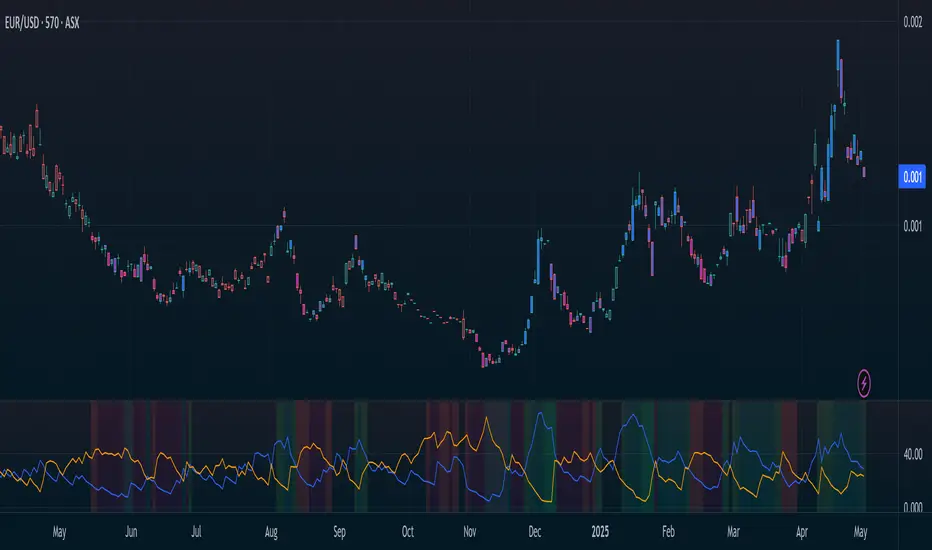
Directional Movement Index (SHADED)Shaded red in between DMI lines when DMI- > DMI+
Shaded blue in between DMI lines when DMI+ > DMI-

Rahul Prakash's BUY/SELL signal for momentum tradeBuy or Sell signal with just on one confirmation candle.
Show a Buy singal then wait for the confirmation candle, is a strong Buy signal.
Show a Sell singal then wait for the confirmation candle, is a strong Sell signal.
You can use as a free version and earn money. Please are taking lots of price for this type of indicator.

Multi-Filter & RSI Overheat Analyzer (Invite Only)🚀 Multi-Filter & RSI Overheat Analyzer (Invite Only)
The Trend-RSI Pro is an advanced, multi-layered analysis tool designed for invite-only subscribers. Its primary function is to provide an instant, high-conviction visual filter of current market conditions by combining three essential technical analyses: EMA trend direction, ADX trend strength, and RSI overbought/oversold momentum.
💡 Key Features and Analysis Logic
This indicator simplifies complex market structure analysis by using a dynamic Background Color filter. The color instantly tells the user the dominant market state, eliminating the need to manually check multiple windows.
The background turns Teal when the Exponential Moving Averages (EMA) are in a strong Bullish Alignment (Short > Medium > Long) and the ADX value exceeds the user-defined Strength Threshold (default 25.0), confirming a Strong Uptrend. Conversely, the background turns Red when the EMAs are in a strong Bearish Alignment (Short < Medium < Long) and the ADX confirms a Strong Downtrend. Any other combination of EMA alignment or a weak ADX reading results in a Gray background, which alerts the user to a Ranging, Weak, or Transitional Market where caution is advised.
To complement the trend analysis, the indicator features RSI Overheat Alert Icons to preemptively analyze potential trend exhaustion. When the Relative Strength Index (RSI) enters the Overbought zone (default >= 70.0), a Red Triangle Down appears above the price bar, warning of potential selling pressure. Conversely, when the RSI enters the Oversold zone (default <= 30.0), a Green Triangle Up appears below the price bar, suggesting potential buying interest.
For users who wish to confirm the underlying components, the indicator also plots the three EMA Lines (Short, Medium, Long) directly on the chart, and the raw ADX Value is plotted in a separate pane, allowing for detailed tracking of strength changes over time. All key parameters, including EMA periods, ADX thresholds, and RSI limits, are fully customizable in the settings.
⚠️ Disclaimer and Usage Guideline
This tool is strictly an analytical aid and not a trading signal or financial advice. Users should utilize the Background Color as their primary context filter, only seeking trades aligned with the indicated strong trend color. The RSI alerts serve as timely warnings for potential short-term reversals within a larger trend. Trading carries substantial risk, and this indicator must always be combined with the user's independent analysis and robust risk management strategies.

ADX with 20 ThresholdI wanted an ADX with a threshold line so I created an indicator.
ADX (20 Threshold) Cheat-Sheet
Purpose: Filter trades by trend strength.
Indicator: ADX (derived from DMI) with optional +DI/−DI lines.
Key Rules:
ADX > 20: Trend is strong → trade OK
ADX < 20: Trend is weak/choppy → avoid trades
Optional +DI / −DI: Shows momentum direction
HTF Use: Stable trend confirmation
LTF Use: Optional filter with EMA slope for entries
Tips:
Combine with EMAs or MACD for directional bias.
ADX does not indicate direction, only strength.
Best used to avoid low-probability trades in sideways markets.

Directional Movement Index - HistogramModified standard DMI to have histogram instead of standard lines

TCP DMITCP DMI - Advanced Technical Indicator
This advanced DMI (Directional Movement Index) indicator enhances the traditional DMI by adding intelligent dynamic support and resistance levels based on historical price action analysis.
KEY FEATURES:
1. Standard DMI Components:
- DI+ (Directional Indicator Positive): Measures upward price movement
- DI- (Directional Indicator Negative): Measures downward price movement
- ADX (Average Directional Index): Measures trend strength
- Middle line at 20 for reference
2. Dynamic Support & Resistance Levels:
The indicator automatically identifies the most significant support and resistance levels by analyzing the last 400 candles (customizable) and detecting where DI lines have been rejected most frequently.
TWO TIERS OF LEVELS:
A) Normal Levels (Solid Lines):
- Support: Below 15
- Resistance: Above 25
- Style: Solid lines with 60% transparency
- These represent moderate support/resistance zones
B) Strong Levels (Dashed Lines):
- Strong Support: Below 10
- Strong Resistance: Above 30
- Style: Dashed lines with 40% transparency (more visible)
- These represent critical support/resistance zones
3. Intelligent Display Logic:
- When DI is ABOVE 20: Shows resistance levels (where price might face selling pressure)
- When DI is BELOW 20: Shows support levels (where price might find buying support)
- Each DI line (+ and -) has its own color-coded support/resistance levels for easy identification
4. Color Coding:
- DI+ levels use GREEN (customizable)
- DI- levels use RED/ORANGE (customizable)
- Support/Resistance lines match their respective DI colors but with reduced opacity
- This makes it instantly clear which DI the support/resistance belongs to
5. Rejection Detection Algorithm:
The indicator scans historical data to find peaks and troughs at specific levels, counting how many times price was rejected at each level. The level with the most rejections becomes the displayed support or resistance.
CUSTOMIZABLE PARAMETERS:
- ADX Smoothing: Default 14
- DI Length: Default 14
- Lookback Period: 400 candles (range: 50-500)
- Line Length: 15 candles forward + 15 candles back = 30 candle span
- DI+ Color: Customizable (default green)
- DI- Color: Customizable (default red)
- ADX Color: Customizable (default blue)
- Normal S/R Transparency: Default 60%
- Strong S/R Transparency: Default 40%
HOW TO USE:
1. Trend Identification:
- When DI+ crosses above DI-: Potential uptrend
- When DI- crosses above DI+: Potential downtrend
- ADX above 25: Strong trend
- ADX below 20: Weak trend or ranging market
2. Support/Resistance Trading:
- Watch for price reaction when DI approaches displayed support/resistance levels
- Solid lines = moderate levels
- Dashed lines = strong levels (more significant)
- The more rejections at a level, the more significant it becomes
3. Entry/Exit Signals:
- Entry: When DI bounces off support (below 20) or resistance (above 20)
- Exit: When DI breaks through major support/resistance levels
- Strong levels (dashed) are more reliable for major decisions
ADVANTAGES:
✓ Reduces chart clutter by only showing relevant levels based on current DI position
✓ Automatically adapts to changing market conditions
✓ Color-coded for instant visual recognition
✓ Two-tier system helps prioritize trading decisions
✓ Historical rejection analysis provides data-backed levels
✓ Fully customizable to match any trading style
BEST USED FOR:
- Swing trading
- Trend following
- Support/resistance trading strategies
- Identifying potential reversal zones
- Confirming breakout validity
- Risk management (stop-loss placement)
This indicator combines the power of traditional DMI with smart support/resistance detection, giving traders a comprehensive tool for technical analysis without overwhelming the chart with excessive information.

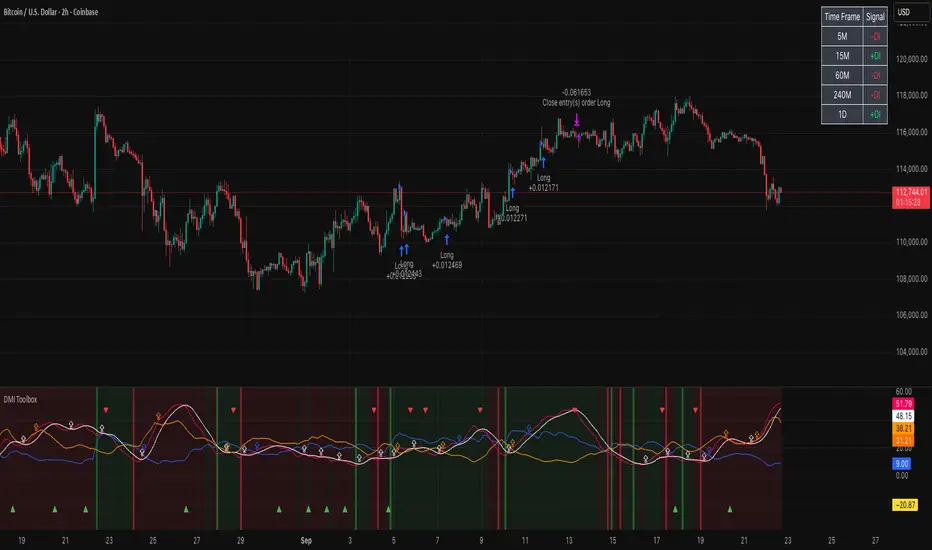
DMI Toolbox StrategyThe Directional Movement Index (DMI) was originally developed by J. Welles Wilder Jr. in 1978. Wilder introduced the DMI along with the Average Directional Index (ADX) in his book, “New Concepts in Technical Trading Systems,” which became a foundational reference for technical analysis.
The indicator can offer a myriad of signals for building a trading strategy. In an effort to provide the user with a meaningful way to evaluate these signals, this DMI Toolbox Strategy offers the chance to back-test various combinations and permutations of DMI signals on long trades. By default it will open a long position on the +DI (upward movement) crossing above the -DI (downward movement). By default, It exits long positions when the ADX (trend strength) reverses.
Suggested Use
Try a wide variety of long entry and exit signals across many different timeframes to see what is most effective for the item you wish to trade. There is a table in the upper right corner that will give a quick view of which signal is dominant across 5 timeframes, based on your current settings. Adjust the pyramidding, slippage, and commission values to more closely match your situation.
Visual Helpers
The DMI indicator has been altered to include a smoothed version of the ADX, as well as a colored background to show which signal is dominant (+DI or -DI). Small up arrows call your attention to ADX crossovers that may indicate a significant threshold in trend strength.
DMI Histogram IndicatorThe Directional Movement Index (DMI) was originally developed by J. Welles Wilder Jr. in 1978. Wilder introduced the DMI along with the Average Directional Index (ADX) in his book, “New Concepts in Technical Trading Systems,” which became a foundational reference for technical analysis.
The indicator can be a bit intimidating for people to interpret if they aren't familiar with it. So this DMI Histogram uses the underlying DMI data to present a different way to visualize the price movement and trend. The goal is to help provide insight into the rising or falling momentum behind the price, at times when the chart itself may not be as obvious. This could potentially help spot a momentum divergence before it plays out on the chart.
The user has the option of displaying ADX reversals as red and green arrows. The ADX is the trend indicator portion of the DMI. When it changes direction, that sometimes leads to shift in who is exerting the most influence on the price, buyers or sellers.
The user also has the option of coloring the candlesticks to match the histogram.
This indicator is meant to be combined with other indicators and other chart analysis tools.

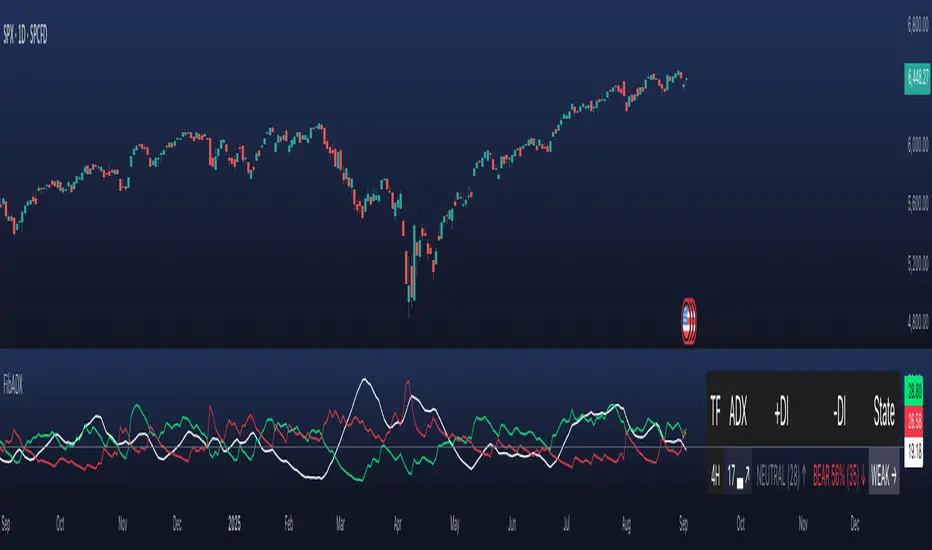
FibADX MTF Dashboard — DMI/ADX with Fibonacci DominanceFibADX MTF Dashboard — DMI/ADX with Fibonacci Dominance (φ)
This indicator fuses classic DMI/ADX with the Fibonacci Golden Ratio to score directional dominance and trend tradability across multiple timeframes in one clean panel.
What’s unique
• Fibonacci dominance tiers:
• BULL / BEAR → one side slightly stronger
• STRONG when one DI ≥ 1.618× the other (φ)
• EXTREME when one DI ≥ 2.618× (φ²)
• Rounded dominance % in the +DI/−DI columns (e.g., STRONG BULL 72%).
• ADX column modes: show the value (with strength bar ▂▃▅… and slope ↗/↘) or a tier (Weak / Tradable / Strong / Extreme).
• Configurable intraday row (30m/1H/2H/4H) + D/W/M toggles.
• Threshold line: color & width; Extended (infinite both ways) or Not extended (historical plot).
• Theme presets (Dark / Light / High Contrast) or full custom colors.
• Optional panel shading when all selected TFs are strong (and optionally directionally aligned).
How to use
1. Choose an intraday TF (30/60/120/240). Enable D/W/M as needed.
2. Use ADX ≥ threshold (e.g., 21 / 34 / 55) to find tradable trends.
3. Read the +DI/−DI labels to confirm bias (BULL/BEAR) and conviction (STRONG/EXTREME).
4. Prefer multi-TF alignment (e.g., 4H & D & W all strong bull).
5. Treat EXTREME as a momentum regime—trail tighter and scale out into spikes.
Alerts
• All selected TFs: Strong BULL alignment
• All selected TFs: Strong BEAR alignment
Notes
• Smoothing selectable: RMA (Wilder) / EMA / SMA.
• Percentages are whole numbers (72%, not 72.18%).
• Shorttitle is FibADX to comply with TV’s 10-char limit.
Why We Use Fibonacci in FibADX
Traditional DMI/ADX indicators rely on fixed numeric thresholds (e.g., ADX > 20 = “tradable”), but they ignore the relationship between +DI and −DI, which is what really determines trend conviction.
FibADX improves on this by introducing the Fibonacci Golden Ratio (φ ≈ 1.618) to measure directional dominance and classify trend strength more intelligently.
⸻
1. Fibonacci as a Natural Strength Threshold
The golden ratio φ appears everywhere in nature, growth cycles, and fractals.
Since financial markets also behave fractally, Fibonacci levels reflect natural crowd behavior and trend acceleration points.
In FibADX:
• When one DI is slightly larger than the other → BULL or BEAR (mild advantage).
• When one DI is at least 1.618× the other → STRONG BULL or STRONG BEAR (trend conviction).
• When one DI is 2.618× or more → EXTREME BULL or EXTREME BEAR (high momentum regime).
This approach adds structure and consistency to trend classification.
⸻
2. Why 1.618 and 2.618 Instead of Random Numbers
Other traders might pick thresholds like 1.5 or 2.0, but φ has special mathematical properties:
• φ is the most irrational ratio, meaning proportions based on φ retain structure even when scaled.
• Using φ makes FibADX naturally adaptive to all timeframes and asset classes — stocks, crypto, forex, commodities.
⸻
3 . Trading Advantages
Using the Fibonacci Golden Ratio inside DMI/ADX has several benefits:
• Better trend filtering → Avoid false DI crossovers without conviction.
• Catch early momentum shifts → Spot when dominance ratios approach φ before ADX reacts.
• Consistency across markets → Because φ is scalable and fractal, it works everywhere.
⸻
4. How FibADX Uses This
FibADX combines:
• +DI vs −DI ratio → Measures directional dominance.
• φ thresholds (1.618, 2.618) → Classifies strength into BULL, STRONG, EXTREME.
• ADX threshold → Confirms whether the move is tradable or just noise.
• Multi-timeframe dashboard → Aligns bias across 4H, D, W, M.
⸻
Quick Blurb for TradingView
FibADX uses the Fibonacci Golden Ratio (φ ≈ 1.618) to classify trend strength.
Unlike classic DMI/ADX, FibADX measures how much one side dominates:
• φ (1.618) = STRONG trend conviction
• φ² (2.618) = EXTREME momentum regime
This creates an adaptive, fractal-aware framework that works across stocks, crypto, forex, and commodities.
⚠️ Disclaimer : This script is provided for educational purposes only.
It does not constitute financial advice.
Use at your own risk. Always do your own research before making trading decisions.
Created by @nomadhedge
MomentumThe strategy uses EMA200, ADX/DMI, RSI, and volume. Pivot levels and Heikin-Ashi ensure safe entries, while cooldowns and opposite-locks prevent overtrading. Exits are managed with ATR trailing stops and trend-reversal signals.

DMI-LuminateIndicator Description: DMI-Luminate (DMI-LMT)
DMI-Luminate is an enhanced version of the Directional Movement Index (DMI) indicator that combines multiple moving averages for smoothing and offers various options to customize the calculation of ADX, +DM, -DM, DX, and ADXR. It is ideal for traders looking to analyze trend strength and equilibrium points between buyers and sellers.
Components and Features
+DM and -DM: Indicators measuring positive and negative directional movement, helping identify trend direction.
DX (Directional Movement Index): Measures the relative difference between +DM and -DM, indicating the current trend strength.
ADX (Average Directional Index): A smoothed line showing trend strength regardless of direction. Values above 25 generally indicate a strong trend.
ADXR (Average Directional Movement Rating): A moving average of ADX that detects trend strength changes with less sensitivity.
Equilibrium Points: Visual markers (blue circles) that appear when +DM and -DM cross, signaling potential reversals or changes in trend strength.
Customizable Settings
DM Length: The period used to calculate directional movements.
ADX Smoothing: The smoothing period for ADX.
MA Type Universal: Select the moving average type used for smoothing calculations. Options include SMA, EMA, WMA, ALMA, T3, and advanced averages like DNA⚡ and RNA🐢.
T3 Hot Factor: Parameter to adjust the intensity of the T3 moving average (when selected).
Show Lines: Toggle the display of ADX, ADXR, DX, and +DM/-DM lines as you prefer.
Show Equilibrium Points: Enable to visualize crossing points between +DM and -DM.
Background Color and Offset: Customize the background color and offset for better visibility.
How to Use
Trend Identification
Watch the ADX line to gauge trend strength. When ADX is above 25, the trend is considered strong. The +DM and -DM lines indicate if the trend is bullish (+DM > -DM) or bearish (-DM > +DM).
Entry/Exit Signals
Use the equilibrium points (blue circles) to identify potential reversals or changes in trend dynamics based on +DM and -DM crossings.
Moving Average Selection
Experiment with different moving averages to smooth the data and tailor the indicator to your trading style and asset. Faster averages like EMA react better in volatile markets, while SMMA and ALMA suit more stable conditions.
Using ADXR
ADXR offers a smoother view of trend strength to avoid false signals during sideways markets.
Visual Customization
Adjust colors and background to improve readability, especially across different chart themes.
Recommendations
Combine DMI-Luminate with other indicators (e.g., volume, RSI, chart patterns) to confirm entries and exits.
Adjust DM Length and ADX Smoothing according to the timeframe you trade.
Use different moving average types to find the setup that works best for your asset and strategy.

Directional Movement Index (DMI) + AlertsThis is a Study with associated visual indicators and Bullish/Bearish Alerts for Directional Movement (DMI). It consists of an Average Directional Index (ADX), Plus Directional Indicator (+DI) and Minus Directional Indicator (-DI).
Published by J. Welles Wilder in 1978 for use with currencies and commodities which are typically more volatile than stocks and have stronger trends.
Development Notes
---------------------------
This indicator, and most of the descriptions below, were derived largely from the TradingView reference manual. Feedback and suggestions for improvement are more than welcome, as well are recommended Input settings and best practices for use.
tradingview.com/chart/?solution=43000502250
Strategy Description
---------------------------
ADX defines whether or not there is a trend present; +DI and -DI compliment the ADX by taking direction into account. An ADX above 25 indicates a strong trend, and a Bullish alert is subsequently triggered when +DI is above -DI and a Bearish alert when -DI is above +DI.
Note that the Bullish or Bearish crossover alert will only trigger if ADX is simultaneously above 25 during the crossover event. If ADX later rises to 25 and +DI is still greater than -DI, or -DI greater than +DI, then a delayed alert will not trigger by design.
Basic Use
---------------------------
Acceptable DMI values are up to the trader's interpretation and may change depending on the financial instrument being examined. Recommend not changing any default values without being first familiar with their purpose and impact on the indicator at large.
Confidence in price action and trend is higher when two or more indicators are in agreement -- therefore we recommend not using this indicator by itself to determine entry or exit trade opportunities.
Recommend also choosing 'Once Per Bar Close' when creating alerts.
Inputs
---------------------------
ADX Smoothing - the time period to be used in calculating the ADX which has a smoothing component (14 is the Default).
DI Length - the time period to be used in calculating the DI (14 is the Default).
Key Level - any trade with the ADX above the key level is a strong indicator that it is trending (23 to 25 is the suggested setting).
Sensitivity - an incremental variable to test whether the past n candles are in the same bullish or bearish state before triggering a delayed crossover alert (3 is the Default). Filter out some noise and reduces active alerts.
Show ADX Option - two visual styles are provided for user preference, a visible ADX line or a background overlay (green or red when ADX is above the key level, for bullish or bearish, and gray when below).
Color Candles - an option to transpose the bullish and bearish crossovers to the main candle bars. Can be turned off in the Style Tab by deselecting 'Bar Colors'. Dark blue is bullish, dark purple is bearish, and the black inner color is neutral. Note that the outer red and green border will still be distinguished by whether each individual candle is bearish or bullish during the specified timeframe.
Indicator Visuals
---------------------------
Bullish or Bearish plot based on DMI strategy (ADX and +/-DI values).
Visual cues are intended to improve analysis and decrease interpretation time during trading, as well as to aid in understanding the purpose of this study and how its inclusion can benefit a comprehensive trading strategy.
Trend Strength
---------------------------
To analyze trend strength, the focus should be on the ADX line and not the +DI or -DI lines. An ADX reading above 25 indicates a strong trend, while a reading below 20 indicates a weak or non-existent trend. A reading between those two values would be considered indeterminable. Though what is truly a strong trend or a weak trend depends on the financial instrument being examined; historical analysis can assist in determining appropriate values.
Bullish DI Cross
---------------------------
1. ADX must be over 25 (strong trend) (value is determined by the trader)
2. +DI cross above -DI
3. Set Stop Loss at the current day's low (any +DI cross-backs below -DI should be ignored)
4. Set trailing stop if ADX strengthens (i.e., signal rises)
Bearish DI Cross
---------------------------
1. ADX must be over 25 (strong trend) (value is determined by the trader)
2. -DI cross above +DI
3. Set Stop Loss at the current day's high (any -DI cross-backs below +DI should be ignored)
4. Set trailing stop if ADX strengthens (i.e., signal rises)
Disclaimer
---------------------------
This post and the script are not intended to provide any financial advice. Trade at your own risk.
No known repainting.
Version 1.1
-------------------------
- Added multi-timeframe resolution using PineCoders secure security function to eliminate repainting.
- Cleaned up option for selecting ADX view; and added a colored line as a choice, based on same bullish, bearish, or neutral colors as the background.
- Added exit crossover indicator to aid in an overall strategy development. This ability pairs better with my CHOP Zone Entry Strategy which relies on DMI Exits. Note that exit conditions don't employ the sensitivity variable. Green labels are for Bullish exits and red are for Bearish.
-- Exit condition is triggered if in an active Bullish or Bearish position and ADX drops below 25, Or if either the -DI crosses above +DI (for previously Bullish) or +DI crosses above -DI (for previously Bearish).
- Added reverse position determination. Triggers when a Bullish entry occurs on the same candle as a Bearish exit, or vice versa. Green labels are for Bullish reverses and red are for Bearish.
- Added selectable option to choose visible labels -- Bearish, Bullish, Both, Exits, Reverses, or All.
-- Note that a reverse label will only show if the opposing entry and exit labels are set to show, otherwise the reverse will revert to the appropriate entry or exit on the chart.
- Added alerts to account for new conditions.
-- Note that alerts for crossovers, exits, and reverses will only be triggered if the associated labels are selected to be shown (i.e., what you choose to see on the chart is what you will be alerted to).
Version 1.2
-------------------------
- Changed exit condition to be decided on by whether ADX is below 25 and on a +/-DI crossover. Versus being either or. The previous version had too many false triggers. This variety can now show multiple Bullish or Bearish alerts before an Exit condition too. I'm tempted to simply make this condition based on ADX, and not DI … thoughts? See lines 138 and 139.
- Updated the Background view to have deeper shades of colors dependent upon the ADX trend strength.
- Added an Oscillator view for the ADX and momentum computations to color the histogram by trend. DI lines are hidden.
-- If ADX is Bullish, then the oscillator is colored light green in an uptrend and dark green in a downtrend; if Bearish, then its light red in an uptrend and dark redin a downtrend; if adx is below key level, then it is light gray in a downtrend and dark grey in the uptrend.
- Added option to Hide ADX in case only the Directional lines are desired. This could be useful if you would like to have the ADX oscillator in one panel and +/-DI crossovers in another.
- Added a Columnar view for the ADX. DI lines are hidden. This view is really simple and compact, with the trend strength still easily understood. Colors are the same as for the oscillator -- the deeper the shade of green or red, then the higher the ADX trend strength level.
- Added a Trend Strength label.
ADX Trend Strength Trade (Y/N) Setup Types
0 to 10 = Barely Breathing N N/A
10 to 20 = Weak Trend Y Range/Pre-Breakout
20 to 30 = Potentially Starting to Trend Y Early Stage Trend
30 to 50 = Strong Trend Y Ride the Wave
50 to 75 = Very Strong Trend N Exhaustion
75 to 100 = Extremely Strong Trend N N/A
Version 1.3
-------------------------
Updated to Pine Script v5 to resolve errors from the deprecated v4 version.
This is a reissue of a previously published script that was hidden due to a v4 compatibility issue.
'https://www.tradingview.com/script/9OoEHrv5-Directional-Movement-Index-DMI-Alerts/'
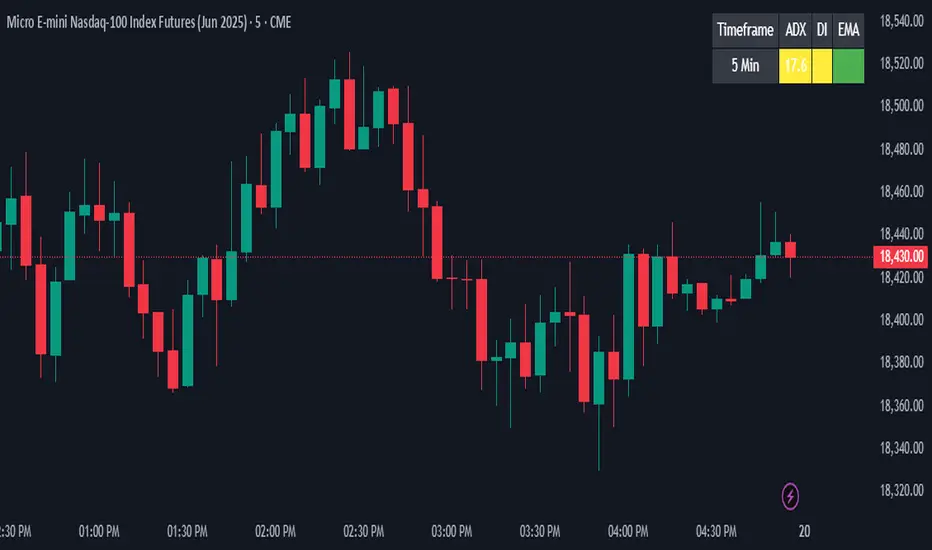
ADX + DI + EMA Dashboard (BKNY)This Indicator creates a dynamic dashboard that combines ADX (Average Directional Index), Directional Movement Index (DI), and Exponential Moving Averages (EMA) to provide a comprehensive view of market trends. The indicator helps traders assess the strength and direction of trends based on key technical indicators.
Features:
ADX: Measures the strength of the trend, allowing traders to identify whether a trend is strong or weak.
+DI and -DI: Show the bullish and bearish directional movements, helping to identify market direction.
EMA Crossover: Compares the fast and slow EMAs to determine the trend’s direction.
Customizable Features:
Adjust the calculation length for ADX, DI, and EMAs.
Set ADX and DI thresholds to define trend strength and direction.
EMA lengths are fully customizable for both fast and slow EMAs.
Display options allow users to show or hide ADX, DI, and EMA values on the dashboard.
Customize the colors to represent bullish, bearish, or neutral trend conditions for ADX, DI, and EMA.
Timeframe selection allows users to choose the preferred timeframe for trend analysis.
The dashboard layout and display are fully customizable, letting users tailor the information shown according to their trading preferences.
This script provides an at-a-glance view of key trend indicators, with flexibility to tailor both the data shown and the visual presentation to individual trading needs.
ADX Divergence and Gap Monitor [theUltimator5]ADX Divergence and Gap Monitor is a custom technical analysis tool designed to visualize momentum imbalances and sudden shifts in trend participation using the ADX system. It combines traditional ADX, DI+ and DI− calculations with dynamic filtering and visual highlighting to help identify key moments of directional acceleration or weakening.
🔍 What It Does:
This indicator builds on the Average Directional Index (ADX) system to detect conditions where market trend strength diverges significantly from directional input (DI) activity. It includes two major visual signals:
Highlight Backgrounds
These appear when the indicator detects a “gap” or sudden acceleration in DI values while ADX remains low, suggesting early-stage momentum bursts or signal noise spikes.
The trigger threshold for DI change can be adjusted using the Gap Trigger Level input.
A background highlight is shown when DI+ or DI− increases sharply, either from a low-ADX environment or from a rapid standalone spike.
GAP Markers
Optional yellow label markers display the word "GAP" just below the lowest line (ADX, DI+, or DI−) whenever a gap condition is triggered. These provide a more noticeable visual cue without crowding the chart.
You can enable or disable the markers with the Show GAP Markers toggle.
🧠 Advanced Divergence Detection:
The script also scans for dominant ADX divergence events, where ADX is significantly higher than DI+ or DI−, indicating strong trend force with weak directional participation. When these conditions are met:
Red or green background fills appear depending on whether DI+ or DI− is being overpowered.
These conditions are based on customizable moving averages and DI strength relationships.
⚙️ Key Inputs:
ADX Length: Period for ADX calculation
DI Moving Average: Smoothing length for directional index signals
Gap Trigger Level: Minimum DI change needed to trigger a GAP highlight
Show Highlight Backgrounds: Toggle to display or hide background signals
Show GAP Markers: Toggle to show or hide text-based GAP labels
🧪 Use Cases:
Spot early breakouts or reversals when DI activity spikes while ADX is still low
Identify periods of trend exhaustion or false breakouts using divergence logic
Confirm trade entry points when ADX begins to rise after a GAP event

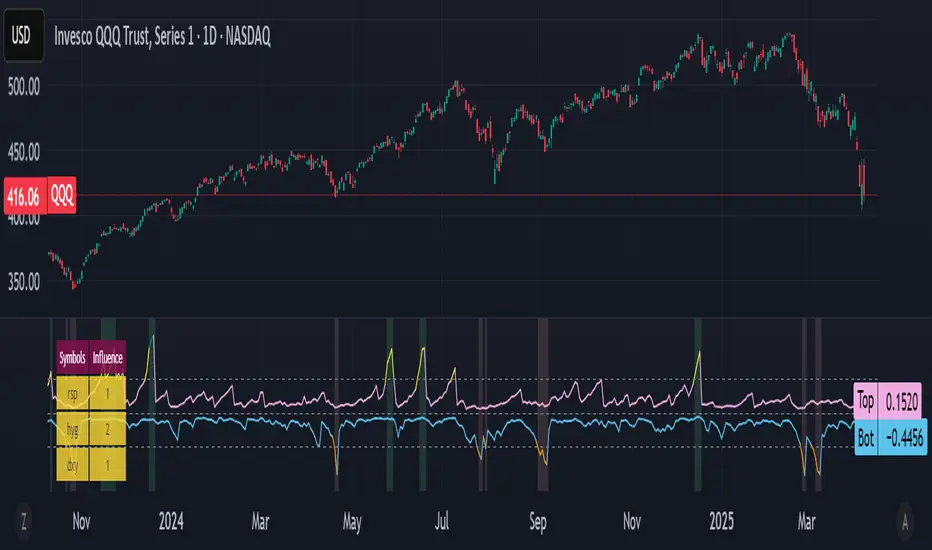
Bottom and Top finder [theUltimator5]🧭 Bottom and Top Finder — Multi-Symbol Momentum Divergence Detector
The Bottom and Top Finder by theUltimator5 is a highly configurable, momentum-based indicator designed to identify potential market reversal points using a multi-symbol relative strength comparison framework. It evaluates Directional Movement Index (DMI) values from up to three correlated or macro-influential assets to determine when the current instrument may be approaching a bottom (oversold exhaustion) or a top (overbought exhaustion).
🧠 How It Works
This script computes both the +DI (positive directional index) and -DI (negative directional index) for:
The currently selected chart symbol
Up to three user-defined reference symbols (e.g., sector leaders, macro ETFs, currencies, volatility proxies)
It uses a logarithmic percent-change approach to normalize all movement metrics, ensuring results are scale-invariant and price-neutral — meaning it works consistently whether a stock trades at $1 or $100,000. This makes the comparison between different assets meaningful, even if they trade on different scales or volatility levels.
The indicator then:
Compares the +DI values of the reference symbols to the current symbol’s +DI → seeking bottoming signals (suggesting the current symbol is unusually weak).
Compares the -DI values of the reference symbols to the current symbol’s -DI → seeking topping signals (suggesting the current symbol is unusually strong on the downside).
These comparisons are aggregated using a weighted average, where you control the influence (multiplier) of each reference symbol.
🔁 Trigger Logic
The indicator generates two dynamic lines:
Bot Line (Bottom Line): Based on reference +DI vs. current +DI
Top Line: Based on reference -DI vs. current -DI
If the Bot Line rises above the user-defined threshold, it may signal that capitulation or oversold conditions are developing. Similarly, if the Top Line rises above its threshold, it may indicate a blow-off top or overbought selling pressure.
To avoid false positives, a second smoothing-based condition must also be met:
The line must significantly exceed its moving average, confirming momentum divergence.
When both conditions are true, the indicator highlights the background in light red (bottom alert) or green (top alert) for easy visual scanning.
🔧 Key Inputs & Customization
You can fine-tune this tool using the following parameters:
Smoothing Length: Controls how smooth or sensitive the DI values are.
Reference Symbols: Up to 3 assets (default: RSP, HYG, DXY) — customizable for sector, macro, or inverse relationships.
Influence Multipliers: Adjust the weight each symbol has on the overall signal.
Display Options:
Toggle to highlight the chart background during trigger conditions.
Toggle to display a real-time table of reference symbols and their influence levels.
📈 Visual Output
Two plotted lines: One for bottoms and one for tops
Dynamically colored based on how far they exceed thresholds
Background highlights to mark trigger zones
Optional table displaying the current reference symbol setup and weights
🛠 Best Use Cases
This tool is ideal for:
Identifying short-term tops or bottoms using momentum exhaustion
Spotting divergences between an asset and broader market or sector health
Macro analysis with assets like SPY, QQQ, GME, MSFT, BTC, etc...
Pair trading signals or market breadth confirmation/disagreement
It complements other technical indicators like RSI, MACD, Bollinger Bands, or price structure patterns (double bottoms/tops, etc.)
Multi-Time Frame DMI with Gradient Bar ColoringDisplays a table showing the Directional Movement Index (DMI) sentiment for multiple time frames based on the Average Directional Index (ADX) value for each time frame.
Table Position and Text Size are configurable, with two styles (vertical or horizontal) available.
Time frame labels can be toggled off for color-only table.
Bars are colored based on the ADX value using a color gradient between the bullish and bearish color inputs. The neutral color is independent of the gradient for contrast.

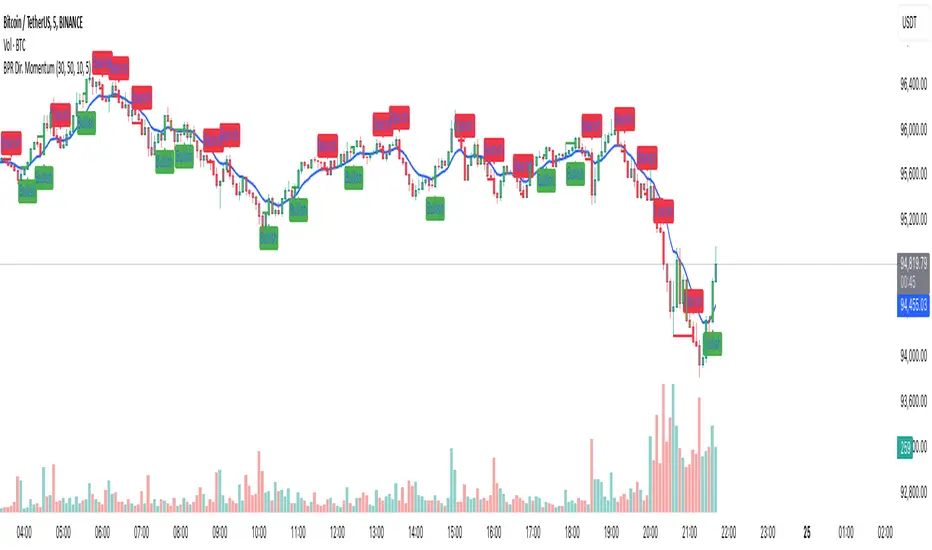
Balance Price Range (BPR) IndicatorOverview
The BPR with Directional Momentum-Filtered Breakouts indicator is designed to identify Balanced Price Ranges (BPR) and d etect high-probability breakouts and breakdowns with directional momentum confirmation . By leveraging historical BPR structures, EMA-based momentum filtering , and a trade cooldown mechanism , this script provides a structured approach to identifying potential trading opportunities while reducing false signals.
This invite-only indicator is ideal for traders who seek precise breakout confirmation, reduced noise, and trend-following logic while maintaining flexibility through adjustable parameters.
How It Works
The script follows a multi-step breakout detection process by integrating multiple key technical components:
1. Balanced Price Range (BPR) Detection:
• A Balanced Candle is identified when the price remains within a specific percentage of its range midpoint.
• These BPR zones represent areas of equilibrium , where a breakout or breakdown is likely to occur.
• The script historically tracks BPR levels across the entire chart to monitor price action around key areas.
2. Momentum-Filtered Breakout & Breakdown Logic:
• Bullish Breakout: Occurs when the price breaks above the historical BPR high with bullish momentum.
• Bearish Breakdown: Occurs when the price breaks below the historical BPR low with bearish momentum.
• Momentum Confirmation: Each breakout requires a strong directional move, measured against the Exponential Moving Average (EMA) .
• Only confirmed breakouts are marked, reducing the likelihood of false signals in choppy markets.
3. Candle-Based Background Visualization:
• Grey Background: Represents a Balanced Price Range (BPR), indicating potential breakout zones.
• Green Background: Indicates a Bullish Breakout when the price successfully breaks and holds above the BPR high.
• Red Background: Indicates a Bearish Breakdown when the price drops below the BPR low.
4. Trade Cooldown Mechanism:
• Prevents consecutive signals from triggering too frequently.
• Default cooldown period: 5 bars (adjustable).
• Ensures that trades are not clustered, improving signal quality.
5. EMA for Trend Direction & Confirmation:
• A 20-period EMA (default, adjustable) is used to confirm trade direction.
• Breakouts above the EMA align with uptrend continuation.
• Breakdowns below the EMA align with downtrend momentum.
Key Features
✔️ Historical BPR Detection – Tracks past BPR levels across the entire chart for structured breakout zones.
✔️ Momentum-Based Breakouts – Ensures breakouts are confirmed by directional price movement before generating signals.
✔️ Candle-Based Background Logic – Subtle candle highlights rather than full background fills, for better chart clarity.
✔️ Trade Cooldown Period – Prevents consecutive buy/sell signals within a defined period, improving signal efficiency.
✔️ Dynamic EMA Confirmation – Ensures trades align with the overall trend, reducing counter-trend trades.
✔️ Customizable Inputs – Adjust breakout thresholds, EMA length, and cooldown periods as per trading style.
✔️ Works Across Multiple Timeframes – Can be applied to intraday, swing, and positional trading strategies.
How to Use
1. Look for Balanced Price Ranges ( BPR )
• These zones highlight equilibrium areas where price is likely to break out.
• Grey-shaded candles indicate potential breakout zones.
2. Monitor for Bullish or Bearish Breakouts
• A green candle background signals a bullish breakout above BPR.
• A red candle background signals a bearish breakdown below BPR.
• The EMA filter helps confirm whether the breakout aligns with the prevailing trend.
3. Follow the Cooldown Logic
• After a breakout signal, wait for the cooldown period before another trade is allowed.
• This helps filter out noisy price action and prevents excessive trading.
4. Use Alongside Other Indicators
• Works well with volume analysis, support/resistance levels, and price action strategies.
• Can be combined with other momentum indicators for further trade confirmation.
Why This Combination?
Unlike generic breakout indicators, this script uniquely combines:
• BPR historical structures for defining potential breakout zones.
• Momentum-based breakout filtering using EMA confirmation.
• Trade cooldown logic to avoid excessive trading signals.
• Subtle candle-based highlights instead of cluttered full-background fills.
This structured approach makes the indicator more robust, adaptive, and reliable in different market conditions.
Why It’s Worth Using?
🔹 Avoid False Breakouts: Built-in momentum confirmation prevents weak or fake breakouts.
🔹 Clean Visualization: No excessive overlays—just precise, meaningful background coloring for breakouts.
🔹 Works in Any Market: Use on stocks, crypto, forex, indices, and commodities across different timeframes.
🔹 User-Friendly & Customizable: Fine-tune parameters to match individual trading styles.
⚠️ Note: This is an Invite-Only script. Access is granted to selected users.
✅ If you find it useful, consider incorporating it into your trend-following & breakout trading strategies.
🚀 Optimize your trading with structured breakout detection! 🚀