VWAP Strength & ATM Meeting AIO DashboardView Mode = STR
STR Strength – CE/PE VWAP Deviation + Straddle Volatility Meter
💡 Key Features
🔹 Strength Calculation
Computes Call Strength (CE) and Put Strength (PE) as the deviation of close from intraday VWAP.
Positive strength → trading above VWAP (bullish bias).
Negative strength → trading below VWAP (bearish bias).
🔹 Smoothing Option
Optionally smooths the strength values using a simple moving average for better clarity and trend visibility.
🔹 Volatility Detection
Monitors straddle percentage change per bar (CE + PE combined).
When volatility exceeds your defined threshold, chart background highlights in yellow.
🔹 Live Data Table
Displays real-time metrics at the bottom of the chart:
CE Strength
PE Strength
All three green is Buyer Strength, all three red is seller strength, both side green is volatile, both side red is sideways(sellers strong).
📊 How to Interpret
Green Line (CE Strength): Bullish bias in the call option.
Red Line (PE Strength): Bearish bias in the put option.
Yellow Background: Indicates high volatility movement in straddle value.
Above 0 line is trending Below 0 line sideways.
View Mode = Meeting Point
💡 Key Features
🔹 Dual Candle Display
Plots CE candles in green/red and PE candles in blue/magenta.
Both legs appear on the same panel — perfect for straddle/strangle monitoring.
🔹 Previous day High, Low, Close for both PE and CE line plotted with text value.
🔹 VWAP Support
Plots VWAP for both CE and PE options individually (toggleable).
Helps compare momentum and strength between both sides.
🔹 Point of Control (POC)
Calculates dynamic intraday POC using 1-minute price–volume density.
Updates automatically as new data streams in.
⚠️ Disclaimer
These data are not exact match, please use wisely.
This indicator is provided for educational and analytical purposes only.
It does not provide trading advice or buy/sell signals.
Use responsibly and in conjunction with your market analysis.
Past performance is not indicative of future results.
Educational

BUY/SELL Multi-Factor Decision Engine (v8) WebhookBUY / SELL Multi-Factor Decision Engine (v8) — Webhook
Important Notice
This indicator is not financial advice, does not guarantee results, and does not eliminate losses.
It is not a bot, not an oracle, and does not replace experience, risk management, or human judgment.
It is a tool for reading, filtering, and organizing market information.
1. What is this indicator?
BUY / SELL Multi-Factor Decision Engine (v8) — Webhook is a technical analysis indicator that:
analyzes multiple indicators at the same time,
evaluates structure, momentum, pressure, and context,
generates BUY / SELL signals when sufficient intent exists,
displays two state semaphores (BAS and CTX),
concentrates complex information into a compact panel,
is highly configurable from the settings panel (almost the entire indicator is configurable, including parameters, thresholds, profiles, and tolerances, allowing significant modification of the indicator’s behavior),
can generate alerts and signals via Webhook.
It does not execute trades.
It does not promise consistent wins.
It does not eliminate risk.
2. What does it actually do?
This indicator does NOT work with simple rules such as:
“RSI above X = buy”
“Moving average crossover = entry”
It also does not wait for everything to be perfect at the same time.
It works as follows:
It evaluates market intent using several indicators simultaneously.
It builds a LONG probability and a SHORT probability.
Intent may exist even if some indicators are neutral.
When intent exceeds a minimum configurable threshold, a BUY or SELL is generated internally.
That signal is only shown if the market is moving enough (ATR filter).
Important note:
ATR does NOT participate in the BUY / SELL decision.
ATR only decides whether existing intent:
is shown on screen,
triggers an alert,
or is sent via Webhook.
In parallel, risk context (CTX) is evaluated and displayed as a warning.
CTX does not participate in the BUY / SELL decision; it only informs about risk.
All analyzed information (EMAs, MACD, RSI, CMF, ADX/DI, BBP, SMC, candles, patterns, sweeps, EQs) is displayed in a compact panel, including the direction they appear to indicate.
BUY / SELL is not an order; it is a visual synthesis of a complex reading.
3. Market Intent (main engine)
This is where BUY or SELL is born.
Intent is calculated using classic indicators, but they are not read as textbook values, rather as behavior.
The engine does not ask:
“Is it above or below X?”
It asks things like:
Is the market pushing or losing strength?
Is momentum accelerating or exhausting?
Is there real pressure or just a bounce?
Does structure support or contradict the move?
Because of this, the indicator may:
anticipate classic signals,
maintain intent while something is neutral,
fail,
arrive early or late.
This is normal in any probabilistic system.
Nothing in the market is certain.
BUY and SELL signals:
are not orders,
are not imperative instructions,
must not be interpreted as mandatory entries or exits,
and do not replace market reading or the trader’s own analysis.
BUY / SELL is:
a visual synthesis of a complex reading,
a probabilistic representation of intent,
a decision-support tool,
not a mandate or a guarantee.
4. Indicators that form intent (interpretation and weight)
The intent engine works on an accumulated score.
Each indicator adds evidence, not orders.
EMAs — weight: 2 points
Measure structure and dynamic direction.
Evaluates:
slope,
speed,
relationship between them.
LONG intent may exist before a classic crossover.
MACD — weight: 2 points
Measures momentum and acceleration.
Not used as a “magic crossover”.
Evaluates:
whether momentum accelerates or weakens,
whether it accompanies price.
RSI — weight: 1 point
Not used as overbought/oversold.
Interpreted as:
direction of pressure,
gain or loss of relative strength.
CMF (Chaikin Money Flow) — weight: 1 point
Evaluates money flow.
Helps distinguish:
supported moves,
empty moves.
ADX + DI — weight: 2 points
Evaluates:
whether there is real trend,
who dominates (buyers or sellers),
whether the move has a foundation.
BBP (Bull/Bear Power) — weight: 1 point
Evaluates buying vs selling pressure.
Helps detect:
control,
exhaustion.
SMC (BOS / CHOCH) — weight: 3 points
Evaluates market structure:
continuity (BOS),
change of character (CHOCH).
Not decorative.
It has the highest individual weight in the engine.
Important:
Bias does not have a 3-point weight.
SMC only adds 3 points when a BOS or CHOCH event appears in the panel.
While only Bias is present, it adds 0 points, because there is no event.
Therefore, the intent threshold depends on the other indicators until a BOS or CHOCH occurs.
Important
The engine does not require unanimity.
It requires sufficient intent (sum of points ≥ configured threshold).
5. BAS Semaphore (intent state)
The BAS semaphore summarizes the state of the intent engine:
🟢 Green → solid intent
🟡 Yellow → weak or transitioning intent
🔴 Red → deteriorated or risky intent
BAS:
is linked to BUY / SELL,
reflects intent quality,
does not automatically cancel a signal.
It helps evaluate trade health, not blind obedience.
6. Operability (ATR Gates)
ATR:
does NOT generate BUY or SELL,
does NOT decide direction.
ATR only answers:
Is the market moving enough for this intent to be operational?
Therefore intent may:
exist,
but not be shown,
not trigger alerts,
not be sent via Webhook.
This avoids:
trading dead ranges,
signal spam,
micro-moves without continuity.
ATR Profiles (timeframe)
Included ATR profiles:
Scalp (2m / 5m)
Intraday (15m / 30m)
Swing (1H – 4H)
Position (1D / 1W / 1M / 3M)
STANDARD (editable)
Profiles only adjust operability filtering.
They do not change direction or the intent engine.
Recommendation:
Use the profile matching your timeframe or edit STANDARD according to your criteria.
7. Engine Profiles
The indicator also includes Engine profiles.
The Engine STANDARD is editable by the user.
Predefined Engine profiles are NOT editable.
They are calibrated as coherent parameter sets.
This avoids common mistakes such as:
scalping EMAs with swing RSI,
mixing incompatible indicator ranges.
Modifying fixed profiles breaks internal coherence.
8. Context (CTX)
Context does NOT participate in BUY / SELL decisions.
It adds no points.
It subtracts no points.
It does not block signals.
It warns about risk.
Evaluates, among other things:
liquidity sweeps,
Equal Highs / Equal Lows (EQ),
candle types,
chart patterns (forming or confirmed).
CTX semaphore:
🟢 relatively clean environment
🟡 transition / caution
🔴 high-risk environment
A BUY with red CTX is not invalid, but riskier.
In CTX, fewer marks is generally better.
9. What is shown on screen
The indicator can show:
BUY / SELL
Compact panel with:
BAS
CTX
indicator readings
L / S labels on the chart
Labels:
L → Long
S → Short
10. Abbreviations (panel key)
Candles
Doji → Doji
LLDoji → Long-legged Doji
Eng → Engulfing
Maru → Dominant no-wick candle
Hammer → Hammer
InvHam → Inverted Hammer
Shoot → Shooting Star
Hang → Hanging Man
BD Slot (strength / indecision)
DD → strong indecision
D → indecision
BE↑ / BE↓ → bullish / bearish engulfing
B↑ / B↓ → dominant candle
Chart Patterns
H&S → Head & Shoulders
iH&S → Inverse H&S
DT / DB → Double Top / Bottom
RWdg / FWdg → Rising / Falling Wedge
RChnl / FChnl → Rising / Falling Channel
SymTri / AscTri / DescTri → Triangles
Comp → Compression
Stage:
F → Forming
C → Confirmed
11. Configuration (very important)
Parameters are not decorative.
Modifying:
EMAs
RSI
MACD
CMF
ADX / DI
BBP
ATR
intent threshold
profiles
context tolerances
changes the real behavior of the engine.
Important:
Adjusting a single parameter in isolation is generally not recommended.
If one value changes, the set should usually be adjusted to avoid incompatible ranges.
Example:
EMA 10/20 ≠ EMA 15/30 ≠ EMA 10/50
Same applies to all indicators.
12. BUY / SELL, Alerts and Webhook
The indicator does not execute trades.
It is used to:
trade manually,
receive alerts,
send signals to Telegram or other systems,
automate only if the user builds their own bot.
The indicator only sends structured information.
Execution is:
external,
user-decided,
user-responsibility.
13. How I use it (creator’s criteria)
I do not rely solely on the indicator, and no one should.
I still read:
each individual indicator,
candle patterns,
chart patterns,
sweeps,
EQs,
structure and overall context.
The indicator does not replace my reading — it confirms it.
I use it to:
consolidate scattered information,
decide faster,
reduce visual noise,
avoid impulsive entries.
It is support, not a substitute for judgment.
DISCLAIMER
Important Notice – read carefully
As stated throughout this document, BUY / SELL Multi-Factor Decision Engine (v8) — Webhook is a technical analysis tool and does not constitute financial advice, investment recommendations, or a guarantee of results.
This indicator:
does not predict the future,
does not guarantee profits,
does not eliminate losses,
does not reduce market risk,
and does not replace experience, human judgment, risk management, or the learning curve required to trade.
BUY / SELL Multi-Factor Decision Engine:
is not a bot,
is not an automated system,
is not an oracle,
does not execute trades,
and does not make decisions for the user.
BUY and SELL signals:
are not orders,
are not imperative instructions,
must not be interpreted as mandatory entries or exits,
and do not replace market reading or personal analysis.
BUY / SELL is:
a visual synthesis of a complex reading,
a probabilistic representation of intent,
a decision-support tool,
not a mandate or a guarantee.
Nature of the indicator and the market
This indicator reads information, not outcomes.
It interprets what the market — and specifically TradingView — shows at each moment: indicators, structure, patterns, candles, sweeps, EQs, momentum, and context.
That a LONG or SHORT intent forms, a BUY or SELL signal triggers, and the market later does not move in that direction does not mean the indicator failed.
This happens because:
the market may show intent and later invalidate it,
new orders may enter,
liquidity may change,
context may deteriorate.
This is exactly why even very experienced traders lose trades.
The indicator always interprets information the same way, but it has no more information than what is publicly available.
It does not see the future, hidden orders, or external events.
A failed signal is not an indicator error — it is the probabilistic and uncertain nature of the market.
Parameter configuration
Users may modify parameters, thresholds, profiles, and tolerances.
Doing so changes the actual behavior of the engine, not just appearance.
Modifying a single parameter in isolation is generally not recommended.
Changing one value often requires adjusting the whole set to avoid incoherent ranges.
The intent-based logic does not change, but results can be altered if ranges are modified inconsistently.
Alerts and Webhook usage
This indicator can generate alerts and send signals via Webhook to external systems (bots, servers, messaging platforms, execution systems).
The Webhook only transmits information generated when internal conditions are met.
The indicator does not execute trades, control external systems, or validate user actions.
Any automation, bot, script, server, or system receiving these signals:
is external to the indicator,
is built, configured, and operated by the user,
and operates under the user’s full responsibility.
The creator is not responsible for:
automated executions,
programming errors in external bots or scripts,
connectivity failures,
duplicate orders,
delays,
losses derived from automation,
or decisions made from Webhook signals.
Using Webhook does not turn this indicator into a bot or automated system.
Webhook is only a communication channel.
Final Statement
Neither this indicator, nor any other indicator, nor any bot:
predicts the future,
guarantees profits,
or prevents losses.
Anyone claiming otherwise is lying.
This indicator is designed as a support tool to:
organize information,
reduce noise,
improve market reading,
and help make more conscious decisions,
not to eliminate risk or replace human judgment.
The creator of BUY / SELL Multi-Factor Decision Engine (v8) — Webhook assumes no responsibility for any loss, economic damage, financial harm, or negative consequence resulting from the use of this indicator.
This includes, but is not limited to, use:
manual,
semi-automated,
automated,
via alerts,
via Webhook,
via bots, scripts, servers, APIs, or any external system.
Any decision made using this indicator:
is solely the user’s responsibility,
made under their own judgment,
and at their own risk.
Using this indicator implies explicit acceptance that:
trading involves risk,
losses are possible,
and the creator assumes no direct or indirect liability for adverse results, misinterpretation, incorrect execution, faulty automation, or trading decisions.

RISK MANAGEMENT G9Professional Risk Management Tool
Entry • SL • Targets • RR Visualization
Invite-Only Access

3D Isometric MFI (Christmas Edition) [Kodexius]3D Isometric MFI (Christmas Edition) is a visual-first interpretation of the classic Money Flow Index, rendered as a projected 3D-style ribbon using an isometric mapping. Instead of plotting a standard oscillator line, the script reconstructs recent MFI history as a depth-aware ribbon that moves from back to front, producing a layered perspective effect that helps you read momentum shifts, regime transitions, and relative strength changes as a continuous structure.
This Christmas Edition was also built for fun and as a creative seasonal experiment. The goal is to keep the underlying indicator logic familiar, while presenting it in a playful, “3D showroom” style that looks great in a separate oscillator panel.
The indicator is designed for presentation quality and chart readability. It uses controlled object management (lines, polylines, labels) and renders only the most recent portion of the MFI history (user-defined depth). A decorative snow background effect adds atmosphere.
🔹 Features 🎄
🔸 Isometric 3D Projection Engine
The ribbon is produced by projecting 3D points (time offset, MFI value, depth) into 2D chart coordinates.
- X represents bar offset into history
- Y represents the MFI value
- Z introduces depth and perspective
Angle controls the projection direction, and Vertical Zoom scales the perceived amplitude.
🔸 Depth-Limited Ribbon Rendering (Back to Front)
Only the most recent History Depth values are drawn to keep performance and readability stable.
- Each segment connects two consecutive MFI values
- A top edge, bottom edge, and filled face are drawn to simulate thickness
- Older segments fade into the background
🔸 Dynamic Gradient Coloring + Depth Fade
Ribbon color follows a value-based gradient:
- Lower values lean red (risk-off pressure)
- Higher values lean green (risk-on pressure)
- Mid values blend naturally
Transparency increases with depth so older history is less dominant but still readable.
🔸 Tip Label (Value + Candy Marker) 🍭🍬
The most recent ribbon tip displays current MFI value.
A candy symbol that switches based on the 50 midpoint
The label is offset so it does not cover the ribbon tip.
🔸 Projected Reference Grid (80, 50, 20)
A projected grid is drawn at classic MFI reference levels to improve orientation:
- 80 Overbought reference
- 50 Midpoint reference
- 20 Oversold reference
These grid lines use the same projection math, so they stay aligned at any angle or zoom.
🔸 Seasonal Snow Background Effect ❄️
Randomized snow is rendered behind the ribbon using lightweight labels. This is purely decorative and does not alter MFI values or logic.
🔸 Object Lifecycle Management
Because 3D-style drawing uses many objects, the script manages them explicitly by storing references in arrays, deleting old objects, and redrawing on the last bar. This helps prevent visual stacking artifacts and keeps the panel clean.
🔹 Calculations
1) Money Flow Index Computation
The script separates “positive” and “negative” money flow based on the direction of change in the selected source, then converts their ratio into the standard 0 to 100 oscillator. Classic MFI Calculations.
calc_mfi(int length, float source) =>
float upper = math.sum(volume * (ta.change(source) <= 0 ? 0 : source), length)
float lower = math.sum(volume * (ta.change(source) >= 0 ? 0 : source), length)
float mfi = 100.0
if lower != 0
float r = upper / lower
mfi := 100 - (100 / (1 + r))
mfi
Interpretation:
upper accumulates volume-weighted source values on up moves
lower accumulates volume-weighted source values on down moves
if lower is zero, MFI defaults to 100 to avoid division errors
otherwise, MFI is computed from the ratio transform
2) History Buffer Management
The current MFI value is pushed into the front of an array every bar. The array is trimmed to History Depth so rendering stays bounded.
array.unshift(ctx.history_val, mfi_curr)
if ctx.history_val.size() > depth
ctx.history_val.pop()
3) 3D Point Model and Ribbon Thickness
Each segment is built from four projected points to form a filled face (a simple quad). A small thickness is applied to create the “ribbon” look, and depth is used to simulate perspective.
4) Isometric Projection to Chart Coordinates
3D points are mapped into chart coordinates with an angle rotation and scaling for zoom and depth.
method project(Point3 p, int anchor_bar, float angle_rad, float zoom, float z_scale) =>
float x_world = -float(p.x) * 2.0
float z_val = p.z * z_scale
float screen_x_offset = (x_world * math.cos(angle_rad)) - (z_val * 1.0)
float screen_y_offset = (p.y * zoom) + (x_world * math.sin(angle_rad)) * 0.5
int final_x = anchor_bar + int(math.round(screen_x_offset))
float final_y = screen_y_offset
chart.point.from_index(final_x, final_y)
5) Gradient and Depth Transparency
Color is derived from MFI value via a gradient, and transparency increases with segment depth so recent data remains dominant while older context stays visible.
6) Projected Reference Grid Construction
The 80, 50, 20 levels are drawn as dotted segments across the same historical span, using the same projection and depth fade logic for consistent alignment.
🎆 Wishing you a great year ahead 🎄✨
May your charts be clear, your risk be controlled, and your next year be filled with health, peace, and good trades. Happy Holidays and Happy New Year.

TradingView Alert Adapter for AlgoWayTRALADAL is a universal TradingView alert adapter designed for traders who work with indicators and want to test and automate indicator-based signals in a structured way.
It allows users to convert indicator outputs into a TradingView strategy and forward the same logic through alerts for multi-platform execution via AlgoWay.
This script can be used as TradingView indicator automation, enabling traders to build a TradingView strategy from indicators and route TradingView alerts through an AlgoWay connector TradingView workflow for multi-platform execution.
Why this adapter is needed
Most TradingView indicators are not available as strategies.
Traders often receive visual signals or alerts but have no access to objective statistics such as win rate, drawdown, or profit factor.
This adapter solves that problem by providing a generic framework that transforms indicator signals into a backtestable strategy — without modifying indicator code and without requiring Pine Script knowledge.
Input source–based design (including closed indicators)
All conditions in TRALADAL are built using input sources, which means you can connect:
Event-based signals (1 / non-zero values, arrows, shapes)
Indicator lines and values (EMA, VWAP, RSI, MACD, etc.)
Outputs from invite-only or closed-source indicators
If an indicator produces a visible signal or alert-compatible output, it can be evaluated and tested using this adapter, even when the source code is locked.
Three-level signal logic
The strategy uses a three-layer condition model commonly applied in discretionary and systematic trading:
Signal — primary entry trigger
Confirmation — directional validation
Filter — additional noise reduction
Each level can be enabled independently and combined using AND / OR logic, allowing traders to test multi-indicator systems without writing complex scripts.
Risk management and alert execution
The adapter supports practical risk parameters:
Stop Loss (pips)
Take Profit (pips)
Trailing Stop (pips)
Two execution modes are available:
Strategy Mode — risk rules are applied inside the TradingView Strategy Tester
Alert Mode — risk parameters are embedded into structured TradingView alerts and handled by AlgoWay during execution
Position sizing follows TradingView conventions (percent of equity, cash, or contracts) to keep strategy results and alerts aligned.
Typical use cases
This TradingView alert adapter is intended for:
Indicator-based trading systems
Backtesting signals from closed or invite-only scripts
Comparing multiple indicators within a single strategy
Sending TradingView alerts to external trading platforms via AlgoWay
The adapter does not generate signals or trading recommendations.
Its purpose is to provide a transparent and testable workflow from indicator signals to TradingView alerts and automated execution.

VIX Percentile OscillatorWhat is this script?
This is a trading tool that helps you decide when to buy or sell options based on market volatility. Think of it as a "fear meter" for the stock market.
What is VIX?
VIX = Volatility Index (also called the "fear index")
When VIX is HIGH → Market is scared/volatile → Options are EXPENSIVE
When VIX is LOW → Market is calm → Options are CHEAP
What does "Percentile" mean?
Instead of just showing VIX price, this script shows where VIX is compared to history.
Example: If VIX Percentile = 85%
This means VIX is higher than 85% of all past readings
Only 15% of the time was VIX higher than now
Translation: Volatility is unusually HIGH
The 5 Trading Zones
The script divides the market into 5 zones:
🔴 EXTREME SELLING ZONE (90-100%)
VIX is in the top 10% historically
Action: AGGRESSIVELY SELL OPTIONS (collect big premiums)
Market panic = expensive options = profit for sellers
🟠 SELLING ZONE (80-89%)
VIX is elevated but not extreme
Action: SELL OPTIONS (good premiums available)
⚪ NEUTRAL ZONE (20-79%)
VIX is normal
Action: WAIT or use other strategies
🟢 BUYING ZONE (10-19%)
VIX is low
Action: BUY OPTIONS (they're cheap)
🟢 EXTREME BUYING ZONE (0-9%)
VIX is in the bottom 10% historically
Action: AGGRESSIVELY BUY OPTIONS (bargain prices)
Market complacency = cheap options = opportunity
Understanding the Chart
Main Line (Blue/Red/Green):
Shows current VIX percentile
Color changes based on zone
Thick line = easy to see
Histogram (Background bars):
Red bars = above 50% (high volatility)
Green bars = below 50% (low volatility)
Purple Momentum Line:
Shows if VIX is rising or falling
Helps you catch trends early
Background Colors:
Light red/orange = Selling zones
Light green = Buying zones
Triangle Markers:
Appear when entering new zones
"EXTREME" label = strongest signals
The Statistics Table (Top Right)
VIX Price: Current VIX value (e.g., 16.50)
Percentile: Where VIX ranks (0-100%)
Z-Score: Statistical measure
Above +2 or below -2 = extreme
Red text = unusually high/low
Momentum: Rate of change
Red = rising (volatility increasing)
Green = falling (volatility decreasing)
Avg VIX: Average VIX over lookback period
Current Zone: Which zone you're in right now
Bars in Zone: How long you've been in this zone
Simple Trading Rules
FOR OPTION SELLERS (Premium Collectors):
✅ SELL when: Percentile > 80% (especially > 90%)
High premiums available
Examples: Sell covered calls, cash-secured puts, credit spreads
FOR OPTION BUYERS (Hedgers/Speculators):
✅ BUY when: Percentile < 20% (especially < 10%)
Cheap options available
Examples: Buy protective puts, long calls, debit spreads
Key Settings You Can Adjust
Lookback Period (default: 252)
How far back to compare (252 = 1 year of trading days)
Longer = smoother, more stable
Shorter = more sensitive to recent changes
Smoothing Period (default: 3)
Reduces noise/wiggling
Higher = smoother line
Lower = more responsive
Zone Thresholds:
Extreme Sell: 90%
Sell: 80%
Buy: 20%
Extreme Buy: 10%
You can customize these!
Real-World Example
Scenario: VIX Percentile jumps to 92%
What this means:
VIX is higher than 92% of all past readings
Market is in panic mode
Option premiums are INFLATED
Trading Action:
✅ Sell covered calls on stocks you own
✅ Sell cash-secured puts on stocks you want to buy
✅ Sell credit spreads
❌ DON'T buy expensive options right now
Why it works: When fear is extreme, it usually calms down eventually. You profit as premiums deflate.
Important Reminders
⚠️ This is a TIMING tool, not a crystal ball
It tells you WHEN premiums are expensive/cheap
It doesn't tell you WHICH options to trade
You still need proper risk management
⚠️ Works on ALL timeframes
Daily charts = swing trading
Weekly charts = position trading
Intraday charts = day trading volatility
⚠️ Best for:
Option sellers during high VIX (>80%)
Option buyers during low VIX (<20%)
Portfolio hedging decisions
Volatility trading strategies
Bottom Line: This script helps you buy options when they're cheap and sell options when they're expensive. It's like shopping for sales, but for volatility!
DISCLAIMER: This information is provided for educational purposes only and should not be considered financial, investment, or trading advice. Please do boost if you like it. Happy Trading.

Risk Adjusted Geometric Exponent [VynthraQuant]RAGE Index (Risk-Adjusted Geometric Exponent)
Overview
The RAGE Index is a quantitative momentum oscillator that measures the efficiency and quality of an asset's price trend. Standing for Risk-Adjusted Geometric Exponent , this indicator goes beyond simple price action by evaluating the average logarithmic growth rate relative to the asset's volatility.
In institutional finance, it is not just about how much an asset moves, but how it moves. RAGE identifies trends that exhibit high compounding growth with minimal "noise" or volatility.
The Logic Behind RAGE
The indicator is built on two core quantitative pillars:
1. Geometric Exponent (GE): Instead of simple percentage changes, we calculate the geometric mean of log-returns. This represents the true compounding "velocity" of the price.
2. Volatility Normalization: We divide the GE by the standard deviation of returns (Volatility) over a specific lookback period.
How to Interpret the RAGE Index
* The Zero Line: The most critical level. When RAGE crosses above 0, the asset has entered a state of positive geometric growth. Below 0, the asset is in a state of efficient decay.
* Trend Quality: A rising RAGE value indicates that the trend is becoming more "efficient", growth is increasing while volatility is staying low or decreasing.
* Color-Coded Candles: The script features a `force_overlay` function that colors the candles on your main chart.
* Bullish Color: Efficient growth detected (Long bias).
* Bearish Color: Efficient decay detected (Short bias).
Key Features
* Logarithmic Accuracy: Uses log-returns to ensure time-additivity and eliminate the bias found in standard percentage calculations.
* Adaptive to Volatility: Unlike a standard RSI or MACD, RAGE penalizes "choppy" price action, helping you stay out of sideways markets.
* Optimized Performance: Written in Pine Script v6 with high-efficiency math to ensure fast loading even on lower timeframes.
Settings
* GE Lookback: The window used to calculate the average growth rate.
* Volatility Lookback: The window used to measure the "risk" or noise of the price action.
General Disclaimer
This indicator is for informational and educational purposes only. It does not constitute financial advice. The creator bears no responsibility for any financial decisions or losses resulting from its use. Past performance is not indicative of future results.
Islamic Disclaimer
All trading activity should be approached with awareness of halal and haram principles. Ensure your investments, instruments, and methods align with Islamic ethical standards. This tool does not promote speculative or impermissible practices.

Position Avg Line + P/L Table - SightLine LabsPosition Avg – SLL is a lightweight position-tracking indicator designed to display a persistent average price level on the chart along with a real-time position summary table.
This script is non-trading and does not generate signals, entries, or exits. It is intended strictly for position awareness and visual reference.
What this indicator does:
Plots a persistent horizontal average price line (dashed by default)
Displays a live position statistics table showing:
Shares owned
Average price
Current price
Unrealized profit/loss in dollars
Unrealized profit/loss in percent
Updates automatically as price changes
Works across all timeframes
Does not depend on broker integration or strategy logic
Key features:
Average Price Line:
User-defined average price input
Persistent across the entire chart
Adjustable color and width
Visibility toggle
Position Table:
Six selectable table positions:
Top Left, Top Center, Top Right, Bottom Left, Bottom Center, Bottom Right
Adjustable text size (Tiny through Huge)
Optional table background fill
Optional inner grid lines
Optional outer frame border
Independent color control for:
Header background
Header text
Value text
Positive and negative P/L values
Chart Overlay Options:
Optional chart background tint
Does not modify the global chart theme
Inputs overview:
Position Settings:
Shares Owned
Average Price
Visual Settings:
Show or hide average price line
Line color and width
Table Settings:
Table position
Table text size
Color Settings:
Header background and text colors
Value text color
Positive and negative P/L colors
Optional table background, grid, and frame colors
How to use:
Add the indicator to a chart
Open the settings panel
Enter the number of shares and the average price
Adjust table position, size, and colors as desired
Use the average price line and table as a visual reference for trade and risk management
Notes and limitations:
This indicator does not place trades
It does not connect to any broker
All values are manually entered
Unrealized P/L is calculated using the chart’s current price
Commissions, fees, and slippage are not included
Disclaimer:
This script is provided for educational and informational purposes only. It does not constitute financial advice, investment recommendations, or trade signals. All trading decisions are the sole responsibility of the user.
Developed by SightLine Labs.

Gold Asia Session Highlighter [IST]Here is a polished description and guide for your Gold Asia Session Highlighter. You can use this text for a YouTube description, a Telegram post, or a PDF guide to explain the tool to others.
Gold Asia Session Highlighter (IST) | Visual Indicator
This is a custom TradingView indicator designed to simplify the Gold Asia Strategy. Instead of automating trades, this tool purely handles the visuals. It automatically highlights the correct Asia Session time window (adjusting for Winter/Summer hours) and marks the exact points where you should draw your Fixed Range Volume Profile (FRVP) tool.
Perfect for: Traders who prefer to draw their own FRVP levels manually but want to ensure they are using the exact, error-free time range every single day.
Features
✅ Automatic Time Zone: Strictly calculated using IST (Indian Standard Time), so you don't need to convert time zones manually.
✅ Smart Season Detection: Automatically switches between Winter Session (04:30 – 06:25) and Summer Session (03:30 – 05:25) based on the current month.
✅ Visual Guidance: Highlights the session background and places "START" and "END" labels on the exact candles.
✅ Zero Clutter: Clean visuals with no moving averages or strategy lines—just the session box.
How to Use It
Add to Chart: Apply the script to your Gold (XAUUSD) 5-minute chart. You will see a blue highlighted box appear during the Asia session.
Locate the Labels:
Look for the blue START label (bottom of the candle).
Look for the red END label (top of the candle).
Draw Your FRVP:
Select the Fixed Range Volume Profile tool from your TradingView toolbar.
Click exactly on the START candle.
Drag and release exactly on the END candle.
Trade: You now have the exact Value Area High (VAH), Value Area Low (VAL), and Point of Control (POC) for the day. Use your breakout strategy as usual!

Monthly Seasonality (for last N Years)Monthly Seasonality analyzes historical price behavior to reveal how a symbol typically performs in each calendar month. It helps traders identify recurring seasonal patterns, stronger months, weaker months, and overall consistency across years.
What this indicator does?
1. Calculates monthly percentage returns using historical price data
2. Aggregates results over a user-defined lookback period (max up to 20 years)
3. Displays a seasonality table showing:
> Average return (%) for each month
> Win rate (%) — how often the month closed positive
> Number of years included in the calculation
4. Automatically highlights:
> 📈 Best performing month
> 📉 Worst performing month
Seasonality Table:
Green shading indicates positive average returns
Red shading indicates negative average returns
⭐ A star marks the strongest and weakest months
Table colors automatically adapt to light and dark themes
Table position is fully customizable (top, middle, bottom)
How Traders Use It?
Identify seasonally strong months for swing trades or position entries
Avoid historically weak periods or tighten risk controls
Combine with technical indicators for higher-probability trade timing
Useful for equities, ETFs, and indices with long trading histories
Examples:
1. AAPL
2. BTCUSD

Market time opens @NeoNztime opens marked out new york session , london session, asia session and highs and lows of each one

ADX + DI Trend Gate PROADX + DI Trend Gate PRO is a trend filter and signal tool built around DMI (DI+ / DI-) and ADX. It helps you avoid choppy conditions by requiring real trend strength and DI separation before allowing signals.
Key features:
AUTO presets for 5m / 15m (optimized for fast intraday use)
Optional MTF confirmation (5m → 15m, 15m → 1H)
Adaptive DI Gap (volatility-based adjustment using ATR/Close)
Confirm on bar close option (no repaint mode)
Signal modes: DI Cross (classic) or Gate Flip (more responsive)
Optional filters: ATR volatility filter and Volume filter
Exit signals when trend weakens (ADX weakening / DI convergence / DI flip)
Info panel with active parameters, AUTO vs MANUAL, MTF diff, and adjustable panel font size
How to use (practical):
For cleaner signals, keep AUTO presets ON and enable Confirm on bar close.
For stricter filtering, enable MTF confirmation and/or Require ADX rising.
Volume filter is best on instruments with meaningful volume; on Forex (tick volume) it’s often better OFF.
Disclaimer : This indicator is a trend filter and timing tool, not financial advice. Always backtest and use proper risk management.

Sector Flow AnalysisSector Flow Analysis - Track market leadership and rotation across 11 major sector ETFs with real-time performance rankings.
Key Features:
Monitors all 11 S&P sector ETFs (XLK, XLF, XLI, XLU, XLV, XLP, XLY, XLB, XLRE, XLC, XLE)
Configurable lookback period (5-60 days) for performance calculation
Color-coded risk indicators: 🟢 Risk-On sectors leading (bullish), 🟠 Risk-Off sectors leading (defensive), 🟡 Neutral sectors
Display top N sectors (1-11) to declutter your chart
Fully customizable positioning, text size, and color
Clean, minimal table overlay that won't obstruct your chart
Use Cases:
Identify sector rotation patterns and market leadership changes
Gauge market sentiment (risk-on vs risk-off behavior)
Find opportunities by tracking which sectors are gaining/losing momentum
Confirm trend strength when your stock's sector is leading
Perfect companion to comprehensive market analysis tools for a complete picture of sector dynamics.

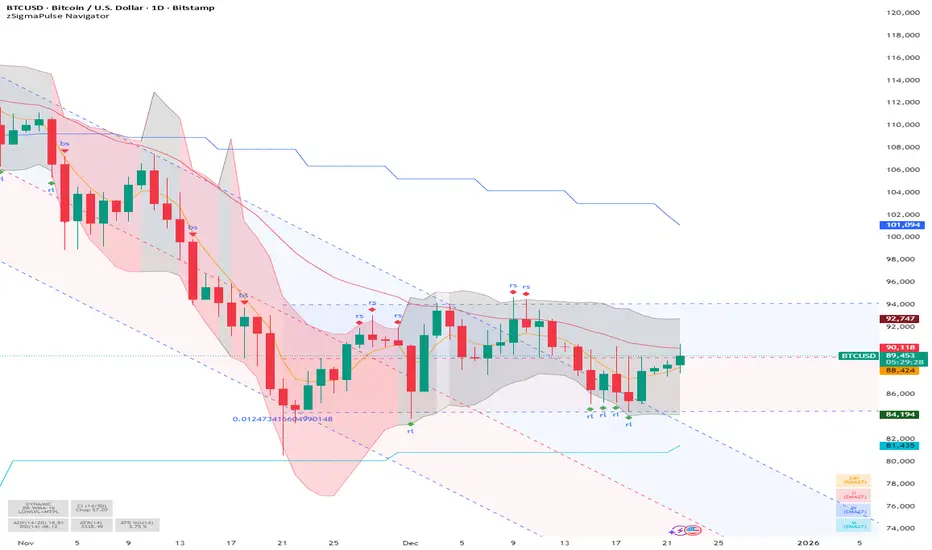
SigmaPulse NavigatorThe **zSigma Pulse Navigator** is a comprehensive, "Regime-Based" algorithmic trading tool designed for TradingView. Unlike standard technical indicators that generate continuous buy or sell signals regardless of market conditions, the zSigma Pulse functions primarily as a **market filter**. It first mathematically classifies the market environment as either "Efficient" (Trending) or "Inefficient" (Choppy) and only unlocks specific trading signals that are statistically valid for that specific state.
It is constructed from three distinct computational "engines" that work in unison to eliminate false signals:
### 1. The Regime Engine (The Filter)
The foundation of the zSigma Pulse is the **Choppiness Index (CI)**. The algorithm uses this to quantify the "Fractal Dimension" of price action.
* **Trend Mode (Green/Red Background):** If the Chop Index falls below a specific threshold (default 50), the system declares a Trend. The chart background lights up Green (Bullish) or Red (Bearish), permitting breakout strategies.
* **Chop Mode (Grey Background):** If the Chop Index rises above the threshold, the background turns Grey. This signals consolidation, warning the trader to ignore breakout signals and focus on mean reversion.
### 2. The Consensus Engine (The Vote)
To determine momentum direction, the indicator employs a proprietary "Voting System" that aggregates three independent indicators: **ADX** (Trend Strength), **RSI** (Momentum), and **SuperTrend** (Price Action).
* **The "2-out-of-3" Rule:** A directional signal (e.g., a Green Cloud) is only generated if at least **two** of these three engines agree. This consensus mechanism filters out "fake-outs" where price might move (SuperTrend) but lacks the internal energy (ADX) to sustain the move.
### 3. The Volatility Engine (The Cloud)
The tool visualises volatility through a **Dynamic Range**—a shaded cloud that expands and contracts based on market noise.
* It typically uses **Bollinger Bands** (based on Standard Deviation) or **Keltner Channels** (based on ATR).
* **In Trends:** The cloud expands, and the bottom of the cloud acts as a dynamic trailing stop.
* **In Chop:** The cloud contracts, creating a visual channel where traders can "buy the dip" (Diamond signals) at the bottom of the range.
### Key Features and Defaults
* **Institutional Tuning:** The indicator is hardcoded with "smart" defaults rather than standard retail settings. For example, it utilizes an **EMA 27** (a Fibonacci-adjacent number) rather than the standard 20 or 50 Moving Average, designed to catch institutional trends earlier.
* **Multi-Timeframe (MTF) Stack:** It automatically plots higher-timeframe Moving Averages (e.g., Weekly and Monthly lines) onto the Daily chart. This allows traders to ensure their trades align with the dominant structural trend without switching tabs.
* **Signal Shapes:**
* **Triangles:** Signal a **Breakout** (Trend Following).
* **Diamonds:** Signal a **Mean Reversion** entry (buying the bottom of the range in a pullback).
### Analogy
Think of the zSigma Pulse Navigator as a **sophisticated voltmeter** for the market.
Just as you wouldn't plug a sensitive appliance into an unstable power outlet, this tool measures the "current" of the market. If the volatility is erratic (Grey/Chop), it cuts the circuit to protect your capital. It only gives you the "Green Light" to trade when the voltage (Momentum) is stable and flowing in one direction.
BTE/TSS - IB 2.0📊 BTE – IB 2.0 (Initial Balance Framework)
BTE – IB 2.0 is a professional Initial Balance (IB) indicator designed for intraday traders who focus on market structure, auction logic, and contextual decision-making — not signal chasing.
The indicator automatically calculates IB High, IB Low, and IB Mid from a user-defined session (default: NY open) and projects IB-based extensions derived from the actual IB range, not arbitrary multipliers.
This is not a predictive tool.
It is a structural framework for understanding market behavior.
📐 What the indicator displays
• IB High & IB Low – core auction boundaries
• IB Mid (50%) – balance point of the auction
• IB Extensions (1×, 2×, 3×) – range-based projections
• Intermediate 50% levels between all extensions
• Optional IB calculation area (boxed range)
• Clean, readable IB level labels directly on the chart
All elements are fully customizable: colors, line styles, extensions, labels, and visibility.
📊 IB Delta & NY Range Analytics
The indicator includes a 20-day statistical table showing:
• IB Range (IB Delta)
• NY Session Range
• Maximum / Mean / Minimum / Current day values
This helps traders:
• evaluate volatility context
• distinguish rotational vs. expansion days
• avoid trading breakouts when statistics do not support them
👤 Who this indicator is for
• Traders using auction market theory
• Traders working with Initial Balance structure
• Traders focused on context, behavior, and reaction
🚫 Who this indicator is NOT for
• Traders looking for buy/sell signals
• Traders expecting predictions
• Traders ignoring session context and structure
🕒 Recommended use
• ES / NQ / YM / RTY
• Futures & index markets
• NY RTH session
• Best combined with Market Profile, order flow, and price action
⚠️ Important note
This indicator does not predict direction.
It defines auction boundaries — execution and bias are the trader’s responsibility.
If you do not understand how to work with Initial Balance, the issue is not the tool.
📩 Contact
For questions, access, or professional use inquiries:
admin@tradingstrategystore.com

Xbirch_Turtle_ Crypto_CalcМодернизированная стратегия Черепах.
Вход/выход по каналу Дончиана, стопы по величине ATR, возможность выбора лонг/шорт/всё. Имеется пирамидинг - добавление по +0,5ATR от первого бая, не более 4х входов. Модернизированный стоп - по ATR от первого бая.
Не финансовый совет.
A modernized Turtle strategy.
Entry/exit based on the Donchian Channel, stops based on the ATR value, and the ability to choose long/short/all options. Pyramiding is available – adding +0.5 ATR from the first buy, with a maximum of four entries. The modernized stop is based on the ATR value from the first buy.
This is not financial advice.

NSE Option Strike Prices by GoldenJetNSE Option Strike Prices Dashboard by GoldenJet
This Pine Script indicator is designed specifically to assist option buyers in making more informed decisions when trading NSE index options (NIFTY, BANKNIFTY, FINNIFTY, and MIDCAP NIFTY).
Key Benefits for Option Buyers:
It displays live Last Traded Prices (LTP) for 7 key strikes around a reference ATM level: 3 strikes below, the ATM, and 3 strikes above.
Helps buyers prioritize In-The-Money (ITM) strikes, which generally offer higher delta and better probability of profit compared to At-The-Money (ATM) or Out-Of-The-Money (OTM) options.
OTM strike prices are intentionally highlighted in RED color (with smaller font) to visually discourage selection of lower-probability OTM options, encouraging buyers to focus on ITM strikes for safer premium decay and directional plays.
The ATM strike is prominently highlighted for quick reference.
Real-time spot price is used to identify the true ATM, ensuring the dashboard reflects current market conditions.
This tool promotes disciplined strike selection by making it easy to spot premium levels across relevant strikes, reducing the risk of overpaying for OTM options with low intrinsic value.
How to Use:
Apply the indicator to any chart (preferably the underlying index chart, e.g., NSE:NIFTY).
Manual Inputs Required:
Spot Symbol: Choose from NIFTY, BANKNIFTY, FINNIFTY, or MIDCAP.
Strike Interval:
NIFTY: 50
BANKNIFTY: 100
FINNIFTY: 50
MIDCAP NIFTY: 25
Expiry Date: Enter Day (e.g., 23), Month (e.g., 12), Year (e.g., 25) for the target weekly/monthly expiry (format: DD MM YY).
Reference ATM Strike: Manually enter the approximate current ATM strike (e.g., closest strike to spot price). This anchors the 7 strikes displayed.
Customize layout: Dashboard position (e.g., bottom_right) and font size for better visibility.
The dashboard appears as a clean table overlay with columns for CE LTP, Strike, and PE LTP, updated in real-time.
Ideal for intraday or expiry-day option buyers looking to avoid common pitfalls like chasing cheap OTM premiums.
Feel free to use and share — happy trading!

Bhuvana Retrace Predictor (ATR + RSI Dive + St Break)It’s a “retracement warning + confirmation” tool. Nothing more.
Concept in simple words
Price runs too far too fast
The script uses EMA + ATR bands to detect when price is “stretched” (far from normal).
The run is losing power
It checks RSI divergence:
Price makes a new high but RSI doesn’t → buyers are getting weaker.
Price makes a new low but RSI doesn’t → sellers are getting weaker.
It waits for proof the pullback started
It then waits for a small structure break:
For a drop: price closes below a recent minor low.
For a bounce: price closes above a recent minor high.
What each label means
SETUP = “Retracement is likely soon” (don’t chase).
CONFIRM = “Retracement probably started” (now it’s tradable).
Brutal truth
This doesn’t predict perfectly. It just stacks 3 common signs:
overextended + weakening momentum + structure break.

Bhuvana Retrace Predictor It’s a “retracement warning + confirmation” tool. Nothing more.
Concept in simple words
Price runs too far too fast
The script uses EMA + ATR bands to detect when price is “stretched” (far from normal).
The run is losing power
It checks RSI divergence:
Price makes a new high but RSI doesn’t → buyers are getting weaker.
Price makes a new low but RSI doesn’t → sellers are getting weaker.
It waits for proof the pullback started
It then waits for a small structure break:
For a drop: price closes below a recent minor low.
For a bounce: price closes above a recent minor high.
What each label means
SETUP = “Retracement is likely soon” (don’t chase).
CONFIRM = “Retracement probably started” (now it’s tradable).
Brutal truth
This doesn’t predict perfectly. It just stacks 3 common signs:
overextended + weakening momentum + structure break.

InCrypto WatermarkInCrypto Watermark
A customizable overlay indicator that displays essential trading information directly on your TradingView charts. This tool helps traders quickly access key market data without cluttering the chart interface.
KEY FEATURES:
• Symbol Information: Displays current trading pair and active timeframe
• Price Display: Optional current price with smart precision formatting
• Price Change: Optional price change percentage over 24 bars with color-coded indicators
• Date & Time: Multiple format options for date (DD/MM/YYYY, MM/DD/YYYY, YYYY-MM-DD, DD.MM.YYYY) and time (HH:MM, HH:MM:SS)
• Custom Text: Customizable title and subtitle text
• Full Customization: Adjustable positioning, colors, sizes, alignment, and opacity for all elements
• Visibility Controls: Show/hide individual elements independently
• Background Options: Customizable background color, opacity, and optional borders
SETTINGS:
The indicator is organized into logical groups:
- Text Content: Title and subtitle customization
- Visibility: Individual show/hide controls for each element
- Watermark Position: Flexible placement options
- Symbol Info Position: Separate positioning controls
- Cell Size: Width and height adjustments
- Title/Subtitle/Symbol Info Settings: Color, size, alignment, and opacity controls
- Background Settings: Background color, opacity, and border options
USE CASES:
• Chart branding for trading groups or channels
• Quick reference for essential trading information
• Professional-looking charts for screenshots
• Multi-timeframe analysis assistance
TECHNICAL DETAILS:
• Pine Script v6
• Overlay indicator
• Works on all TradingView-supported markets and timeframes
• Real-time updates
HOW TO USE:
1. Add the indicator to your chart
2. Customize title and subtitle in Text Content settings
3. Adjust positioning for watermark and symbol info sections
4. Enable/disable individual information elements as needed
5. Fine-tune colors, sizes, and opacity to match your chart style
The indicator automatically adjusts price precision based on the asset's price level. Price change is calculated over 24 bars of the current timeframe (not 24 hours).
DISCLAIMER:
This indicator is for informational purposes only. It does not constitute investment advice, financial advice, trading advice, or any other type of advice. Past performance does not guarantee future results. Always conduct your own research and risk management before making trading decisions. Trading involves substantial risk of loss and is not suitable for every investor.

XAU Seasonality + Setup Quality + Month Strength | WarRoomXYZXAU Seasonality Engine is a technical analysis indicator developed for the study of recurring, calendar-based behavior on XAUUSD (Gold).
The tool blends month-of-year seasonality statistics with higher-timeframe context and a setup-quality gate to help users observe when market conditions historically lean strong, weak, or neutral — and how strict trade selection should be during each regime.
Indicator Concept
An indicator for XAUUSD that combines:
1. Seasonality Regime (Month-of-Year Bias)
► Classifies the current month as Strong / Weak / Neutral based on either:
• Preset months (user-defined)
or
• Auto mode (computed from historical monthly performance)
► Strong months suggest a bullish tailwind (not a signal).
► Weak months suggest headwind / caution and require stricter setup quality.
2. Monthly Performance Engine (Under the Hood)
► Uses the symbol’s monthly timeframe data to compute, per calendar month:
• Average monthly return (%)
• Win rate (%) — how often that month closes positive
• Month Strength Score (0–100) — a blended score derived from performance data
► The score is designed to provide a relative strength snapshot of seasonality by month.
3. Month Strength Histogram
► Plots a histogram (0–100) of the current month’s strength score.
• Higher bars = historically stronger month tendency
• Lower bars = historically weaker month tendency
► Optional horizontal reference lines mark “strong” and “weak” zones to make regimes obvious at a glance.
4. Setup Quality Meter (Confluence Filter)
► The indicator calculates a Setup Quality Score (0–100) using market structure and momentum components, such as:
• EMA trend alignment
• Momentum confirmation (EMA fast vs slow)
• Structure break confirmation (BOS)
• Liquidity sweep behavior
• Candle confirmation logic
► This score is intended as a trade-selectivity filter , not a trade executor.
5. Adaptive Rules for Weak Months (Strict Mode)
► When the indicator detects a weak seasonal regime, conditions automatically tighten:
• The A+ threshold increases (adaptive thresholding)
• Optional rule: Weak months require BOS + Sweep + FVG simultaneously before any A+ condition is considered valid
This forces the user into “higher-quality-only” behavior during historically weaker seasonal periods.
🔹1 Visual Components Included
• Seasonality regime label (Strong / Weak / Neutral)
• Optional background shading based on regime
• Month Strength Score histogram (0–100)
• Current month stats: Avg return + win rate
• Setup Quality Meter value (0–100)
• Adaptive A+ threshold display
• Weak-month confluence gate status (BOS / Sweep / FVG pass/fail)
• Optional alerts when strict criteria are met
➣What Means in the XAU Indicator
🔹 Definition (in THIS indicator)
Win Rate = the percentage of historical months that closed positive for the same calendar month.
It is NOT:
trade win rate ❌
signal accuracy ❌
It is a s tatistical seasonality metric .
How It’s Calculated
For each calendar month (January, February, etc.), the indicator:
1.Looks at historical monthly candles (Monthly timeframe).
2. Counts how many times that month:
•Closed higher than it opened (or higher than previous month close).
3. Divides:
Number of positive months
÷
Total number of observed months
× 100
Example: September
If over the last 20 years:
September closed green 14 times
September closed red 6 times
Then:
Win Rate = (14 / 20) × 100 = 70%
That’s what you see as in the dashboard.
What the Win Rate Is Used For
1️⃣ Part of the Month Strength Score
The indicator blends:
•Average Monthly Return (%) → measures magnitude
•Win Rate (%) → measures consistency
Combined into:
Month Strength Score (0–100)
This avoids a common trap:
•A month with 1 huge rally but many losses ≠ reliable
•A month with steady positive closes = higher quality environment
What Win Rate Tells You
High Win Rate (e.g. 65–75%)
•Gold more often closes higher in this month
•Continuation is statistically more likely
•Pullbacks are more likely to resolve in trend direction
Low Win Rate (e.g. 35–45%)
•Gold more often fails to close higher
•More chop, deeper retracements, false breakouts
•Continuation trades statistically struggle
What It Does NOT Tell You
🚫 It does NOT mean:
•“You will win 70% of your trades”
•“Every setup in this month works”
•“Direction is guaranteed”
Seasonality is context, not prediction.
Why This Is Powerful When Combined With Your System
On its own, win rate is just data.
But in your indicator, it’s used to:
•🔒 Raise the A+ threshold in weak months
•🧠 Force BOS + Sweep + FVG confluence
•❌ Block marginal setups automatically
So instead of guessing:
-“Why is gold so choppy this month?”
You know:
-“This month historically underperforms SO I must be stricter.”
➣What Means in the XAU Seasonality Indicator
🔹 Definition (in THIS indicator)
Avg Monthly Return = the average percentage gain or loss of XAUUSD for a specific calendar month, calculated across many years.
It measures magnitude , not frequency.
It is NOT:
•trade profit ❌
•expected return for the next month ❌
•guaranteed performance ❌
It is a historical seasonality tendency.
How It’s Calculated
For each calendar month (January, February, etc.), the indicator:
1.Takes every historical occurrence of that month.
2.Calculates the percentage change of the monthly candle:
(Monthly Close − Previous Monthly Close)
÷ Previous Monthly Close × 100
3. Adds all those percentage changes together.
4. Divides by the total number of observations.
Example: September
Assume over 20 years:
+2.4%, +1.1%, −0.6%, +3.0%, +1.8%, ...
If the sum of all September returns = +28% across 20 years:
Avg Monthly Return = +1.40%
That’s the number displayed in the indicator.
What Avg Monthly Return Is Used For
1️⃣ Measuring Strength of Movement
•Win Rate → “How often does it close green?”
•Avg Monthly Return → “How big are the moves when it works?”
Both are needed.
A month can:
•Win often but move very little
•Move a lot but only occasionally
The indicator combines both to avoid misleading conclusions.
How to Interpret Avg Monthly Return
Positive Avg Return (e.g. +0.8% to +2.0%)
•Gold tends to expand during this month
•Continuation phases are more likely
•Pullbacks are often absorbed
Near-Zero Avg Return (e.g. −0.2% to +0.2%)
•Market is statistically balanced
•Expect chop, rotations, false breaks
•Continuation is less reliable
Negative Avg Return (e.g. −0.5% or worse)
•Downward pressure or heavy mean reversion
•Rallies often fade
•Risk of aggressive stop hunts
What Avg Monthly Return Does NOT Mean
🚫 It does NOT mean:
•“Price will move +1.4% this month”
•“You should buy because the number is positive”
•“This is a guaranteed edge”
It describes historical behavior, not future certainty.
Why Avg Monthly Return Matters More Than People Think
Two months can have the same win rate but behave very differently:
Example:
Month Win Rate Avg Return Reality
Month A 65% +0.2% Small, choppy wins
Month B 55% +1.6% Fewer wins, but strong expansions
Your indicator would rank Month B as stronger, which is correct for continuation-based strategies.
How It Feeds the Month Strength Score
The indicator blends:
•60% Avg Monthly Return (normalized)
•40% Win Rate
This means:
•Big moves matter more than small consistency
•But consistency still matters enough to prevent distortion
Result:
Month Strength Score (0–100)
Which is then used to:
•tighten or relax A+ thresholds
•activate weak-month strict rules
•control trade frequency
🔹2. Intended Use
The indicator is designed as a discretionary analysis tool to support study of:
• seasonal bias and calendar tendencies
• relative strength/weakness across months
• how strict trade selection should be across different regimes
• confluence behavior when seasonal conditions are unfavorable
The tool does not generate forecasts, does not guarantee outcomes, and should not be relied upon as a stand-alone decision mechanism.
🔹3.How to Use XAU Seasonality Engine
Recommended charts: XAUUSD, intraday (5m–15m) with a HTF context (1H–4H).
1. Identify the Seasonal Regime
• Strong month → you can allow more continuation bias (still require structure).
• Neutral month → trade normally, standard criteria.
• Weak month → tighten selection, demand clean A+ conditions only.
2. Read the Month Strength Histogram
• If the score is high (e.g., 70+), the month has historically shown stronger tendency.
• If the score is low (e.g., 40 and below), expect slower conditions, deeper pullbacks, or more chop — and reduce marginal trades.
3. Use the Setup Quality Meter as the Gate
► In normal/strong months:
• A+ threshold is moderate (e.g., 70)
► In weak months:
• A+ threshold is higher (e.g., 80+)
• Optional strict mode: must also pass BOS + Sweep + FVG alignment
4. Example Trade Logic (Framework, Not Signals)
► Bullish framework in a Strong Month:
• Seasonal regime = Strong (tailwind)
• Structure supports bullish continuation (trend alignment)
• Sweep occurs into demand / liquidity grab
• Setup Quality reaches A+ threshold
• Entry: confirmation candle or retrace to key level
• SL: beyond sweep low / invalidation
• TP: nearest liquidity / prior highs / HTF level
► Weak Month rule-set (Strict Mode):
• Seasonal regime = Weak (headwind)
• Only consider trades if:
✅ BOS confirms direction
✅ Sweep occurs and rejects cleanly
✅ FVG exists recently (or is mitigated if you choose that model)
✅ Setup Quality exceeds the elevated adaptive threshold
If any one is missing → no trade
This is not meant to “predict” gold — it’s meant to enforce discipline when seasonality historically underperforms.
🔹4.Limitations and User Responsibility
► The indicator does not represent financial advice or imply performance expectations.
► Seasonality is statistical tendency, not certainty — macro conditions can override it.
► Results vary by broker feed, timeframe, and settings.
► Users should test thoroughly in simulation before applying to live markets.
► All trading decisions, risk management, and execution remain solely the responsibility of the user.
🔹5. Alerts
Optional alerts can notify when:
• a new month begins and the seasonal regime changes
• A+ criteria are met
• weak-month strict conditions pass (BOS + Sweep + FVG)
Alerts are informational only and do not constitute actionable recommendations.
Disclaimer
This script is provided for informational and educational purposes only . It does not provide financial, investment, or trading advice, and it does not guarantee profits or future performance. All decisions made based on this script are solely the responsibility of the user.
This script does not execute trades, manage risk, or replace the need for trader discretion. Market behavior can change quickly, and past behavior detected by the script does not ensure similar future outcomes.
Users should test the script on demo or simulation environments before applying it to live markets and must maintain full responsibility for their own risk management, position sizing, and trade execution.
Trading involves risk, and losses can exceed deposits. By using this script, you acknowledge that you understand and accept all associated risks.

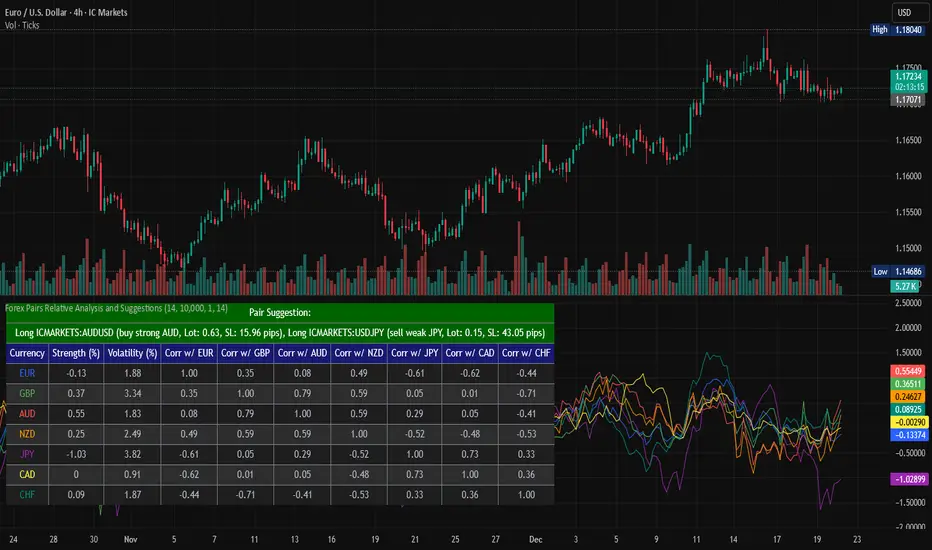
Forex Pairs Relative Analysis and SuggestionsThis Pine Script (version 5) indicator, titled "Forex Pairs Relative Analysis and Suggestions," is designed for use on TradingView charts. It provides real-time analysis of major forex pairs sourced from the IC Markets exchange, facilitating relative value or pair trading strategies by evaluating currency strengths against the US Dollar (USD). The script focuses on seven major currencies—EUR, GBP, AUD, NZD, JPY, CAD, and CHF—through their respective pairs: EURUSD, GBPUSD, AUDUSD, NZDUSD, USDJPY, USDCAD, and USDCHF.
Key features include:
Relative Currency Strengths: Calculated using the Rate of Change (ROC) over a user-defined lookback period (default: 14 bars), normalized to reflect performance versus USD. Positive values indicate strengthening, while negative values denote weakening.
Annualized Volatilities: Derived from the standard deviation of logarithmic returns, annualized assuming 252 trading days, and expressed as percentages to compare risk levels across pairs.
Full Pairwise Correlations: A comprehensive matrix displaying Pearson correlation coefficients between all pairs over the lookback period, aiding in identifying hedging opportunities (e.g., low or negative correlations for diversification).
Automated Pair Suggestions: Identifies the strongest and weakest currencies, proposing a long position in the pair to buy the strong currency and a short position (or opposite direction) to sell the weak currency against USD. Suggestions include estimated lot sizes based on user-input account balance, risk percentage (default: 1%), and a stop-loss proxy using 1x Average True Range (ATR).
Visual Elements: A table displays all metrics with color-coded rows for readability (optimized for dark mode), alternating backgrounds, and merged cells for suggestions. Strengths are also plotted in a separate pane with matching colors for trend visualization.
Customization: Users can adjust the lookback length, ATR period, account balance, and risk percentage via indicator settings to tailor the analysis.
Ensure access to IC Markets data in your TradingView account. The table appears in the top-left position by default and updates on the last bar. This tool is intended for educational and analytical purposes, supporting informed decision-making in forex trading by highlighting relative strengths, risks, and potential hedges.
Guidance on Choosing a Timeframe:
The indicator adapts to the chart's timeframe, with the lookback period influencing the historical window for metrics. Select based on your strategy:
Short-Term (Intraday/Scalping): Use 15-minute to 1-hour charts for timely signals; adjust lookback to 5–10 for responsiveness.
Medium-Term (Swing Trading): Opt for 4-hour to daily charts (recommended default) for balanced trends; 14-bar lookback covers days to weeks.
Long-Term (Position Trading): Choose weekly or monthly charts for macro views; increase lookback to 20–50 for smoother data.
Test across timeframes via backtesting to align with your risk and objectives.
Disclaimer:
This script is provided for informational and educational purposes only and does not constitute financial, investment, or trading advice. Trading forex involves significant risk of loss and is not suitable for all individuals. Past performance is not indicative of future results. The calculations, suggestions, and metrics (including lot sizes) are based on historical data and simplified assumptions, such as using ATR for stop-loss estimation, and may not account for real-time market conditions, slippage, commissions, or other factors. Users should conduct their own research, consult with qualified financial professionals, and verify the script's outputs before making any trading decisions. The author assumes no responsibility or liability for any losses incurred from the use of this script.
Gold Smart Scalper V3 - Clean ChartOverview
The Gold Smart Scalper V3 is a trend-following momentum strategy specifically optimized for XAU/USD (Gold). It focuses on catching "value pullbacks" within a strong trend, avoiding the noise of sideways markets. Unlike many scalpers that use lagging indicators for exits, this version uses fixed ATR-based targets to lock in profits during high-volatility moves common in Gold.
Core Methodology
The strategy operates on three layers of confirmation:
Macro Trend (HTF Filter): Uses a 50-period EMA to ensure trades are only taken in the direction of the higher-timeframe momentum.
The Value Zone: Instead of "chasing" green or red candles, the script waits for a pullback to the space between the 9 EMA and 21 EMA. This ensures a better risk-to-reward entry point.
The Trigger: A trade is only executed when price confirms the resumption of the trend by crossing back over the signal EMA after the pullback.
Key Features
Fixed Profit Targets: Replaced dynamic trailing stops with fixed Take Profit (TP) and Stop Loss (SL) levels based on ATR, ensuring exits aren't "hunted" by Gold's signature volatility spikes.
C lean Chart Interface : All moving average plots are hidden. The only visuals provided are the active TP/SL levels when a trade is live, keeping your workspace clutter-free.
Single-Trade Logic: The script includes a "One Trade Per Cross" gate, preventing the strategy from over-trading or "stacking" positions during choppy price action.
Settings & OptimizationATR Multipliers :
Stop Loss (SL): Default $2.0 \times ATR$. Protects against standard market noise.Take Profit (TP): Default $3.0 \times ATR$. Designed for a high Risk/Reward profile.Timeframe Recommendation: Optimized for 15m and 1H for swing scalping, or 5m for aggressive scalping.Instrument: Specifically tuned for Gold (XAU/USD), but applicable to other high-volatility pairs like GBP/JPY or NASDAQ.
Disclaimer
This script is for educational and backtesting purposes only. Past performance does not guarantee future results. Always practice proper risk management.
