DT AlertsA pretty stink indicator for trading. Only use this is you don't mind losing every now and then.
移動平均線

Buy/Sell Indicator (RSI, MACD, ATR) v6+Buy Sell indicators based on EMA, Volume and MACD Has buy and sale flag indicators

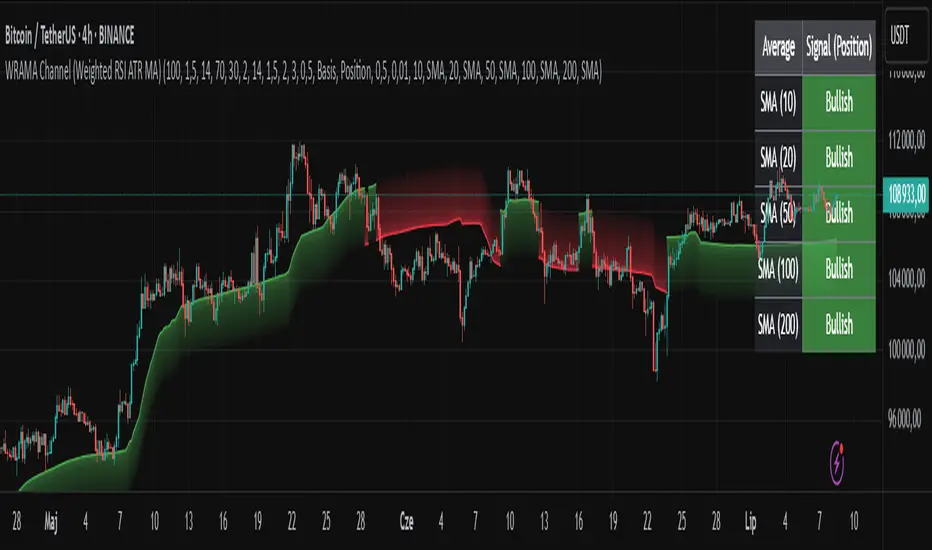
WRAMA Channel (Weighted RSI ATR MA)OVERVIEW
The WRAMA Channel (Weighted RSI ATR MA) is an advanced technical analysis tool designed to react more quickly to price movements compared to indicators using conventional moving averages. It combines the Relative Strength Index (RSI), Average True Range (ATR), and a weighted moving average, resulting in the WRAMA. This indicator forms a dynamic price channel based on a weighted average that incorporates both trend strength (via RSI) and market volatility (via ATR). It helps traders identify trends, potential reversals, and breakout signals, while offering broad customization options.
Key Features
WRAMA Price Channel:
Generates a dynamic channel around the weighted moving average (WRAMA), adapting to market volatility and momentum, similar to Bollinger Bands. Users are encouraged to adjust channel width and length according to their strategy.
The upper and lower channel bands are calculated based on a percentage deviation from the baseline line.
The channel fill color changes depending on the price's position relative to the baseline (green above, red below), with an optional gradient for better visualization.
Weighted Moving Average (WRAMA):
WRAMA is a custom weighted moving average (MA1), where closing prices are weighted based on RSI and ATR, allowing it to dynamically adapt to market conditions.
Baseline: The WRAMA line calculated over a user-defined period.
WRAMA Calculation:
RSI Weight: Based on RSI value. When RSI is in extreme zones (below the lower threshold or above the upper threshold), an extreme weight is applied. Otherwise, the weight is based on the squared RSI value divided by 100, raised to a power defined by the rsi_weight_factor.
ATR Weight: Based on the ATR-to-average-ATR ratio. If ATR exceeds a threshold (atr_threshold × avg_atr), an extreme weight is applied. Otherwise, the weight is based on the squared ratio of ATR to average ATR, raised to the power of the atr_weight_factor.
Combined Weight: RSI and ATR weights are combined using a rsi_atr_balance parameter. Final weight = RSI weight × balance + ATR weight × (1 - balance).
WRAMA Calculation: The closing price is multiplied by the combined weight. The result is averaged over the ma_length period and divided by the average of the weights, forming the WRAMA line. For current WRAMA (ma_length = 1), the calculation simplifies to a single weighted price.
Additional Moving Averages:
For additional confirmations, the indicator supports up to five moving averages (MA1–MA5) with various types (SMA, EMA, WMA, HMA, ALMA) and customizable periods.
All additional MAs are calculated based on WRAMA or its baseline, ensuring consistency and enabling deeper analysis within a unified methodology. MA trend directions can be tracked in a built-in signal table.
Trading Signals:
Breakout Signals: Breakouts above/below the channel are optionally marked with triangle shapes (green for bullish, red for bearish).
MA Signals: Price position relative to MAs or their slope generates bullish/bearish signals. These are optionally visualized with default triangles (green up, red down).
A signal table in the top-right corner summarizes the status of each moving average – bullish, bearish, or neutral.
Customization Options
Channel Settings:
MA Period: Length of the WRAMA baseline (default: 100).
Channel Deviation : Percentage offset from the baseline for upper/lower bands (default: 1.5%).
RSI Settings:
RSI Period: Length of the RSI calculation (default: 14).
RSI Upper/Lower Threshold: Overbought/oversold levels (default: 70/30).
RSI Weight Factor: Influence of RSI on weighting (default: 2.0).
ATR Settings:
ATR Period: ATR calculation length (default: 14).
ATR Threshold: Volatility threshold as a multiple of average ATR (default: 1.5).
ATR Weight Factor: Influence of ATR on weighting (default: 2.0).
RSI & ATR Combined:
Extreme Weight: Weight applied in extreme RSI/ATR conditions (default: 3.0).
RSI/ATR Balance: Balance between RSI and ATR influence (default: 0.5).
Signal Settings:
Show Breakout Signals: Enable/disable breakout triangles.
Show MA Signals: Enable/disable MA-based signals.
MA Signal Source: Choose between current WRAMA or baseline.
MA Signal Analysis: Based on price position or slope.
Neutral Threshold : Minimum distance from MA for signal neutrality (default: 0.5%).
Minimum MA Slope : Minimum slope for trend direction signals (default: 0.01%).
Moving Averages (MA1–MA5):
Options to enable/disable, select type (SMA, EMA, WMA, HMA, ALMA), set period length, and choose color.
Style Settings:
Gradient Fill: Enable/disable gradient coloring within the channel.
Show Baseline: Enable/disable WRAMA baseline visibility.
Colors: Customize line, fill, and signal colors.
Use Cases
Trend Identification: The WRAMA channel highlights trend direction and potential reversal zones when price contacts the channel edges.
Breakout Signals: Channel breakouts may indicate trend shifts or momentum surges.
MA Analysis: The signal table provides a clear summary of market direction (bullish, bearish, or neutral) based on selected moving averages.
Trading Strategies: Suitable for trend-following, mean-reversion, and scalping strategies, depending on user preferences and settings.
Notes
The indicator offers a high degree of flexibility, making it adaptable to various trading styles, instruments, and timeframes.
It is recommended to adjust channel length and width to fit your trading strategy.
Backtesting settings on historical data is advised to optimize parameters for a specific strategy and market.
Simple ## User Guide for the Simple
I. Indicator Philosophy
This indicator is not a simple system that provides only one type of signal. It is an advanced tool that analyzes the market using three independent "engines," each specializing in detecting a different type of trading opportunity. Its goal is to identify high-probability setups by filtering out market noise.
II. Legend – What You See on the Chart
Before we proceed to the signals, you need to understand what each visual element represents:
Orange Line (200 EMA): This is the main, long-term trend indicator. It acts like a river – if the price flows above it, we look for buying opportunities (LONG). If it's below, we look for selling opportunities (SHORT).
The Ribbon (green/red): Represents short-term momentum and acts as a dynamic support/resistance zone. A green ribbon suggests buying strength, while a red one suggests selling pressure.
Kijun-sen Line (blue/red): This is the medium-term "center of gravity" of the market. It shows the price equilibrium. Its position relative to the price and the ribbon is crucial for many signals.
Gray Background: This is a "NO-TRADE ZONE." It appears when the ADX indicator shows that the market is in consolidation and lacks a clear trend. Most signals are ignored in these areas.
## III. The Three Signal Engines – When to Consider a Position
The indicator generates three different types of signals, each with its own characteristics and risk profile.
1. LONG / SHORT Labels (The Pullback Engine - Conservative)
Character: Safe, conservative, trend-following. Appears the least frequently.
How it works: It looks for ideal, "textbook" conditions. For a LONG signal, all indicators must be in full alignment (price > ribbon > Kijun > orange line), the trend must be strong (high ADX), AND the price must make a pullback to the ribbon and then bounce off it.
When to consider a position: When you see this signal, you are entering a well-developed, healthy trend. It's a high-probability entry, but often not at the very beginning of the move. Ideal for traders who value safety.
2. 🔵 / 🟣 Circles (The Squeeze Engine - Moderate)
Character: Moderately aggressive, looks for the beginning of a new, dynamic move.
How it works: It searches for periods of consolidation and low volatility (when the market is "gathering energy"). The signal (a circle) appears at the moment the price breaks out of this consolidation, and the direction of the breakout is confirmed by the Kijun-sen line.
When to consider a position: When you see the price has been moving sideways for a while, and then a circle appears. This is a sign that the consolidation phase has likely ended and a new impulse is beginning. Ideal for catching "fresh" moves.
3. ⚡ Lightning Bolt (The Reversal Engine - Aggressive)
Character: Aggressive, contrarian, attempts to catch sharp reversals. This is the riskiest signal.
How it works: It ignores most of the trend filters. Its sole purpose is to find a moment where the price, after a sharp and overextended move in one direction, suddenly reverses on a strong candle with high volume.
When to consider a position: When you want to take a risk to catch the very bottom (V-bottom) or top (V-top). This signal requires the most experience. It is recommended to only take it when it appears near a significant, horizontal support or resistance level. Never take it "in a vacuum."
IV. Summary and Practical Strategy
Signal
Signal Type
Character
Ideal Market Conditions
LONG/SHORT
Pullback Entry
Conservative
A strong, developed, and healthy trend.
🔵/🟣
Squeeze Breakout
Moderate
The end of a sideways move, the beginning of a new impulse.
⚡
Sharp Reversal
Aggressive
Market panic, oversold/overbought conditions at a key S/R level.
Eksportuj do Arkuszy

Volumetric Compressed MAVCMA uses the compressor and weighted stdev functions originally translated to pine by @gorx1. Compressor is usually used in audio to avoid clipping of certain frequencies. The original idea is actually pretty simple:
ma(simple string smt, float src, simple int len) =>
switch smt
'RMA' => ta.rma(src, len)
'SMA' => ta.sma(src, len)
'EMA' => ta.ema(src, len)
'WMA' => ta.wma(src, len)
'HMA' => ta.hma(src, len)
'LSMA' => ta.linreg(src, len, 0)
=> na
compressor(float in_1, simple int len, simple int thresh_dn_m, simple int thresh_up_m) =>
data = math.log(math.abs(in_1))
loc = ta.wma(data, len)
dev = wstdev(data, len)
thresh_dn = loc + dev * thresh_dn_m
thresh_up = loc + dev * thresh_up_m
math.exp(math.min(math.max(data, thresh_up), thresh_dn)) - math.exp(thresh_up)
compressed_out = compressor(volume, len_window, up_thresh, down_thresh)
comp_ma = ma(ma_type, close * compressed_out, len_ml) / ma(ma_type, compressed_out, len_ml)
vwma = ma(ma_type, close, len_window)
We get the ratio of the compressed volume calculation and plot it with the base MA. Base MA's length is determined by window size input compared to ML length that is used for compressed version.
This provides us another possible confirmation indicator that can be used to take advantage of volume ranges. Autmated crossover alerts are also added. A reminder is that this kind of indicators should not be used on it's own for trading but rather should be used as a confirmation along with your trend detection and main entry indicators to provide additional confluence.

SMA Crossover Strategy with TP/SL📊 Strategy Description: SMA Crossover Strategy with TP/SL
This is a Simple Moving Average (SMA) Crossover Strategy designed to help traders identify trend reversals and manage trades with proper risk-reward logic.
🔹 Entry Logic:
Buy Signal: When the Fast SMA crosses above the Slow SMA → indicating a bullish trend.
Sell Signal: When the Fast SMA crosses below the Slow SMA → indicating a bearish trend.
🔹 Exit Logic:
Take Profit: The strategy exits the position when price reaches a user-defined profit target.
Stop Loss: The trade is closed if price moves against the position beyond the specified stop-loss limit.
⚙️ Parameters:
Fast SMA Length: Number of candles used for fast moving average (default: 10)
Slow SMA Length: Number of candles used for slow moving average (default: 30)
Take Profit (%): Profit target in percentage (default: 0.10%)
Stop Loss (%): Maximum allowed loss per trade (default: 0.10%)
✅ Additional Features:
Strategy backtesting supported
Visual arrows for Buy/Sell signals
Bar coloring based on trend
Alert conditions for Buy/Sell crossover signals
🧠 Suggested Use:
Works best on 1 min, 5 hour, or daily timeframes.
Can be applied to stocks, crypto, forex, or indices.
Ideal for trend-following traders who want automation with risk control.

High Accuracy Volume Breakout StrategyHigh Accuracy Volume Breakout Strategy (EMA + RSI Filter)
🧠 Description:
This is a high-accuracy breakout strategy based on volume surges, trend confirmation, and momentum filtering, designed for intraday and short-term trading.
The strategy aims to capture strong directional moves triggered by sudden increases in volume, with entry filters to avoid low-quality or choppy signals.
✅ Entry Logic:
🔺 Buy Entry Conditions:
Current candle closes above previous high
Volume is greater than 1.5× the 20-period average
Price is above 50 EMA (uptrend confirmation)
RSI is below 70 (not overbought)
🔻 Sell Entry Conditions:
Current candle closes below previous low
Volume is greater than 1.5× the 20-period average
Price is below 50 EMA (downtrend confirmation)
RSI is above 30 (not oversold)
🎯 Exit Logic:
Stop Loss: 1.2 × ATR(14)
Take Profit: 2.0 × ATR(14)
🧪 Recommended Settings:
Parameter Value
Timeframe 5-minute, 15-minute
Markets Gold (XAUUSD), Nifty, BankNifty, BTC, NASDAQ
Risk/Reward ~1:1.6
Expected Accuracy ~65–75% in trending markets
📊 Features:
🔸 ATR-based dynamic stoploss and target
🔸 Volume spike confirmation to detect real breakouts
🔸 EMA 50 trend filter to reduce false signals
🔸 RSI filter to avoid extreme zones (overbought/oversold)
🔸 Plotted buy/sell arrows for clarity
⚠️ Disclaimer:
This strategy is for educational purposes only. Please backtest and paper trade before using in live markets. Performance may vary depending on asset and timefram
plot(ema50, color=color.orange)

Fibonacci 61.8 BUY or SELL (EMA-Filtered)This indicator helps identify Fibonacci-based Buy or Sell zones based on recent pivot highs/lows, but only when filtered by the EMA trend.
✅ Buy Zones: Only when price is above EMA
✅ Sell Zones: Only when price is below EMA
🟩 Draws a 61.8% Fibonacci retracement line
🟥 Adds a label with price value: BUY @ or SELL @
📏 All drawing is based on pivot structure (LL → LH for buy; HH → HL for sell)
📊 EMA Trend Filter
Only draws buy setups when price > EMA
Only draws sell setups when price < EMA
You can change the EMA length:
📈 How It Works – Step by Step
✅ BUY SETUP (LL → LH, only if price > EMA):
Detects pivot low → stores as prevLow
Detects pivot high after that → stores as prevHigh
Calculates Fib Level:
fibLevel = prevLow + (prevHigh - prevLow) * 0.618
Draws a green dashed line at that fib level
Adds a label to the right:
"BUY @ price"
🚫 SELL SETUP (HH → HL, only if price < EMA):
Detects pivot high → stores as prevHigh
Detects pivot low after that → stores as prevLow
Calculates Fib Level:
fibLevel = prevHigh - (prevHigh - prevLow) * 0.618
Draws a red dashed line at that fib level
Adds a label to the right:
"SELL @ price"
✅ Strengths
Simple yet powerful EMA + Fibonacci strategy
Visually clean: only one signal shown at a time
Customizable: style, color, width, offset, precision
Works well for trend continuation trades
⚠️ Limitations
Only shows latest setup, not historical signals
Does not show price breaking fib level or reacting to it
Assumes fixed 61.8% retracement—no multi-level analysis
Doesn't differentiate between minor and major pivots
📌 How to Trade It
🟢 BUY Example:
Price above EMA
Pivot Low → Pivot High → 61.8% level plotted
Wait for price to react at that level to go long
🔴 SELL Example:
Price below EMA
Pivot High → Pivot Low → 61.8% level plotted
Wait for price to react at that level to go short

Multi SMA AnalyzerMulti SMA Analyzer with Custom SMA Table & Advanced Session Logic
A feature-rich SMA analysis suite for traders, offering up to 7 configurable SMAs, in-depth trend detection, real-time table, and true session-aware calculations.
Ideal for those who want to combine intraday, swing, and higher-timeframe trend analysis with maximum chart flexibility.
Key Features
📊 Multi-SMA Overlay
- 7 SMAs (default: 5, 20, 50, 100, 200, 21, 34)—individually configurable (period, source, color, line style)
- Show/hide each SMA, custom line style (solid, stepline, circles), and color logic
- Dynamic color: full opacity above SMA, reduced when below
⏰ Session-Aware SMAs
- Each SMA can be calculated using only user-defined session hours/days/timezone
- “Ignore extended hours” option for accurate intraday trend
📋 Smart Data Table
- Live SMA values, % distance from price, and directional arrows (↑/↓/→)
- Bull/Bear/Sideways trend classification
- Custom table position, size, colors, transparency
- Table can run on chart or custom (higher) timeframe for multi-TF analysis
🎯 Golden/Death Cross Detection
- Flexible crossover engine: select any two from (5, 10, 20, 50, 100, 200) for fast/slow SMA cross signals
- Plots icons (★ Golden, 💀 Death), optional crossover labels with custom size/colors
🏷️ SMA Labels
- Optional on-chart SMA period labels
- Custom placement (above/below/on line), size, color, offset
🚨 Signal & Trend Engine
- Bull/Bear/Sideways logic: price vs. multiple SMAs (not just one pair)
- Volume spike detection (2x 20-period SMA)
- Bullish engulfing candlestick detection
- All signals can use chart or custom table timeframe
🎨 Visual Customization
- Dynamic background color (Bull: green, Bear: red, Neutral: gray)
- Every visual aspect is customizable: label/table colors, transparency, size, position
🔔 Built-in Alerts
- Crossovers (SMA20/50, Golden/Death)
- Bull trend, volume spikes, engulfing pattern—all alert-ready
How It Works
- Session Filtering:
- SMAs can be set to count only bars from your chosen market session, for true intraday/trading-hour signals
Dynamic Table & Signals:
- Table and all signal logic run on your selected chart or custom timeframe
Flexible Crossover:
- Choose any pair (5, 10, 20, 50, 100, 200) for cross detection—SMA 10 is available for crossover even if not shown as an SMA line
Everything is modular:
- Toggle features, set visuals, and alerts to your workflow
🚨 How to Use Alerts
- All key signals (crossovers, trend shifts, volume spikes, engulfing patterns) are available as alert conditions.
To enable:
- Click the “Alerts” (clock) icon at the top of TradingView.
- Select your desired signal (e.g., “Golden Cross”) from the condition dropdown.
- Set your alert preferences and create the alert.
- Now, you’ll get notified automatically whenever a signal occurs!
Perfect For
- Multi-timeframe and swing traders seeking higher timeframe SMA confirmation
- Intraday traders who want to ignore pre/post-market data
- Anyone wanting a modern, powerful, fully customizable multi-SMA overlay
// P.S: Experiment with Golden Cross where Fast SMA is 5 and Slow SMA is 20.
// Set custom timeframe for 4 hr while monitoring your chart on 15 min time frame.
// Enable Background Color and Use Table Timeframe for Background.
// Uncheck Pine labels in Style tab.
Clean, open-source, and loaded with pro features—enjoy!
Like, share, and let me know if you'd like any new features added.

The Frendicator#1 Indicator for all Frens
This indicator was made for the one and only Master Fren
This indicator revolves around two things: Time and Price
This indicator also splits days into easy to understand segments!

MA Crossover Strategy with TP/SL (5 EMA Filter)How the Strategy Works on a 5-Minute Chart:
Data Input (5-Minute Candles):
Every single data point (candle) on your chart will represent 5 minutes of price action (Open, High, Low, Close for that 5-minute period).
All calculations (MAs, EMA, signals) will be based on these 5-minute price data points.
Moving Average Calculations:
Fast MA (10-period SMA): This will be the Simple Moving Average of the closing prices of the last 10 five-minute candles. It reacts relatively quickly to recent price changes.
Slow MA (30-period SMA): This will be the Simple Moving Average of the closing prices of the last 30 five-minute candles. It represents a slightly longer-term trend compared to the Fast MA.
5 EMA (5-period EMA): This is the Exponential Moving Average of the closing prices of the last 5 five-minute candles. Being an EMA, it gives more weight to the most recent 5-minute prices, making it very responsive to immediate price action.
Signal Generation (Entry Conditions):
Long Entry Signal:
The 10-period SMA crosses above the 30-period SMA (indicating a potential bullish shift in the short-to-medium term trend).
AND the current 5-minute candle's closing price is above the 5-period EMA (confirming that the immediate price momentum is also bullish and supporting the crossover).
If both conditions are met at the close of a 5-minute candle, a "Buy" signal is generated.
Short Entry Signal:
The 10-period SMA crosses below the 30-period SMA (indicating a potential bearish shift).
AND the current 5-minute candle's closing price is below the 5-period EMA (confirming immediate bearish momentum).
If both conditions are met at the close of a 5-minute candle, a "Sell" signal is generated.
Trade Execution:
When a signal is triggered, the strategy enters a trade (long or short) at the closing price of that 5-minute candle.
Immediately upon entry, it places two contingent orders:
Take Profit (Target): Set at 2% (by default) away from your entry price. For a long trade, it's 2% above; for a short trade, 2% below.
Stop Loss: Set at 1% (by default) away from your entry price. For a long trade, it's 1% below; for a short trade, 1% above.
The trade will remain open until either the Take Profit or Stop Loss price is hit by subsequent 5-minute candles.
Implications for Trading on a 5-Minute Chart:
Increased Trade Frequency: You will likely see many more signals and trades compared to higher timeframes (like 1-hour or daily charts). This means more potential opportunities but also more transaction costs (commissions, slippage).
Sensitivity to Noise: Lower timeframes are more prone to "market noise" – small, random price fluctuations that don't indicate a true trend. While the 5 EMA filter helps, some false signals might still occur.
Faster Price Action: Price movements can be very rapid on a 5-minute chart. Your take profit or stop loss levels might be hit very quickly, sometimes within the same or next few candles.
Parameter Optimization is Crucial: The default MA lengths (10, 30) and EMA (5) might not be optimal for every asset or market condition on a 5-minute chart. You'll need to backtest extensively and potentially adjust these lengths, as well as the targetPerc and stopPerc, to find what works best for the specific instrument you're trading.
Risk Management: The fixed percentage stop loss is vital on a 5-minute chart due to its volatility. Without it, a few unfavorable moves could lead to significant losses.

ma rationing🧠 MA Rationing Indicator – Multi-Averaged Momentum + Divergence Zones
This script blends various moving average ratios (SMA, EMA, WMA, RMA) to create a smoothed and zero-centered momentum oscillator. Its goal is to highlight shifts in trend strength and spot possible divergences confirmed by volume.
🔍 Key Features:
• MA Ratio Core: Composite of multiple MA types across a short vs. long smoothing window, plotted against zero for trend clarity.
• Visual Acceleration Markers: Circle color intensity reflects momentum acceleration or deceleration.
• Volume-Supported Divergence: Highlights when price diverges from momentum and volume supports the signal.
• RSI Zone Highlighting: Dynamically draws boxes over RSI Overbought/Oversold regions as sentiment zones form.
• Custom Alerts: Includes alerts for zero-line crosses and divergence + volume confirmation.
This tool is designed for users seeking to combine price action, momentum, and volume into one clear visualization. It does not provide direct trade signals and should be used alongside your broader analysis.

SMA Ratio w/ RSI, BB & EMAOverview:
This strategy combines signal-based trend logic with advanced volatility filters, RSI confirmation, dynamic stop-loss/take-profit levels, and higher-timeframe (HTF) trend validation. A fully visual dashboard provides live feedback on market conditions, win rates, and current signal strength.
Key Features:
🔁 Dynamic Stop-Loss/Take-Profit based on ATR and signal strength
📶 Gradient Signal Strength using custom SMA/EMA crossovers
📊 Higher Timeframe Trend Filter for directional bias
🌀 Bollinger Band Squeeze Filter to detect low-volatility breakout zones
💹 RSI Filter to avoid overbought/oversold traps
🧠 Signal Classification: Detects LH/HL Buy/Sell setups and displays them as labels (e.g., "LH Buy", "HL Sell")
🧾 Live Dashboard: Displays signal strength, trend status, volatility, win rate, drawdown, and confidence
🎨 Arcade Theme Option for colorful visual feedback
How It Works:
Entry signals are generated using a differential between fast and slow SMAs (sig) and an EMA of the signal for smoothing.
ATR and Bollinger Band widths adjust SL/TP zones based on market volatility.
Higher timeframe EMA determines bullish or bearish market bias.
Confirmations require RSI agreement and a Bollinger Band squeeze breakout.
Trade Classification Logic:
LH Buy/Sell = Lower High → potential weak reversal
HL Buy/Sell = Higher Low → potential strength after correction
These are shown with labels on the chart to help you assess trade strength visually.
Best Use:
Works on various timeframes
Suitable for trend-following strategies with volatility-based exits
Ideal for traders who want clarity and visual feedback on trade quality
⚠️ Disclaimer: This is a strategy script for educational purposes only. Always test thoroughly on demo accounts before using with real capital.

Super Neema!🟧 Super Neema! — Multi-Timeframe EMA-9 Overlay
🔍 What is "Neema"?
The term "Neema" has recently emerged among traders such as Jeff Holden—a top proprietary trading firm trader—whose colleagues colloquially use "Neema" as shorthand for the 9-period Exponential Moving Average (EMA). Due to its increasing popularity and reliability, the phrase caught on quickly as traders needed a quick, memorable name for such an essential tool.
📚 Why the 9-EMA?
Scalping around the 9-EMA is now one of the most widely used intraday trading techniques. Traders of various experience levels frequently rely on it because it effectively highlights short-term momentum shifts.
But there's a crucial nuance: traders across different assets or market periods don't always agree on which timeframe’s 9-EMA to follow. Depending on who's currently active in the market, the dominant "Neema" could be the 1-minute, 2-minute, 3-minute, or 5-minute 9-EMA. This variation arises naturally due to differences in trader populations, risk tolerance, style, and current market conditions.
👥 Social Convention & Normative Social Influence
Trading is fundamentally a social activity, and normative social influence plays a critical role in market behavior. Traders don’t operate in isolation; they follow patterns, respond to cues, and rely on shared conventions. The popularity of any given indicator—like the 9-EMA—is not just technical, but deeply social. Traders adapt to what's socially accepted, recognizable, and effective.
Over time, these conventions shift. What once was "the standard" timeframe can subtly evolve as dominant traders or institutions shift their preferred style or timeframe, creating "variants" of established trends. Understanding this dynamic is essential for market participants because recognizing where the majority of traders currently focus gives a critical edge.
📈 Why Does This Matter? (Market Evolution & Trader Adaptability)
Market trends aren't just technical—they're social constructs. As markets evolve, participants adapt their methods to fit new norms. Traders who recognize and adapt quickly to these evolving norms gain a decisive advantage.
By clearly visualizing multiple Neemas (9-EMAs across timeframes) simultaneously, you don't merely see EMA levels—you visually sense the current social convention of the market. This heightened awareness helps you stay adaptive and flexible, aligning your strategy dynamically with the broader community of traders.
🎨 Transparency Scheme (Visual Identification):
5-minute Neema: Most opaque, brightest line (slowest, most significant trend)
3-minute Neema: Slightly more transparent
2-minute Neema: Even more transparent
1-minute Neema: Most transparent, subtle background hint (fastest, quickest reaction)
This deliberate visual hierarchy makes it intuitive to identify immediately which timeframe is currently dominant, and therefore, which timeframe other traders are using most actively.
✅ Works on:
Any timeframe, any chart. Automatically plots the 1m–5m EMA-9 lines regardless of your current chart.
🧠 Key Insight:
Markets are driven by social trends and normative influence.
Identifying the currently dominant timeframe (the Neema most respected by traders at that moment) is a powerful, socially-informed edge.
Trader adaptability isn't just technical—it's social awareness in action.
Enjoy your trading, and welcome to Super Neema! ⚡

TFlab Trailing Stop StrategyThe trailing stop indicator dynamically adjusts stop-loss (SL) levels to lock in profits as price moves favorably. It uses pivot levels and ATR to set optimal SL points, balancing risk and reward.
Trade confirmation filters, a key feature, ensure entries align with market conditions, reducing false signals. In 2023 a study showed filtered entries improve win rates by 15% in forex. This enhances trade precision.
SL settings, ranging from very tight to very wide, adapt to volatility via ATR calculations. These settings anchor SL to previous pivot levels, ensuring alignment with market structure. This caters to diverse trading styles, from scalping to swing trading.
The indicator colors the profit zone between the entry point (EP) and SL, using light green for buy trades and light red for sell trades. This visual cue highlights profit potential. It’s ideal for traders seeking dynamic risk management.
A table displays real-time trade details, including EP, SL, and profit/loss (PNL). Backtests show trailing stops cut losses by 20% in trending markets. This transparency aids decision-making.

TRIPLE Moving AveragesThis Pine Script indicator plots three customizable moving averages (MAs) along with an optional composite MA (average of all three). It provides visual cues, alerts, and trend confirmation based on MA crossovers and price positioning relative to the MAs.
🔹 Key Features
1. Multiple Moving Average Types
Supports 7 different MA types for each line:
EMA (Exponential Moving Average)
SMA (Simple Moving Average)
SMMA / RMA (Smoothed / Regular Moving Average)
WMA (Weighted Moving Average)
VWMA (Volume Weighted Moving Average)
HMA (Hull Moving Average)
2. Three Independent MAs
MA1, MA2, MA3 can each be enabled/disabled
Custom lengths (default: 12, 21, 50)
Different price sources (close, open, high, low, etc.)
3. Composite Moving Average (Optional)
Calculates (MA1 + MA2 + MA3) / 3
Acts as a consensus trend filter
4. Visual & Alert Features
✅ Color-Coded Lines (Yellow = Price Above MA, Red = Price Below MA)
✅ Thick Line Width (3) for better visibility
✅ Background Highlights for crossovers/crossunders
✅ Alerts for All Crossover Combinations
🔹 How It Works
📈 MA Crossovers & Trend Signals
Bullish Signal: When a faster MA crosses above a slower MA
Bearish Signal: When a faster MA crosses below a slower MA
Trend Confirmation: All MAs aligned in the same direction (e.g., MA1 > MA2 > MA3 = Strong Uptrend)
🎨 Visual Indicators
Green Background → Bullish crossover detected
Red Background → Bearish crossover detected
Yellow Line → Price is above the MA (bullish)
Red Line → Price is below the MA (bearish)
🔔 Alert Conditions
Alerts are triggered for all possible MA crossover combinations, including:
MA1 crossing MA2
MA1 crossing MA3
MA2 crossing MA3
Any MA crossing the Composite MA

Momentum_EMABandThe Momentum EMA Band V1 is a precision tool designed for intraday traders & scalpers. This is the first version of the script, combining three powerful technical elements to help traders identify directional moves while filtering out weak, choppy market phases.
🔧 How the Indicator Works — Combined Logic
This indicator merges well-known but distinct concepts into a unified visual framework:
1️⃣ EMA Price Band — Dynamic Zone Visualization
Plots upper and lower EMA bands based on user input (default: 9-period EMA).
Price relative to the bands provides immediate visual cues:
Green Band: Price above the upper EMA — bullish strength.
Red Band: Price below the lower EMA — bearish pressure.
Yellow Band: Price within the band — neutral zone.
2️⃣ Supertrend Overlay — Reliable Trend Confirmation
ATR-based Supertrend logic (customizable ATR length & factor).
Green Supertrend Line: Uptrend confirmation.
Red Supertrend Line: Downtrend confirmation.
Helps traders ride trends with dynamic levels that adjust to volatility.
3️⃣ ADX-Based No Trade Zone — Choppy Market Filter
Manual ADX calculation measures trend strength (default ADX length: 14).
When ADX is below a user-defined threshold (default: 20) and price is within the EMA Band buffer, a gray background highlights sideways or indecisive market conditions — suggesting no new trade or low momentum zone
Optional gray triangle marker shows the start of each No-Trade Zone phase.
🎯 Key Features
✅ Combines EMA Bands, Supertrend & ADX filtering for comprehensive market context.
✅ Visual No-Trade Zone shading keeps traders out of low-probability setups.
✅ Supertrend Line tracks evolving trend bias.
✅ Fully customizable — adjust EMA, ATR, ADX settings to match different instruments or styles.
✅ Clean, focused chart presentation for easy interpretation.
💡 Practical Application
Momentum Breakouts: Enter trades when price breaks beyond the EMA Band, with Supertrend confirmation.
Avoid Sideways Traps: Refrain from trading during gray-shaded No-Trade Zones, minimizing exposure to whipsaws.
Scalping & Intraday Edge: Particularly effective on lower timeframes where choppy periods are common.
⚠️ Important Disclaimer
This is Version 1 — future versions may expand on features based on trader feedback.
This script is for educational purposes only. Always combine with risk management and thorough strategy validation.
No indicator guarantees profitability — use this tool as part of a broader trading system.

Relative StrengthDescription:
This indicator provides a simplified yet powerful method for measuring a stock's momentum based on its proximity to its recent high. It is a direct implementation of a trading concept discussed in a lecture from the New York Institute of Finance.
Core Concept
The underlying theory, supported by academic research, is that a stock making a new high is one of the most bullish signals possible. Such stocks have a statistical tendency to continue making new highs in the near term.
Instead of requiring complex relative strength calculations against a universe of stocks, this indicator uses a simple and elegant ratio to act as a proxy for momentum:
Indicator Value = Current Close / Highest High of Lookback Period
A value approaching 1.0 indicates the stock is strong and nearing a new high. A value at 1.0 means a new high has just been made.
How to Use This Indicator
The indicator consists of two primary components:
RS Line (Teal): The core momentum calculation (Close / High).
Signal MA (Orange): A moving average of the NHRS Line, which acts as the trigger for signals.
The signals are generated based on the crossover between these two lines:
BUY Signal: When the RS Line crosses ABOVE its moving average. This suggests that short-term momentum is accelerating and a new uptrend may be starting. The background will turn green.
SELL Signal: When the RS Line crosses BELOW its moving average. This indicates that momentum is fading and it may be prudent to exit the position to avoid a decline. The background will turn red.
Indicator Settings
You can customize the indicator to fit your trading style and the timeframe you are analyzing:
High Lookback Period: Choose the period for the "Highest High" calculation. Options range from 1 Month to 12 Months (52 weeks), allowing you to measure short-term or long-term strength.
Moving Average Length: Adjust the length of the signal line's moving average. The lecturer defaults to 26 weeks for a six-month view.
Moving Average Type: Select the type of moving average for the signal line (SMA, EMA, WMA, HMA).
Credits and Inspiration
Proper credit is essential. This script is a practical application of a concept that builds upon foundational academic work.
The core idea that a stock's proximity to its 52-week high is an investable anomaly was detailed in the 2004 Journal of Finance paper:
"The 52 Week High and Momentum Investing" by Thomas J. George and Chuan-Yang Hwang.
The lecturer's contribution, which this script implements, was to simplify this concept into an actionable trading tool by applying a moving average crossover to generate clear and objective buy and sell signals.
Disclaimer: This tool is for educational and informational purposes only. It is not financial advice. All trading involves risk, and you should always perform your own research and backtesting before making any trading decisions.

[GalihRidha] Scalping Dashboard 5m Scalping Dashboard 5m is a practical, real-time, and user-friendly indicator designed for 5-minute intraday scalping strategies. This indicator provides clear, actionable signals along with dynamic risk management levels, all visualized in a single vertical dashboard on your chart.
Key Features:
Actionable Next Signal:
Generates a strong, easy-to-follow trading signal ("LONG" or "SHORT") every 5 minutes, based on a multi-factor algorithm (MA20/MA50 trend, RSI, price/volume strength, candle momentum, and market structure).
Dynamic TP/SL Calculation:
Automatically displays recommended Take Profit (TP) and Stop Loss (SL) price ranges, calculated from recent price action, support/resistance, and volatility (ATR).
Vertical Dashboard Layout:
Information is neatly split between "LAST SECTION" (your most recent executed signal, TP, and SL) and "NEXT SECTION" (real-time signal, recommended TP/SL, and current price). Perfectly formatted for both desktop and mobile TradingView use.
Live "Capturing" Status:
When a new signal is forming (1 minute before candle close), the dashboard shows an animated "Capturing..." status—so you always know when the indicator is preparing the next actionable trade.
Buffered Signal Logic:
Prevents “signal repainting” by ensuring that your "Last Signal" and TP/SL levels are exactly what was shown in the previous Next Signal, never the recalculated value from a new bar. This is vital for honest backtesting and live trade confidence.
Zero Lag, Mobile Ready:
Designed to be lightweight and responsive, with instant dashboard updates and no visual lag—even on slower connections or when switching timeframes.
No repaint, no lagging, pure price action + volatility logic.
How to Use:
Add to Chart
Apply the indicator to any liquid crypto or forex pair on the 5-minute (5m) timeframe.
Watch the Dashboard
1 minute before the close of each 5-minute candle, the "Next Signal" section will activate.
"Capturing..." status (with animated dots) means a new entry signal is forming.
Use the suggested Entry, TP Range, and SL for your scalping strategy.
Follow the Signal
When "Next Signal" appears, you have 1 minute to enter the trade if desired.
After the signal passes, the values are locked into the "Last Section" for reference, record-keeping, or trade management.
Mobile Friendly
The vertical format ensures the dashboard is always visible and readable on both web and mobile versions of TradingView.
No need to manually refresh or guess when a new signal is forming—just watch for "Capturing..."!
Best Practice & Tips:
For best results, use on trending or high-volume assets. Avoid low liquidity or choppy sideways markets.
Combine with your own risk management and execution strategy for maximum performance.
This dashboard is 100% Pine Script v5, fully open-source, and does not repaint. You can customize TP/SL logic or integrate with alerts for even more automation.
Why This Indicator?
Most scalping indicators provide signals, but don't show you the real, actionable context—especially in mobile or fast-moving markets.
This dashboard solves that problem by giving you everything you need for quick, clear, and confident trading—all in one place, with true buffer logic so your entries and results are always honest and reproducible.
Happy scalping and stay disciplined—let the dashboard do the heavy lifting for you! 🚀

WMA(10) Momentum Indicatorshows wma momentum. work in progress. Attempts to capture mementum changes and confirm current trend direction. i will be expanding on this.

EMA-Pack MTFEMA-Pack MTF
This TradingView Pine Script defines a custom indicator called "EMA-Pack MTF" that overlays various types of moving averages and Bollinger Bands across multiple timeframes on a chart. It begins by importing the built-in technical analysis library and defining a custom ma function that calculates several types of moving averages (SMA, EMA, TEMA, DEMA, HMA, and ALMA) based on user input. The ema function is the core logic, retrieving market data for the specified timeframe and calculating fast, mid, slow, 50, 100, and 200-period moving averages along with Bollinger Band components (basis, upper, and lower bands). The function adjusts values to the nearest valid price tick and returns them.
User input fields allow customization of timeframes, source data, moving average types, and Bollinger Band parameters. The script calls the ema function for each selected timeframe (1 minute, 5 minutes, 15 minutes, 1 hour, 4 hours, and 1 day), storing their respective computed values. It then plots the calculated moving averages and Bollinger Band basis lines on the chart, using different colors and line widths to distinguish between them. Some plots are hidden by default (display.none) to reduce chart clutter. This script is useful for multi-timeframe trend analysis using customizable moving averages and Bollinger Bands.

20 EMA Envelope with Editable %Its Ema envelope with editable feature of EMA and % of EMA how much one want deviation from EMA.

EMA Stack (13–200) Toggle📈 EMA Stack (13–200) Toggle – Color-Coded Trend Filter
Customizable EMA stack with slope-based coloring:
• 🟩 Green = Bullish slope
• 🟥 Red = Bearish slope
• Lengths: 13, 20, 34, 50, 89, 100, 200
• Toggle each EMA on/off in settings
✅ Great for:
• Trend confirmation
• Pullback entries
• Momentum confluence across timeframes
• Heikin Ashi candle setups (as shown in screenshot)
Clean, clear, and built for scalping or trend-riding.
