ICC PRO - Complete Trading SystemICC Trading, or Indication, Correction, Continuation, is a structured day/swing trading strategy that identifies market cycles for high-probability entries, focusing on price breaking key levels (Indication), pulling back (Correction) to grab liquidity, and then resuming the trend (Continuation) for entries, emphasizing discipline and market structure over impulsive trades. It helps traders avoid chasing breakouts by waiting for pullbacks, improving timing and risk management by understanding how institutions move markets.
ICC PRO INDICATOR - Complete User Guide
1. **✅ Break of Structure (BOS) Detection**
- Automatically identifies H1 bullish and bearish BOS
- Marks HH, HL, LH, LL on the chart
- Clear visual lines showing BOS levels
2. **✅ Supply & Demand Zones**
- Automatically draws demand zones (green boxes) at swing lows
- Automatically draws supply zones (red boxes) at swing highs
- Tracks how many times each zone is tested
- Zones extend forward to show upcoming resistance/support
3. **✅ Fair Value Gap (FVG) Detection**
- Identifies bullish FVGs (blue dashed boxes)
- Identifies bearish FVGs (purple dashed boxes)
- Only shows gaps larger than minimum ATR threshold
- Highlights imbalance areas where price may return
4. **✅ Multi-Timeframe Analysis**
- H1 timeframe for BOS identification
- M15 timeframe for entry signals
- Automatic structure analysis across timeframes
5. **✅ M15 Reversal Pattern Confirmation**
- Waits for M15 to print HH+HL (bullish reversal)
- Waits for M15 to print LH+LL (bearish reversal)
- Optional: Can disable and trade without waiting
6. **✅ Confluence Rating System**
- Rates each setup from C to A+
- Scores based on: BOS + M15 Reversal + S/D Zone + FVG + R:R
- Only trade A/A+ setups for highest probability
7. **✅ Professional TP/SL Calculations**
- Multiple TP methods: H1 swing, R:R ratios, ATR multiples
- Conservative vs Aggressive SL options
- Visual TP1, TP2, and SL lines on chart
8. **✅ Enhanced Dashboard**
- Shows current ICC phase
- Displays H1 trend direction
- Shows confluence score and rating
- Real-time R:R ratio
- Zone and FVG status
## 🎉 You're Ready to Trade!
The ICC PRO Indicator does the heavy lifting:
- ✅ Identifies BOS automatically
- ✅ Waits for proper correction
- ✅ Confirms M15 reversal
- ✅ Detects S/D zones
- ✅ Finds FVG confluence
- ✅ Calculates TP and SL levels
- ✅ Rates setup quality
- ✅ Sends you alerts
**Your job is simple**
1. Wait for A or A+ signal
2. Enter the trade
3. Set SL and TP from indicator
4. Manage the trade
5. Log results
**Remember**
- Discipline beats intelligence
- Quality over quantity
- Follow the system
- Trust the confluence rating
- Risk management is everything
Good luck, and may your ICC setups be A+ rated! 🚀📈
Pattern

Zig Zag ++ SG (Premium)🔥 Zig Zag ++ SG
Professional Market Structure & Cycle Analyzer
Zig Zag ++ SG is an advanced, research-grade market structure indicator built on top of a refined ZigZag engine, designed for traders and investors who want to understand price cycles, not chase candles.
This is not a buy-sell arrow tool.
It is a decision-support system used to analyze trend strength, exhaustion, pullback depth, and cycle behavior across any market and timeframe.
🧠 What Makes Zig Zag ++ SG Different?
Most ZigZag indicators only draw lines.
Zig Zag ++ SG answers the real questions:
Is the trend getting stronger or weaker?
Are higher highs still meaningful?
How deep are pullbacks in percentage terms?
Which stocks recover fast vs stay weak?
Is this accumulation, distribution, or reversal?
It does this by combining:
Market Structure (HH / HL / LH / LL)
Consecutive structure counting
Gain & fall percentage per swing
Clean visual logic (no repaint confusion)
📌 Core Features
✅ 1. Automatic Market Structure Detection
Labels every major swing as:
HH – Higher High
HL – Higher Low
LH – Lower High
LL – Lower Low
This instantly shows whether the market is:
Trending
Consolidating
Distributing
Reversing
✅ 2. Consecutive Structure Count (ON by default)
Each structure type is counted sequentially:
HH (1), HH (2), HH (3)…
HL (1), HL (2)…
This reveals:
Trend maturity
Exhaustion zones
Early breakdown warnings
Example:
HH (4) = trend may be overextended
HL (3) = healthy trend continuation
✅ 3. Gain & Fall % on Every Swing (ON by default)
Every HH, HL, LH, LL shows:
Exact % move from the previous pivot
This allows you to:
Compare pullback depth across stocks
Identify leaders (shallow HLs)
Spot weak stocks (deep HLs / LHs)
Study cycle symmetry
Example label:
HL (2)
-6.4%
✅ 4. Clean, Readable Visual Design
🟩 Green labels → White text
🟥 Red labels → High-contrast white text
Optional background trend shading (OFF by default)
Works perfectly in dark & light mode
Designed for long chart study sessions, not flashy screenshots.
✅ 5. Safe Repaint Logic (Transparent by Design)
Uses ZigZag logic intentionally
No fake “non-repainting” claims
Ideal for analysis, research & planning
What you see is structurally correct
This indicator is for thinking traders, not signal chasers.
⚙️ Best Settings (Recommended)
🔹 Intraday Trading
Timeframe: 5m / 15m
Depth: 8–10
Deviation: 3–5
Backstep: 2
🔹 Swing Trading (Most Popular)
Timeframe: Daily
Depth: 12–15
Deviation: 5
Backstep: 2
🔹 Long-Term / Investing
Timeframe: Weekly
Depth: 15–20
Deviation: 5–8
Backstep: 3
💡 Tip:
Lower depth = more swings
Higher depth = cleaner, major cycles
📈 How to Use Zig Zag ++ SG (Practically)
🔹 Trend Strength
HH (3+) + HL (2–3)
→ Strong, healthy trend
🔹 Exhaustion Warning
HH (4+)
→ Risk of distribution or slowdown
🔹 Pullback Quality
HL −3% to −7%
→ Strong stock
HL −12% to −20%
→ Weak hands / fragile trend
🔹 Reversal Confirmation
LH followed by LL (2+)
→ Trend change likely
🧪 Who Is This Indicator For?
✅ Swing traders
✅ Positional traders
✅ Long-term investors
✅ Market structure students
✅ Stock researchers
✅ Anyone tired of noisy indicators
❌ Not for:
People wanting instant buy/sell arrows
Scalpers chasing 1-minute signals
“Magic indicator” seekers
💎 Why This Is Worth Purchasing
Built with Pine Script v6 best practices
Solves real market questions
Helps avoid:
Buying late
Selling early
Holding weak stocks too long
Encourages process-driven trading
One-time learning tool you’ll use for years
Most traders lose money not because of entries —
but because they misread structure and cycles.
Zig Zag ++ SG fixes that.

Perfect Reversal - LogicPrecision reversal indicator built specifically for Nasdaq (NQ) futures.
✅ No repaint — what you see stays
✅ No delay — real-time signals
✅ Optimized for 3min & 5min timeframes
✅ Built-in alerts for long & short entries
Detects high-probability reversal points before the move happens. Designed for day traders and scalpers who want an edge on timing.
Works on NQ futures. Clean signals. No noise.

4 Bar Sequential Counter (9 to 13) [DotGain]4-Bar Sequential Counter (Seq4)
This indicator identifies potential trend exhaustion phases using a strict sequential count
based on the relationship between the current closing price and the closing price four bars earlier.
How it works
• A bullish sequence is counted as long as the current close remains below the close from 4 bars ago.
• A bearish sequence is counted as long as the current close remains above the close from 4 bars ago.
• The count resets immediately if the respective condition is no longer met.
• The sequence counts up to a maximum of 13 , after which it resets and a new sequence may begin.
Visualization
• Only counts from 9 to 13 are displayed on the chart.
• Bullish sequences are plotted below price bars.
• Bearish sequences are plotted above price bars.
• The minimalist design keeps the chart clean and focused on potentially relevant exhaustion zones.
Interpretation
• A count of 9 may indicate an early sign of market overextension.
• A count of 13 represents a more advanced sequence and a higher probability
of consolidation or corrective price action.
• This indicator is not a standalone trading system and should be used in combination
with trend analysis, volume, and support/resistance levels.
Alerts
• Bullish sequence at 9
• Bullish sequence at 13
• Bearish sequence at 9
• Bearish sequence at 13
Disclaimer
This "4-Bar Sequential Counter (9–13)" (Seq4) indicator is provided for informational and educational purposes only. It does not, and should not be construed as, financial, investment, or trading advice.
This indicator is an independent implementation of a sequential counting method and is not affiliated with, or endorsed by any trademarked trading concepts or methodologies.
The signals generated by this tool (Green and Red) are the result of a specific set of algorithmic conditions. They are not a direct recommendation to buy or sell any asset.
All trading and investing in financial markets involves a substantial risk of loss. You can lose all of your invested capital.
Past performance does not guarantee future results.
This indicator highlights sequential price exhaustion patterns and may generate false, lagging, or incomplete signals. Markets can remain unpredictable longer than you can remain solvent.
The creator DotGain assumes no liability for any financial losses or damages you may incur, directly or indirectly, as a result of using this indicator or the information it provides.
You are solely responsible for your own trading and investment decisions. Always conduct your own research (DYOR), validate signals with other methods, and consider your personal risk tolerance before entering any trade.

Smart Candlestick Pattern Filter [MarkitTick]💡 This Script is a sophisticated technical analysis tool designed to identify, grade, and display over 40 distinct candlestick formations based on a proprietary strength and context filtering system. Unlike standard pattern finders that often clutter charts with conflicting signals, this script utilizes a hierarchy logic to display only the most significant pattern detected on any given candle, ensuring chart clarity and actionable data.
● Originality and Utility
The primary utility of this script lies in its filtering engine. Standard indicators often flag every minor Doji or Spinning Top, creating noise. This indicator categorizes patterns into five distinct levels of strength, ranging from simple indecision to very strong reversal or continuation signals.
Furthermore, it incorporates a Trend Context filter, which checks the relationship between price and a Simple Moving Average (SMA). This ensures that reversal patterns (like Hammers) are prioritized during downtrends, while continuation patterns are highlighted during established moves, reducing false positives.
● Methodology
The indicator evaluates price action using specific ratios between the Open, High, Low, and Close, alongside the body size relative to the total range. It assigns a strength score to each detected pattern.
• Pattern Strength Grading
Strength 1 (Indecision): Includes patterns like Doji, Spinning Tops, Dragonfly, and Gravestone Dojis. These signal a pause in momentum.
Strength 2 (Weak): Includes patterns like Hanging Man, Inverted Hammer, Belt Holds, and In-Neck lines. These suggest potential movement but often require confirmation.
Strength 3 (Moderate): Includes classic reversals like Hammers, Shooting Stars, Haramis, Dark Cloud Cover, and Piercing Lines.
Strength 4 (Strong): Includes major signals like Engulfing patterns, Morning/Evening Stars, and Marubozu candles.
Strength 5 (Very Strong): Reserved for rare, high-probability multi-candle formations like Three White Soldiers, Three Black Crows, Rising/Falling Three Methods, and Breakaway gaps.
The script calculates all potential patterns for the current bar and then compares their strength scores. Only the pattern with the highest strength is displayed. If the Show Trend Context option is enabled, the script further validates the pattern against the current market direction (determined by the SMA and slope) before plotting.
● How to Use
Traders can use this tool to identify potential entry and exit points based on the strength of the signal.
• Visual Signals
Patterns are labeled directly on the chart:
Green Labels/Text: Indicate Bullish patterns.
Red Labels/Text: Indicate Bearish patterns.
Gray/White Labels: Indicate Indecision or Weak patterns.
Hovering over any label provides the full name of the pattern and its strength rating (e.g., "Bullish Engulfing - Strength: Strong").
• Trading Logic
High Strength Signals (Levels 4-5): These can be used as primary triggers for trend reversals or strong continuations.
Moderate Signals (Level 3): Useful for adding confluence to existing analysis or anticipating a setup.
Indecision (Level 1): Often useful for taking profits or tightening stop-losses, as they indicate the current trend may be stalling.
● Settings
Show Only Strong Patterns: When enabled, filters out Strength 1, 2, and 3, showing only the most significant signals (Strength >= 4).
Max Patterns to Display: Limits the number of historical labels to prevent chart clutter.
Max Candles to Check Engulfing: Adjusts how far back the script looks to validate the size of an engulfing candle.
Trend Detection Period: Sets the length of the SMA used to determine the background trend context.
Show Only Trend-Appropriate Patterns: If checked, bullish reversals are only shown in downtrends, and bearish reversals in uptrends.
● Disclaimer
All provided scripts and indicators are strictly for educational exploration and must not be interpreted as financial advice or a recommendation to execute trades. I expressly disclaim all liability for any financial losses or damages that may result, directly or indirectly, from the reliance on or application of these tools. Market participation carries inherent risk where past performance never guarantees future returns, leaving all investment decisions and due diligence solely at your own discretion.

Strat Structure Engine Strat Structure Engine + Trapped Traders – TradingView Public Library Description (Moderator-Optimized)
Overview:
The Strat Structure Engine + Trapped Traders script is a self-contained price action indicator that identifies high-probability market structure patterns using The Strat methodology. It integrates bar-based structure, volatility (ATR), and volume analysis to detect potential reversals, exhaustion points, and trapped trader scenarios directly on the chart. Unlike generic indicators, it grades signals for reliability and visual clarity, providing actionable insight for traders.
Originality and Purpose:
This script is original because it combines multiple structure-based patterns into a single, coherent system:
3-Bar → Failed 2 (3→F2) – A tiered scoring system evaluates the strength of a strict 3-bar structure followed by a Failed 2 bar.
2-Bar → Failed 2 (2→F2, A+ only) – Filters only the strongest 2-bar setups followed by a Failed 2 for high-confidence reversal signals.
Failed 2 → Failed 2 (Dragon’s Tail / F2→F2) – Detects consecutive Failed 2 bars in opposite directions, signaling trapped traders and quick reversals.
Each pattern is evaluated using objective criteria: bar range relative to ATR, Failed 2 close relative to the preceding structure, body-to-range ratio, and volume spikes compared to recent averages. The combination of multiple patterns with tiered scoring and volume confirmation is unique and cannot be reproduced by simply merging standard indicators.
Signal Evaluation and Scoring:
1. 3→F2 (Tiered Scoring)
Criteria:
3-bar range vs ATR
Failed 2 close relative to 3-bar midpoint
Body-to-range ratio
Volume vs recent SMA
Tier Grades: A+, A, B, —
Purpose: Helps traders prioritize high-confidence reversal setups while filtering out weaker signals.
2. 2→F2 (A+ Only)
Evaluates strict 2-bar structures followed by a Failed 2 bar.
Displays only the strongest A+ setups to reduce noise.
3. F2→F2 (Dragon’s Tail)
Detects consecutive Failed 2 bars in opposite directions.
Highlights trapped trader zones and potential rapid reversals.
Volume and Volatility Integration:
ATR normalization ensures bar ranges are contextualized to market volatility.
SMA volume averaging confirms unusual activity, filtering signals with low participation.
This ensures signals are structurally valid and contextually significant.
Chart and Visual Clarity:
Labels are color-coded (green for bullish, red for bearish) and include tier/score for easy interpretation.
Only confirmed patterns are labeled, avoiding clutter or ambiguous markings.
Works on standard candlestick charts (does not use Heikin Ashi, Renko, or Range bars), ensuring realistic and reliable signals.
Customization and Alerts:
Toggle each pattern on/off: 3→F2, 2→F2, F2→F2
Adjust ATR length and volume average period per instrument or timeframe.
Alerts available for all patterns for bar-close confirmation, enabling real-time monitoring or integration with trading systems.
Practical Trading Use:
Identify exhaustion points, trapped traders, and reversals.
Can be used alongside VWAP, liquidity zones, fair value gaps, and session extremes for enhanced entry and exit decisions.
Focus on A+ / A tier signals for execution; use B-tier signals for context or partial entries.
Designed for multiple instruments (equities, futures, Forex) and adaptable across timeframes.
Compliance and Risk Notes:
Signals are historical, not predictive.
Follow proper risk management and do not rely solely on indicator signals.
Past performance does not guarantee future results.
Does not use request.security() with lookahead; all signals are confirmed on bar close.
✅ Key Advantages:
Fully self-contained, original methodology.
Multi-pattern integration with tiered scoring for reliability.
Volume and ATR confirmation reduces noise and false signals.
Clean, uncluttered chart output that is easy to read and interpret.
This version explicitly addresses moderation points:
Originality: explains why the mashup is necessary and unique.
Usefulness: shows exactly how traders can use it.
Chart clarity: confirms labels are meaningful, non-redundant, and easy to read.
Signal realism: bars are confirmed, no lookahead used.

Harmonik PRZ MalibuThe Harmonik PRZ Malibu indicator includes 6 main features:
1. Harmonic Pattern Detection
2. PRZ (Potential Reversal Zone) Visualization
3. RSI Confluence System
4. Time Ratio Analysis
5. Quality Scoring
6. Automatic TP/SL Management
━━━━━━━━━━━━━━━━━━━━━━━━━━━━━━━━━━━━━━━━━━━━━━━━━━━━━━━━━━━━━━━━━━━
HARMONIC PATTERN DETECTION:
◆ What are Harmonic Patterns?
Harmonic patterns are geometric price structures that use Fibonacci ratios to identify potential reversal points. They represent natural market cycles where institutional buying and selling creates predictable XABCD formations.
◆ How does the indicator detect patterns?
The indicator uses a multi-layer ZigZag analysis system with 4 independent depth levels: Micro, Small, Medium, and Macro. Each layer scans for valid swing highs and lows simultaneously, ensuring no pattern is missed regardless of market volatility or timeframe.
When all required swing points align with harmonic geometry rules, the indicator confirms a valid pattern. Supported patterns include Gartley, Bat, Butterfly, Shark, Cypher, and AB=CD variations.
━━━━━━━━━━━━━━━━━━━━━━━━━━━━━━━━━━━━━━━━━━━━━━━━━━━━━━━━━━━━━━━━━━━
PRZ (POTENTIAL REVERSAL ZONE):
◆ What is PRZ?
The PRZ is not a single price level but a cluster zone where multiple Fibonacci projections converge. This confluence creates a high-probability reversal area.
◆ How is PRZ calculated?
The indicator calculates PRZ using three independent projections:
• BC Projection - Where the CD leg is expected to complete
• AB=CD Completion - Symmetry point of the pattern
• BA Retracement Extension - Additional confirmation level
When these three levels cluster tightly, the pattern receives a higher quality score.
━━━━━━━━━━━━━━━━━━━━━━━━━━━━━━━━━━━━━━━━━━━━━━━━━━━━━━━━━━━━━━━━━━━
RSI CONFLUENCE SYSTEM:
◆ Why use RSI with harmonic patterns?
Price reaching the PRZ alone is not enough. The RSI Confluence System adds momentum confirmation by checking if the market is actually oversold (for bullish patterns) or overbought (for bearish patterns) at the D point.
◆ What is RSI Divergence Check?
For extension patterns like Butterfly, the indicator also checks for RSI divergence - when price makes a new extreme but RSI does not. This divergence signals exhaustion and increases reversal probability.
The RSI value at entry is displayed on the pattern label with a ✓ (confirmed) or ✗ (not confirmed) symbol.
━━━━━━━━━━━━━━━━━━━━━━━━━━━━━━━━━━━━━━━━━━━━━━━━━━━━━━━━━━━━━━━━━━━
TIME RATIO ANALYSIS:
◆ What is Time Ratio?
Harmonic patterns are not only about price - TIME matters equally. The Time Ratio measures how long the CD leg takes compared to the AB leg.
◆ Why is it important?
A pattern where CD completes too quickly or takes too long compared to AB has lower reliability. The ideal time ratio falls within natural Fibonacci proportions, creating a balanced and symmetrical pattern in both price AND time.
The indicator displays the Time Ratio on each pattern label and can filter out patterns with abnormal timing.
━━━━━━━━━━━━━━━━━━━━━━━━━━━━━━━━━━━━━━━━━━━━━━━━━━━━━━━━━━━━━━━━━━━
QUALITY SCORING SYSTEM:
◆ How are patterns graded?
Each pattern receives a quality score from A+ to C based on multiple factors:
• PRZ Tightness - How closely the Fibonacci levels cluster
• RSI Confirmation - Whether momentum aligns with direction
• Time Ratio Balance - Whether timing is proportional
◆ How to use quality scores?
• A+ patterns: Highest probability setups - suitable for larger position sizes
• A patterns: Strong setups - standard position sizes
• B patterns: Moderate setups - reduced position sizes or skip
• C patterns: Weak setups - consider skipping or paper trading only
The statistics table tracks Win/Loss rate separately for each quality grade.
━━━━━━━━━━━━━━━━━━━━━━━━━━━━━━━━━━━━━━━━━━━━━━━━━━━━━━━━━━━━━━━━━━━
AUTOMATIC TP/SL MANAGEMENT:
◆ Where are TP levels placed?
Take-profit levels are calculated using CD leg retracement. The indicator displays TP1 and TP2 levels with clear price labels.
◆ Where is Stop-Loss placed?
Stop-loss placement is pattern-specific. For internal patterns (Gartley, Bat), SL is placed beyond the X point. For extension patterns (Butterfly, Shark), SL accounts for the extended structure.
All levels are drawn automatically with adjustable visual settings.
━━━━━━━━━━━━━━━━━━━━━━━━━━━━━━━━━━━━━━━━━━━━━━━━━━━━━━━━━━━━━━━━━━━
REAL-TIME STATISTICS:
The indicator includes a built-in statistics table that tracks:
• Total patterns detected per type
• Win/Loss count (TP1 hit vs SL hit)
• Win rate percentage
• Filter by quality score
This allows you to see actual performance directly on your chart.
━━━━━━━━━━━━━━━━━━━━━━━━━━━━━━━━━━━━━━━━━━━━━━━━━━━━━━━━━━━━━━━━━━━
📱 7-DAY FREE TRIAL: Contact via Telegram @lmaLibul
Send your TradingView username to get access.

Smart match finder🔍 Pattern Match Finder
What It Does:
This indicator finds historical price patterns that look similar to your current price action and projects what might happen next based on what happened after those past patterns.
How It Works:
📊 Captures Current Pattern - Takes the last 30 bars (configurable) of price movement as your "current pattern"
🔎 Searches History - Scans up to 2,500 bars back looking for price patterns that moved similarly
📈 Matches by Trend - When "Same Condition" is ON, it only finds patterns that moved in the same direction (bullish matches bullish, bearish matches bearish)
🎯 Quality Filter - Uses correlation (75%+ by default) to ensure matches are high quality, not random
🔮 Projects Future - Takes what happened AFTER those historical matches and draws a prediction (yellow dashed line) showing where price might go next
📊 Shows Best Match - Highlights the best matching pattern with cyan vertical lines and overlays it on your current chart
Key Features:
✅ Trend-aware matching - Finds patterns with same market direction
✅ Quality scoring - Shows correlation % and match quality (Excellent/Good/Fair)
✅ Visual projection - Yellow prediction line showing expected price movement
✅ Smart filtering - Adjustable correlation and distance thresholds
✅ No match alerts - Warns you when no similar patterns exist
Technical Strength:
This indicator employs advanced statistical correlation analysis combined with normalized pattern recognition algorithms, making it highly effective for identifying statistically significant price pattern repetitions with quantifiable confidence metrics.
⚠️ Important Disclaimer:
This tool is for educational and analytical purposes only. Pattern projections are based on historical data and should NOT be used as the sole basis for buy/sell decisions. Always combine with proper risk management, fundamental analysis, and other technical tools before making any trading decisions.

Engulfing Failed Zone Detector by RWBTradeLabEngulfing Failed Zone Detector by RWBTradeLab
A clean, non-repainting tool that focuses on one thing only: showing where strong engulfing patterns failed and the market broke through their base.
What this indicator does
This script automatically scans for confirmed engulfing patterns (Regular & E-Regular) and then tracks where those structures are invalidated.
It highlights two types of failure zones:
1. Buy Engulfing Failed
* A bullish engulfing pattern forms (Regular or E-Regular).
* Later, a bearish candle closes below the base low of that engulfing.
* The zone from the base candle to the failure candle is marked as Buy EG Failed .
2. Sell Engulfing Failed
* A bearish engulfing pattern forms (Regular or E-Regular).
* Later, a bullish candle closes above the base high of that engulfing.
* The zone from the base candle to the failure candle is marked as Sell EG Failed .
Only the first clear failure after each engulfing is drawn, keeping the chart clean and readable.
Visuals on chart
1. A rectangle (box) is drawn from the engulfing base candle to the failure candle.
2. Labels are placed automatically:
* Buy EG Failed (below the zone)
* Sell EG Failed (above the zone)
3. Label distance from the zone is controlled by Text Offset from Box (%).
4. Separate color controls for:
* Buy Engulfing Failed Box Color
* Sell Engulfing Failed Box Color
The label style matches Engulfing Detector by RWBTradeLab for a consistent visual experience.
Alerts
Built-in alerts trigger only on confirmed bar close when a new failure completes:
* Buy EG Failed
* Sell EG Failed
Each alert message includes:
* Brand prefix: RWBTradeLab
* Price
* Time
* Ticker
Perfect for linking with bots, webhooks or alert-based trade management.
Key settings
Candle Length (closed candles)
* Defines how many recent confirmed candles are scanned (the live bar is excluded).
Display toggles
* Buy Engulfing Failed
* Sell Engulfing Failed
* Text
Turn each element ON/OFF to control how much information you want on the chart.
Text Offset from Box (%)
* Controls how far the label is placed from the failed zone, with a safe minimum to keep labels clear and readable.
Non-repainting confirmation
* All detection and alerts are based on closed candles only.
* No signals from the running candle, no repaint tricks.
* Once a failure zone appears, it stays fixed.
Best use
Failed engulfing zones can reveal:
* Broken demand/supply zones
* Liquidity grabs where “smart money” flushed traders out
* Strong momentum shifts after a failed reversal attempt
* Levels where continuation or clean retests often occur
Works on any symbol and timeframe. For best results, combine with:
* Higher timeframe structure
* Key support/resistance or supply/demand mapping
* Your own confirmation tools and risk management
Disclaimer
This indicator is a technical pattern-detection tool, not financial advice. Trading involves risk. Always confirm signals with your own analysis and use proper risk management.
Creator: RWBTradeLab
If this script adds value to your trading, please leave a ⭐ and share your feedback.

Engulfing Overlap Zone Detector by RWBTradeLabEngulfing Overlap Zone Detector by RWBTradeLab
A focused, non-repainting tool that detects high-value “overlap zones” formed when one engulfing pattern fails and the opposite side immediately takes control.
What this indicator does
Instead of showing every engulfing pattern, this script filters out noise and highlights only Engulfing Overlap Zones:
1. It internally detects both:
* Regular Engulfing (R EG)
* E-Regular Engulfing (ER EG)
2. It then checks for engulfing failure:
* A Sell EG fails when a bullish candle closes above its base high.
* A Buy EG fails when a bearish candle closes below its base low.
3. After the failure, it looks for an opposite-side engulfing confirmation.
4. When the failed zone and the new opposite engulfing zone overlap, the script marks that region as a Buy EG Overlap or Sell EG Overlap zone.
Only these premium, overlap-based structures are shown on the chart.
Visuals on chart
1. Two stacked rectangles are drawn for each overlap setup:
* The failed engulfing zone
* The opposite confirming engulfing zone
2. Clean labels appear at the edge of the overlap:
* Buy EG Overlap (bullish zone)
* Sell EG Overlap (bearish zone)
3. Text distance from the zone is adjustable via Text Offset from Box (%).
4. Separate color controls for:
* Buy Engulfing Overlap Box
* Sell Engulfing Overlap Box
Alerts
Built-in alerts trigger only on confirmed bar close when a new overlap setup completes:
*Buy EG Overlap
*Sell EG Overlap
Each alert message includes price, time and ticker, prefixed with RWBTradeLab for easier filtering and automation.
Key settings
1. Candle Length (closed candles) – Defines how many recent confirmed candles are scanned (current bar is excluded).
2.Display toggles – Turn ON/OFF:
* Buy Engulfing Overlap
* Sell Engulfing Overlap
* Text labels
3. Text Offset from Box (%) – Controls how far the label is placed from the overlap zone, with a safe minimum to keep labels readable.
Non-repainting logic
* All calculations use closed candles only .
* No running-bar signals, no repaint tricks.
* The zones and alerts reflect stable, confirmed structures.
Best use
This indicator is designed to help you spot:
* Liquidity grabs and fake outs followed by real reversals
* Strong continuation zones after a failed attempt by the opposite side
* High-quality reaction areas for entries, pullbacks and retests
Works on any symbol or timeframe. For best results, combine with:
* Higher-timeframe market structure
* Key support/resistance or supply/demand zones
* Your own trade management and confirmation rules
Disclaimer
This script is a technical pattern-detection tool, not financial advice. Trading involves risk. Always use proper risk management and confirm signals with your own analysis.
Creator: RWBTradeLab
If this indicator helps your trading, please leave a ⭐ and share your feedback.

Auto Seasonality Scanner by Novatrix CapitalThe Auto Seasonality Scanner analyzes historical daily price data to identify recurring seasonal patterns in the market. It highlights periods over the last 10 years where certain price movements have historically occurred. This indicator is designed for the DAILY (1D) timeframe only.
Key Features:
Visualizes historical entry and exit points for Long and Short patterns using vertical lines.
Option to exclude specific years (e.g., 2020) from the analysis.
Optional filter by US election cycles.
Calculates average returns, win rates, trade lengths, and number of trades for each pattern.
Displays results in a customizable table with color-coded Long and Short patterns.
This tool is for educational and informational purposes only. It provides a visual guide to potential recurring seasonal trends and does not constitute financial advice or trading recommendations.

Direction via Zone Break [by rukich]🟠 OVERVIEW
The indicator shows the direction of movement and zones: SSL, BSL, FVG.
Zones serve as support/resistance and as validation/invalidation of a movement reversal.
🟠 COMPONENTS
The direction of movement is built based on a three-candle swing high (BSL) and swing low (SSL) pattern. If swing high (BSL) and swing low (SSL) are formed, and then an internal swing high/low is formed (depending on the direction of movement), then in case the initial movement continues — for example, in an upward movement — the new swing low (SSL) will be the minimum before the update, i.e., the internal low, while the swing high (BSL) will be formed according to the three-candle pattern.
A change of direction is considered when a candle closes beyond the key swing high/low (BSL/SSL), depending on the direction of movement. For example, in an upward movement, a break occurs when a candle closes beyond the swing low (SSL). After that, the swing high (BSL) will be the nearest fractal (swing high), and the swing low (SSL) will be formed according to the three-candle pattern.
All the above logic also applies to downward movements.
Within each movement, there can be FVG zones, which can act as support/resistance or indicate weakness in the movement direction.
Note: if the movement is upward, only bullish FVG+ will be displayed; if the movement is downward, only bearish FVG- will be displayed.
Weakness of movement direction.
For example, consider an upward impulse with the nearest FVG+ zone. If the price closes beyond the lower boundary of the zone, it will be considered invalidated (inv. FVG-), which in turn indicates weakness in the movement direction and a possible local short, which may subsequently lead to a break of the entire movement.
🟠 HOW TO USE
There are only two visual settings in the configuration:
Show previous SSL/BSL – enables/disables the display of all previous SSL/BSL zones
Show Bullish/Bearish trend – enables/disables background shading between SSL and BSL for visual understanding of the movement direction
On the chart, the following are displayed:
Labels with current SSL/BSL
FVG+- / inv. FVG+- zones, for trading in the movement direction
In case the nearest FVG is invalidated, a label will appear with the text: Weak bullish/bearish & local short/long (this is not a signal, but only indicates the probability of a potential move based on the weakness of the nearest zone)
🟠 CONCLUSION
The indicator helps determine the current movement with zones for trading in the direction, and also indicates movement weakness through invalidation of the nearest zones.

BETradez HTF Order Blocks BETradez HTF Order Blocks identifies and displays order blocks from higher timeframes on your chart. It detects Break of Structure (BOS) events, when price breaks above the highest high or below the lowest low—then scans back up to 200 bars to find the last opposing candle, which becomes the order block zone. The indicator displays up to 5 active order blocks per side (bullish in green, bearish in red), automatically extends them forward in time, and can hide invalidated blocks when price violates them. You can customize the timeframe (use chart or a custom higher timeframe), adjust forward extension, show optional wick lines and center lines, and control label text size. Order blocks often act as support/resistance zones where institutional activity occurred, making them useful for identifying potential entry areas, support/resistance levels, and risk management points in multi-timeframe analysis.

Viprasol Elite Advanced Pattern Scanner# 🚀 Viprasol Elite Advanced Pattern Scanner
## Overview
The **Viprasol Elite Advanced Pattern Scanner** is a sophisticated technical analysis tool designed to identify high-probability double bottom (DISCOUNT) and double top (PREMIUM) patterns with unprecedented accuracy. Unlike basic pattern detectors, this elite scanner employs an AI-powered quality scoring system to filter out false signals and highlight only the most reliable trading opportunities.
## 🎯 Key Features
### Advanced Pattern Detection
- **DISCOUNT Patterns** (Double Bottoms): Identifies bullish reversal zones where price may bounce
- **PREMIUM Patterns** (Double Tops): Detects bearish reversal zones where price may decline
- Multi-point validation system (5-point structure)
- Symmetry analysis with customizable tolerance
### 🤖 AI Quality Scoring System
Each pattern receives a quality score (0-100) based on:
- **Symmetry Analysis** (32% weight): How closely the two bottoms/tops match
- **Trend Context** (22% weight): Strength of the preceding trend using ADX
- **Volume Profile** (22% weight): Volume confirmation at key points
- **Pattern Depth** (16% weight): Significance of the pattern's price range
- **Structure Quality** (16% weight): Overall pattern formation quality
Quality Grades:
- ⭐ **ELITE** (88-100): Highest probability setups
- ✨ **VERY STRONG** (77-87): Strong trade opportunities
- ✓ **STRONG** (67-76): Valid patterns with good potential
- ○ **VALID** (65-66): Acceptable patterns meeting minimum criteria
### 🎯 Intelligent Target System
Three target modes per pattern direction:
- **Conservative**: 0.618 Fibonacci extension (safer, closer targets)
- **Balanced**: 1.0 extension (moderate risk/reward)
- **Aggressive**: 1.618 extension (higher risk/reward)
Targets automatically adjust based on pattern quality score.
### 🔧 Advanced Filtering Options
- **Volatility Filter (ATR)**: Excludes patterns during extreme volatility
- **Momentum Filter (ADX)**: Ensures sufficient trend strength
- **Liquidity Filter (Volume)**: Confirms adequate trading volume
### 📊 Pattern Lifecycle Management
- Real-time neckline tracking with extension multiplier
- Pattern invalidation after extended wait period
- Breakout/breakdown confirmation
- Reversal detection (pattern failure scenarios)
- Target achievement tracking
### 🌈 Premium Visual System
- Color-coded quality levels
- Cyber-themed color scheme (Neon Green/Hot Pink/Purple/Cyan)
- Transparent fills for pattern zones
- Dynamic labels with pattern information
- Elite dashboard showing live pattern stats
## 📈 How To Use
### Basic Setup
1. Add indicator to your chart
2. Enable desired patterns (DISCOUNT and/or PREMIUM)
3. Adjust quality threshold (default: 65) - higher = fewer but better signals
4. Set your preferred target mode
### Trading DISCOUNT Patterns (Bullish)
1. Wait for pattern detection (labeled points 1-4)
2. Check quality score on dashboard
3. Entry on breakout above neckline (point 5)
4. Stop loss below the lowest bottom
5. Target shown automatically based on your mode
6. ⚠️ Watch for pattern failure (break below bottoms = SHORT signal)
### Trading PREMIUM Patterns (Bearish)
1. Wait for pattern detection (labeled points 1-4)
2. Check quality score on dashboard
3. Entry on breakdown below neckline (point 5)
4. Stop loss above the highest top
5. Target shown automatically based on your mode
6. ⚠️ Watch for pattern failure (break above tops = LONG signal)
## ⚙️ Input Settings Guide
### 🔍 Detection Engine
- **Left/Right Pivots**: Higher = fewer but cleaner patterns (default: 6/4)
- **Min Pattern Width**: Minimum bars between bottoms/tops (default: 12)
- **Symmetry Tolerance**: Max % difference allowed between levels (default: 1.8%)
- **Extension Multiplier**: How long to wait for breakout (default: 2.2x pattern width)
### ⭐ Quality AI
- **Min Quality Score**: Only show patterns above this score (default: 65)
- **Weight Distribution**: Customize what matters most (symmetry/trend/volume/depth/structure)
### 🔧 Filters
- **Volatility Filter**: Avoid choppy markets (recommended: ON)
- **Momentum Filter**: Ensure trend strength (recommended: ON)
- **Liquidity Filter**: Volume confirmation (recommended: ON)
### 💎 Target System
- Choose target aggression for each pattern type and direction
- Higher quality patterns get adjusted targets automatically
## 🎨 Visual Customization
- Adjust colors for DISCOUNT/PREMIUM patterns
- Set quality-based color coding
- Customize label sizes
- Toggle dashboard visibility and position
- Show/hide historical patterns
## 🚨 Alert System
Set up TradingView alerts for:
- 🚀 **LONG Signals**: DISCOUNT breakout, PREMIUM failure
- 📉 **SHORT Signals**: PREMIUM breakdown, DISCOUNT failure
- ✅ **Target Achievement**: When price hits your target
## 💡 Pro Tips
1. **Higher Timeframes = Better Signals**: Patterns on 4H, Daily, Weekly are more reliable
2. **Quality Over Quantity**: Focus on ELITE and VERY STRONG grades
3. **Combine with Trend**: DISCOUNT in uptrend, PREMIUM in downtrend = best results
4. **Watch Pattern Failures**: Failed patterns often provide strong counter-trend signals
5. **Adjust for Your Style**: Intraday traders use Conservative, swing traders use Aggressive
## 🔒 Pattern Invalidation
Patterns become invalid if:
- No breakout/breakdown within extension period
- Support/resistance levels are broken prematurely
- Pattern shown in faded colors = no longer active
## ⚠️ Risk Disclaimer
This indicator is a tool for technical analysis and does not guarantee profitable trades. Always:
- Use proper risk management
- Combine with other analysis methods
- Never risk more than you can afford to lose
- Past performance does not indicate future results

Simple Line📌 Understanding the Basic Concept
The trend reverses only when the price moves up or down by a fixed filter size.
It ignores normal volatility and noise, recognizing a trend change only when price moves beyond a specified threshold.
Trend direction is visually intuitive through line colors (green: uptrend, red: downtrend).
⚙️ Explanation of Settings
Auto Brick Size: Automatically determines the brick/filter size.
Fixed Brick Size: Manually set the size (e.g., 15, 30, 50, 100, etc.).
Volatility Length: The lookback period used for calculations (default: 14).
📈 Example of Identifying Buy Timing
When the line changes from gray or red to green, it signals the start of an uptrend.
This indicates that the price has moved upward by more than the required threshold.
📉 Example of Identifying Sell Timing
When the line changes from green to red, it suggests a possible downtrend reversal.
At this point, consider closing long positions or evaluating short entries.
🧪 Recommended Use Cases
Use as a trend filter to enhance the accuracy of existing strategies.
Can be used alone as a clean directional indicator without complex oscillators.
Works synergistically with trend-following strategies, breakout strategies, and more.
🔒 Notes & Cautions
More suitable for medium- to long-term trend trading than for fast scalping.
If the brick size is too small, the indicator may react to noise.
Sensitivity varies greatly depending on the selected brick size, so backtesting is essential to determine optimal values.
❗ The Trend Simple Line focuses solely on direction—remove the noise and focus purely on the trend.
초대 전용 스크립트
이 스크립트에 대한 접근이 제한되어 있습니다. 사용자는 즐겨찾기에 추가할 수 있지만 사용하려면 사용자의 권한이 필요합니다. 연락처 정보를 포함하여 액세스 요청에 대한 명확한 지침을 제공해 주세요.
이 비공개 초대 전용 스크립트는 스크립트 모더레이터의 검토를 거치지 않았으며, 하우스 룰 준수 여부는 확인되지 않았습니다. 트레이딩뷰는 스크립트의 작동 방식을 충분히 이해하고 작성자를 완전히 신뢰하지 않는 이상, 해당 스크립트에 비용을 지불하거나 사용하는 것을 권장하지 않습니다. 커뮤니티 스크립트에서 무료 오픈소스 대안을 찾아보실 수도 있습니다.
작성자 지시 사항
.
c9indicator
면책사항
해당 정보와 게시물은 금융, 투자, 트레이딩 또는 기타 유형의 조언이나 권장 사항으로 간주되지 않으며, 트레이딩뷰에서 제공하거나 보증하는 것이 아닙니

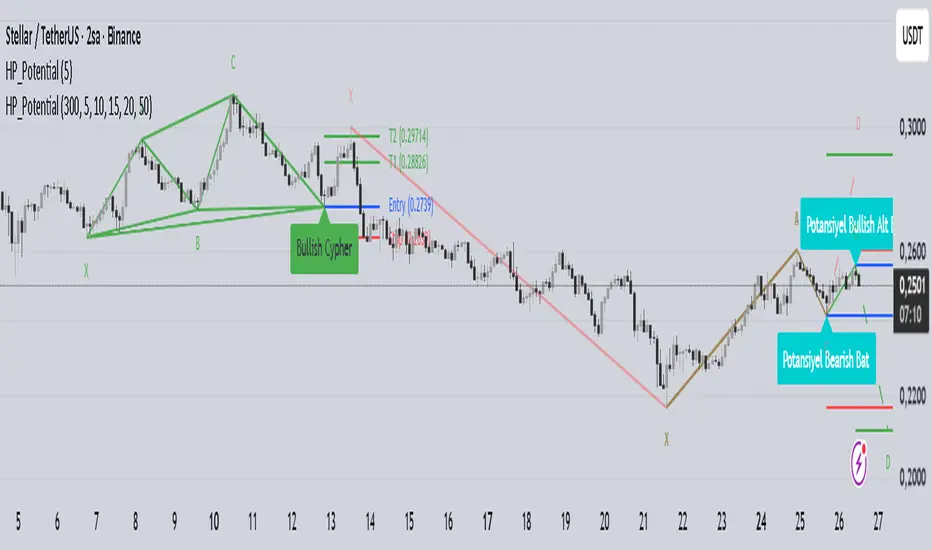
Harmonic Patterns with Potential DetectionThis indicator is designed to automatically detect commonly used Harmonic Patterns in financial markets and provide early warnings for "Potential" patterns that have not yet completed. It utilizes a Multi-ZigZag structure to analyze price movements across different timeframes simultaneously.
Key Features:
Advanced Pattern Detection:
Detects the following 8 harmonic patterns in both Bullish and Bearish directions:
Gartley
Bat
Alt Bat
Butterfly
Crab
Deep Crab
Shark
Cypher
Potential Pattern Detection (Early Warning System):
Calculates the probable D point (Entry Level) after the C point is formed, even before the pattern is fully completed, and visualizes it with dashed lines.
This feature allows traders to prepare and plan their trading strategies before the pattern completes.
Automatically plots Entry, Stop, and Target levels for potential patterns.
Multi-ZigZag Analysis:
Scans the market using 5 different ZigZag lengths (5, 10, 15, 20, 50). This allows you to see both short-term and long-term patterns on the same chart.
Each ZigZag period uses distinct color coding, making it easy to distinguish which timeframe a pattern belongs to.
User-Friendly Visuals:
Completed patterns are shown with clear lines and labels (X, A, B, C, D).
Hovering over pattern labels (Tooltip) displays detailed information including the pattern name, entry, target, and stop levels.
Only valid and active patterns are highlighted to prevent visual clutter.
Alert System:
You can set alerts for both completed patterns (when point D is formed) and potential patterns (when point C is formed).
Fully compatible with the TradingView alert system.
How to Use:
Add the indicator to your chart.
Select which patterns to scan for in the settings menu (all are selected by default).
Customize ZigZag sensitivities according to your strategy.
Dashed lines indicate "Potential" (uncompleted) opportunities, while solid lines indicate "Completed" patterns.
Disclaimer: This indicator is for educational and analytical purposes only. It does not constitute investment advice. Harmonic patterns are probability-based analysis methods and may not always yield successful results.
Analog Flow [KedArc Quant]Overview
AnalogFlow is an advanced analogue based market projection engine that reconstructs future price tendencies by matching current price behavior to historical analogues in the same instrument. Instead of using traditional indicators such as moving averages, RSI, or regression, AnalogFlow applies pattern vector similarity analysis - a data driven technique that identifies historically similar sequences and aggregates their subsequent movements into a smooth, forward looking curve.
Think of it as a market memory system:
If the current pattern looks like one we have seen before, how did price move afterward?
Why AnalogFlow Is Unique
1. Pattern centric - it does not rely on any standard indicator formula; it directly analyzes price movement vectors.
2. Adaptive - it learns from the same instrument's past behavior, making it self calibrating to volatility and regime shifts.
3. Non repainting - the projection is generated on the latest completed bar and remains fixed until new data is available.
4. Noise resistant - the EMA Blend engine smooths the projected trajectory, reducing random variance between analogues.
Inputs and Configuration
Pattern Bars
Number of bars in the reference pattern window: 40
Projection Bars
Number of bars forward to project: 30
Search Depth
Number of bars back to look for matching analogues: 600
Distance Metric
Comparison method: Euclidean, Manhattan, or Cosine (default Euclidean)
Matches
Number of top analogues to blend (1-5): Top 3
Build Mode
Projection type: Cumulative, MeanStep, or EMA Blend (default EMA Blend)
EMA Blend Length
Smoothness of the projected path: 15
Normalize Pattern
Enable Z score normalization for shape matching: true
Dissimilarity Mode
If true, finds inverse analogues for mean reversion analysis: false
Line Color and Width
Style settings for projection curve: Blue, width 2
How It Works with Past Data
1. The system builds a memory bank of patterns from the last N bars based on the scanDepth value.
2. It compares the latest Pattern Bars segment to each historical segment.
3. It selects the Top K most similar or dissimilar analogues.
4. For each analogue, it retrieves what happened after that pattern historically.
5. It averages or smooths those forward moves into a single composite forecast curve.
6. The forecast (blue line) is drawn ahead of the current candle using line.new with no repainting.
Output Explained
Blue Path
The weighted mean future trajectory based on historical analogues.
Smoother when EMA Blend mode is enabled.
Flat Section
Indicates low directional consensus or equilibrium across analogues.
Upward or Downward Slope
Represents historical tendency toward continuation or reversal following similar conditions.
Recommended Timeframes
Scalping / Short Term
1m - 5m : Short winLen (20-30), small ahead (10-15)
Swing Trading
15m - 1h : Balanced settings (winLen 40-60, ahead 20-30)
Positional / Multi Day
4h - 1D : Large windows (winLen 80-120, ahead 30-50)
Instrument Compatibility
Works seamlessly on:
Stocks and ETFs
Indices
Cryptocurrency
Commodities (Gold, Crude, etc.)
Futures and F&O (both intraday and positional)
Forex
No symbol specific calibration needed. It self adapts to volatility.
How Traders Can Use It
Forecast Context
Identify likely short term price path or drift direction.
Reversal Detection
Flip seekOpp to true for mean reversion pattern analysis.
Scenario Comparison
Observe whether the current regime tends to continue or stall.
Momentum Confirmation
Combine with trend tools such as EMA or MACD for directional bias.
Backtesting Support
Compare projected path versus realized price to evaluate reliability.
FAQ
Q1. Does AnalogFlow repaint?
No. It calculates only once per completed bar and projects forward. The future path remains static until a new bar closes.
Q2. Is it a neural network or AI model?
Not in the machine learning sense. It is a deterministic analogue matching engine using statistical distance metrics.
Q3. Why does the projection sometimes flatten?
That means similar historical setups had no clear consensus in direction (neutral expectation).
Q4. Can I use it for live trading signals?
AnalogFlow is not a signal generator. It provides probabilistic context for upcoming movement.
Q5. Does higher scanDepth improve accuracy?
Up to a point. More depth gives more analogues, but too much can dilute recency. Try 400 to 800.
Glossary
Analogue
A past pattern similar to the current price behavior.
Distance Metric
Mathematical formula for pattern similarity.
Step Vector
Difference between consecutive closing prices.
EMA Blend
Exponential smoothing of the projected path.
Cumulative Mode
Adds sequential historical deltas directly.
Z Score Normalization
Rescaling to mean 0 and variance 1 for shape comparison.
Summary
AnalogFlow converts the market's historical echoes into a structured, statistically weighted forward projection. It gives traders a contextual roadmap, not a signal, showing how similar past setups evolved and allowing better informed entries, exits, and scenario planning across all asset classes.
Disclaimer
This script is provided for educational purposes only.
Past performance does not guarantee future results.
Trading involves risk, and users should exercise caution and proper risk management when applying this strategy.

Auto Chart PatternsAuto Chart Patterns automatically scans the chart for major technical patterns and marks them directly on price action. It detects:
• Head & Shoulders (bearish reversal)
• Inverse Head & Shoulders (bullish reversal)
• Rising and Falling Wedges
• Double / Triple Tops and Bottoms
• Cup & Handle (bullish continuation)
For each pattern, the script draws the structure (trendlines / neckline), shades the pattern zone, and places a label with the pattern name.
It also generates optional trade signals:
• “BUY” when a bullish pattern breaks out with confirmation
• “SELL” when a bearish pattern breaks down with confirmation
Confirmations can include:
• Follow-through candle in the breakout direction
• Volume spike vs recent average
• RSI momentum agreement
Inputs let you control:
• Pivot sensitivity (left/right bars)
• Pattern types to display
• Cup & Handle depth rules
• Confirmation rules for entry/exit signals
This tool is designed to help you visually spot reversal and continuation setups, highlight potential breakout levels (necklines / wedge boundaries), and time trades with clearer confirmation instead of guessing.
Disclaimer: This script is for educational/technical analysis purposes only. It does not guarantee future performance, does not execute trades, and is not financial advice. Always confirm signals with your own analysis and risk management before entering any position.

Pattern DetectorPattern Detector
Identifies and summarizes common chart patterns on any symbol/timeframe. Shows a compact table of the most recent confirmed patterns (up to 6), optional candle coloring that matches table row colors, and optional targets for context. Designed for analysis support only.
What it detects
Triangles and wedges, flags and pennants, head & shoulders (and inverse), rectangles, channels, broadening formations, double/triple tops & bottoms, cup & handle (and inverse), rounding tops/bottoms, diamonds, bump & run, island reversals, staircase patterns, V patterns, gaps (up/down), pipe/spike patterns, harmonic ABCD, Elliott (simplified), three drives, Quasimodo, dead cat bounce, tower top/bottom, shakeout, and Wolfe waves.
Inputs
Lookback Mode: Auto or Manual (Manual Lookback bars)
Min Confidence to Confirm: threshold for confirmation
Display: Show Pattern Table, Show Pattern Numbers, Color Pattern Candles
Style: table row colors; bullish/bearish direction colors
Notes:
Candle coloring uses the table’s row colors and requires Show Pattern Table to be enabled.
Targets are approximate and for reference only.
Alerts
Pattern Confirmed
Pattern Target Reached
Important
Educational/information tool only; not a signal generator and not financial advice.
No performance guarantees. Use with other analysis and risk management.
Calculations update in real time; confirmations happen on closed bars. Detected patterns can change intrabar; use closed‑bar alerts for greater reliability.
Results may vary by symbol, timeframe, liquidity, and volatility.

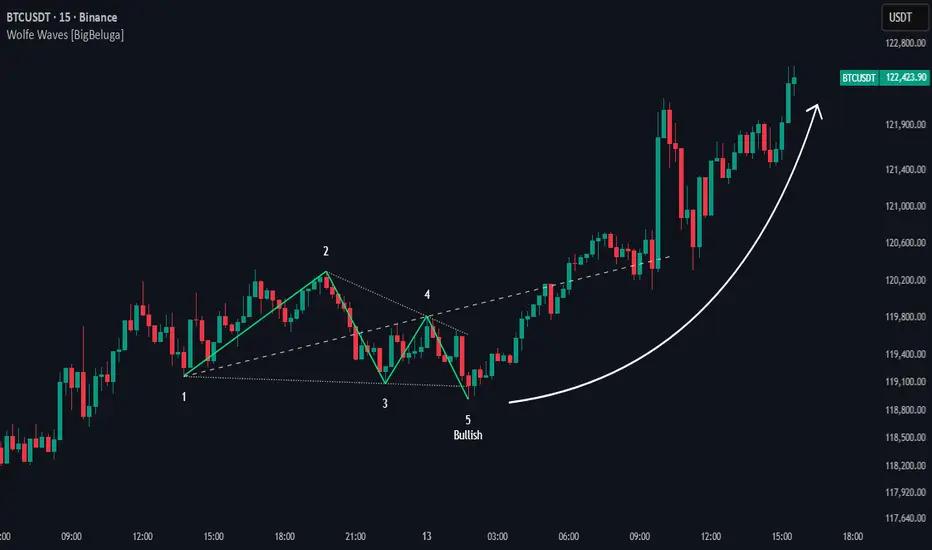
Wolfe Waves [BigBeluga]🔵 OVERVIEW
The Wolfe Waves pattern was first introduced by Bill Wolfe , a trader and analyst in the 1980s–1990s who specialized in market geometry and natural rhythm cycles. Wolfe observed that price often forms symmetrical wave structures that anticipate equilibrium points where supply and demand meet. These formations, called Wolfe Waves , gained popularity as a reliable pattern for forecasting both short- and long-term reversals.
The Wolfe Waves indicator automatically detects these patterns in real time. It tracks sequences of five pivots (points 1 through 5) and connects them with wave lines. Users can select either Bullish or Bearish Wolfe Waves depending on their trading bias. When the pattern fails, the lines automatically turn red to highlight invalidation.
🔵 CONCEPTS
Five-Point Structure – Wolfe Waves are defined by five pivots (1–5), which together form the basis of the wave pattern.
Bullish Pattern – Occurs when price compresses downward into point 5, signaling a potential upside reversal.
Bearish Pattern – Occurs when price extends upward into point 5, forecasting a downside reversal.
Validation & Failure – The pattern is considered valid once all five pivots form; if price fails to respect the expected breakout, the indicator marks the structure as broken with red lines.
🔵 FEATURES
Automatic detection of Bullish and Bearish Wolfe Waves.
Labels each pivot (1–5) on the chart for clarity.
Draws connecting lines between pivots to visualize the wave structure.
Projects target/dashed lines (EPA/ETA) based on Wolfe Wave geometry.
Lines automatically turn red when the pattern is broken, giving immediate feedback.
Customizable color scheme for bullish (lime) and bearish (orange) waves.
Adjustable sensitivity for pivot detection.
🔵 HOW TO USE
Choose between Bullish or Bearish mode depending on your analysis.
Watch for the formation of all five pivots; the indicator labels them clearly.
Look for potential entries near point 5, with the expectation that price will travel toward the projected EPA line.
Use invalidation (lines turning red) as a risk management warning to exit failed setups.
Combine with momentum, volume, or higher-timeframe analysis to increase reliability.
🔵 CONCLUSION
The Wolfe Waves brings the classic Wolfe Wave theory into an automated TradingView tool. Inspired by Bill Wolfe’s original concept of natural market cycles, this indicator detects, labels, and validates Wolfe Waves in real time. With automatic invalidation marking and customizable settings, it offers traders a structured way to harness one of the most well-known geometric reversal patterns.
ADR% / CDR% Range Analyzer - PajameinThe "ADR%/CDR% Range Analyzer" is a versatile TradingView indicator designed for traders who want to monitor and compare the "Average Daily Range (ADR%)" and "Current Daily Range (CDR%)" in real-time. ADR% represents the average percentage range (high-low relative to low) over a user-defined number of daily bars, helping you gauge a stock's typical volatility. CDR% shows the current session's range as a percentage, either intraday (customizable from start to end price) or full daily, allowing you to assess how the current bar's movement stacks up against historical norms.
Key features include:
- "Visual Comparison": Displays both values as clean labels on the chart with customizable positions (separate or combined).
- "Dynamic Background Coloring": CDR% label background changes color based on its relation to ADR%—light green for low volatility (< low threshold), light blue for neutral (between thresholds), and light red for high volatility (> high threshold). This helps quickly spot expansion or contraction in daily moves.
- "Flexibility": Works on any timeframe, with options for intraday customization and anti-clipping adjustments for multi-pane layouts.
This indicator is ideal for day traders, swing traders, or anyone tracking volatility breakouts, range-bound setups, or risk management based on expected daily moves.
Input Settings Guide
Here's a breakdown of each setting and how it enhances your trading workflow:
- "Show ADR%" (Boolean, default: true)
Toggle to display/hide the ADR% label. Use this to declutter your chart when focusing solely on current range.
- "Show CDR%" (Boolean, default: true)
Toggle to display/hide the CDR% label. Ideal for charts where you only need historical average or current metrics.
- "ADR% Length" (Integer, default: 20, min: 1)
Number of daily bars for averaging the range percentage. Shorter lengths (e.g., 10) for recent volatility; longer (e.g., 50) for broader trends.
- "CDR%: Start" (Source, default: low)
Starting price for intraday CDR% (e.g., open, previous close). Customize for specific range measurements like gap fills.
- "CDR%: End" (Source, default: high)
Ending price for intraday CDR% (e.g., low, close). Pair with Start for targeted ranges, like open-to-low for downside capture.
- "Intraday Display" (String dropdown: "Intraday CDR%", "Daily CDR%", default: "Daily CDR%")
Switch between real-time intraday calculation (dynamic updates) or fixed daily value (stable, non-repainting).
- "Low Threshold %" (Float, default: 40.0, range: 0-100)
Percentage of ADR% below which CDR% gets the low (green) background. Lower it (e.g., 30%) for stricter low-volatility alerts.
- "High Threshold %" (Float, default: 60.0, range: 0-100)
Percentage of ADR% above which CDR% gets the high (red) background. Raise it (e.g., 70%) to highlight only extreme expansions.
- "ADR% Text Color" (Color picker, default: black)
Foreground color for ADR% text. Choose contrasting colors for dark/light themes.
- "CDR% Text Color" (Color picker, default: black)
Foreground color for CDR% text. Ensures readability over dynamic backgrounds.
- "Low CDR% Background (below low threshold)" (Color picker, default: light green with 70% transparency)
Background for subdued ranges. Adjust opacity for subtlety.
- "Mid CDR% Background (between thresholds)" (Color picker, default: light blue with 70% transparency)
Neutral background for typical moves.
- "High CDR% Background (above high threshold)" (Color picker, default: light red with 70% transparency)
Alert-style background for breakouts.
- "Cell Height %" (Integer, default: 8, range: 1-20)
Vertical padding for labels as a percentage of chart height. Increase (e.g., 12) in multi-pane layouts to prevent text clipping; decrease for compact views.
- "ADR% Position" (String dropdown: Top/Bottom/Middle Left/Right/Center, default: Bottom Right)
Placement of ADR% label. Use separate positions for side-by-side comparison.
- "CDR% Position" (String dropdown: Top/Bottom/Middle Left/Right/Center, default: Bottom Right)
Placement of CDR% label. Matching positions auto-stacks them vertically.
- "Text Size" (String dropdown: Tiny/Small/Normal/Large, default: Normal)
Font size for labels. "Small" for dense charts; "Normal" for clarity.
Usage Tips
- "Volatility Trading": Set thresholds to 50%/80% for spotting range expansions during news events.
- "Multi-Timeframe": Apply on 5-min charts with daily ADR for intraday targets (e.g., aim for 80% of ADR).
- "Customization": For forex/crypto, tweak Start/End to session opens. Test in replay mode to verify non-repainting.
- "Limitations": Intraday mode updates live but may not repaint until bar close; daily mode is fixed.

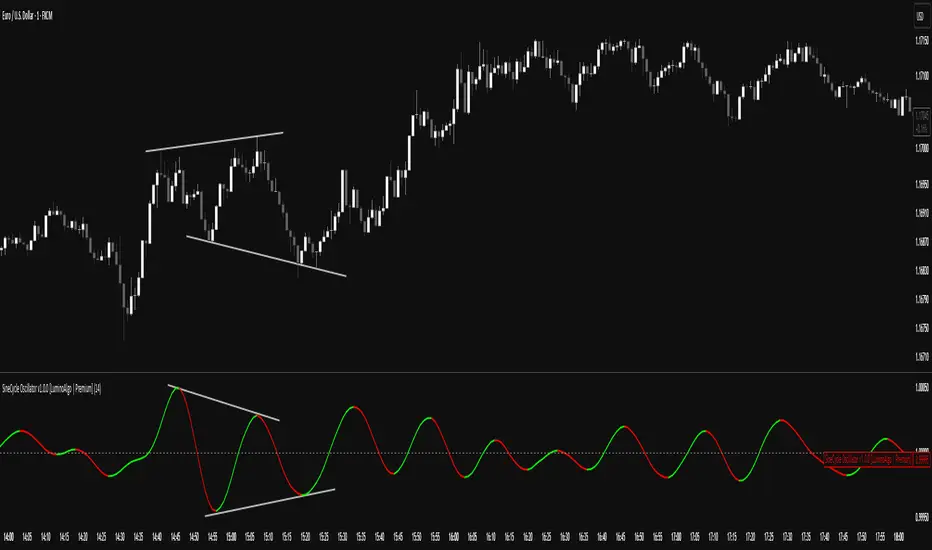
SigmoidCycle Oscillator [LuminoAlgo]Purpose:
The SineCycle Oscillator measures price momentum using sigmoid function mathematics (S-curve transformation) borrowed from neural network theory. It generates an oscillator that fluctuates around 1.0, identifying momentum shifts and potential reversal points.
Mathematical Foundation:
This indicator applies the sigmoid logistic function concept: y = 1/(1+e^-x) , which creates an S-shaped curve. In financial markets context, this transformation:
- Maps price changes to a bounded range (-1 to +1)
- Provides non-linear sensitivity (high near zero, low at extremes)
- Naturally filters outliers without lag penalty
Calculation Process:
1. Statistical Normalization: Price deviations are measured from a moving average baseline and scaled by recent volatility (standard deviation over N periods)
2. Sigmoid Transformation: Normalized values undergo S-curve transformation, which weights small movements linearly but compresses large movements logarithmically
3. Dual Timeframe Analysis:
• Short window: User-defined period (N)
• Long window: Double period (2N)
• Ratio calculation: Short sigmoid average ÷ Long sigmoid average
4. Volatility-Weighted Smoothing: Final values use exponential smoothing where the smoothing factor adjusts based on the coefficient of variation (volatility/mean ratio)
What Makes This Different:
Unlike linear momentum oscillators (RSI, Stochastic) that use fixed mathematical relationships, the sigmoid transformation creates variable sensitivity zones. This mimics how professional traders mentally weight price movements.
Trading Application:
Signal Types:
- Momentum: Green (>1.0) = bullish, Red (<1.0) = bearish
- Reversals: 1.0 line crosses with volume confirmation
- Divergence: Price makes new high/low, oscillator doesn't
- Exhaustion: Extended readings (>1.2 or <0.8) suggest overextension
Optimal Conditions:
- Works best: Trending markets with clear swings
- Avoid: Low volume, ranging markets under 1% daily movement
- Timeframes: 4H and above for reliability
Parameter Guidelines:
- Length 8-10: Day trading (expect more whipsaws)
- Length 14-20: Swing trading (balanced signals)
- Length 25-30: Position trading (fewer, stronger signals)
Limitations:
- Lag increases with higher length settings
- Can give false signals during news-driven spikes
- Requires additional confirmation in choppy markets
Trading Framework:
Based on momentum persistence theory - assumes trends continue until sigmoid curve flattens (indicating momentum exhaustion). The mathematical model captures both mean reversion (extreme readings) and trend following (mid-range readings) characteristics.
Intelligent Trading SuiteIntelligent Trading Suite
“One script to rule them all.”
Overview
The Intelligent Trading Suite is a professional-grade decision system built in Pine Script. It is a unified engine—not a bundle of indicators—that combines adaptive pattern recognition, historical memory, and multi-context intelligence into one framework. Using a deep historical pattern database and integrating session dynamics, market calendars, holiday effects, and economic events, it filters noise and adapts to conditions. Core emphasis: precise pattern detection with target-price projection that remains stable as new candles print (mitigates target drift) and early detection of forming geometric patterns and divergences/hidden divergences.
Core Features
All-Timeframe Operation: Works across every TradingView timeframe—from 1m to 1W—without performance drift.
Pattern Recognition with Targets: Detects triangles, wedges, cup & handle, flags, and H&S; projects targets and stabilizes them against common drift as price evolves.
Early Signal Engine: Flags forming patterns and divergences before completion and notifies when prerequisites align.
Historical Pattern Intelligence: Stores and compares thousands of prior states (Hull, VWAP, RSI, MACD, SMA, CVD) to weight current conditions and calibrate confidence.
Context & Regime Awareness: Adjusts for volatility regimes, liquidity sessions, day-of-week bias, holidays, and macro events.
Unified Signal & Confidence: Fuses all streams into a single Overall signal with calibrated confidence levels (Weak / Neutral / Strong).
Visualization & Alerts
Compact Ultimate Intelligence Table showing each analytical pillar, plus the Overall signal, and an option to show them on the chart as well.
Alerts on table for: new pattern detection, divergence events, volatility shifts, and trend reversals.
Important Notes
-Free plan runtime: TradingView Free accounts may hit platform limits.
Fix: Open settings → switch Mode from Paid to Free → runs within Free limits.
-Heavy computation: The script is calculation- and data-intensive; initial runs can take time.
If a rare runtime error occurs, simply reload the page and continue.
Attributions
Hull Moving Average (Alan Hull)
VWAP (Volume Weighted Average Price)
RSI (Relative Strength Index, J. Welles Wilder Jr.)
MACD (Moving Average Convergence Divergence, Gerald Appel)
Black Flag ATR bands (Jose Azcarate)
Proprietary enhancements, target-stabilization logic, and the nuclear intelligence architecture are original research for this suite.
Compliance
Educational and analytical use only
No financial advice
Ad-free; aligned with TradingView House Rules
Proper attribution included
Access
To get access, please read the Author’s instructions on the script’s page.
