Vix FIX dotsDescription
Vix FIX Dots is a momentum and volatility-based trend-following tool. It combines the classic Williams VIX Fix logic with Stochastic and RSI filters to identify high-probability reversal points and trend exhaustion.
Unlike the standard VIX Fix which is often displayed in a separate pane, this script overlays signals directly onto your chart as colorful dots to simplify the decision-making process.
How it Works
The script calculates the "Synthetic VIX" (Williams VIX Fix) to find market bottoms and volatility peaks. To reduce noise and false signals, it incorporates price action filters and trend-strength lookbacks.
Signal Guide
The indicator plots four distinct types of dots:
Green Circle (Below Bar): Filtered Long Entry. This represents a standard buy signal where volatility has peaked and price action confirms a move up.
Blue Circle (Below Bar): Aggressive Long Entry. A faster signal for traders looking to catch a move earlier, based on multi-candle lookbacks.
Red Circle (Above Bar): Filtered Exit/Short. Indicates a standard trend exhaustion point.
Orange Circle (Above Bar): Aggressive Exit/Short. A faster signal indicating the trend may be rolling over.
Key Features
Volatility Bands: Uses Bollinger Bands and Percentile calculations on the VIX Fix to identify extreme exhaustion.
Price Action Filter: Signals only trigger if the current close outperforms a user-defined number of previous bars.
Customizable Lookbacks: Fully adjustable settings for Stochastic and RSI filters to match your specific timeframe (M5, H1, D1, etc.).
隨機震盪指標(KD)

Multi-timeframe RSI & Stochastic dashboard with visual gradient █ OVERVIEW
The MTF RSI + Stochastic Dashboard displays RSI and Stochastic values across 6 customizable timeframes in a compact, visual format. Instead of switching between charts or opening multiple indicator windows, see all your momentum data at a glance.
This indicator combines two of the most popular oscillators (RSI and Stochastic) and shows you where they agree—and where they don't.
█ FEATURES
- 6 Customizable Timeframes — Default: 1m, 5m, 15m, 1H, 4H, Daily (fully adjustable)
- Combined RSI + Stochastic Signal — Shows agreement between both indicators
- Visual Gradient Meters — Left side = Stochastic, Right side = RSI
- Color-Coded Status — OB (Overbought), OS (Oversold), Bull, Bear, S.Bull (Strong Bull), S.Bear (Strong Bear), Mixed
- Overall Trend Bias Bar — Shows percentage of timeframes bullish vs bearish
- Built-in Alerts — Trigger when all timeframes align or reach 80%+ agreement
- Fully Customizable — Colors, position, scale, spacing all adjustable
█ HOW TO READ IT
ROW 1 - TIMEFRAME
Shows which timeframe each column represents.
ROW 2 - COMBINED VALUE
The average of RSI and Stochastic for that timeframe. Color indicates the current state.
ROW 3 - STATUS
- OB = Both RSI and Stochastic overbought (>70/80)
- OS = Both RSI and Stochastic oversold (<30/20)
- Bull = Both indicators bullish (>50)
- Bear = Both indicators bearish (<50)
- S.Bull = Strong bullish (one OB, one Bull)
- S.Bear = Strong bearish (one OS, one Bear)
- Mixed = Indicators disagree
ROW 4 - GRADIENT METERS
Visual representation of RSI (right half) and Stochastic (left half) levels.
- Purple/Magenta = Overbought zone
- Green = Bullish zone
- Yellow/Orange = Neutral zone
- Red = Bearish zone
- Cyan = Oversold zone
BOTTOM BAR - TREND BIAS
Shows overall market bias based on all 6 timeframes.
- STRONG BULL = 70%+ timeframes bullish
- BULL = 55%+ timeframes bullish
- STRONG BEAR = 70%+ timeframes bearish
- BEAR = 55%+ timeframes bearish
- MIXED = No clear direction
█ HOW TO USE IT
CONFLUENCE TRADING
Look for multiple timeframes showing the same status. When 4+ timeframes agree, the signal is stronger.
DIVERGENCE SPOTTING
If lower timeframes show bearish while higher timeframes show bullish, price may be pulling back in an uptrend—potential buy opportunity.
OVERBOUGHT/OVERSOLD EXTREMES
When multiple timeframes hit OB or OS together, watch for potential reversals.
TREND CONFIRMATION
Use the bias bar to confirm your directional bias before entering trades.
█ SETTINGS
RSI Settings
- Length, Source, OB/OS levels
Stochastic Settings
- %K Length, %K Smoothing, %D Smoothing
- Choose to display %K or %D
- OB/OS/Mid/Zero levels
Timeframes
- 6 fully customizable slots
Layout
- Position offset, scale, box sizing, spacing
Colors
- Full control over all visual elements
█ ALERTS
- All Timeframes Bullish — Triggers when all 6 show bullish
- All Timeframes Bearish — Triggers when all 6 show bearish
- Strong Bullish Alignment — Triggers at 80%+ bullish
- Strong Bearish Alignment — Triggers at 80%+ bearish
█ BEST WAY TO DISPLAY THIS INDICATOR
For optimal viewing, follow these steps:
1. ADD THE INDICATOR
• Keep all settings at default — they're optimized for immediate use
2. SCALE YOUR CHART
• Right-click on the price scale (right side of chart)
• Select "Reset Price Scale" or double-click the price scale
• Use your mouse scroll wheel on the price scale to zoom OUT vertically
• This enlarges the indicator relative to the price action
3. POSITION ADJUSTMENT (if needed)
• Vertical Offset: Increase if indicator overlaps candles
• Horizontal Offset: Move left/right to your preference
• Overall Scale Size: Increase for larger display (default 2.0)
4. CHART SHIFT (recommended)
• Enable "Shift Chart" at the bottom-right of TradingView
• This gives the indicator room on the right side of your chart
PRO TIP: The indicator scales with your visible price range. Zoom out on the price scale (not the time scale) to make the dashboard larger and easier to read.
█ NOTES
- Non-repainting: Uses confirmed bar data for calculations
- Overlay indicator: Displays directly on your price chart
- Compatible with all markets and timeframes
- Free to use — part of the XRayTrade indicator collection
█ CREDITS
Developed by XRayTrade

Stacked 3 Stochastics [Wonniewant]Stacked 3 Stochastics
This indicator is designed for traders who need multi-timeframe momentum analysis in a single, compact view. Instead of cluttering your screen with three separate oscillator panes, this script stacks three Stochastic Oscillators vertically within one panel using an offset technique.
It provides a clear hierarchy of market momentum, from slow trends to fast execution signals, without overlapping lines.
Key Features:
Triple Layered View (Stacked):
Top Layer (Slow): Default 20-12-12. Best for identifying major trend direction and reversals.
Middle Layer (Medium): Default 10-6-6. Acts as a bridge between the trend and entry signals.
Bottom Layer (Fast): Default 5-3-3. Ideal for pinpointing precise entry and exit timing.
Clean Visualization:
Each Stochastic has its own dedicated zone (0-100, 125-225, 250-350), so the lines never get messy or confused.
Reference Lines: Clearly marked 80 (Overbought) and 20 (Oversold) levels for each individual layer directly on the chart.
Separators: Distinct white lines separate the layers for better readability.
Full Customization:
Toggle visibility for any layer.
Customize K & D Lengths, Smoothness, Colors, and Line Widths for each Stochastic independently via the settings menu.
How to Use:
Top Layer (Slow): Watch for crosses in the overbought/oversold zones to gauge the overall market sentiment.
Bottom Layer (Fast): Use for short-term trade execution when aligned with the upper layers.
Divergence: Compare the three layers to spot momentum divergence across different time horizons.
Author: Wonniewant

ChromaFlows Momentum Index - Consensus Engine V1.2ChromaFlows Momentum Index — Conceptual Description
Overview
ChromaFlows Momentum Index is a momentum-analysis tool designed to evaluate trend quality and directional agreement by combining multiple oscillators into a single consensus-based system.
Rather than displaying independent signals from separate indicators, this script produces output only when all internal engines align, filtering out conflicting or low-quality momentum conditions.
The goal is not to generate standalone trading signals, but to provide a clear visual representation of momentum consensus and regime strength.
Conceptual Architecture
The indicator is built around three momentum engines, each assigned a distinct functional role:
Slow Stochastic — acts as the primary momentum baseline, defining the broader overbought/oversold context.
Fast Stochastic — functions as a short-term acceleration filter, detecting rapid changes in momentum relative to the baseline.
RSI — serves as a regime validator, confirming whether momentum conditions are stable enough to be considered directional.
These components are not averaged or displayed independently.
Each engine is conditionally dependent on the others.
Interaction & Consensus Logic
ChromaFlows uses a strict consensus model:
A directional state is produced only when all momentum engines agree on direction.
If even one engine diverges, the system suppresses directional output and enters a neutral state.
This logic prevents partial or conflicting momentum signals from being displayed and reduces noise commonly produced by single-indicator oscillators.
The resulting output represents agreement quality, not raw oscillator values.
Visual Output & Interpretation
The main oscillator wave represents the current momentum state derived from the consensus logic:
Bullish Consensus — all engines aligned to the upside
Bearish Consensus — all engines aligned to the downside
Neutral State — disagreement or low-quality momentum
Additional visual elements (signal markers and trend filters) are derived from the same internal state, providing contextual confirmation rather than independent signals.
These visuals are intended to help users interpret momentum context, not to automate execution.
Originality & Purpose
This script is not a visual mashup of existing indicators.
Its output cannot be replicated by observing the individual components separately, as the system’s behavior depends on conditional interaction and suppression logic between engines.
By requiring full agreement before displaying momentum states, ChromaFlows emphasizes momentum clarity over signal frequency, making it suitable as a contextual analysis layer within broader trading frameworks.
Usage Notes
ChromaFlows Momentum Index is a visual analysis tool designed to assist with market interpretation.
It does not provide investment advice or guarantee outcomes and should be used in conjunction with other forms of analysis and risk management.
Version Notes (V1.2)
• Expanded divergence detection logic added for SMI line for improved momentum context
• Minor internal optimizations and code refinements

Gold Sniper V21 + ATR (SMART FILTER)This is the Indicator to combine my Gold Sniper V21 + ATR Filter
How to use the Indicator :
- Recommend to use in M30 Chart.
- Very simple just follow the BUY/SELL Signal once appear. This indicator I try to filter as much as I can for the fake signal.
- Feel free to comment if you found any need to improve

Williams %RDescription
This is a modified version of the classic Williams %R oscillator, adapted for markets with defined trading sessions (e.g., FTSEMIB, DAX, US stocks, etc.). It adjusts the lookback period based on the actual trading session length, making it more accurate on intraday timeframes.
Key Features
Session Adjustment:
Automatically scales the period to trading days (default: 8.5 hours for FTSEMIB, DAX, CAC; customizable for any market).
Formula (classic Williams %R):
%R = 100 × (Close - Highest High) / (Highest High - Lowest Low)
over a user-defined period (default 14 days).
Standard Levels:
-20 (overbought)
-50 (middle line)
-80 (oversold)
Visual Enhancements:
- Customizable colors for the line, levels, and background fill
- Shaded overbought/oversold zone
How to Use:
Overbought (above -20):
Potential sell signal or reversal (especially after a prolonged uptrend).
Oversold (below -80):
Potential buy signal or reversal (especially after a downtrend).
Divergences:
Look for bullish/bearish divergences between price and %R for early reversal warnings.
Best Markets:
Indices (FTSEMIB, DAX, SPX), stocks, futures. For 24/7 markets (crypto), set session duration to 24 hours.
Timeframes:
Works on intraday (15m, 1h, etc.) and daily charts.
Customization Tips:
- Adjust the period (shorter = more sensitive, longer = smoother).
- Change session duration for different markets.
- Customize colors to match your chart theme.
Note: Williams %R is a momentum oscillator and should be used in combination with other tools (trendlines, support/resistance, volume). Always practice proper risk management.

Composite Index [Auto Signals]Composite Index
Description (描述正文):
Overview This is an enhanced version of the famous Composite Index (CI) developed by Connie Brown. While the traditional RSI is confined between 0 and 100, often masking true momentum in strong trends, the Composite Index is uncapped and incorporates a momentum component to reveal the market's true structural strength.
I have engineered this script to include Automated Signal Markers based on the crossover of the Composite Index and its Slow Moving Average. This helps traders instantly identify momentum shifts and "Timing" entries/exits without manual guesswork.
Key Features
Uncapped Momentum: Unlike RSI, the CI can go anywhere, preventing the "flattening" effect seen in strong trending markets (e.g., TSLA, NVDA).
Automated Signals:
▲ Green Triangle (Launch): Triggers when the Gray CI line crosses ABOVE the Red Slow MA. This indicates bearish momentum is exhausted and bulls are regaining control.
▼ Red Triangle (Warning): Triggers when the Gray CI line crosses BELOW the Red Slow MA. This indicates bullish momentum is failing, serving as an early warning for exits or tightening stops.
Classic Formula: Uses the standard Connie Brown parameters (14, 9, 3) + SMA smoothing for reliable divergence detection.
How to Use This Indicator This script is best used as a companion to trend indicators like TTM Squeeze or Moving Average Ribbons.
For Entries (The "Dip Buy"): In an uptrend, wait for a pullback. When the Green Triangle (▲) appears, it confirms that the pullback is over and momentum has turned back up.
For Exits (The "Top"): Look for Divergence. If Price makes a Higher High but the Composite Index makes a Lower High—followed by a Red Triangle (▼)—this is a high-probability sell signal.
The "Slow MA" Filter: The signals are generated only when the CI crosses the Slow MA (Red Line). This filters out the noise of minor fluctuations (crossing the Green line) and focuses on significant momentum changes.
Settings
RSI Period: 14 (Default)
Momentum Period: 9 (Default)
Signal Logic: Crossover/Crossunder of the Slow MA (33 Period).
Disclaimer This tool is for educational purposes only. Always combine momentum signals with price action and structure analysis.

Mini RSI+STOCH-RSI+RSI-DIVERGENCE @Marx_CapitalMini version of RSI + STOCHASTIC-RSI with RSI-Divergence detection - all in one, adjustable small table overlayed on your chart. The table box gives RSI and Stoch-RSI values and signals detected RSI divergences.
Uncheck 'Update only on bar close' in indicator settings if the box does not appear right away.

RSI + STOCH RSI - Marx_CapitalSimple RSI + STOCH RSI indicator in one pane. In addition to the standard 30/70 and 20/80 RSI levels you have three adjustable levels (eg. 0, 50, 100) to indicate STOCH RSI overbought/oversold scenarios.

Gold Sniper V21: M15 Holding MasterGold Sniper Entry (Follow Trend to enter)
My Indicator :
- Clarify the M30 in Up/Down Trend
- Only entry the trade in M1/M5 Timeframe to make a Sniper Entry.
- Indicator will show when to TP before the Trend Change

Rahul Prakash's BUY/SELL signal for momentum tradeBuy or Sell signal with just on one confirmation candle.
Show a Buy singal then wait for the confirmation candle, is a strong Buy signal.
Show a Sell singal then wait for the confirmation candle, is a strong Sell signal.
You can use as a free version and earn money. Please are taking lots of price for this type of indicator.

VCAI Stochastic RSI+VCAI Stoch RSI+ is a cleaned-up Stochastic RSI built with V-Core colours for faster, clearer momentum reads and more reliable OB/OS signals.
What it shows:
Purple %K line → bearish momentum strengthening
Yellow %D line → bullish momentum building and smoothing
Soft purple/yellow background bands → OB/OS exhaustion zones, not just raw 80/20 triggers
Midline at 50 → balance point where momentum shifts between bull- and bear-side control
Optional HTF mode → run Stoch RSI from any timeframe while viewing it on your current chart
How to read it:
Both lines rising out of OS → early bullish shift; pullbacks that hold direction favour continuation
Both lines falling from OB → early bearish shift; bounces into the purple OB zone can become fade setups
Lines stacked and moving together → strong, cleaner momentum
Lines crossing repeatedly → low-conviction, choppy conditions
OB/OS shading highlights exhaustion so you focus on moves with context, not every 80/20 tick
Why it’s different:
Classic Stoch RSI is hyper-sensitive and mostly noise.
VCAI Stoch RSI+ applies V-Core’s colour-driven regime logic, controlled OB/OS shading, and optional HTF smoothing so you see momentum structure instead of clutter — making it easier to judge when momentum is genuinely shifting and when it’s just another wiggle.

DSS Bressert (Double Smoothed Stochastic) Mid point (H+L)/2Changed source to midpoint (High+Low)/2 instead of Close for a cleaner average.

4x Stochastic Combo - %K only4x Stochastic Combo in one indicator.
Default parameters: (9, 3, 3), (14, 3, 3), (40, 4, 4), (60, 10, 10)
Only %K is shown.
Possibility to set alerts "all above 80" or "all below 20".
How to use:
Look for divergence after getting an alert for good quality signals. Connect the stochastic signals with multi-timeframe analysis.


REMS - Deep SynergyThis is a more flexible version of the REMS Synergy indicator. Like other indicators in the REMS family, it builds upon the foundations assessing the relationships between RSI, EMAs, MACDs, and Stochastic RSI across multiple timeframes. Designed to help traders identify less frequent, but high probability entries across 2 time frames. Uses 3 levels of confluence indicators for both long and short moves.
Features 3 levels of confluence across 2 timeframes. All 3 levels allow filtering of any combination of REMS filters. Features more options and customization than previous REMS Synergy.
Includes VWAP and 4 EMAs as optional visual representations.
Includes 'Enhanced Candles' than can colour code candlesticks for better visual identification. (off by default)
Originally designed with 5 minute and 2 minute timeframes in mind, and pairs well with REMS First Strike and/or REMS Snap Shot indicators.
This version features no hard-coded inputs and allows for more freedom than previous version. With the added flexibility comes the ability for the indicator to be more easily stacked.

Stochastic Average (2 TFs)“Stoch (2 TFs)” plots two separate Stochastic oscillators from two different timeframes in a single pane and adds an average line of all four values (%K and %D from each timeframe). It is designed to quickly compare short-term vs higher-timeframe momentum and see whether they are aligned or diverging.
The script is an overlay-off oscillator, so it appears in its own window under the price chart.
How it works
The indicator calculates a classic Stochastic (%K and %D) on two user-selectable timeframes:
tf1 (default 30 minutes)
tf2 (default 60 minutes)
For each timeframe it:
Requests the high, low and close series from that timeframe using request.security.
Computes %K as the smoothed position of the close within the lookback high/low range.
Computes %D as a moving average of %K.
So you get four lines in total:
K1 and D1 from timeframe 1
K2 and D2 from timeframe 2
A small table in the top-right of the pane shows which timeframes are currently selected for TF1 and TF2, so you always know what you are looking at even if you change the chart timeframe.
Inputs
%K Length – lookback period used to find highest high and lowest low.
%K Smoothing – smoothing length for the %K line.
%D Smoothing – smoothing length for the %D line.
30 (tf1) – first Stochastic timeframe (default 30m).
%K Color (1) / %D Color (1) – colors for K1 and D1.
60 (tf2) – second Stochastic timeframe (default 60m).
%K Color (2) / %D Color (2) – colors for K2 and D2.
Average Color – color for the current bar average line.
Average Prev Color – color for the previous-bar average line.
You can put this indicator on any chart timeframe; the internals always use the two selected timeframes via request.security.
Visual elements
The pane shows:
Four Stochastic lines:
K1 and D1 (for tf1), K2 and D2 (for tf2), using the input colors.
Three horizontal reference levels:
80 (upper band), 50 (middle), 20 (lower band).
A light blue background band between 80 and 20 to make the overbought/oversold zone easier to see visually.
A 2-cell table in the top-right with the current values of tf1 and tf2.
These elements make it easy to see when each timeframe is overbought, oversold, or in the middle zone, and whether the two timeframes are synchronized or showing divergence.
Average and previous-average lines
At the bottom of the script there is a simple composite measure:
Sum KD adds K1 + D1 + K2 + D2 and divides by 4.
Prev Sum KD does the same for the previous bar ( ).
Both are plotted as separate lines:
Sum KD – current bar average of all four Stochastic values (main composite).
Prev Sum KD – previous bar average (for comparison).
This makes it easy to see whether overall multi-timeframe Stochastic momentum is increasing or decreasing from bar to bar without having to visually average four separate curves.
How to use
Typical uses:
See short- vs higher-timeframe Stochastic at a glance and trade only when they agree.
Look for divergence between TF1 and TF2 (e.g., lower timeframe overbought while higher timeframe still neutral).
Use the average lines (Sum KD and Prev Sum KD) as a simple “multi-TF momentum gauge” for confirmations or filters.
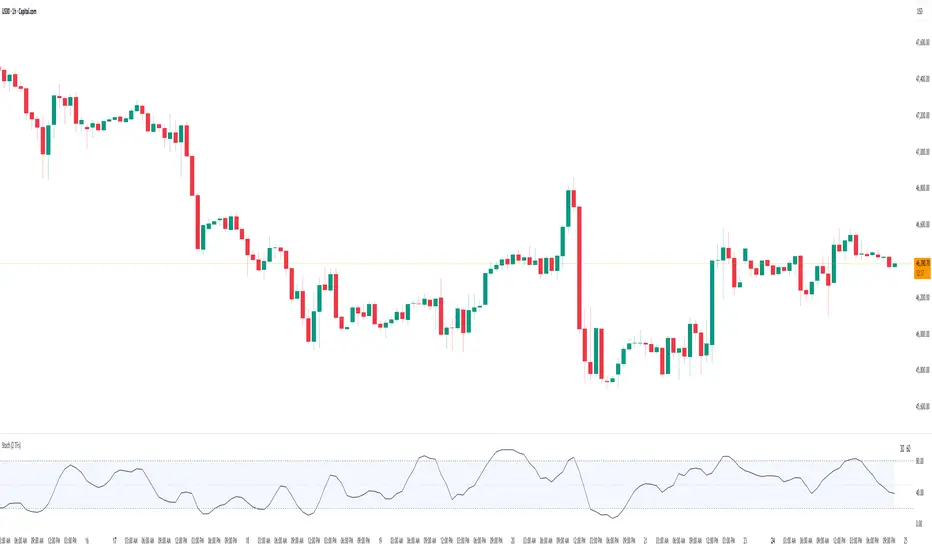
SMI 30m With Built-in Divergence AlertsStochastic Momentum Index SMI 30m is a simplified, single-timeframe Stochastic Momentum Index (SMI) designed for traders who want a clean momentum oscillator with clear crossover signals and automatic higher-timeframe filtering.
This version is locked to a 30-minute timeframe, making it consistent across any chart you place it on.
The script plots:
SMI Blue Line – the main momentum line
SMI Orange Line – the signal line (EMA-smoothed)
Overbought / Oversold regions
Optional colored background zones that highlight strong momentum extremes
Both the Blue and Orange plots are fully exposed, allowing users to manually create TradingView alerts for crossovers.
Additionally, the script includes two built-in alert conditions for traders who prefer automatic signals.
How the SMI is calculated
This script uses a double-EMA smoothing method to stabilize momentum:
Highest and lowest price ranges are calculated over the selected %K period.
Relative position of price inside that range is computed.
A double EMA is applied to both the range and the midpoint offset.
The SMI result is scaled to ±200 for clarity.
The Signal Line is a single-EMA applied to the SMI.
These parameters can be adjusted:
%K Length
%D Length
EMA Length
The default values match traditional 13-3-3 SMI settings.
Visual Components
1. SMI Blue Line
Represents the primary momentum movement.
Values above 40 indicate positive momentum; values below −40 indicate negative momentum.
2. SMI Orange Line
Acts as a smoothing signal line.
Crossovers between Blue and Orange often indicate momentum shifts.
3. Overbought / Oversold Zones
+40 = overbought boundary
−40 = oversold boundary
These levels help identify exhaustion points.
4. Gradient High/Low Zones
The script includes colored fill zones above +40 and below −40 to visually highlight extreme momentum regions.
Built-In Alerts
The indicator includes two pre-configured alert conditions:
1. Bearish Cross (Overbought)
Triggers when:
The Blue SMI crosses below the Orange SMI
AND the Blue SMI value is above 80
This represents a potential bearish divergence or momentum reversal from extreme highs.
Alert title:
SMI Bearish Cross
2. Bullish Cross (Oversold)
Triggers when:
The Blue SMI crosses above the Orange SMI
AND the Blue SMI value is below −80
This represents a potential bullish divergence or reversal from extreme lows.
Alert title:
SMI Bullish Cross
How to Use Alerts
After adding the indicator to your chart:
Open the Alerts panel
Select Condition → SMI (1 TF) 30m
Choose either:
SMI Bearish Cross
SMI Bullish Cross
Set your preferred trigger method:
Once per bar close
Once per bar
Once per minute
Create the alert
Traders can also manually create alerts for:
Blue crossing above Orange
Blue crossing below Orange
Because both plots are fully exposed.
Purpose
This indicator is intended for traders who want a stable, single-timeframe SMI with:
Clear structure
Extreme-zone highlighting
Exposed plots for custom alerts
Built-in reversal alerts
Consistent 30-minute TF regardless of chart
It can be used for:
Identifying trend reversals
Detecting momentum exhaustion
Confirming entries/exits
Spotting early divergence signals

Stochastic BTC OptimizedEnhanced Stochastic for Bitcoin (BTC) – Optimized for Daily Timeframe
This enhanced Stochastic oscillator is specifically fine-tuned for BTC/USD on the 1D timeframe, leveraging historical data from Bitstamp (2011–2025) to minimize false signals and maximize reliability in Bitcoin's volatile swings.
Unlike the classic Stochastic (14, 3, 3), this version uses optimized parameters:
- K Period = 21 – smoother reaction, better suited for BTC’s macro cycles
- D Period = 3, Smooth K = 3 – reduces noise while preserving responsiveness
- Overbought = 85, Oversold = 15 – accounts for BTC’s tendency to trend strongly within extreme zones without immediate reversal
✅ Smart Signal Logic:
Buy/sell signals appear only when %K crosses %D inside the oversold (≤15) or overbought (≥85) zones, and only the first signal is shown to avoid whipsaws.
Visual Enhancements:
- Thick lines when %K/%D are in overbought/oversold zones
- Green/red background highlights on valid signals
- Optional up/down arrows for clear entry visualization
- Customizable colors, line widths, and transparency
🔒 No alerts included – clean, focused on price action and momentum.
💡 Pro Tip: For even higher accuracy, use this indicator in combination with a long-term trend filter (e.g., EMA 200). The oscillator excels in ranging or retracement phases but should not be used alone in strong parabolic moves.
Based on Mozilla Public License v2.0 – feel free to use, modify, and share. Perfect for swing traders and long-term Bitcoin analysts seeking high-probability reversal zones.
перевод на русский
Улучшенный Stochastic для Bitcoin (BTC) — оптимизирован для дневного таймфрейма
Этот улучшенный осциллятор Stochastic специально настроен под BTC/USD на дневном графике, с учётом исторических данных Bitstamp (2011–2025), чтобы минимизировать ложные сигналы и повысить надёжность в условиях высокой волатильности биткоина.
В отличие от классического Stochastic (14, 3, 3), эта версия использует оптимизированные параметры:
- Период K = 21 — более плавная реакция, лучше соответствует макроциклам BTC
- Период D = 3, Сглаживание K = 3 — снижает шум, сохраняя отзывчивость
- Уровень перекупленности = 85, перепроданности = 15 — учитывает склонность BTC к сильным трендам в экстремальных зонах без немедленного разворота
✅ Интеллектуальная логика сигналов:
Покупка/продажа отображается только при пересечении %K и %D внутри зоны перепроданности (≤15) или перекупленности (≥85), и только первый сигнал фиксируется, чтобы избежать «хлыстов».
Улучшенная визуализация:
- Жирные линии, когда %K/%D находятся в экстремальных зонах
- Зелёный/красный фон при появлении сигналов
- Опциональные стрелки для чёткого отображения точек входа
- Настройка цветов, толщины линий и прозрачности
🔒 Без алертов — чистый инструмент, сфокусированный на цене и импульсе.
💡 Совет профессионала: для ещё большей точности используйте этот индикатор вместе с трендовым фильтром (например, EMA 200). Осциллятор лучше всего работает в фазах консолидации или отката, но не стоит применять его в одиночку во время сильных параболических движений.
На основе Mozilla Public License v2.0 — свободно используйте, модифицируйте и делитесь. Идеален для свинг-трейдеров и аналитиков Bitcoin, ищущих зоны с высокой вероятностью разворота.


stochastic supper trendstocastic supper trend channel based on sk trading system with dynamic od os lines changing color

Stochastic Pro+ Suite📚 What Is the Stochastic Oscillator?
The stochastic oscillator is a momentum indicator comparing a security's closing price to its price range over a set number of periods. The %K line represents the raw stochastic value, while the %D line is a smoothed moving average of %K.
Stochastic helps identify:
Overbought and oversold conditions
Bullish and bearish crossovers
Momentum shifts before price reversals
It is widely used in both trending and ranging markets.
💡 What Makes This Suite Different?
This script supercharges the traditional stochastic with a multi-timeframe engine , divergence detection , and a highly customizable visual suite , including:
✅ Core Features:
- Multi-Timeframe (%K, %D, Spread): Pulls stochastic data from any higher timeframe for improved signal quality.
- Custom Overbought/Oversold Levels: Fully adjustable OB/OS thresholds (default: 80/20).
- %K-%D Spread Histogram: View the difference between %K and %D visually as a histogram.
- Color-coded Cross Highlights: Optional background shading for key crossover events in OB/OS zones (high probability reversal areas).
🔍 Divergence Detection (Optional):
- Bullish Divergence: Price makes lower lows while %K makes higher lows.
- Bearish Divergence: Price makes higher highs while %K makes lower highs.
- Customizable pivot lookbacks and range filters to control divergence strictness.
- Visual divergence labels plotted directly on the oscillator.
🎛️ Fully Toggleable Visuals:
Show/hide %K, %D, OB/OS lines, spread histogram, background highlight, and divergence — all via simple checkboxes.
🔔 Alerts:
Set alerts for both bullish and bearish divergences — ideal for swing, day, or trend reversal strategies.
⚙️ Use Cases
- Spot exhaustion in overbought/oversold zones
- Confirm or filter entries with divergence signals
- Monitor multiple timeframes without switching charts
- Use as a signal tool in confluence with price action or volume indicators
⚠️ Disclaimer
This tool is for educational and informational purposes only. It does not constitute financial advice, trading advice, or investment guidance. Always do your own research and consult a qualified financial advisor before making trading decisions.

SMI Color Red/Green📌 TradingView Description – SMI Red/Green Momentum Line
🔥 Stochastics Momentum Index (SMI) – Dynamic Red/Green Version
This indicator is an enhanced and modernized version of the Stochastic Momentum Index (SMI), designed to deliver a more visual, intuitive, and responsive view of trend momentum.
It includes:
✔️ Smoothed SMI
✔️ Dynamic Red/Green momentum coloring
✔️ Signal EMA line
✔️ Overbought/Oversold zones with shading
🎨 Dynamic Red/Green SMI Line
The main SMI line automatically changes color based on momentum direction:
Green → Bullish momentum (SMI rising)
Red → Bearish momentum (SMI falling)
This provides instant visual feedback and highlights early momentum changes even before traditional signal-line crossovers.
📉 Indicator Structure
1️⃣ Smoothed SMI
The SMI is calculated using the price’s position inside its range and then smoothed with an SMA to reduce noise.
2️⃣ EMA Signal Line
A customizable EMA acts as a signal line, providing:
Clear bullish/bearish crossovers
Trend confirmation
Cleaner entry/exit signals
3️⃣ Overbought / Oversold Zones
Extreme levels are highlighted using color-filled zones:
Red Zone (Overbought) → potential bearish reversal
Green Zone (Oversold) → potential bullish reversal
Levels are fully adjustable.
💡 How to Use It
The indicator works exceptionally well across all timeframes.
The most powerful signals are:
✔️ SMI crossing above/below the EMA
SMI crosses above EMA → bullish signal
SMI crosses below EMA → bearish signal
✔️ Leaving Overbought/Oversold zones
SMI exits the oversold zone → potential long setup
SMI exits the overbought zone → potential short setup
✔️ Color shifts (momentum direction)
Red → Green : early bullish momentum
Green → Red : early bearish momentum
Perfect for scalping, day trading, and swing trading.
🚀 Why This Version Is Better
Extremely visual momentum reading
Noise reduction through smoothing
Instantly readable color-coded trend
Strong OB/OS zone visualization
Works on any market and timeframe
Great in combination with RSI, MACD, HMA, ALMA, and trend filters
If you'd like, I can also write:
🔹 a SEO-optimized title,
🔹 recommended TradingView tags,
🔹 or a shorter promotional description.
