ZigZag++ UltraAlgo EditionLagging indicator used to understand trends and entry / exit points. Suggest using at 4h - 1d intervals first, then 1-2h, to identify zones of opportunities and validate your position. Pine Script®指標由antonini2002提供22103
Custom RSI + Divergence + Bold Lines (v6, matched)📌 Custom RSI with Divergence & Dynamic Coloring This indicator enhances the classic Relative Strength Index (RSI) by combining dynamic visual feedback with automatic regular divergence detection. It is designed to help traders quickly identify overbought / oversold conditions and potential momentum shifts through clear and intuitive visualization. ⸻ 🔍 Key Features 1️⃣ Dynamic RSI Line Coloring • Overbought zone (RSI > Overbought level) → RSI line turns green • Oversold zone (RSI < Oversold level) → RSI line turns red • Neutral zone → RSI line remains white This allows instant recognition of the current RSI state. ⸻ 2️⃣ Overbought / Oversold Visual Highlighting • Clear overbought and oversold reference lines • Background shading when RSI enters these zones → improves signal visibility and reaction speed ⸻ 3️⃣ Automatic Regular Divergence Detection • Bullish Divergence • Price makes a lower low • RSI makes a higher low • Pivot lows are connected with a bold green line • Bearish Divergence • Price makes a higher high • RSI makes a lower high • Pivot highs are connected with a bold red line Pivot points are connected directly, making divergence structures easy to identify at a glance. ⸻ 4️⃣ Clear Signal Markers • Bullish divergence: ▲ (bottom of the RSI pane) • Bearish divergence: ▼ (top of the RSI pane) ⸻ ⚙️ Inputs • RSI Length • Overbought / Oversold Levels • Pivot Length (controls divergence sensitivity) ⸻ 💡 How to Use • Oversold + Bullish Divergence → Potential rebound setup • Overbought + Bearish Divergence → Potential pullback or reversal • Best used in combination with trend analysis, support/resistance, and volume ⸻ ⚠️ Notes • Divergence signals are probabilistic, not guaranteed. • In ranging markets, divergences may appear more frequently. • Always apply proper risk management. ⸻ 🎯 Best For • Traders who actively use RSI • Traders looking for clean and intuitive divergence visualization • Users who prefer minimal but informative indicatorsPine Script®指標由Yesugei提供7
Miela Labs | John Dee's Watchtower [257-463]Bridging the gap between 16th-century esoteric mathematics and modern algorithmic trading. The Enochian Watchtower is not merely a trend indicator; it is a computational artifact developed by Miela Labs LLC. This script translates Dr. John Dee’s "Great Table of the Watchtowers" and the "Sigil Dei Aemeth" into actionable financial data points. Using our proprietary Occultator V2.0 Engine, we have derived specific mathematical constants that resonate with the current market structure. 🏛️ The Algorithmic Logic This indicator utilizes three sacred numbers to construct a "Future Vision" of the market: 1. The Axis Mundi (Vector 257): derived from Fermat Primes and John Dee’s Grid coordinates. This Weighted Moving Average (WMA) acts as the spinal cord of the trend. 2. The Gates (Cipher 463): A prime number derived from the "Galethog" cipher stride. These bands define the absolute volatility limits (Heaven & Earth Gates). 3. Future Vision (Offset 21): Utilizing Fibonacci time sequences, the indicator projects Support and Resistance levels 21 bars into the future, allowing traders to anticipate market movements before they occur. ⚡ How to Use • The Trend: If price is above the Purple Axis (257), the market is in a bullish phase. • The Entry: Look for "L" (Long) and "S" (Short) signals. These are confirmed when the signal path crosses the Axis. • The Future: Watch the projected lines on the right side of the chart to identify upcoming resistance zones. About Miela Labs Miela Labs is a Technomancy Research Institute based in McKinney, Texas. We specialize in building open-source esoteric trading tools and the Magic Programming Language (MPL). 🌐 Official Hub: Visit Miela Labs 💻 Source Code & Research: GitHub Repository Disclaimer: This tool is for educational and research purposes only. It demonstrates the application of esoteric mathematics in financial analysis. Trade responsibly.Pine Script®指標由hknyrgnc提供3
Exit Levels by ATRAdjust Stoploss by x * ATR. x maybe 0.5, 1, 2, adjust by yourselfPine Script®指標由PhmDuyTn提供1
FxAST Trend Force [ALLDYN]Attribution This indicator is based on the original Trend Speed Analyzer created by Zeiierman . FxAST Trend Force is a modified and simplified derivative that preserves the core methodology while focusing on clarity, usability, and practical trend interpretation . This indicator is intended for educational and analytical use. Derivative works must retain attribution and license terms. __________________________________________________________________________________ FxAST Trend Force Overview FxAST Trend Force is a directional pressure indicator designed to show who is in control of the market and how strong that control is, in real time. Instead of measuring raw price speed or traditional momentum, this tool focuses on trend force — the sustained push of price relative to a dynamic trend baseline. The result is a clean, intuitive view of trend direction, strength, and condition without complex math or hard-to-interpret ratios. This indicator is best used as a trend confirmation and trade management tool , not a standalone signal generator. _________________________________________________________________________________ How It Works FxAST Trend Force uses a Dynamic Moving Average (DMA) that adapts to changing market conditions. Price behavior relative to this adaptive trend line determines the current trend regime. While price remains on one side of the trend: Directional pressure accumulates Strength builds or weakens The regime resets only when price decisively crosses the trend This creates a clear visual representation of trend persistence vs exhaustion , rather than short-term noise. __________________________________________________________________________________ Core Concepts (Plain English) Trend Shows the current directional bias: Bull → price above the dynamic trend Bear → price below the dynamic trend This answers: “Which side is currently in control?” __________________________________________________________________________________ Strength Displays how strong the current trend pressure is on a 0–100 scale , normalized to recent market conditions. Strength is shown both as: A simple label: Weak / Normal / Strong A visual meter for quick interpretation This answers: “Is this move weak, average, or meaningful?” __________________________________________________________________________________ State Indicates whether trend force is: Building → pressure increasing Fading → pressure weakening This answers: “Is the trend gaining energy or losing it?” __________________________________________________________________________________ Visual Meter A compact bar at the bottom of the table represents trend force intensity at a glance. Longer bar → stronger sustained pressure Shorter bar → weaker or stalling trend No ratios. No multipliers. Just visual clarity. __________________________________________________________________________________ How to Use Trend Confirmation Favor longs when Trend = Bull and Strength = Normal/Strong Favor shorts when Trend = Bear and Strength = Normal/Strong __________________________________________________________________________________ Trade Management Building state supports continuation Fading state warns of exhaustion, consolidation, or potential reversal __________________________________________________________________________________ Filtering Noise Weak strength often signals chop or low-quality conditions Strong force helps filter false breakouts __________________________________________________________________________________ Settings (Simplified) Maximum Length Controls how smooth or responsive the dynamic trend is. Accelerator Multiplier Adjusts how quickly the trend adapts to price changes. Lookback Period Defines the window used to normalize trend force. Enable Candles Colors price candles by trend force for visual clarity. Show Simple Table Toggles the Trend / Strength / State display. __________________________________________________________________________________ Philosophy FxAST Trend Force is intentionally not a signal-spamming indicator. It is designed to reduce cognitive load , not increase it. If you need: exact entries → use price action exact exits → use structure context and confirmation → use Trend Force __________________________________________________________________________________ Disclaimer This indicator is provided for educational purposes only and does not constitute financial advice. Trading involves risk, and users are responsible for their own decisions. Pine Script®指標由alldyn_pip_king提供已更新 43
CODEX OB + BBMA V1CODEX OB + BBMA is a multi-purpose Smart Money Concepts (SMC) indicator that automatically detects and visualizes key institutional trading elements such as Order Blocks, Fair Value Gaps, Rejection Blocks, Break of Structure, Pivots, High Volume Bars, and several qualitative SMC signals. In addition to SMC tools, this indicator also incorporates multi-timeframe BBMA logic, allowing traders to view higher-timeframe momentum, trend direction, and volatility envelopes directly from the current chart. This makes it easier to align SMC setups—like OB, FVG, and BOS—with BBMA structure such as MA touches, re-entry zones, extreme candles, and volatility expansions. This combination helps traders identify institutional footprints, multi-timeframe confluence, and displacement-based setups with high clarity.Pine Script®指標由padencodex提供3385
The Abramelin Protocol [MPL]"Any sufficiently advanced technology is indistinguishable from magic." — Arthur C. Clarke 🌑 SYSTEM OVERVIEW The Abramelin Protocol is not a standard technical indicator; it is a "Technomantic" trading algorithm engineered to bridge the gap between 15th-century esoteric mathematics and modern high-frequency markets. This script is the flagship implementation of the MPL (Magic Programming Language) project—an open-source experimental framework designed to compile metaphysical intent into executable Python and Pine Script algorithms. Unlike traditional indicators that rely on arbitrary constants (like the 14-period RSI or 200 SMA), this protocol calculates its parameters using "Dynamic Entity Gematria." We utilize a custom Python backend to analyze the ASCII vibrational frequencies of specific metaphysical archetypes, reducing them via Tesla's 3-6-9 harmonic principles to derive market-responsive periods. 🧬 WHAT IS ? MPL (Magic Programming Language) is a domain-specific language and research initiative created to explore Technomancy—the art of treating code as a spellbook and the market as a chaotic entity to be tamed. By integrating the logic of ancient Grimoires (such as The Book of Abramelin) with modern Data Science, MPL aims to discover hidden correlations in price action that standard tools overlook. 🔗 CONNECT WITH THE PROJECT: If you are a developer, a trader, or a seeker of hidden knowledge, examine the source code and join the order: • 📂 Official Project Site: hakanovski.github.io • 🐍 MPL Source Code (GitHub): github.com • 👨💻 Developer Profile (LinkedIn): www.linkedin.com 🔢 THE ALGORITHM: 452 - 204 - 50 The inputs for this script are mathematically derived signatures of the intelligence governing the system: 1. THE PAIMON TREND (Gravity) • Origin: Derived from the ASCII summation of the archetype PAIMON (King of Secret Knowledge). • Function: This 452-period Baseline acts as the market's "Event Horizon." It represents the deep, structural direction of the asset. • Price > Line: Bullish Domain. • Price < Line: Bearish Void. 2. THE ASTAROTH SIGNAL (Trigger) • Origin: Derived from the ASCII summation of ASTAROTH (Knower of Past & Future), reduced by Tesla’s 3rd Harmonic. • Function: This is the active trigger line. It replaces standard moving averages with a precise, gematria-aligned trajectory. 3. THE VOLATILITY MATRIX (Scalp) • Origin: Based on the 9th Harmonic reduction. • Function: Creates a "Cloud" around the signal line to visualize market noise. 🛡️ THE MILON GATE (Matrix Filter) Unique to this script is the "MILON Gate" toggle found in the settings. • ☑️ Active (Default): The algorithm applies the logic of the MILON Magic Square. Signals are ONLY generated if Volume and Volatility align with the geometric structure of the move. This filters out ~80% of false signals (noise). • ⬜ Inactive: The algorithm operates in "Raw Mode," showing every mathematical crossover without the volume filter. ⚠️ OPERATIONAL USAGE • Timeframe: Optimized for 4H (The Builder) and Daily (The Architect) charts. • Strategy: Use the Black/Grey Line (452) as your directional bias. Take entries only when the "EXECUTE" (Long) or "PURGE" (Short) sigils appear. Use this tool wisely. Risk responsibly. Let the harmonics guide your entries. — Hakan Yorganci Technomancer & Full Stack DeveloperPine Script®指標由hknyrgnc提供已更新 16
RSI Median DeviationRSI Median Deviation – Adaptive Statistical RSI for High-Probability Extremes The Relative Strength Index (RSI) is a momentum oscillator developed by J. Welles Wilder in 1978 to measure the magnitude of recent price changes and identify potential overbought or oversold conditions. It calculates the ratio of upward to downward price movements over a specified period, scaled to 0-100. However, standard RSI often relies on fixed thresholds like 70/30, which can produce unreliable signals in varying market regimes due to their lack of adaptability to the actual distribution of RSI values. This indicator was developed because I needed a reliable tool for spotting intermediate high-probability bottoms and tops. Instead of arbitrary horizontal lines, it uses the RSI’s own historical median as a dynamic centerline and measures how far the current RSI deviates from that median over a chosen lookback period. The main signals are triggered only at 2 standard deviation (2σ) extremes — statistically rare events that occur roughly 5 % of the time under a normal distribution. I selected 2σ because it is extreme enough to be meaningful yet frequent enough for practical trading. For oversold signals I further require RSI to be below 42, a filter that significantly improved results in my mean-reversion tests (enter on oversold, exit on the first bar the condition is no longer true). The combination of percentile median + standard deviation bands is deliberate: the median is far more robust to outliers than a simple average, while the SD bands automatically adjust to the current volatility of the RSI itself, producing adaptive envelopes that work equally well in ranging and trending markets. Underlying Concepts and Calculations Base RSI: RSI = 100 − (100 / (1 + RS)), RS = average gain / average loss (default length 10). Percentile Median: 50th percentile of the last "N" RSI values (default 28 = 4 weeks) → dynamic, outlier-resistant centerline. Standard Deviation Bands: rolling stdev of RSI (default length 27 = = 4 weeks (almost)) → bands = median ± 1σ / 2σ. Optional Dynamic MA Envelopes: user-selectable moving average (TEMA, WMA, etc., default WMA length 37) for additional momentum context. Trend Bias Coloring Independent of the statistical extremes, the RSI line itself is colored green when above the user-defined Long Threshold (default 60) and red when below the Short Threshold (default 47). This provides an instant bullish/bearish bias overlay similar to classic RSI usage, without interfering with the main 2σ extreme signals. Extremes are highlighted with background color (green for oversold 2σ + RSI<42, magenta for overbought 2σ) and small diamond markers for ultra-extremes (RSI <25 or >85). Originality and Development Rationale The indicator was built and refined through extensive testing on dozens of assets including major cryptocurrencies: (BTC, ETH, SOL, SUI, BNB, XRP, TRX, DOGE, LINK, PAXG, CVX, HYPE, VIRTUAL and many more), the Magnificent 7 stocks,, QQQ, SPX, and gold. Default parameters were chosen to deliver consistent profitability in simple mean-reversion setups while maximizing Sortino ratio and minimizing maximum drawdown across this broad universe — ensuring the settings are robust and not overfitted to any single instrument or timeframe. How to Use It Ideal for swing / position trading on the 1h to daily charts (the same defaults work). Oversold (high-probability long): RSI crosses below lower 2σ band AND RSI < 42 → green background → enter long, exit the first bar the condition disappears. Overbought (high-probability short): RSI crosses above upper 2σ band → magenta background → enter short, exit on opposite signal or at median. (Shorts were not tested, it's only an idea) Use the green/red RSI line coloring for quick trend context and to avoid fighting strong momentum. Always confirm with price action and manage risk appropriately. This indicator is not a standalone trading system. Disclaimer: This is not financial advice. Backtests are based on past results and are not indicative of future performance. Pine Script®指標由PaulWegelin提供2245
Standard Deviation Levels with Settlement Price and VolatilityStandard Deviation Levels with Settlement Price and Volatility. This indicator plots the standard deviation levels based on the settlement price and the implied volatility. It works for all Equity Stocks and Futures. For Futures Symbol Volatility Symbol (Implied Volatility) NQ VXN ES VIX YM VXD RTY RVX CL OVX GC GVZ BTC DVOL The plot gives you an ideas that the price has what probability staying in the range of 1SD,2SD,3SD ( In normal distribution method) Please provide the feedback or comments if you find any improvements Pine Script®指標由ASstocks提供14
ATR R-LevelsATR-R Levels is built for clarity of risk management. The script takes your account size, chosen risk %, and the market’s volatility, then turns all of that into exact stop-loss, take-profit, and position size so there’s no guessing. It’s inspired by key principles from NNFX, especially ATR-based stop placement and fixed-risk position sizing, but redesigned for fast intraday crypto trading. You get the same consistency and discipline NNFX is known for, adapted to a much shorter timeframe. ATR-R Levels gives you: A volatility-based stop using ATR A clean 2R (or custom R-multiple) target Automatic position sizing based on your risk rules A simple HUD showing ATR, entry, stop, TP, size, and risk Optional net profit estimates after fees Let me know what you think or if you use it! Pine Script®指標由schmypto提供9
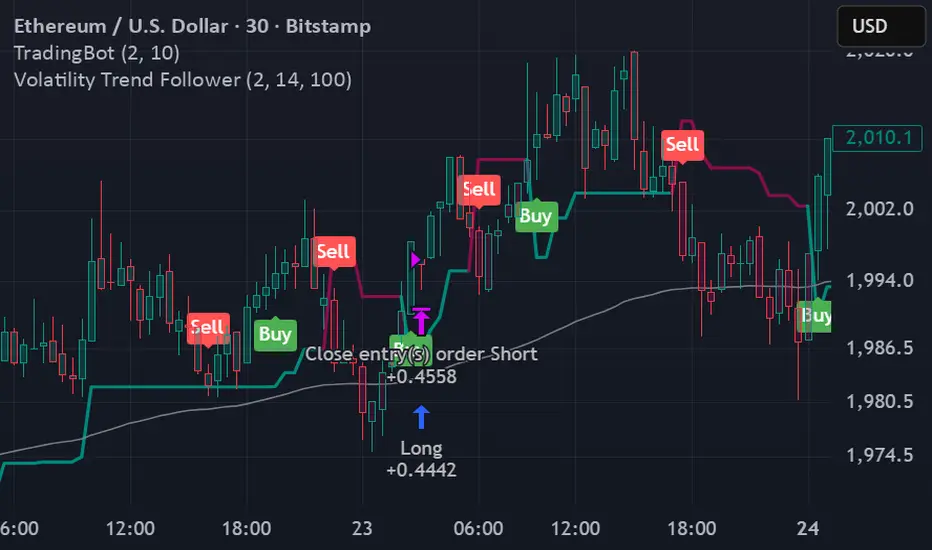
Volatility Trend FollowerThe script combines several classic technical analysis techniques: SuperTrend / Adaptive Band - The main idea comes from the SuperTrend indicator, which uses ATR (Average True Range) to create a trailing band that adapts to volatility ATR (Average True Range) - A volatility measure developed by J. Welles Wilder Jr. EMA (Exponential Moving Average) - Used as a global trend filter Heikin Ashi - An option to smooth prices and reduce noisePine Script®策略由Benji1302提供28
FF calculation Saptarshi ChatterjeeForward factor (in options contexts) measures implied volatility (IV) for a future period between two expirations, like from 30 DTE (days to expiry) front-month to 60 DTE back-month options. This indicator calculates the FORWARD FACTOR(FF) using 2 IVs of 2 DTEs. +ve value means front DTE is rich in premium and back expiry is cheap. -ve value means front DTE IV is cheap and 2nd DTE is expensive we can use this term structure disbalance to trade calendar spreads with edge.Pine Script®指標由sapc1992提供1114
Layered Bi-Directional Grid Maker SUPERBESTsuper best for btc 1m scalp trade please be carefulPine Script®策略由Besttraderalltheworld提供17
Volatility Value BandsThis indicator is a modern adaptation of Mark Helweg's original Value Charts concept, focused on visually displaying volatility zones and "extreme value" areas directly on the price chart. It does not replicate the original work but draws inspiration from the logic of normalizing price by volatility to highlight statistically stretched regions. 1. Introduction This study displays three lines directly on the chart: - a central reference line (base), - an upper overvaluation band, - and a lower undervaluation band. The bands are calculated from the relationship between price, moving average, and volatility (via true range/ATR), following Mark Helweg's Value Charts concept but with a custom implementation and adjustable parameters for different assets and timeframes. This allows objectively visualizing when price is in a statistically extended region relative to its recent behavior. 2. Key Features - Volatility-normalized base The indicator converts price deviation into "value units" using a combination of moving average and smoothed volatility (true range/ATR), making levels comparable across different assets and time horizons. - Auto-adjusting limits (optional) An automatic mode can calculate upper and lower limits from recent value unit extremes, using a configurable sampling window and percentile, allowing bands to adapt to the current volatility regime without manual recalibration. - Direct plot on price chart The three lines (central, upper, and lower) are drawn directly on the main asset chart (`overlay`), making it easy to read context: it's clear when price "touches" or breaks the volatility bands without switching to a separate pane. - Flexible parameters Users can control: - base moving average period (length) - volatility factor (manual or automatic) - independent windows for volatility and limits calculation - limits mode (auto or manual) and percentile used This allows adapting behavior to different markets (stocks, indices, forex, crypto). 3. How to Use - Basic interpretation - When price approaches or exceeds the upper band, it indicates a statistically overvalued zone where the asset is stretched upward relative to recent volatility. - When price approaches or exceeds the lower band, it indicates a statistically undervalued zone. - The central line serves as a reference for recent "average value," derived from the base moving average. - Recommended initial setup - Choose the Value Chart period (e.g., 144 bars) for the base. - Enable automatic limits mode for coherent bands matching the asset's volatility. - Adjust the limits window and percentile for tighter bands (more signals) or wider bands (fewer but more extreme). - Best practices - Use bands as context filters, not standalone buy/sell signals. Combine with trend, market structure, or other confirmation indicators. - Avoid decisions solely because price touched a band; in strong trends, price can "walk the edge" for extended periods. - Always follow TradingView community rules when publishing: clearly state in the description that the study is "inspired by Mark Helweg's Value Charts concept," without claiming official status, reproducing proprietary code, or violating copyrights.Pine Script®指標由destrobr0685提供16
Elliott Wave Full Fractal System v2.0Elliott Wave Full Fractal System v2.0 – Q.C. FINAL (Guaranteed R/R) Elliott Wave Full Fractal System is a multi-timeframe wave engine that automatically labels Elliott impulses and ABC corrections, then builds a rule-based, ATR-driven risk/reward framework around the “W3–W4–W5” leg. “Guaranteed R/R” here means every order is placed with a predefined stop-loss and take-profit that respect a minimum Reward:Risk ratio – it does not mean guaranteed profits. Core Idea This strategy turns a full fractal Elliott Wave labelling engine into a systematic trading model. It scans fractal pivots on three wave degrees (Primary, Intermediate, Minor) to detect 5-wave impulses and ABC corrections. A separate “Trading Degree” pivot stream, filtered by a 200-EMA trend filter and ATR-based dynamic pivots, is then used to find W4 pullback entries with a minimum, user-defined Reward:Risk ratio. Default Properties & Risk Assumptions The backtest uses realistic but conservative defaults: // Default properties used for backtesting strategy( "Elliott Wave Full Fractal System - Q.C. FINAL (Guaranteed R/R)", overlay = true, initial_capital = 10000, // realistic account size default_qty_type = strategy.percent_of_equity, default_qty_value = 1, // 1% risk per trade commission_type = strategy.commission.cash_per_contract, commission_value = 0.005, // example stock commission slippage = 0 // see notes below ) Account size: 10,000 (can be changed to match your own account). Position sizing: 1% of equity per trade to keep risk per idea sustainable and aligned with TradingView’s recommendations. Commission: 0.005 cash per contract/share as a realistic example for stock trading. Slippage: set to 0 in code for clarity of “pure logic” backtesting. Real-life trading will experience slippage, so users should adjust this according to their market and broker. Always re-run the backtest after changing any of these values, and avoid using high risk fractions (5–10%+) as that is rarely sustainable. 1. Full Fractal Wave Engine The script builds and maintains four pivot streams using ATR-adaptive fractals: Primary Degree (Macro Trend): Captures the large swings that define the major trend. Labels ①–⑤ and ⒶⒷⒸ using blue “Circle” labels and thicker lines. Intermediate Degree (Trading Degree): Captures the medium swings (swing-trading horizon). Uses teal labels ( (1)…(5), (A)(B)(C) ). Minor Degree (Micro Structure): Tracks short-term swings inside the larger waves. Uses red roman numerals (i…v, a b c). ABC Corrections (Optional): When enabled, the engine tries to detect standard A–B–C corrective structures that follow a completed 5-wave impulse and plots them with dashed lines. Each degree uses a dynamic pivot lookback that expands when ATR is above its EMA, so the system naturally requires “stronger” pivots in volatile environments and reacts faster in quiet conditions. 2. Theory Rules & Strict Mode Normal Mode: More permissive detection. Designed to show more wave structures for educational / exploratory use. Strict Mode: Enforces key Elliott constraints: Wave 3 not shorter than waves 1 and 5. No invalid W4 overlap with W1 (for standard impulses). ABC Logic: After a confirmed bullish impulse, the script expects a down-up-down corrective pattern (A,B,C). After a bearish impulse, it looks for up-down-up. 3. Trend Filter & Pivots EMA Trend Filter: A configurable EMA (default 200) is used as a non-wave trend filter. Price above EMA → Only long setups are considered. Price below EMA → Only short setups are considered. ATR-Adaptive Pivots: The pivot engine scales its left/right bars based on current ATR vs ATR EMA, making waves and trading pivots more robust in volatile regimes. 4. Dynamic Risk Management (Guaranteed R/R Engine) The trading engine is designed around risk, not just pattern recognition: ATR-Based Stop: Stop-loss is placed at: Entry ± ATR × Multiplier (user-configurable, default 2.0). This anchors risk to current volatility. Minimum Reward:Risk Ratio: For each setup, the script: Computes the distance from entry to stop (risk). Projects a take-profit target at risk × min_rr_ratio away from entry. Only accepts the setup if risk is positive and the required R:R ratio is achievable. Result: Every order is created with both TP and SL at a predefined distance, so each trade starts with a known, minimum Reward:Risk profile by design. “Guaranteed R/R” refers exclusively to this order placement logic (TP/SL geometry), not to win-rate or profitability. 5. Trading Logic – W3–W4–W5 Pattern The Trading pivot stream (separate from visual wave degrees) looks for a simple but powerful pattern: Bullish structure: Sequence of pivots forms a higher-high / higher-low pattern. Price is above the EMA trend filter. A strong “W3” leg is confirmed with structure rules (optionally stricter in Strict mode). Entry (Long – W4 Pullback): The “height” of W3 is measured. Entry is placed at a configurable Fibonacci pullback (default 50%) inside that leg. ATR-based stop is placed below entry. Take-profit is projected to satisfy min Reward:Risk. Bearish structure: Mirrored logic (lower highs/lows, price below EMA, W3 down, W4 retrace up, W5 continuation down). Once a valid setup is found, the script draws a colored box around the entry zone and a label describing the type of signal (“LONG SETUP” or “SHORT SETUP”) with the suggested limit price. 6. Orders & Execution Entry Orders: The strategy uses limit orders at the computed W4 level (“Sniper Long” or “Sniper Short”). Exits: A single strategy.exit() is attached to each entry with: Take-profit at the projected minimum R:R target. Stop-loss at ATR-based level. One Trade at a Time: New setups are only used when there is no open position (strategy.opentrades == 0) to keep the logic clear and risk contained. 7. Visual Guide on the Chart Wave Labels: Primary: ①,②,③,④,⑤, ⒶⒷⒸ Intermediate: (1)…(5), (A)(B)(C) Minor: i…v, a b c Trend EMA: Single blue EMA showing the dominant trend. Setup Boxes: Green transparent box → long entry zone. Red transparent box → short entry zone. Labels: “LONG SETUP / SHORT SETUP” labels mark the proposed limit entry with price. 8. How to Use This Strategy Attach the strategy to your chart Choose your market (stocks, indices, FX, crypto, futures, etc.) and timeframe (for example 1h, 4h, or Daily). Then add the strategy to the chart from your Scripts list. Start with the default settings Leave all inputs on their defaults first. This lets you see the “intended” behaviour and the exact properties used for the published backtest (account size, 1% risk, commission, etc.). Study the wave map Zoom in and out and look at the three wave degrees: Blue circles → Primary degree (big picture trend). Teal (1)…(5) → Intermediate degree (swing structure). Red i…v → Minor degree (micro waves). Use this to understand how the engine is interpreting the Elliott structure on your symbol. Watch for valid setups Look for the coloured boxes and labels: Green box + “LONG SETUP” label → potential W4 pullback long in an uptrend. Red box + “SHORT SETUP” label → potential W4 pullback short in a downtrend. Only trades in the direction of the EMA trend filter are allowed by the strategy. Check the Reward:Risk of each idea For each setup, inspect: Limit entry price. ATR-based stop level. Projected take-profit level. Make sure the minimum Reward:Risk ratio matches your own rules before you consider trading it. Backtest and evaluate Open the Strategy Tester: Verify you have a decent sample size (ideally 100+ trades). Check drawdowns, average trade, win-rate and R:R distribution. Change markets and timeframes to see where the logic behaves best. Adapt to your own risk profile If you plan to use it live: Set Initial Capital to your real account size. Adjust default_qty_value to a risk level you are comfortable with (often 0.5–2% per trade). Set commission and slippage to realistic broker values. Re-run the backtest after every major change. Use as a framework, not a signal machine Treat this as a structured Elliott/R:R framework: Filter signals by higher-timeframe trend, major S/R, volume, or fundamentals. Optionally hide some wave degrees or ABC labels if you want a cleaner chart. Combine the system’s structure with your own trade management and discretion. Best Practices & Limitations This is an approximate Elliott Wave engine based on fractal pivots. It does not replace a full discretionary Elliott analysis. All wave counts are algorithmic and can differ from a manual analyst’s interpretation. Like any backtest, results depend heavily on: Symbol and timeframe. Sample size (more trades are better). Realistic commission/slippage settings. The 0-slippage default is chosen only to show the “raw logic”. In real markets, slippage can significantly impact performance. No strategy wins all the time. Losing streaks and drawdowns will still occur even with a strict R:R framework. Disclaimer This script is for educational and research purposes only and does not constitute financial advice or a recommendation to buy or sell any security. Past performance, whether real or simulated, is not indicative of future results. Always test on multiple symbols/timeframes, use conservative risk, and consult your financial advisor before trading live capital. Pine Script®策略由mbedaiwi2提供49
VCAI MACD LiteVCAI MACD Lite is a clean, modern version of the classic MACD oscillator, rebuilt with selectable EMA/SMA types and a 2-tone histogram using VCAI’s visual style. It keeps the indicator lightweight and easy to read while giving clearer momentum shifts through rising/falling histogram colour changes. What it does Calculates MACD using your choice of EMA or SMA Plots signal line and histogram with 2-tone VCAI colours Highlights changes in momentum strength as histogram bars rise or fade Works on any market and timeframe How to use it Expanding yellow bars reflect strengthening upside momentum; dim yellow shows fading strength. Darker and lighter VCAI purple tones show momentum behaviour below zero, helping you see when bearish pressure is increasing or weakening. Part of the VCAI Lite Series — clean, minimal tools.Pine Script®指標由Vectorcoresai提供23
ATR Trailing StopShows a trailing stop loss based on ATR (Average True Range). The user can select ATR period and multiple, to adjust to the volatility of the current chart. Only for long positions.Pine Script®指標由itsdayagain提供7
Fractal Fade Pro IndicatorA revolutionary contrarian trading indicator that applies chaos theory, fractal mathematics, and market entropy to generate high-probability reverse signals. This indicator fades traditional technical signals, providing BUY signals when conventional indicators say SELL, and SELL signals when they say BUY. Full Description: Most traders follow the herd. QFCI does the opposite. It identifies when conventional technical analysis is about to fail by detecting mathematical patterns of exhaustion in market structure. How It Works (Technical Overview): The indicator combines three sophisticated mathematical approaches: Fractal Dimension Analysis: Measures the "roughness" of price movements using fractal mathematics Market Entropy Calculation: Quantifies the randomness and disorder in price returns using information theory Phase Space Reconstruction: Analyzes price evolution in multi-dimensional state space from chaos theory Signal Generation Process: Step 1: Market Regime Detection Chaotic Regime: High fractal complexity + rising entropy (avoid trading) Trending Regime: Low fractal complexity + high phase space distance (fade breakouts) Mean-Reverting Regime: Very low fractal complexity (fade extremes) Step 2: Reverse Signal Logic When traditional indicators would give: BUY signal (breakout, oversold bounce, volatility spike) → QFCI shows SELL SELL signal (breakdown, overbought rejection, volatility crash) → QFCI shows BUY Step 3: Smart Signal Filtering No consecutive same-direction signals Adjustable minimum bars between signals Multiple confirmation layers required Unique Features: 1. Mathematical Innovation: Original fractal dimension algorithm (not standard indicators) Market entropy calculation from information theory Phase space reconstruction from chaos theory Multi-regime adaptive logic 2. Trading Psychology Advantage: Contrarian by design - profits from market overreactions Fades retail trader mistakes - enters when others are exiting Reduces overtrading - strict signal frequency controls 3. Clean Visual Interface: Only BUY/SELL labels - no chart clutter Clear directional arrows - immediate signal recognition Built-in alerts - never miss a trade Recommended Settings: Default (Balanced Approach): Fractal Depth: 20 Entropy Period: 200 Min Bars Between Signals: 100 Aggressive Trading: Fractal Depth: 10-15 Entropy Period: 100-150 Min Bars Between Signals: 50-75 Conservative Trading: Fractal Depth: 30-40 Entropy Period: 300-400 Min Bars Between Signals: 150-200 Optimal Timeframes: Primary: Daily, Weekly (best performance) Secondary: 4-Hour, 12-Hour Can work on: 1-Hour (with adjusted parameters) How to Use: For Beginners: Apply indicator to chart Use default settings Wait for BUY/SELL labels Enter on next candle open Use 2:1 risk/reward ratio Always use stop losses For Advanced Traders: Adjust parameters for your trading style Combine with support/resistance levels Use volume confirmation Scale in/out of positions Track performance by regime Risk Management Guidelines: Position Sizing: Conservative: 1-2% risk per trade Moderate: 2-3% risk per trade Aggressive: 3-5% risk per trade (not recommended) Stop Loss Placement: BUY signals: Below recent swing low or -2x ATR SELL signals: Above recent swing high or +2x ATR Take Profit Targets: Primary: 2x risk (minimum) Secondary: Previous support/resistance Tertiary: Trailing stops after 1.5x risk IMPORTANT RISK DISCLOSURE This indicator is for educational and informational purposes only. It is not financial advice. Past performance does not guarantee future results. Trading involves substantial risk of loss and is not suitable for every investor. The risk of loss in trading can be substantial. You should therefore carefully consider whether such trading is suitable for you in light of your financial condition.Pine Script®指標由ChandraBose2002提供805
Trinity ATR Real Move DetectorTrinity ATR Real Move Detector This ATR Energy Table indicator is one of the simplest yet most powerful filters you can have on a chart when trading short-dated or 0DTE options or swing trades on any timeframe from 1-minute up to 4-hour. Its entire job is to answer the single most important question in intraday and swing trading: “Does the underlying actually have enough short-term explosive energy right now to make a directional position worth the theta and the spread, or is this just pretty candles that will die in ten minutes?” Most losing 0DTE and short-dated option trades happen because people buy or sell direction on a “nice-looking” breakout or pullback while the underlying is actually in low-energy grind mode. The premium decays faster than the move develops, and you lose even when you’re “right” on direction. This little table stops that from ever happening again. Here’s what it does in plain English: Every bar it measures two things: - The current ATR on whatever timeframe you are using (1 min, 3 min, 5 min, 10 min, etc.). This tells you how big the average true range of the last 14 bars has been — in other words, how violently the stock or index is actually moving right now. - The daily ATR (14-period on the daily chart). This is your benchmark for “normal” daily movement over the last two–three weeks. It then multiplies the daily ATR by a small number (the multiplier you set) and compares the two. If the short-term ATR is bigger than that percentage of the daily ATR, the table turns bright green and says “ENOUGH ENERGY”. If not, it stays red and says “NOT ENOUGH”. Why this works so well: - Real explosive moves that carry for 0DTE and 1–3 DTE options almost always show a short-term ATR spike well above the recent daily average. Quiet grind moves never do. - The comparison is completely adaptive — on a high-vol day the threshold automatically rises, on a low-vol day it automatically drops. You never have to guess if “2 points on SPY is big today”. - It removes emotion completely. You simply wait for green before you even think about clicking buy or sell on an option. Key settings and what to do with them: - Energy Multiplier — this is the only number you ever touch. It is expressed as a decimal (0.15 = 15 % of the daily ATR). Lower = more signals, higher = stricter and higher win rate. The tooltip gives you the exact sweet-spot numbers for every popular timeframe (0.09 for 1-minute scalping, 0.13 for 3-minute, 0.14–0.16 for 5-minute, 0.15–0.19 for 10-minute, etc.). Just pick your timeframe once and type the number — done forever. - ATR Length — leave it at 14. That’s the standard and works perfectly. - Table Position — move the table to wherever you want on the chart (top-right, bottom-right, bottom-left, top-left). - Table Size — make the text Tiny, Small, Normal or Large depending on how much screen space you have. How this helps you make money and stop losing it: - On most days you will see red 80–90 % of the time — that’s good! It is forcing you to sit on your hands instead of overtrading low-energy chop that eats premium. - When it finally flips green you know institutions are actually pushing size right now — follow-through probability jumps from ~40 % to 65–75 % depending on the stock and timeframe. - You stop buying calls on every green candle and puts on every red candle. You only strike when the market is genuinely “awake”. - Over a week you take dramatically fewer trades, but your win rate and average winner size go way up — which is exactly how consistent intraday option profits are made. In short, this tiny table is the closest thing to an “edge on/off switch” that exists for short-dated options. Red = preserve capital and go do something else. Green = pull the trigger with confidence. Use it religiously and you’ll immediately feel the difference in your P&L.Pine Script®指標由EMA34TRADER提供已更新 2222695
MorphWave Bands [JOAT]MorphWave Bands - Adaptive Volatility Envelope System MorphWave Bands create a dynamic price envelope that automatically adjusts its width based on current market conditions. Unlike static Bollinger Bands, this indicator blends ATR and standard deviation with an efficiency ratio to expand during trending conditions and contract during consolidation. What This Indicator Does Plots adaptive upper and lower bands around a customizable moving average basis Automatically adjusts band width using a blend of ATR and standard deviation Detects volatility squeezes when bands contract to historical lows Highlights breakouts when price moves beyond the bands Provides squeeze alerts for anticipating volatility expansion Adaptive Mechanism The bands adapt through a multi-step process: // Blend ATR and Standard Deviation blendedVol = useAtrBlend ? (atrVal * 0.6 + stdVal * 0.4) : stdVal // Normalize volatility to its historical range volNorm = (blendedVol - volLow) / (volHigh - volLow) // Create adaptive multiplier adaptMult = baseMult * (0.5 + volNorm * adaptSens) This creates bands that respond to market regime changes while maintaining stability. Squeeze Detection A squeeze is identified when band width drops below a specified percentile of its historical range: Background highlighting indicates active squeeze conditions Low percentile readings suggest compressed volatility Squeeze exits often precede directional moves Inputs Overview Band Length — Period for basis calculation (default: 20) Base Multiplier — Starting band width multiplier (default: 2.0) MA Type — Choose from SMA, EMA, WMA, VWMA, or HMA Adaptation Lookback — Historical period for normalization (default: 50) Adaptation Sensitivity — How much bands respond to volatility changes Squeeze Threshold — Percentile below which squeeze is detected Dashboard Information Current trend direction relative to basis and bands Band width percentage Squeeze status (Active or None) Efficiency ratio Current adaptive multiplier value How to Use It Look for squeeze conditions as potential precursors to breakouts Use band touches as dynamic support/resistance references Monitor breakout signals when price closes beyond bands Combine with momentum indicators for directional confirmation Alerts Upper/Lower Breakout — Price exceeds band boundaries Squeeze Entry/Exit — Volatility compression begins or ends Basis Crosses — Price crosses the center line This indicator is provided for educational purposes. It does not constitute financial advice. — Made with passion by officialjackofalltrades Pine Script®指標由officialjackofalltrades提供25
ADR% / ATR / Dynamic LoD–HoD TableThis indicator displays a clean data table showing ADR%, ATR, and a dynamic LoD/HoD distance value based on daily trend conditions. When price is above the 21-day or 50-day moving average, the indicator shows the distance from the Low of Day. When price is below BOTH daily moving averages, it automatically switches to showing distance from the High of Day. The table updates in real-time and gives a fast, volatility-based view of where price sits inside the day’s range. Features • ADR% (Average Daily Range Percentage) • ATR (Average True Range) • Automatic LoD → HoD switching based on daily trend • Customizable colors and layout • Clean, space-efficient table format • Designed for intraday and volatility-focused tradersPine Script®指標由InsiderTradingCuh提供24
VCAI Volume & Liquidity Map LiteVCAI Volume & Liquidity Map Lite visualises recent market participation using a horizontal liquidity/volume histogram plotted beside current price. It shows where trading activity has clustered, where the chart is thin, and how much of that activity came from buying vs selling pressure. This Lite edition keeps the tool simple and fast: Yellow = buy-side volume (aggressive buyers / upward pressure) Purple = sell-side volume (aggressive sellers / downward pressure) Thicker sections = higher traded volume at that price POC line (purple) marks the price with the highest volume concentration Value Area lines (yellow dashed) mark where ~70% of volume has traded Bars extend outward to the right of price for a clean, unobstructed chart Lookback setting controls how many candles the map is built from Use it to quickly identify: high-interest price zones low-liquidity areas where price can move fast likely reaction levels where momentum may slow, reverse, or break through Designed as a lightweight, open-source tool for anyone wanting a clean liquidity/volume map without complex settings. Part of the VCAI Lite Series.Pine Script®指標由Vectorcoresai提供46
VCAI Volume LiteVCAI Volume Lite is a clean, modern take on volume analysis designed for traders who want a clearer read on participation without loading multiple indicators. This Lite edition focuses on the essentials: real activity vs dead sessions expansion vs contraction momentum shifts around breakouts and pullbacks No hype, no filters, no hidden logic — just a straightforward volume tool rebuilt with the VCAI visual framework. Use it to quickly spot: stronger moves backed by genuine participation weak pushes running on low volume areas where momentum may stall or accelerate Part of the VCAI Lite Series.Pine Script®指標由Vectorcoresai提供7