OPEN-SOURCE SCRIPT
已更新 Madrid MA Ribbon Bar
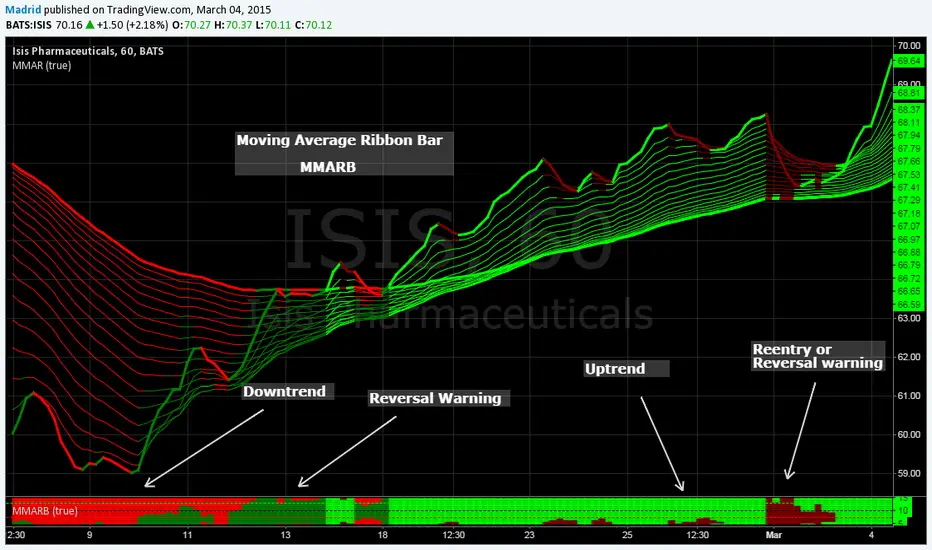
This is the MMAR companion study. This along with the MMAR study help visualize in a concise way the trend direction, patterns, trend strength, entry points and reversals.
Trading with MMAR: Look for the size of the bar, when it is partially filled with a color starting from bottom to top it means there is a reentry point, but if it fills 50% or more then there is a strong possibility that this will turn into a trend reversal. You may want to wait for confirmation. Normally after two or three solid bars you can have an idea of where the trend goes.
The standard colors are
1. Red : Downtrend
2. Maroon : Short reentry or uptrend warning
3. Lime : Uptrend
4. Green : Long reentry or downtrend warning
This indicator is based on the MMAR, so the only parameter it needs is the kind of MA you want to use, if you're using a regular standard moving average or an exponential moving average (this reduces lagging). Normally I use the exponential MA, which is the default value. It is simple, it only has four output values, it can be easily interpreted and practically no input parameters to tune. This doesn't require too much space on the screen
I suggest you to shrink the bar so it gives the visual effect of a solid bar and put it at the bottom of the screen.
Trading with MMAR: Look for the size of the bar, when it is partially filled with a color starting from bottom to top it means there is a reentry point, but if it fills 50% or more then there is a strong possibility that this will turn into a trend reversal. You may want to wait for confirmation. Normally after two or three solid bars you can have an idea of where the trend goes.
The standard colors are
1. Red : Downtrend
2. Maroon : Short reentry or uptrend warning
3. Lime : Uptrend
4. Green : Long reentry or downtrend warning
This indicator is based on the MMAR, so the only parameter it needs is the kind of MA you want to use, if you're using a regular standard moving average or an exponential moving average (this reduces lagging). Normally I use the exponential MA, which is the default value. It is simple, it only has four output values, it can be easily interpreted and practically no input parameters to tune. This doesn't require too much space on the screen
I suggest you to shrink the bar so it gives the visual effect of a solid bar and put it at the bottom of the screen.
發行說明
Upgrade from PSv1 to PSv6開源腳本
秉持TradingView一貫精神,這個腳本的創作者將其設為開源,以便交易者檢視並驗證其功能。向作者致敬!您可以免費使用此腳本,但請注意,重新發佈代碼需遵守我們的社群規範。

免責聲明
這些資訊和出版物並非旨在提供,也不構成TradingView提供或認可的任何形式的財務、投資、交易或其他類型的建議或推薦。請閱讀使用條款以了解更多資訊。
開源腳本
秉持TradingView一貫精神,這個腳本的創作者將其設為開源,以便交易者檢視並驗證其功能。向作者致敬!您可以免費使用此腳本,但請注意,重新發佈代碼需遵守我們的社群規範。
免責聲明
這些資訊和出版物並非旨在提供,也不構成TradingView提供或認可的任何形式的財務、投資、交易或其他類型的建議或推薦。請閱讀使用條款以了解更多資訊。