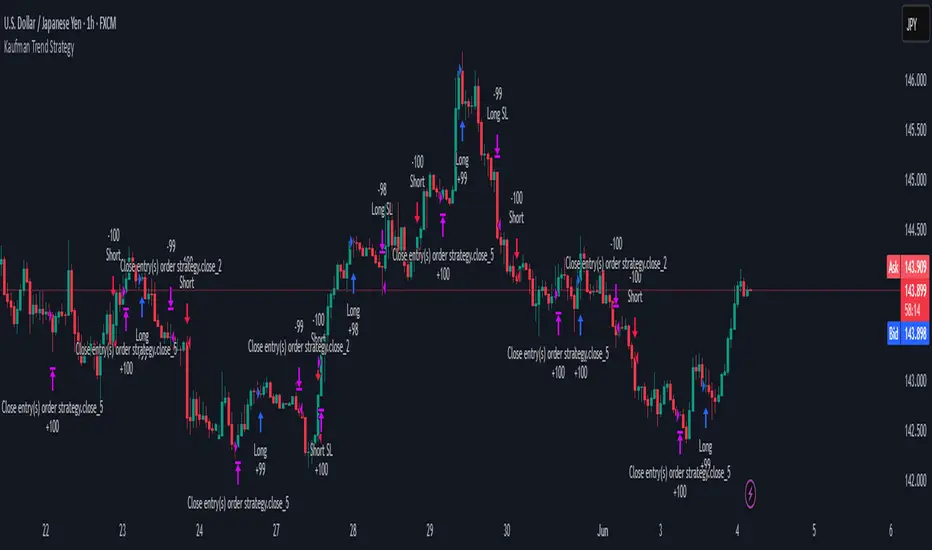
KAMA Momentum Extension WarningKAMA Momentum Extension Warning (Parabolic Exit)
Description This indicator is designed for Momentum & Trend Following strategies. Its primary goal is to identify "Parabolic Blow-Off" tops—moments where price moves vertically away from the trend, creating an unsustainable "rubber band" effect.
While standard trend-following tools (like moving averages) tell you when to enter or hold, this tool tells you exactly when to take profit into strength before a likely crash.
Visual Signals
Blue Line (KAMA 21): The "Floor." This represents the sustainable trend. In a healthy move, price should hug this line.
Orange Line (Extension Limit): The "Ceiling." This is calculated as KAMA + (ATR * Multiplier). It represents the mathematical limit of a normal move.
Yellow Candles: The "Climax Signal."
This triggers when the High of the day pierces the Orange Extension Limit.
It indicates the price is statistically over-extended (vertical).
How to Trade It
Trend Following: As long as candles are "Normal" colored and above the Blue Line, hold the position.
The Warning: If a candle paints Yellow, the stock has gone parabolic.
The Execution:
Sell 50% of the position immediately (do not wait for the close).
Tighten the stop loss on the remaining shares to the Low of the Previous Day.
Settings / Inputs
KAMA Length (Default: 21): Controls the baseline trend. Increase for longer-term trends, decrease for faster entries.
ATR Length (Default: 21): The volatility lookback period (usually matches the KAMA length).
Extension Multiplier (Default: 3.5): The "Sensitivity."
3.5 - 4.0: Best for volatile "Super Stocks" (Crypto, Biotech, Tech).
2.5 - 3.0: Best for slower, large-cap stocks.
Tip: Adjust in 0.1 increments to fit the specific stock's personality.
考夫曼自適應移動平均線(KAMA)

SMA Cross + Adaptive Q MA + AMA Channel
📘 OPERATIONAL MANUAL: Adaptive Trend & SR Breakout SystemThis system combines non-parametric regression, volatility channels, and automated price action structures to identify high-probability entries.
1. Core IndicatorsAdaptive Q (KAMA): The primary trend line.
Green = Bullish;
Red = Bearish.
AMA Channel: An ATR-based envelope ($1.5 \times ATR$) that defines the "Value Area".
SMA 50 Filter: Global trend filter. Trade Long only above; Short only below.
SR Zones: Automatic boxes marking historical Support
(Blue/Green) and Resistance (Red).Shutterstock
2. Entry Rules
🟢 LONG SETUP:Price is above SMA 50.Large Lime Triangle appears (Channel Cross).Adaptive Q line is Green.Best entry: Price bounces off a Support Box.
🔴 SHORT SETUP:Price is below SMA 50.Large Red Triangle appears (Channel Cross).Adaptive Q line is Red.Best entry: Price rejects a Resistance Box.
3. Risk Management
Stop Loss: Set at $1.5 \times ATR$ or behind the nearest SR Box.
Take Profit: Target the next opposite SR Zone or exit if the Adaptive Q changes color.
4. LegendLarge Triangles: High-conviction volatility signals.
Small Triangles: Standard SMA Cross (early warning).
Red/Green Boxes: Supply and Demand zones for structural confirmation.

Plain and Simple ProPlain and Simple Pro™ Trading Indicator
Overview
Plain and Simple Pro is a comprehensive technical analysis indicator for TradingView that combines multiple trading strategies and visual tools to help identify market opportunities. It uses proprietary smoothing algorithms and volatility-based bands to generate trading signals across different timeframes and market conditions.
Core Components
1. Primary Signal System
Utilizes a custom smoothing algorithm that adapts to market volatility
Displays dynamic support and resistance levels
Color-coded trend visualization (uptrend, downtrend, neutral)
Bullish and bearish zone fills for clearer market structure identification
2. Volatility Band System
Four-tier volatility bands based on ATR (Average True Range)
Uses Fibonacci-based multipliers (0.618, 1.236, 2.618, 4.236)
Generates entry signals when bands crossover:
Long/Short Entry Signals: Band 1-2 crossovers for regular trades
Major Long/Short Signals: Band 3-4 crossovers for significant moves
Optional Heikin Ashi smoothing for cleaner signals
3. Performance Dashboard
Tracks two distinct trading strategies in real-time:
Aggressive Signal Strategy: Fast-moving momentum-based approach
Shows current position (LONG/SHORT/NEUTRAL)
Displays unrealized P&L for active positions
Balanced Strategy: Trend-following system with dynamic moving average
More conservative positioning
Real-time P&L tracking
Dashboard is fully customizable (position, size, visibility)
4. Market Structure Analysis
Order Blocks: Identifies institutional buying/selling zones
Bullish order blocks (demand zones)
Bearish order blocks (supply zones)
Automatically removes invalidated blocks
Trend Lines: Automatically drawn support and resistance trendlines
Uses pivot point detection
Validates slope direction
Extends in real-time
Key Features
Customization Options
Complete color customization for all visual elements
Toggle individual components on/off
Adjustable dashboard position and size
Configurable number of order blocks displayed (1-10)
Trend line sensitivity adjustment
Signal Types
Small triangular markers for regular entry signals
Labeled alerts for major trade opportunities
Visual zone fills to highlight key price areas
Real-time position and P&L tracking
Technical Approach
Multi-timeframe analysis capability
Adaptive algorithms that respond to market volatility
Combines momentum, trend-following, and structure-based analysis
Uses both price action and mathematical indicators
Use Cases
Day Trading: Quick entry/exit signals via band crossovers
Swing Trading: Order blocks and trend lines for position entries
Risk Management: Visual zones help identify stop-loss levels
Strategy Testing: Built-in P&L dashboard for strategy evaluation
Visual Elements
Clean, modern interface with customizable colors
Semi-transparent zone fills for clarity
Multiple layers of information without chart clutter
Professional-grade visual presentation
This indicator is designed for traders who want a comprehensive, all-in-one solution that combines technical analysis, signal generation, and performance tracking in a single, customizable package.

Malama's 5x Universal Anchored M.A. (Optional S/R)Malama's 5x Universal Anchored M.A. (5-UMA+) is a comprehensive moving average utility designed to streamline chart analysis by consolidating five fully independent, highly customizable MA slots into a single script instance.
Justification for this Combination (The Mashup): Traders often require multiple moving averages to analyze different time horizons (e.g., the 20, 50, 100, and 200 MAs simultaneously). Using separate indicators for each consumes limited TradingView indicator slots and clutters the interface. Furthermore, most standard MA tools lack advanced "Anchoring" capabilities or adaptive calculation methods. This script solves these issues by unifying 5 independent calculation engines into one optimized tool. It allows traders to mix and match standard MAs (SMA, EMA) with advanced adaptive types (KAMA, VIDYA) and apply custom anchors to specific events (like earnings or market opens) without needing multiple scripts.
How the Components Work Together:
Universal Calculation Engine: Each of the 5 slots can select from over 28 different smoothing algorithms. This allows for direct comparison—for example, plotting a lagging SMA against a responsive Hull MA to gauge trend momentum.
Independent Anchoring Logic: Unlike standard tools that apply one logic to all lines, each slot has its own "Anchor State." Slot 1 can be a rolling EMA, while Slot 2 is anchored to a specific date. The script manages these state variables independently to prevent conflict.
Dynamic S/R Visualization: Each line can optionally toggle "Support/Resistance Mode."
Logic: If Price > MA, the line turns Green (Support). If Price < MA, it turns Red (Resistance).
Interaction: This visual feedback loop helps traders instantly identify trend alignment across multiple timeframes.
Data Dashboard: A modular table system renders real-time data for each active MA, displaying its current value, trend direction (Slope), and percent deviation from price.
Included MA Types & Underlying Math:
Standard: SMA, EMA, WMA, TMA, VWMA, SMMA.
Low Lag: HMA (Hull), ZLEMA (Zero-Lag), DEMA, TEMA, T3.
Adaptive: KAMA (Kaufman), VIDYA (Chande), FRAMA (Fractal), McGinley Dynamic, Kalman Filter.
Ehlers: MAMA/FAMA, Cyber Cycle, Super Smoother, Laguerre, Reflex.
Features:
5 Independent Slots: Configure up to 5 unique MAs on one chart.
Anchored Mode: Anchor any MA to a specific Date/Time, Bar Index, or the First Bar of the chart.
Smart Tables: Individual dashboard panels for each MA that can be positioned anywhere on the screen.
Disclaimer: This tool is for educational analysis only. Trading involves significant risk.

Advanced Market Flow IndicatorAdvanced Market Flow Indicator - Complete Trading Guide
What This Indicator Does
The Advanced Market Flow (AMF) Indicator helps you identify whether the market is in a buying condition, selling condition, or if you should wait. It combines multiple analysis methods to give you clear signals on when to enter and exit trades.
Getting Started: Choose Your Trading Mode
Before using the indicator, select your preferred Trading Mode in the input settings:
Aggressive Mode ⚡
Best for: Day traders, scalpers, short-term traders
Shows: Volatility Band 1 (Green/Red line only)
Characteristics: Fast signals, more trade opportunities, quicker reactions
Risk Level: Higher (more false signals possible)
Timeframes: 1M, 5M, 15M, 1H
Balanced Mode 🎯
Best for: Swing traders, position traders, beginners
Shows: Volatility Band 2 (Blue/Orange line only)
Characteristics: Stable signals, fewer but quality trades, smoother trends
Risk Level: Lower (more reliable signals)
Timeframes: 1H, 4H, 1D, 1W
Both Mode 📊
Best for: Experienced traders, full market analysis
Shows: Both Volatility Bands (all lines visible)
Characteristics: Complete picture, can compare fast vs slow signals
Risk Level: Medium (requires understanding of both bands)
Timeframes: All timeframes
Understanding the Visual Elements
1. Volatility Bands
Band 1 - Aggressive (Green/Red Line)
More sensitive, reacts faster to price changes
Green = Price in uptrend (bullish)
Red = Price in downtrend (bearish)
Acts as dynamic support/resistance for quick trades
Band 2 - Balanced (Blue/Orange Line)
Less sensitive, shows stronger, confirmed trends
Blue = Price in confirmed uptrend (bullish)
Orange = Price in confirmed downtrend (bearish)
Acts as major support/resistance for swing trades
Key Concept:
When price is above the band = bullish territory
When price is below the band = bearish territory
Price touching the band = potential entry point
2. Green Zone (Bullish Zone)
Appears when conditions favor buying
Shows the support flow area where price may bounce up
The larger the green zone, the stronger the bullish signal
Only appears during BUY signals
3. Red Zone (Bearish Zone)
Appears when conditions favor selling
Shows the resistance flow area where price may reverse down
The larger the red zone, the stronger the bearish signal
Only appears during SELL signals
4. Status Box (Top Right)
BUY (Green Background) = Long position conditions
SELL (Red Background) = Short position conditions
WAIT (Gray Background) = No clear direction, stay out
P&L Row: Shows profit/loss from current signal entry point
5. Multi-Timeframe Table (Bottom Right)
Displays signals across 7 timeframes (1M, 5M, 15M, 1H, 4H, 1D, 1W)
Each row shows: Period | Status | P&L
Helps confirm if multiple timeframes align
Green = BUY, Red = SELL, Gray = WAIT
How to Take Trades by Mode
🔴 AGGRESSIVE MODE TRADING
BUY Signal (Long Entry)
Set indicator to "Aggressive" mode
Wait for Status Box to show "BUY" in green
Confirm green zone appears on chart
Watch for price to touch the Green/Red Band (when it's green)
Enter: When price bounces off the green band or breaks above it
Stop Loss: 10-20 points below the green zone bottom
Take Profit:
Quick scalp: 1:1 or 1:2 risk-reward
Or exit when band turns red
Or exit when Status changes to "WAIT"
SELL Signal (Short Entry)
Wait for Status Box to show "SELL" in red
Confirm red zone appears on chart
Watch for price to touch the Green/Red Band (when it's red)
Enter: When price rejects from the red band or breaks below it
Stop Loss: 10-20 points above the red zone top
Take Profit:
Quick scalp: 1:1 or 1:2 risk-reward
Or exit when band turns green
Or exit when Status changes to "WAIT"
Aggressive Mode Tips
Take profits quickly (signals change fast)
Use tight stop losses
Best during high volatility periods
Check 1M, 5M, 15M timeframes in the table
Don't hold positions overnight
🔵 BALANCED MODE TRADING
BUY Signal (Long Entry)
Set indicator to "Balanced" mode
Wait for Status Box to show "BUY" in green
Confirm green zone appears on chart
Watch for price to touch the Blue/Orange Band (when it's blue)
Enter: When price bounces off the blue band or confirms above it
Stop Loss: 30-50 points below the green zone bottom
Take Profit:
Target previous swing high
Or 2:1 to 3:1 risk-reward ratio
Or exit when band turns orange
Or exit when Status changes to "WAIT"
SELL Signal (Short Entry)
Wait for Status Box to show "SELL" in red
Confirm red zone appears on chart
Watch for price to touch the Blue/Orange Band (when it's orange)
Enter: When price rejects from the orange band or confirms below it
Stop Loss: 30-50 points above the red zone top
Take Profit:
Target previous swing low
Or 2:1 to 3:1 risk-reward ratio
Or exit when band turns blue
Or exit when Status changes to "WAIT"
Balanced Mode Tips
Be patient, wait for clear setups
Use wider stop losses
Best during trending markets
Check 1H, 4H, 1D timeframes in the table
Can hold positions for days/weeks
Fewer trades but higher win rate
🟣 BOTH MODE TRADING
Advanced Strategy: Band Confluence
When both bands are visible, you can use advanced techniques:
Strong BUY Setup (Highest Probability)
Both bands are green/blue = Strong uptrend
Price above both bands = Momentum confirmed
Green zone present = Support established
Multiple timeframes show BUY = Alignment confirmed
Action: Enter long with confidence, wider profit targets
Strong SELL Setup (Highest Probability)
Both bands are red/orange = Strong downtrend
Price below both bands = Momentum confirmed
Red zone present = Resistance established
Multiple timeframes show SELL = Alignment confirmed
Action: Enter short with confidence, wider profit targets
Early Entry Signal
Band 1 turns green but Band 2 still red = Early bullish reversal
Action: Small position, tight stop, expect volatility
Exit: When Band 2 turns blue (confirm trend) or Band 1 turns red (false signal)
Trend Confirmation Signal
Band 1 already green, Band 2 turns blue = Confirmed uptrend
Action: Add to position, move stop to breakeven
Hold: Until either band changes color
Divergence Warning
Band 1 red but Band 2 blue = Conflicting signals
Action: Reduce position size or stay out
Meaning: Short-term weakness in longer-term uptrend
Both Mode Tips
Use Band 1 for entries, Band 2 for confirmation
When bands disagree, respect the higher timeframe (Band 2)
Best for traders who want complete market view
Requires more screen time and experience
Multi-Timeframe Analysis
How to Use the Bottom Right Table
The table shows 7 timeframes simultaneously. Here's how to read it:
Strong Signals (High Confidence)
All green (1M through 1W) = Very strong uptrend across all timeframes
All red = Very strong downtrend across all timeframes
Action: Trade in the direction of alignment with larger positions
Moderate Signals (Medium Confidence)
3-4 timeframes aligned = Decent trend forming
Action: Trade with standard position size
Example: 15M, 1H, 4H all show BUY = Good long setup
Weak Signals (Low Confidence)
Mixed colors = No clear trend, choppy market
Action: Reduce position size or avoid trading
Example: 5M shows BUY, but 1H shows SELL = Conflict
Timeframe Priority by Trading Style
Scalpers: Focus on 1M, 5M (must align)
Day Traders: Focus on 5M, 15M, 1H (at least 2 must align)
Swing Traders: Focus on 1H, 4H, 1D (at least 2 must align)
Position Traders: Focus on 4H, 1D, 1W (must align)
Risk Management Rules (CRITICAL)
Position Sizing
Aggressive Mode: Risk 0.5-1% per trade (more trades = smaller size)
Balanced Mode: Risk 1-2% per trade (fewer trades = larger size)
Both Mode: Risk 1-1.5% per trade
Never risk more than 5% of capital across all open trades
Stop Loss Rules
ModeStop Loss DistanceMax Risk per TradeAggressive10-20 points below/above zone0.5-1%Balanced30-50 points below/above zone1-2%Both20-40 points (based on band used)1-1.5%
Take Profit Targets
Aggressive Mode: 1:1 to 1:2 risk-reward ratio
Balanced Mode: 2:1 to 3:1 risk-reward ratio
Both Mode: 1.5:1 to 2.5:1 risk-reward ratio
When to Exit Immediately
Status changes to "WAIT" (close all positions in that direction)
Stop loss is hit (no exceptions, no "holding hoping")
P&L in Status Box turns negative and worsening
Major news event announced (close before news)
Common Trading Scenarios
Scenario 1: Perfect Setup (Take This Trade)
Mode: Balanced
Status: BUY
Zone: Large green zone
Timeframes: 1H, 4H, 1D all show BUY
P&L: All positive in table
Action: Enter long, standard position size, target 2:1 RR
Scenario 2: Risky Setup (Reduce Size or Skip)
Mode: Aggressive
Status: BUY
Zone: Small green zone
Timeframes: Mixed (some BUY, some SELL)
P&L: Some negative in table
Action: Either skip or enter with 0.5% risk, tight stop
Scenario 3: Reversal Setup
Mode: Both
Status: Changes from SELL to BUY
Bands: Band 1 turns green, Band 2 still orange
Action: Exit all shorts immediately, prepare for long entry when Band 2 turns blue
Scenario 4: Trend Continuation
Mode: Balanced
Status: BUY (has been BUY for several candles)
P&L: +50 in Status Box
Price: Pulls back to touch blue band
Action: Add to position (pyramid), move stop to breakeven
Scenario 5: Choppy Market (Stay Out)
Status: Constantly switching BUY → WAIT → SELL → WAIT
Zones: Appearing and disappearing rapidly
Timeframes: No alignment (all different)
Action: Close all positions, wait for clarity
Scenario 6: False Signal
Status: BUY
You enter: Long position
P&L immediately negative: -10, -15, -20
Action: Exit immediately (don't wait for stop loss), signal is failing
Trading Rules Checklist
Before Entering Any Trade:
Indicator Status is BUY or SELL (not WAIT)
Appropriate zone is visible (green for BUY, red for SELL)
At least 2 timeframes agree in the multi-timeframe table
You know your exact stop loss level
You know your exact take profit target
Risk is 0.5-2% of capital (based on mode)
No major news in next 30 minutes
After Entering a Trade:
Stop loss order placed immediately
Take profit target set
Position size recorded
Monitor Status Box for changes
Monitor P&L (if goes deeply negative, consider exit)
Daily Trading Rules:
Maximum 3 trades per day in Aggressive mode
Maximum 1-2 trades per day in Balanced mode
Stop trading after 2 consecutive losses
Stop trading if daily loss reaches 3%
Pro Tips & Tricks
Timing Your Entries
Best Entry (Aggressive): When price touches the band and shows rejection candle
Best Entry (Balanced): Wait for candle close above/below band before entering
Worst Entry: Chasing price far from the band
Using the P&L Feature
Positive P&L growing: Signal is working, consider adding position
P&L near zero: Signal uncertain, prepare to exit
Negative P&L: Signal failing, exit or tighten stop
P&L in table all negative: Wrong market conditions, stop trading
Zone Size Interpretation
Large zones (wide gap): Strong conviction, high probability
Medium zones: Standard signal, normal position size
Tiny zones: Weak signal, reduce size or skip
No zone: Never trade when no zone is visible
Band Color Changes
Aggressive Band (1) flips frequently: High volatility, good for scalping
Balanced Band (2) stable: Low volatility, good for swing trading
Both bands same color: Strong trend, high confidence
Bands different colors: Transitioning, be cautious
Best Market Conditions by Mode
ModeBest MarketWorst MarketAggressiveHigh volatility, rangingLow volatility trendingBalancedTrending marketsChoppy, sidewaysBothAny (adaptable)Extremely choppy
Troubleshooting Common Problems
Problem 1: Too Many Losses in Aggressive Mode
Solution: Switch to Balanced mode or reduce trade frequency
Reason: Market may not be suitable for quick trades
Problem 2: Missing Big Moves in Balanced Mode
Solution: Switch to Both mode to see early signals
Or: Add alerts on Aggressive band for early warnings
Problem 3: Signals Keep Changing to WAIT
Solution: Market is choppy, stop trading until clear trend forms
Check: Move to higher timeframe charts
Problem 4: Stop Loss Getting Hit Often
Solution: Widen stop loss distance or trade higher timeframes
Check: Zone size - if tiny, signals are weak
Problem 5: Can't Decide Between Modes
Start with: Balanced mode (safer for beginners)
After 50 trades: Review results, switch if needed
Consider: Your personality (patient vs action-oriented)
Mode Selection Guide
Choose Aggressive Mode If:
You can monitor charts constantly
You prefer many small profits over few large ones
You trade during high volatility hours
You're comfortable with quick decisions
You use timeframes: 1M, 5M, 15M
Choose Balanced Mode If:
You check charts a few times per day
You prefer fewer, higher-quality trades
You want less stressful trading
You're a beginner or part-time trader
You use timeframes: 1H, 4H, 1D
Choose Both Mode If:
You're an experienced trader
You want to see complete market structure
You can interpret conflicting signals
You want early entry + confirmation
You use multiple strategies
Quick Reference Cards
Aggressive Mode Quick Reference
SignalBand ColorZoneActionStopTargetBUYGreenGreen appearsLONG-10-20pts1:1 RRSELLRedRed appearsSHORT+10-20pts1:1 RRWAITAnyNone/BothOUT--
Balanced Mode Quick Reference
SignalBand ColorZoneActionStopTargetBUYBlueGreen appearsLONG-30-50pts2:1 RRSELLOrangeRed appearsSHORT+30-50pts2:1 RRWAITAnyNone/BothOUT--
Both Mode Quick Reference
Band 1Band 2Signal StrengthActionGreenBlueVery Strong UPLONG (full size)RedOrangeVery Strong DOWNSHORT (full size)GreenOrangeWeak/EarlyLONG (small size)RedBlueWeak/EarlySHORT (small size)MixedMixedConfusedWAIT
Final Reminders
Golden Rules
Never trade without a stop loss - This is your safety net
Respect the WAIT signal - No signal is better than a bad signal
Start small - Master one mode before trying others
Keep a trading journal - Track which mode works best for you
The indicator is a tool, not a crystal ball - Use your brain too
Success Formula
Success = (Right Mode × Proper Risk Management × Discipline) - Emotions
Remember
This indicator shows probabilities, not certainties
No indicator wins 100% of the time
Risk management is more important than win rate
Consistency beats occasional big wins
Paper trade first before risking real money

777 expected Movehell yeaaaaaaaaaaaah, we back at it again yfm, some bs right here, will NOT tap ever!!!!!!

Adaptive ML Trailing Stop [BOSWaves]Adaptive ML Trailing Stop – Regime-Aware Risk Control with KAMA Adaptation and Pattern-Based Intelligence
Overview
Adaptive ML Trailing Stop is a regime-sensitive trailing stop and risk control system that adjusts stop placement dynamically as market behavior shifts, using efficiency-based smoothing and pattern-informed biasing.
Instead of operating with fixed ATR offsets or rigid trailing rules, stop distance, responsiveness, and directional treatment are continuously recalculated using market efficiency, volatility conditions, and historical pattern resemblance.
This creates a live trailing structure that responds immediately to regime change - contracting during orderly directional movement, relaxing during rotational conditions, and applying probabilistic refinement when pattern confidence is present.
Price is therefore assessed relative to adaptive, condition-aware trailing boundaries rather than static stop levels.
Conceptual Framework
Adaptive ML Trailing Stop is founded on the idea that effective risk control depends on regime context rather than price location alone.
Conventional trailing mechanisms apply constant volatility multipliers, which often results in trend suppression or delayed exits. This framework replaces static logic with adaptive behavior shaped by efficiency state and observed historical outcomes.
Three core principles guide the design:
Stop distance should adjust in proportion to market efficiency.
Smoothing behavior must respond to regime changes.
Trailing logic benefits from probabilistic context instead of fixed rules.
This shifts trailing stops from rigid exit tools into adaptive, regime-responsive risk boundaries.
Theoretical Foundation
The indicator combines adaptive averaging techniques, volatility-based distance modeling, and similarity-weighted pattern analysis.
Kaufman’s Adaptive Moving Average (KAMA) is used to quantify directional efficiency, allowing smoothing intensity and stop behavior to scale with trend quality. Average True Range (ATR) defines the volatility reference, while a K-Nearest Neighbors (KNN) process evaluates historical price patterns to introduce directional weighting when appropriate.
Three internal systems operate in tandem:
KAMA Efficiency Engine : Evaluates directional efficiency to distinguish structured trends from range conditions and modulate smoothing and stop behavior.
Adaptive ATR Stop Engine : Expands or contracts ATR-derived stop distance based on efficiency, tightening during strong trends and widening in low-efficiency environments.
KNN Pattern Influence Layer : Applies distance-weighted historical pattern outcomes to subtly influence stop placement on both sides.
This design allows stop behavior to evolve with market context rather than reacting mechanically to price changes.
How It Works
Adaptive ML Trailing Stop evaluates price through a sequence of adaptive processes:
Efficiency-Based Regime Identification : KAMA efficiency determines whether conditions favor trend continuation or rotational movement, influencing stop sensitivity.
Volatility-Responsive Scaling : ATR-based stop distance adjusts automatically as efficiency rises or falls.
Pattern-Weighted Adjustment : KNN compares recent price sequences to historical analogs, applying confidence-based bias to stop positioning.
Adaptive Stop Smoothing : Long and short stop levels are smoothed using KAMA logic to maintain structural stability while remaining responsive.
Directional Trailing Enforcement : Stops advance only in the direction of the prevailing regime, preserving invalidation structure.
Gradient Distance Visualization : Gradient fills reflect the relative distance between price and the active stop.
Controlled Interaction Markers : Diamond markers highlight meaningful stop interactions, filtered through cooldown logic to reduce clustering.
Together, these elements form a continuously adapting trailing stop system rather than a fixed exit mechanism.
Interpretation
Adaptive ML Trailing Stop should be interpreted as a dynamic risk envelope:
Long Stop (Green) : Acts as the downside invalidation level during bullish regimes, tightening as efficiency improves.
Short Stop (Red) : Serves as the upside invalidation level during bearish regimes, adjusting width based on efficiency and volatility.
Trend State Changes : Regime flips occur only after confirmed stop breaches, filtering temporary price spikes.
Gradient Depth : Deeper gradient penetration indicates increased extension from the stop rather than imminent reversal.
Pattern Influence : KNN weighting affects stop behavior only when historical agreement is strong and remains neutral otherwise.
Distance, efficiency, and context outweigh isolated price interactions.
Signal Logic & Visual Cues
Adaptive ML Trailing Stop presents two primary visual signals:
Trend Transition Circles : Display when price crosses the opposing trailing stop, confirming a regime change rather than anticipating one.
Stop Interaction Diamonds : Indicate controlled contact with the active stop, subject to cooldown filtering to avoid excessive signals.
Alert generation is limited to confirmed trend transitions to maintain clarity.
Strategy Integration
Adaptive ML Trailing Stop fits within trend-following and risk-managed trading approaches:
Dynamic Risk Framing : Use adaptive stops as evolving invalidation levels instead of fixed exits.
Directional Alignment : Base execution on confirmed regime state rather than speculative reversals.
Efficiency-Based Tolerance : Allow greater price fluctuation during inefficient movement while enforcing tighter control during clean trends.
Pattern-Guided Refinement : Let KNN influence adjust sensitivity without overriding core structure.
Multi-Timeframe Context : Apply higher-timeframe efficiency states to inform lower-timeframe stop responsiveness.
Technical Implementation Details
Core Engine : KAMA-based efficiency measurement with adaptive smoothing
Volatility Model : ATR-derived stop distance scaled by regime
Machine Learning Layer : Distance-weighted KNN with confidence modulation
Visualization : Directional trailing stops with layered gradient fills
Signal Logic : Regime-based transitions and controlled interaction markers
Performance Profile : Optimized for real-time chart execution
Optimal Application Parameters
Timeframe Guidance:
1 - 5 min : Tight adaptive trailing for short-term momentum control
15 - 60 min : Structured intraday trend supervision
4H - Daily : Higher-timeframe regime monitoring
Suggested Baseline Configuration:
KAMA Length : 20
Fast/Slow Periods : 15 / 50
ATR Period : 21
Base ATR Multiplier : 2.5
Adaptive Strength : 1.0
KNN Neighbors : 7
KNN Influence : 0.2
These suggested parameters should be used as a baseline; their effectiveness depends on the asset volatility, liquidity, and preferred entry frequency, so fine-tuning is expected for optimal performance.
Parameter Calibration Notes
Use the following adjustments to refine behavior without altering the core logic:
Excessive chop or overreaction : Increase KAMA Length, Slow Period, and ATR Period to reinforce regime filtering.
Stops feel overly permissive : Reduce the Base ATR Multiplier to tighten invalidation boundaries.
Frequent false regime shifts : Increase KNN Neighbors to demand stronger historical agreement.
Delayed adaptation : Decrease KAMA Length and Fast Period to improve responsiveness during regime change.
Adjustments should be incremental and evaluated over multiple market cycles rather than isolated sessions.
Performance Characteristics
High Effectiveness:
Markets exhibiting sustained directional efficiency
Instruments with recurring structural behavior
Trend-oriented, risk-managed strategies
Reduced Effectiveness:
Highly erratic or event-driven price action
Illiquid markets with unreliable volatility readings
Integration Guidelines
Confluence : Combine with BOSWaves structure or trend indicators
Discipline : Follow adaptive stop behavior rather than forcing exits
Risk Framing : Treat stops as adaptive boundaries, not forecasts
Regime Awareness : Always interpret stop behavior within efficiency context
Disclaimer
Adaptive ML Trailing Stop is a professional-grade adaptive risk and regime management tool. It does not forecast price movement and does not guarantee profitability. Results depend on market conditions, parameter selection, and disciplined execution. BOSWaves recommends deploying this indicator within a broader analytical framework that incorporates structure, volatility, and contextual risk management.

The Magic MAOverview
The Magic MA is a smart, adaptive trend-following indicator designed to simplify market structure into a single, highly intuitive visual system. It blends multiple dynamic trend signals into one composite output — giving traders a clean view of momentum, direction, and overall trend health at a glance.
Instead of juggling multiple moving averages, The Magic MA condenses them into a unified scoring model that updates in real-time, highlighting when the market is strong, weakening, or about to shift.
How It Works
Powered by a proprietary algorithm, The Magic MA analyzes trend direction and momentum using three core concepts:
- Trend Slope — Are trends strengthening or losing steam?
- Market Positioning — Is price aligned with the dominant direction?
- Relative Trend Structure — Are short-term dynamics supporting or contradicting the larger move?
These components combine into a 0–100 trend score, continuously recalculated to reflect the live market environment.
The system adapts based on volatility and trend consistency — more responsive during strong moves, smoother when markets get noisy.
What You See
The Magic MA Line
A smoothed, adaptive trend baseline:
Green when upward momentum dominates
Red when downward momentum prevails
The Trend Fill
A color-graded zone that reveals trend strength:
Bright Green — Strong uptrend, momentum expanding
Green — Bullish bias, healthy trend
Orange — Neutral / transition zone
Red — Bearish conditions, momentum negative
The fill not only shows direction — its thickness can help gauge conviction in current price movement.
Trend Score Display
A clean scoreboard panel showing current trend strength (0–100) to support quick decision-making.
How To Use It
Trend Bias
Score > 70 → High-probability bullish environment
Score 50–70 → Favor long setups
Score 30–50 → Caution — market may be reversing or consolidating
Score < 30 → Bearish environment — avoid longs or consider shorts
Signal Concepts
Bullish trigger → Score rising above the midline with the Magic MA turning green
Bearish trigger → Score falling below the midline with the Magic MA turning red
Momentum exits → Trend score pulling back from extremes
Best Practices
Align trades with the trend fill direction
Use score shifts to confirm breakouts or reversals
Validate setups with structure levels (S/R, swing highs/lows)
Credits
Core logic draws inspiration from recognized adaptive trend research and digital signal processing techniques, including the work of Kaufman and Ehlers. Code by Alex Orekhov (everget) and LuxAlgo.

Moving VWAP-KAMA CloudMoving VWAP-KAMA Cloud
Overview
The Moving VWAP-KAMA Cloud is a high-conviction trend filter designed to solve a major problem with standard indicators: Noise. By combining a smoothed Volume Weighted Average Price (MVWAP) with Kaufman’s Adaptive Moving Average (KAMA), this indicator creates a "Value Zone" that identifies the true structural trend while ignoring choppy price action.
Unlike brittle lines that break constantly, this cloud is "slow" by design—making it exceptionally powerful for spotting genuine trend reversals and filtering out fakeouts.
How It Works
This script uses a unique "Double Smoothing" architecture:
The Anchor (MVWAP): We take the standard VWAP and smooth it with a 30-period EMA. This represents the "Fair Value" baseline where volume has supported price over time.
The Filter (KAMA): We apply Kaufman's Adaptive Moving Average to the already smoothed MVWAP. KAMA is unique because it flattens out during low-volatility (choppy) periods and speeds up during high-momentum trends.
The Cloud:
Green/Teal Cloud: Bullish Structure (MVWAP > KAMA)
Purple Cloud: Bearish Structure (MVWAP < KAMA)
🔥 The "Reversal Slingshot" Strategy
Backtests reveal a powerful behavior during major trend changes, particularly after long bear markets:
The Resistance Phase: During a long-term downtrend, price will repeatedly rally into the Purple Cloud and get rejected. The flattened KAMA line acts as a "concrete ceiling," keeping the bearish trend intact.
The Breakout & Flip: When price finally breaks above the cloud with conviction, and the cloud flips Green, it signals a structural regime change.
The "Slingshot" Retest: Often, immediately after this flip, price will drop back into the top of the cloud. This is the "Slingshot" moment. The old resistance becomes new, hardened support.
The Rally: From this support bounce, stocks often launch into a sustained, multi-month bull run. This setup has been observed repeatedly at the bottom of major corrections.
How to Use This Indicator
1. Dynamic Support & Resistance
The KAMA Wall: When price retraces into the cloud, the KAMA line often flattens out, acting as a hard "floor" or "wall." A break of this wall usually signals a genuine trend change, not just a stop hunt.
2. Trend Confirmation (Regime Filter)
Bullish Regime: If price is holding above the cloud, only look for Long setups.
Bearish Regime: If price is holding below the cloud, only look for Short setups.
No-Trade Zone: If price is stuck inside the cloud, the market is traversing fair value. Stand aside until a clear winner emerges.
3. Multi-Timeframe Versatility
While designed for trend confirmation on higher timeframes (4H, Daily), this indicator adapts beautifully to lower timeframes (5m, 15m) for intraday scalping.
On Lower Timeframes: The cloud reacts much faster, acting as a dynamic "VWAP Band" that helps intraday traders stay on the right side of momentum during the session.
Settings
Moving VWAP Period (30): The lookback period for the base VWAP smoothing.
KAMA Settings (10, 10, 30): Controls the sensitivity of the adaptive filter.
Cloud Transparency: Adjust to keep your chart clean.
Alerts Included
Price Cross Over/Under MVWAP
Price Cross Over/Under KAMA
Cloud Flip (Bullish/Bearish Trend Change)
Tip for Traders
This is not a signal entry indicator. It is a Trend Conviction tool. Use it to filter your entries from faster indicators (like RSI or MACD). If your fast indicator signals "Buy" but the cloud is Purple, the probability is low. Wait for the Cloud Flip

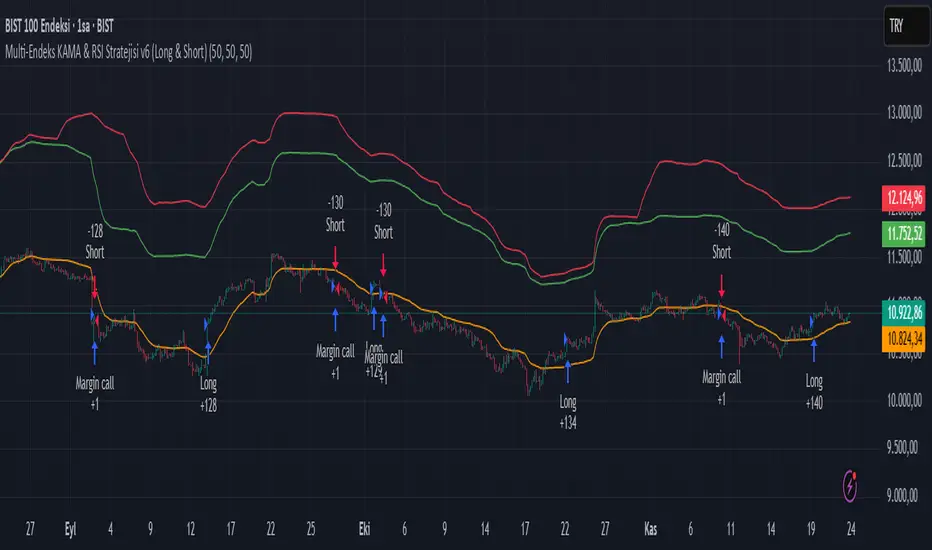
Multi-Endeks KAMA & RSI Stratejisi v6 (Long & Short)Multi-Index KAMA & RSI Strategy v6 (Long & Short)
This is a hybrid trading strategy that combines two powerful technical analysis tools—the Kaufman's Adaptive Moving Average (KAMA) for trend following and the Relative Strength Index (RSI) for measuring momentum and identifying overbought/oversold conditions.
The term "Multi-Index" suggests that the decision-making process might incorporate data or conditions from several different market indices or timeframes, rather than just the single asset being traded.
🧭 Core Components
1. KAMA (Kaufman's Adaptive Moving Average)
KAMA is an adaptive moving average developed by quantitative financial theorist Perry J. Kaufman.
Adaptivity: Unlike standard moving averages, KAMA automatically adjusts its smoothing factor (speed) based on market volatility.
Mechanism:
Trending Markets (Low Noise): When prices move clearly in one direction (low volatility), KAMA speeds up, hugging the price closely and providing fast signals.
Sideways Markets (High Noise): When prices are choppy (high volatility/noise), KAMA slows down, smoothing out price fluctuations to reduce the risk of whipsaws (false signals).
Role in Strategy: To define the main trend direction. The position of the price relative to the KAMA line determines the base directional bias (Long or Short).
2. RSI (Relative Strength Index)
RSI is a momentum oscillator developed by J. Welles Wilder Jr. that measures the speed and change of price movements.
Overbought/Oversold: It oscillates between 0 and 100. Conventionally, a reading above 70 suggests overbought conditions (potential sell signal), and a reading below 30 suggests oversold conditions (potential buy signal).
Role in Strategy: Timing and Confirmation. Once the trend is confirmed by KAMA, the RSI acts as a timing filter, often confirming an entry as it moves away from extreme overbought (for Short) or oversold (for Long) levels.
📉 Potential Trading Logic (V6)
This "v6" strategy likely aims to capture more reliable entries by requiring both trend (KAMA) and momentum (RSI) alignment:
1. LONG (Buy) Entry Conditions
Trend Confirmation (KAMA): The asset's price (Closing Price) must be above the KAMA line (confirming an uptrend).
Momentum Confirmation (RSI):
Option A (Reversal): The RSI must cross above the 30 level (exiting oversold) or decisively move above the 50 level.
Option B (Trend-Continuation): In a strong uptrend, the RSI might bounce off the 40-50 zone and turn upwards, confirming trend continuation.
2. SHORT (Sell) Entry Conditions
Trend Confirmation (KAMA): The asset's price (Closing Price) must be below the KAMA line (confirming a downtrend).
Momentum Confirmation (RSI):
Option A (Reversal): The RSI must cross below the 70 level (exiting overbought) or decisively move below the 50 level.
Option B (Trend-Continuation): In a strong downtrend, the RSI might be rejected from the 50-60 zone and turn downwards, confirming continuation.
3. Exit Management
The strategy likely utilizes dynamic risk controls:
Stop-Loss: A dynamic stop placed on the opposite side of the KAMA, or an ATR-based distance to adjust to volatility.
Take-Profit: Conditions such as the RSI reaching extreme levels or the KAMA line being crossed in the reverse direction.
🌟 Implication of the "V6" Version
The "v6" designation implies that the strategy has been refined and iterated upon over time to address weaknesses in prior versions (v1, v2, etc.). These improvements might include:
Filters: Adding stricter RSI or KAMA cross filters to reduce false signals.
Multi-Index Logic: Using the RSI or KAMA of a secondary instrument (e.g., a major index or volatility measure) as a macro filter for the main trade execution.
Optimization: Optimizing the default lookback periods for KAMA and RSI for different asset classes.
Crypto Schlingel - PVSRA POC EMA Suite v5.903The Chart Indicator Suite combines a wide range of powerful tools that help traders accurately analyze market structures, volatility, and key price zones. With indicators such as POC, pivot points, EMAs, VWAP, Bollinger Bands, and important market levels such as yesterday/weekly high & low, daily open, psy high/low, and ADR, the suite offers a comprehensive overview of trends and market behavior. Supplemented by pvsra candles, long candle detection, and the display of relevant stock market opening hours, it reliably supports traders in making informed trading decisions.
Indicators are configurable
All of the indicators mentioned are fully configurable and can be flexibly adapted to individual trading strategies. Users can freely adjust parameters, display types, and sensitivities to highlight exactly the market information that is relevant to their personal trading style.
The individual fields in the configuration are self-explanatory or are explained in a toolbar, so that the possible settings become clear.
POC
The Point of Control (POC) is a central concept in market profile and volume profile analysis and plays an important role in technical chart analysis. Here is a detailed description of its usefulness and significance:
Definition
The point of control (POC) is the price level at which the most trading volume has taken place within a certain period of time.
It therefore shows the price at which buyers and sellers were most active – the center of market interest.
📊 Use and significance in chart analysis
1. Central support and resistance zone
Since the largest volume was traded at the POC, this price is considered a “fair zone” or equilibrium price.
The market often reacts strongly to the POC:
Above the POC → potential resistance if the price is coming from below.
Below the POC → potential support if the price is falling from above.
Example: If the price returns to the POC, this can be an entry opportunity for traders betting on a market reaction.
2. Interpretation of market acceptance
A price range with high volume (including POC) shows where the market has accepted a fair value.
Low volume, on the other hand, indicates rejection or disinterest.
→ The POC therefore helps to distinguish between accepted price zones and transition areas.
PIVOT POINTS
Pivot points are predefined price levels calculated from the previous day's price data (or a previous time unit).
They help traders identify potential support and resistance zones for the current trading day (or period).
Benefits of pivot points in chart analysis
1. Determining support and resistance areas
The calculated pivot levels (P, S1, S2, R1, R2, etc.) show where the market is likely to react:
Supports (S1, S2, S3) → possible downward turning points.
Resistance (R1, R2, R3) → possible upward turning points.
These zones are often observed by many traders at the same time, making them self-fulfilling marks.
2. Trend determination and market sentiment
If the market opens above the pivot (P) and remains there → signals buying pressure.
If the market trades below the pivot (P) → signals selling pressure.
A break above R1 or below S1 may indicate a strong trend day.
EMA Exponential Moving Average
The EMA is the exponentially weighted moving average of a price.
It shows the average price of a security over a certain period of time, weighted according to recency – that is:
👉 more recent price data has more influence than older data.
This distinguishes it from the simple moving average (SMA), in which all values are weighted equally.
Benefits of the EMA in chart analysis -> Identifying trends
The EMA reacts more quickly to price changes than the SMA and is therefore ideal for:
Identifying trend reversals at an early stage
Confirming trend directions
👉 Rising EMA → Upward trend
👉 Falling EMA → Downward trend
Traders often use combinations such as:
EMA 50 / EMA 200 → Long-term trends
SIGNIFICANCE OF HIGHS AND LOWS
The daily high, daily low, weekly high, and weekly low are objective price zones that show:
Where the market bought (high) or sold (low) the most, and where supply and demand reached their extremes in the past period.
These levels often act as magnetic price zones in ongoing trading, where traders react (entry, profit-taking, or stop setting).
🎯 Use of yesterday's high and low (previous day high/low)
🔹Support and resistance levels
Yesterday's high often acts as resistance when the price comes from below.
Yesterday's low becomes support when the price falls from above.
➡️ Traders watch these levels closely to trade breakouts or reversals.
EMA 9 / EMA 20 → Short-term movements
🎯 Benefits of weekly highs and lows (Weekly High/Low)
Important structural markers in the higher time frame
Weekly highs and lows show medium to long-term market structure.
They are often considered stronger supports/resistances than daily levels.
➡️ For example, if the price breaks above the weekly high, this usually signals institutional interest and may indicate a continuation of the trend.
➡️ Conversely, failure to break above a weekly high may indicate market weakness or a reversal.
DAILY OPEN
The Daily Open is the price at which trading begins on a new day.
It marks the first price after the close of the previous trading session.
👉 In many markets (e.g., Forex, index futures, crypto), this is the starting point of daily price movement, where market direction and sentiment realign.
🎯 Benefits of the Daily Open in chart analysis
Direction indicator (daily bias)
The Daily Open serves as a neutral center line for the current trading day.
Traders use it to assess the market direction (bias):
Price above the Daily Open → bullish day (buyers dominate)
Price below the daily open → bearish day (sellers dominate)
📈 → If the daily open is broken and held above, this indicates upward momentum.
📉 → If it is broken below, this signals weakness.
This simple observation helps traders trade with the daily trend rather than against it.
STOCK MARKET OPENING HOURS
Every major stock exchange has defined trading hours during which institutional capital is active.
Examples (CET):
Asia (Tokyo/ Hong Kong) 1:00 a.m. – 9:00 a.m.
Europe (London/Frankfurt) 08:00 – 17:30
USA (New York) 15:30 – 22:00
Market dynamics change significantly during these time windows, as volume, liquidity, and volatility fluctuate depending on the session.
📈 Benefits in chart analysis
🔹Recognizing volatility and liquidity phases
At the start of a session (e.g., 9:00 a.m. in Frankfurt or 3:30 p.m. in New York), trading volume rises sharply.
This results in strong movements, often with changes in direction or breakouts.
👉 These phases are particularly suitable for:
Breakout strategies
Volume or momentum trades
Example:
If an index (e.g., DAX or S&P 500) reacts strongly at the US opening, this indicates institutional activity that may shape the rest of the day.
PSY HIGH AND PSY LOW
Psy High and Psy Low stand for:
Psychological High → the psychologically significant upper price level of a particular range
Psychological Low → the psychologically significant lower price level
These are often round numbers or striking price zones that market participants unconsciously use as a guide.
Examples:
For EUR/USD: 1.0500, 1.1000, 1.1500
For DAX: 17,000, 17,500, 18,000
For BTC/USD: 60,000, 65,000, 70,000
Traders also refer to such levels as “big figures” or “round numbers.”
📊 Why are psy levels so important?
Because they are based on human perception and market psychology:
👉 People think in round numbers, not in decimals such as 1.1037 or 17.264.
That's why:
Private investors often place their stop losses or take profits just above or below these levels, Institutional traders place large limit orders in these zones, and Algorithms react to the liquidity created there.
→ This results in increased volume, reaction patterns, and price movements at these levels.
ADR (Average Daily Range)
The ADR measures the average daily trading range of a market over a specific period of time – i.e., how many points, pips, or dollars the price typically moves per day.
Example:
If the DAX has moved an average of 180 points per day over the last 14 days, the ADR(14) = 180.
🎯 The benefits of ADR in chart analysis
🔹 Assessment of daily volatility
The ADR shows how much a market typically moves per day.
→ This allows you to see whether the current day is more volatile or calmer than normal.
Interpretation – Meaning
Current range < ADR
→ Market is still moving within normal limits → Potential for further movement
Current range ≈ ADR
→ Daily target largely achieved → lower probability of significant expansion
Current range > ADR
→ Market overextended → increased probability of correction or consolidation
👉 This helps you to plan entries, price targets, and stops realistically.
VWAP (Volume Weighted Average Price)
The VWAP is the volume-weighted average price of a security for a specific period of time – usually per day.
👉 Unlike a simple moving average (e.g., EMA), the VWAP takes into account how much was actually traded – not just where the price was.
It therefore reflects the fair market value, taking into account the trading volume.
🎯 Benefits of VWAP in chart analysis
🔹 Determining the fair average price
The VWAP shows where the majority of the trading volume took place – i.e., the price that the majority of market participants actually paid.
➡️ This is the “fair price of the day.”
Price above VWAP → buyers dominate (bullish)
Price below VWAP → sellers dominate (bearish)
This information is particularly valuable for determining the intraday bias (direction of the day).
BOLLINGER BANDS
Bollinger Bands consist of three lines based on a moving average (usually SMA 20):
Middle band:
→ usually the 20-period SMA (simple moving average)
Upper band:
→ SMA + (2 × standard deviation)
Lower band:
→ SMA − (2 × standard deviation)
👉 This means that the bands “breathe” with volatility – they widen when the market is volatile and contract when the market is calm.
🎯 The benefits of Bollinger Bands in chart analysis
🔹 Measuring market volatility
The main function of Bollinger Bands is to visualize the volatility of a market:
Wide bands → high volatility → strong movement/trend phase
Narrow bands → low volatility → calm market/consolidation
📈 When the bands contract sharply (“Bollinger squeeze”) → often a harbinger of an impending breakout.
KAMA
The KAMA was developed by Perry J. Kaufman.
Unlike normal moving averages such as SMA or EMA, it dynamically adjusts its smoothing to market conditions:
Low volatility / strong trend → reacts faster to price movements
High volatility / sideways movement → reacts slower, reduces false signals
The core idea: adaptability instead of rigid smoothing.
🎯 Benefits of KAMA in chart analysis
🔹 Filtering out market noise
KAMA smooths out unnecessary price fluctuations (noise) that many normal indicators mistakenly interpret as signals.
➡️ This minimizes false signals in sideways phases, while real trends remain visible.
EXTRA LARGE WICKS
A wick (or wick) is the thin line above or below the candle body:
Top → Highest price during the period
Bottom → Lowest price during the period
Long wick → Significant rejection of the price at this extreme zone
Example: A long upper wick means that the price rose high but was then pushed back sharply.
🎯 Benefits of long wicks in chart analysis
🔹 Recognizing rejections and resistance
Long upper wick: Sellers did not allow the higher price → possible downward reversal
Long lower wick: Buyers defended the lower price → possible upward reversal
💡 The market “speaks” through these wicks: It shows where buyers or sellers are not giving in any further.

Doctor Analytics – EMERSON >🜂 Doctor Analytics – EMERSON >
“Where probability replaces emotion.”
Doctor Analytics – EMERSON > isn’t a tool — it’s a behavioral correction system for traders who refuse to gamble.
Built on the Kulture Metrics / Emerson Moss framework, it combines the raw aggression of momentum with the cold precision of mathematical expectancy.
This isn’t signal-hunting; it’s surgical probability alignment.
Inside every calculation beats the Path-Integral Engine — Linetsky-inspired stochastic modeling that measures the expected payoff of all recent price paths, weighted by volatility and discounted through time. It watches volatility breathe, measures it, and only moves when mathematics agrees with momentum.
The Kulture Metrics Dashboard transforms trading discipline into data:
Tracks your live balance, dynamic risk %, and target %.
Computes exact dollar risk and payoff values in real time.
Enforces drawdown protection with an automatic Loss Halt Flag after two consecutive hits.
Embeds compliance awareness through a Trust Bank audit watermark.
While others chase trends, EMERSON > calculates the probability of continuation.
Each signal passes through layered verification — trend integrity, volatility gate, and path-integral confirmation — filtering out emotional noise until only certainty remains.
Benefits that dominate the screen:
⚙️ Real-time equity evolution and risk-to-reward feedback.
⚙️ Path-integral logic that aligns with professional option-pricing models.
⚙️ Adaptive volatility gating for ultra-clean confirmations.
⚙️ Visual dashboard — no spreadsheets, no hesitation, no excuses.
Doctor Analytics – EMERSON > is more than an indicator; it’s a trading philosophy encoded in Pine v6.
For those who understand that discipline and mathematics are the last forms of rebellion.
Kulture Metrics | EMERSON — When logic meets inevitability.

Average True Range Stop Loss Finder with KAMAATR SL finder with bands
Kaufmann adaptive moving average
ATR SL finder with bands
Kaufmann adaptive moving average

Tunç ŞatıroğluTunç Şatıroğlu's Technical Analysis Suite
Description:
This comprehensive Pine Script indicator, inspired by the technical analysis teachings of Tunç Şatıroğlu, integrates six powerful TradingView indicators into a single, user-friendly suite for robust trend, momentum, and divergence analysis. Each component has been carefully selected and enhanced by beytun to improve functionality, performance, and visual clarity, aligning with Şatıroğlu's approach to technical analysis. The default configuration is meticulously set to match the exact settings of the individual indicators as used by Tunç Şatıroğlu in his training, ensuring authenticity and ease of use for followers of his methodology. Whether you're a beginner or an experienced trader, this suite provides a versatile toolkit for analyzing markets across multiple timeframes.
Included Indicators:
1. WaveTrend with Crosses (by LazyBear, modified): A momentum oscillator that identifies overbought/oversold conditions and trend reversals with clear buy/sell signals via crosses and bar color highlights.
2. Kaufman Adaptive Moving Average (KAMA) (by HPotter, modified): A dynamic moving average that adapts to market volatility, offering a smoother trend-following signal.
3. SuperTrend (by Alex Orekhov, modified): A trend-following indicator that plots dynamic support/resistance levels with buy/sell signals and optional wicks for enhanced accuracy.
4. Nadaraya-Watson Envelope (by LuxAlgo, modified): A non-linear envelope that highlights potential reversals with customizable repainting options for smoother outputs.
5. Divergence for Many Indicators v4 (by LonesomeTheBlue, modified): Detects regular and hidden divergences across multiple indicators (MACD, RSI, Stochastic, CCI, Momentum, OBV, VWMA, CMF, MFI, and more) for early reversal signals.
6. Ichimoku Cloud (TradingView built-in, modified): A multi-faceted indicator for trend direction, support/resistance, and momentum, with enhanced visuals for the Kumo Cloud.
Key Features:
- Authentic Default Settings : Pre-configured to mirror the exact parameters used by Tunç Şatıroğlu for each indicator, ensuring alignment with his proven technical analysis approach.
- Customizable Settings : Enable/disable individual indicators and fine-tune parameters to suit your trading style while retaining the option to revert to Şatıroğlu’s defaults.
- Enhanced User Experience : Modifications improve visual clarity, performance, and usability, with options like repainting smoothing for Nadaraya-Watson and adjustable Ichimoku projection periods.
- Multi-Timeframe Analysis : Combines trend-following, momentum, and divergence tools for a holistic view of market dynamics.
- Alert Conditions : Built-in alerts for SuperTrend direction changes, buy/sell signals, and divergence detections to keep you informed.
- Visual Clarity : Overlays (KAMA, SuperTrend, Nadaraya-Watson, Ichimoku) and pane-based indicators (WaveTrend, Divergences) are clearly distinguished, with customizable colors and styles.
Notes:
- The Nadaraya-Watson Envelope and Ichimoku Cloud may repaint in their default modes. Use the "Repainting Smoothing" option for Nadaraya-Watson or adjust Ichimoku settings to mitigate repainting if preferred.
- Published under the MIT License, with components licensed under GPL-3.0 (SuperTrend), CC BY-NC-SA 4.0 (Nadaraya-Watson), MPL 2.0 (Divergence), and TradingView's terms (Ichimoku Cloud).
Usage:
Add this indicator to your TradingView chart to leverage Tunç Şatıroğlu’s exact indicator configurations out of the box. Customize settings as needed to align with your strategy, and use the combined signals to identify trends, reversals, and divergences. Ideal for traders following Şatıroğlu’s methodologies or anyone seeking a powerful, all-in-one technical analysis tool.
Credits:
Original authors: LazyBear, HPotter, Alex Orekhov, LuxAlgo, LonesomeTheBlue, and TradingView.
Modifications and integration by beytun .
License:
Published under the MIT License, incorporating code under GPL-3.0, CC BY-NC-SA 4.0, MPL 2.0, and TradingView’s terms where applicable.

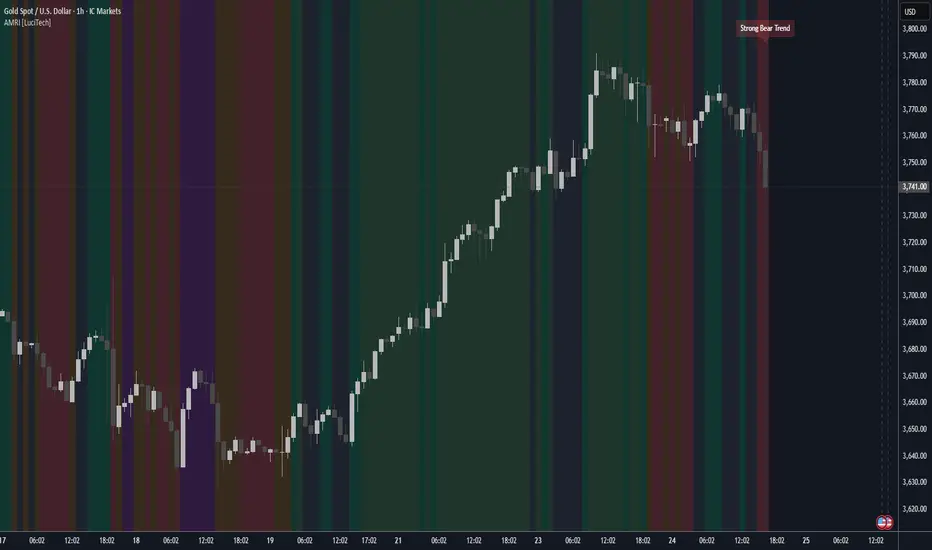
Adaptive Market Regime Identifier [LuciTech]What it Does:
AMRI visually identifies and categorizes the market into six primary regimes directly on your chart using a color-coded background. These regimes are:
-Strong Bull Trend: Characterized by robust upward momentum and low volatility.
-Weak Bull Trend: Indicates upward momentum with less conviction or higher volatility.
-Strong Bear Trend: Defined by powerful downward momentum and low volatility.
-Weak Bear Trend: Suggests downward momentum with less force or increased volatility.
-Consolidation: Periods of low volatility and sideways price action.
-Volatile Chop: High volatility without clear directional bias, often seen during transitions or indecision.
By clearly delineating these states, AMRI helps traders quickly grasp the overarching market context, enabling them to apply strategies best suited for the current conditions (e.g., trend-following in strong trends, range-bound strategies in consolidation, or caution in volatile chop).
How it Works (The Adaptive Edge)
AMRI achieves its adaptive classification by continuously analyzing three core market dimensions, with each component dynamically adjusting to current market conditions:
1.Adaptive Moving Average (KAMA): The indicator utilizes the Kaufman Adaptive Moving Average (KAMA) to gauge trend direction and strength. KAMA is unique because it adjusts its smoothing period based on market efficiency (noise vs. direction). In trending markets, it becomes more responsive, while in choppy markets, it smooths out noise, providing a more reliable trend signal than static moving averages.
2.Adaptive Average True Range (ATR): Volatility is measured using an adaptive version of the Average True Range. Similar to KAMA, this ATR dynamically adjusts its sensitivity to reflect real-time changes in market volatility. This helps AMRI differentiate between calm, ranging markets and highly volatile, directional moves or chaotic periods.
3.Normalized Slope Analysis: The slope of the KAMA is normalized against the Adaptive ATR. This normalization provides a robust measure of trend strength that is relative to the current market volatility, making the thresholds for strong and weak trends more meaningful across different instruments and timeframes.
These adaptive components work in concert to provide a nuanced and responsive classification of the market regime, minimizing lag and reducing false signals often associated with fixed-parameter indicators.
Key Features & Originality:
-Dynamic Regime Classification: AMRI stands out by not just indicating trend or range, but by classifying the type of market regime, offering a higher-level analytical framework. This is a meta-indicator that provides context for all other trading tools.
-Adaptive Core Metrics: The use of KAMA and an Adaptive ATR ensures that the indicator remains relevant and responsive across diverse market conditions, automatically adjusting to changes in volatility and trend efficiency. This self-adjusting nature is a significant advantage over indicators with static lookback periods.
-Visual Clarity: The color-coded background provides an immediate, at-a-glance understanding of the current market regime, reducing cognitive load and allowing for quicker decision-making.
-Contextual Trading: By identifying the prevailing regime, AMRI empowers traders to select and apply strategies that are most effective for that specific environment, helping to avoid costly mistakes of using a trend-following strategy in a ranging market, or vice-versa.
-Originality: While components like KAMA and ATR are known, their adaptive integration into a comprehensive, multi-regime classification system, combined with normalized slope analysis for trend strength, offers a novel approach to market analysis not commonly found in publicly available indicators.
HMA super trade by @arkancapMulti-HMA with five customizable moving averages: visual colors, transparency via picker, flexible line styles, and label/alert for HMA50↔HMA100 crossovers. Lightweight, readable, and ready for trading templates.
Мульти-HMA с пятью настраиваемыми скользящими: визуальные цвета, прозрачность через пикер, гибкие стили линий и метка/алерт для пересечений HMA50↔HMA100. Лёгкий, читабельный и готовый к торговым шаблонам.
Five Hull moving averages that show the trend and indicate key crossovers. Customize colors, thickness, and get accurate alerts. Suitable for scalping and multi-timeframes. Support for filling between moving averages to visually highlight areas of strength or weakness.
Пять Hull-скользящих, которые показывают тренд и подсказывают ключевые пересечения. Настраивай цвета, толщину и получай аккуратные алерты. Подходит для скальпа и мульти-таймфрейма. Поддержка заливки между скользящими для наглядного выделения зон силы или слабости.

ETH/SOL 1D Dynamic Trend Core - Indicator v46🚀 Dynamic Trend Core
The Dynamic Trend Core is a sophisticated, multi-layer trading engine designed to identify high-probability, trend-following opportunities. It offers both a quantitative backtesting engine and a rich, intuitive visual interface.
Its core philosophy is simple: confirmation. The system seeks to filter out market noise by requiring a confluence of conditions—trend, momentum, price action, and volume—to be in alignment before a signal is considered valid.
⚙️ Core Logic Components
Primary Trend Analysis (SAMA): The foundation is a Self-Adjusting Moving Average (SAMA) that determines the underlying market trend (Bullish, Bearish, or Consolidation).
Confirmation & Momentum: Signals are confirmed with a blend of the Natural Market Slope and a Cyclic RSI to ensure momentum aligns with the primary trend.
Advanced Filtering Layers: A suite of optional filters allows for robust customization:
Volume & ADX: Ensure sufficient market participation and trend strength.
Market Regime: Uses the total crypto market cap to gauge broad market health.
Multi-Timeframe (MTF): Aligns signals with the dominant weekly trend.
BTC Cycle Analysis: Uses Halving or Mayer Multiple models to position trades within historical macro cycles.
Delta Zones: An additional filter to confirm signals with recent buy or sell pressure detected in candle wicks.
📊 The On-Chart Command Center
The strategy's real power comes from its on-chart visual feedback system, which provides full transparency into the engine's decision-making process.
Note: For the dashboard to update in real-time, you must enable "Recalculate on every tick" in the script's settings.
Power Core Gauge: Located at the bottom-center, this gauge is the heart of the system. It displays the number of active filter conditions met (e.g., 6/7) and "powers up" by glowing brightly as a signal becomes fully confirmed.
Live Conditions Panel: In the bottom-right corner, this panel acts as a detailed pre-flight checklist. It shows the real-time status of every single filter, helping you understand exactly why a trade is (or is not) being triggered.
Energized Trendline: The main SAMA trendline changes color and brightness based on the strength and direction of the trend, providing immediate visual context.
Halving Cycle Visualization: An optional visual guide to the phases of the Bitcoin halving cycle.
Delta Zone Pressure Boxes: A visual guide that draws boxes around candles exhibiting significant buying or selling pressure.
🛠️ How to Use
Operation Mode: "Alerts-Only Mode" for generating live signals.
Configure Strategy: Start with the default filters. If a potential trade setup is missed, check the Live Conditions Panel to see exactly which filter blocked the signal. Adjust the filters to suit your specific asset and timeframe.
Manage Risk: Adjust the Risk & Exit settings to match your personal risk tolerance.

BTC Dynamic Trend Core - Indicator v46🚀 Dynamic Trend Core
The Dynamic Trend Core is a sophisticated, multi-layer trading engine designed to identify high-probability, trend-following opportunities. It offers both a quantitative backtesting engine and a rich, intuitive visual interface.
Its core philosophy is simple: confirmation. The system seeks to filter out market noise by requiring a confluence of conditions—trend, momentum, price action, and volume—to be in alignment before a signal is considered valid.
⚙️ Core Logic Components
Primary Trend Analysis (SAMA): The foundation is a Self-Adjusting Moving Average (SAMA) that determines the underlying market trend (Bullish, Bearish, or Consolidation).
Confirmation & Momentum: Signals are confirmed with a blend of the Natural Market Slope and a Cyclic RSI to ensure momentum aligns with the primary trend.
Advanced Filtering Layers: A suite of optional filters allows for robust customization:
Volume & ADX: Ensure sufficient market participation and trend strength.
Market Regime: Uses the total crypto market cap to gauge broad market health.
Multi-Timeframe (MTF): Aligns signals with the dominant weekly trend.
BTC Cycle Analysis: Uses Halving or Mayer Multiple models to position trades within historical macro cycles.
Delta Zones: An additional filter to confirm signals with recent buy or sell pressure detected in candle wicks.
📊 The On-Chart Command Center
The strategy's real power comes from its on-chart visual feedback system, which provides full transparency into the engine's decision-making process.
Note: For the dashboard to update in real-time, you must enable "Recalculate on every tick" in the script's settings.
Power Core Gauge: Located at the bottom-center, this gauge is the heart of the system. It displays the number of active filter conditions met (e.g., 6/7) and "powers up" by glowing brightly as a signal becomes fully confirmed.
Live Conditions Panel: In the bottom-right corner, this panel acts as a detailed pre-flight checklist. It shows the real-time status of every single filter, helping you understand exactly why a trade is (or is not) being triggered.
Energized Trendline: The main SAMA trendline changes color and brightness based on the strength and direction of the trend, providing immediate visual context.
Halving Cycle Visualization: An optional visual guide to the phases of the Bitcoin halving cycle.
Delta Zone Pressure Boxes: A visual guide that draws boxes around candles exhibiting significant buying or selling pressure.
🛠️ How to Use
Indicator version of BTC DTC Strategy: "Alerts-Only Mode" for generating live signals.
Configure Strategy: Start with the default filters. If a potential trade setup is missed, check the Live Conditions Panel to see exactly which filter blocked the signal. Adjust the filters to suit your specific asset and timeframe.
Manage Risk: Adjust the Risk & Exit settings to match your personal risk tolerance.

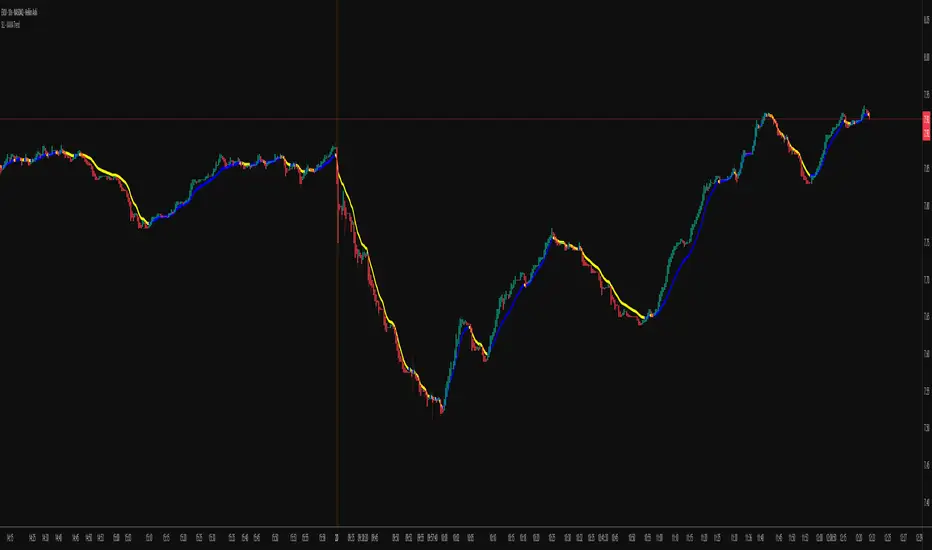
KAMA Trend Flip - SightLing LabsBuckle up, traders—this open-source KAMA Trend Flip indicator is your ticket to sniping trend reversals with a Kaufman Adaptive Moving Average (KAMA) that’s sharper than a Wall Street shark’s tooth. No voodoo, no fluff—just raw, volatility-adaptive math that dances with the market’s rhythm. It zips through trending rockets and chills in choppy waters, slashing false signals like a samurai. Not laggy like the others - this thing is the real deal!
Core Mechanics:
• Efficiency Ratio (ER): Reads the market’s pulse (0-1). High ER = turbo-charged MA, low ER = smooth operator.
• Adaptive Smoothing: Mixes fast (default power 2) and slow (default 30) constants to match market mood swings.
• Trend Signals: KAMA climbs = blue uptrend (bulls run wild). KAMA dips = yellow downtrend (bears take over). Flat = gray snooze-fest.
• Alerts: Instant pings on flips—“Trend Flip Up” for long plays, “Down” for shorts. Plug into bots for set-and-forget domination.
Why It Crushes:
• Smokes static MAs in volatile arenas (crypto, stocks, you name it). Backtests show 20-30% fewer fakeouts than SMA50.
• Visual Pop: Overlays price with bold blue/yellow signals. Slap it on BTC 1D to see trends light up like Times Square.
• Tweakable: Dial ER length (default 50) to your timeframe. Short for scalps, long for swing trades.
Example Settings in Action:
• 10s Chart (Hyper-Scalping): Set Source: Close, ER Length: 100, Fast Power: 1, Slow Power: 6. Catches micro-trends in crypto like a heat-seeking missile. Blue/yellow flips scream entry/exit on fast moves.
• 2m Chart (Quick Trades): Set Source: Close, ER Length: 14, Fast Power: 1, Slow Power: 6. Perfect for rapid trend shifts in stocks or forex. Signals align with momentum bursts—check historical flips for proof.
Deployment:
• Drop it on any chart. Backtest settings to match your asset’s volatility—tweak until it sings.
• Pair with RSI or volume spikes for killer confirmation. Pro move: Enter on flip + volume pop, exit on reverse.
• Strategy-Ready: Slap long/short logic on alerts to build a lean, mean trading machine.
Open source from SightLing Labs—grab it, hack it, profit from it. Share your tweaks in the comments and let’s outsmart the market together. Trade hard, win big!
ETH/SOL 1D Dynamic Trend Core - STRATEGY v 45Overview
The Dynamic Trend Core is a sophisticated, multi-layer trading engine designed to identify high-probability, trend-following opportunities. Its core philosophy is rooted in confluence, meaning it requires multiple conditions across trend, momentum, and volume to align before generating a signal. This approach aims to filter out market noise and provide a clearer view of the underlying trend.
The script includes a comprehensive backtesting engine for strategy optimization and a rich, intuitive visual interface for real-time analysis.
How It Works: Core Logic
The engine validates signals through several sequential layers:
Primary Trend Analysis (SAMA): The foundation is a Self-Adjusting Moving Average (SAMA) that dynamically determines the primary market direction (Bullish, Bearish, or Consolidation).
Momentum Confirmation: Signals are then qualified using a blend of the Natural Market Slope and a Cyclic RSI to ensure momentum is firmly aligned with the established trend.
Advanced Filtering Suite: A suite of optional filters provides robust confirmation and allows for deep customization:
Volume & ADX: Confirms that trades are supported by sufficient market participation and trend strength.
Market Regime: Gauges broad market health (e.g., using TOTAL market cap) to avoid trading against the entire market.
Multi-Timeframe (MTF) Analysis: Aligns signals with the dominant trend on a higher timeframe (e.g., Weekly).
BTC Cycle Analysis: Positions trades within the context of historical Bitcoin cycles using models like the Halving Cycle or Mayer Multiple.
On-Chart Visuals & Features
The script provides full transparency into its logic with a powerful on-chart interface.
IMPORTANT: For the live visual elements to function correctly, you must enable "Recalculate on every tick" in the script's settings (Settings > Properties).
Power Core Gauge: Located at the bottom-center of the chart, this gauge is the heart of the system. It displays the number of filter conditions currently met (e.g., 5/6) and "powers up" by glowing brighter as more conditions align, indicating a fully confirmed signal is ready.
Live Conditions Panel: This panel in the bottom-right corner acts as a real-time pre-flight checklist. It shows the status (pass/fail) of every individual filter, so you know exactly why a signal is, or is not, being generated.
Energized Trendline: The primary SAMA trendline changes color and intensity based on the strength and direction of the trend, offering immediate visual context.
BTC Halving Cycle Visualizer: Provides a background color guide to the different phases of the Bitcoin halving cycle for macro context.
How to Use & Configure
Select Operation Mode:
Backtest Mode: Use this to test different settings on historical data and find optimal configurations for a specific asset and timeframe.
Alerts-Only Mode: Use this for live trading to generate alert signals without cluttering the chart with backtest data. (Contact publisher for access to this version)
Configure Your Filters:
Start with the default filter settings.
If a potential setup is missed, check the Live Conditions Panel to see which specific filter blocked the signal.
Enable, disable, or adjust filters in the script's settings to match your trading style and the asset's characteristics.
Manage Your Risk:
Go to the "Risk & Exit" settings to configure your Stop Loss and Take Profit parameters to match your personal risk tolerance.
Disclaimer: This script is for educational and informational purposes only. It is not financial advice. All trading involves risk, and past performance is not indicative of future results. Please conduct your own research and backtesting before making any trading decisions.

BTC Dynamic Trend Core Strategy v45// The Dynamic Trend Core is a sophisticated, multi-layer trading strategy that provides both a quantitative //
// backtesting engine and a rich, intuitive visual interface. It is designed to identify high-probability //
// trend-following opportunities by requiring a confluence of conditions to be met before a signal is considered //
// valid. //
// //
// The system's philosophy is rooted in confirmation, seeking to filter out market noise by ensuring that trend, //
// momentum, market sentiment, and volume are all in alignment. //
// //
// --- CORE LOGIC COMPONENTS --- //
// 1. **Primary Trend Analysis (SAMA):** The foundation is a self-adjusting moving average (SAMA) that //
// determines the underlying market trend (Bullish, Bearish, or Consolidation). //
// //
// 2. **Confirmation & Momentum:** Signals are confirmed with a blend of the Natural Market Slope and a Cyclic //
// RSI to ensure momentum aligns with the primary trend. //
// //
// 3. **Advanced Filtering Layers:** A suite of optional filters allows for robust customization: //
// - **Volume & ADX:** Ensure sufficient market participation and trend strength. //
// - **Market Regime:** Uses total crypto market cap to gauge broad market health. //
// - **Multi-Timeframe (MTF):** Aligns signals with the dominant weekly trend. //
// - **BTC Cycle Analysis:** Uses Halving or Mayer Multiple models to position trades within historical //
// macro cycles. //
// //
// --- VISUAL INTERFACE --- //
// The strategy's real power comes from its on-chart visual feedback system, which provides full transparency. //
// ****Note: for this to be enabled recalculate 'on every tick' needs to be enabled in the properties settings. //
// 1. **Power Core Gauge:** Located at the bottom-center, this gauge is the heart of the system. It displays the //
// number of active filter conditions that have been met (e.g., 5/6). It "powers up" as more conditions align,//
// glowing brightly when a signal is fully confirmed and ready. //
// //
// 2. **Live Conditions Panel:** In the bottom-right corner, this panel acts as a detailed pre-flight checklist. //
// It shows the real-time status of every single filter, helping you understand exactly why a trade is (or //
// is not) being triggered. //
// //
// 3. **Energized Trendline:** The main SAMA trendline changes color and brightness based on the strength and //
// direction of the trend, providing immediate visual context. //
// //
// 4. **Halving cycle visualisation:** Visual guide to halving phases //
// //
// --- HOW TO USE --- //
// 1. **Select Operation Mode:** Use "Backtest Mode" to test settings and "Alerts-Only Mode" for live signals. //
// //
// 2. **Configure Strategy:** Start with the default filters. If a potential trade setup is missed, check the //
// **Live Conditions Panel** to see exactly which filter blocked the signal. Adjust the filters to suit your //
// specific asset and timeframe. //
// //
// 3. **Manage Risk:** Adjust the Risk & Exit settings to match your personal risk tolerance. //

Kaufman Trend Strength Signal█ Overview
Kaufman Trend Strength Signal is an advanced trend detection tool that decomposes price action into its underlying directional trend and localized oscillation using a vector-based Kalman Filter.
By integrating adaptive smoothing and dynamic weighting via a weighted moving average (WMA), this indicator provides real-time insight into both trend direction and trend strength — something standard moving averages often fail to capture.
The core model assumes that observed price consists of two components:
(1) a directional trend, and
(2) localized noise or oscillation.
Using a two-step Predict & Update cycle, the filter continuously refines its trend estimate as new market data becomes available.
█ How It Works
This indicator employs a Kalman Filter model that separates the trend from short-term fluctuations in a price series.
Predict & Update Cycle : With each new bar, the filter predicts the price state and updates that prediction using the latest observed price, producing a smooth but adaptive trend line.
Trend Strength Normalization : Internally, the oscillator component is normalized against recent values (N periods) to calculate a trend strength score between -100 and +100.
(Note: The oscillator is not plotted on the chart but is used for signal generation.)
Filtered MA Line : The trend component is plotted as a smooth Kalman Filter-based moving average (MA) line on the main chart.
Threshold Cross Signals : When the internal trend strength crosses a user-defined threshold (default: ±60), visual entry arrows are displayed to signal momentum shifts.
█ Key Features
Adaptive Trend Estimation : Real-time filtering that adjusts dynamically to market changes.
Visual Buy/Sell Signals : Entry arrows appear when the trend strength crosses above or below the configured threshold.
Built-in Range Filter : The MA line turns blue when trend strength is weak (|value| < 10), helping you filter out choppy, sideways conditions.
█ How to Use
Trend Detection :
• Green MA = bullish trend
• Red MA = bearish trend
• Blue MA = no trend / ranging market
Entry Signals :
• Green triangle = trend strength crossed above +Threshold → potential bullish entry
• Red triangle = trend strength crossed below -Threshold → potential bearish entry
█ Settings
Entry Threshold : Level at which the trend strength triggers entry signals (default: 60)
Process Noise 1 & 2 : Control the filter’s responsiveness to recent price action. Higher = more reactive; lower = smoother.
Measurement Noise : Sets how much the filter "trusts" price data. High = smoother MA, low = faster response but more noise.
Trend Lookback (N2) : Number of bars used to normalize trend strength. Lower = more sensitive; higher = more stable.
Trend Smoothness (R2) : WMA smoothing applied to the trend strength calculation.
█ Visual Guide
Green MA Line → Bullish trend
Red MA Line → Bearish trend
Blue MA Line → Sideways/range
Green Triangle → Entry signal (trend strengthening)
Red Triangle → Entry signal (trend weakening)
█ Best Practices
In high-volatility conditions, increase Measurement Noise to reduce false signals.
Combine with other indicators (e.g., RSI, MACD, EMA) for confirmation and filtering.
Adjust "Entry Threshold" and noise settings depending on your timeframe and trading style.
❗ Disclaimer
This script is provided for educational purposes only and should not be considered financial advice or a recommendation to buy/sell any asset.
Trading involves risk. Past performance does not guarantee future results.
Always perform your own analysis and use proper risk management when trading.
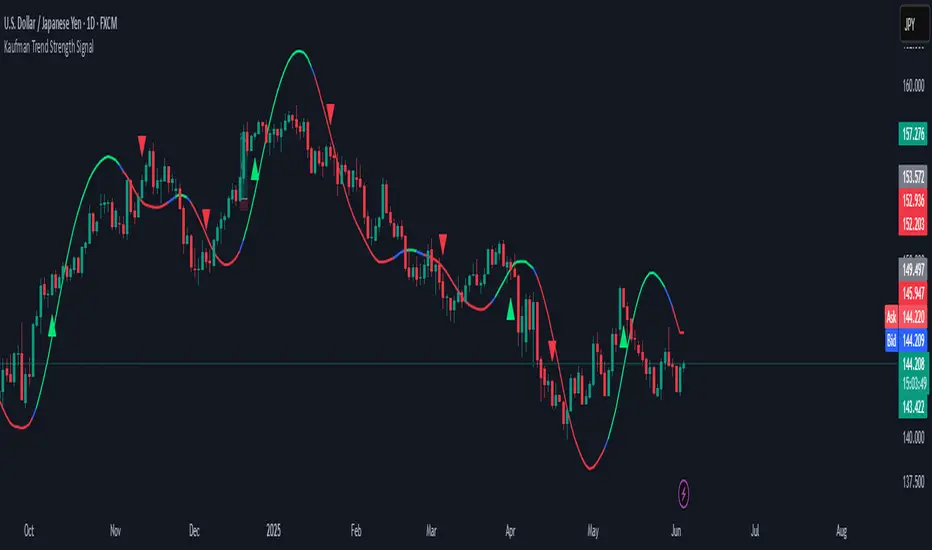
Kaufman Trend Strategy# ✅ Kaufman Trend Strategy – Full Description (Script Publishing Version)
**Kaufman Trend Strategy** is a dynamic trend-following strategy based on Kaufman Filter theory.
It detects real-time trend momentum, reduces noise, and aims to enhance entry accuracy while optimizing risk.
⚠️ _For educational and research purposes only. Past performance does not guarantee future results._
---
## 🎯 Strategy Objective
- Smooth price noise using Kaufman Filter smoothing
- Detect the strength and direction of trends with a normalized oscillator
- Manage profits using multi-stage take-profits and adaptive ATR stop-loss logic
---
## ✨ Key Features
- **Kaufman Filter Trend Detection**
Extracts directional signal using a state space model.
- **Multi-Stage Profit-Taking**
Automatically takes partial profits based on color changes and zero-cross events.
- **ATR-Based Volatility Stops**
Stops adjust based on swing highs/lows and current market volatility.
---
## 📊 Entry & Exit Logic
**Long Entry**
- `trend_strength ≥ 60`
- Green trend signal
- Price above the Kaufman average
**Short Entry**
- `trend_strength ≤ -60`
- Red trend signal
- Price below the Kaufman average
**Exit (Long/Short)**
- Blue trend color → TP1 (50%)
- Oscillator crosses 0 → TP2 (25%)
- Trend weakens → Final exit (25%)
- ATR + swing-based stop loss
---
## 💰 Risk Management
- Initial capital: `$3,000`
- Order size: `$100` per trade (realistic, low-risk sizing)
- Commission: `0.002%`
- Slippage: `2 ticks`
- Pyramiding: `1` max position
- Estimated risk/trade: `~0.1–0.5%` of equity
> ⚠️ _No trade risks more than 5% of equity. This strategy follows TradingView script publishing rules._
---
## ⚙️ Default Parameters
- **1st Take Profit**: 50%
- **2nd Take Profit**: 25%
- **Final Exit**: 25%
- **ATR Period**: 14
- **Swing Lookback**: 10
- **Entry Threshold**: ±60
- **Exit Threshold**: ±40
---
## 📅 Backtest Summary
- **Symbol**: USD/JPY
- **Timeframe**: 1H
- **Date Range**: Jan 3, 2022 – Jun 4, 2025
- **Trades**: 924
- **Win Rate**: 41.67%
- **Profit Factor**: 1.108
- **Net Profit**: +$1,659.29 (+54.56%)
- **Max Drawdown**: -$1,419.73 (-31.87%)
---
## ✅ Summary
This strategy uses Kaufman filtering to detect market direction with reduced lag and increased smoothness.
It’s built with visual clarity and strong trade management, making it practical for both beginners and advanced users.
---
## 📌 Disclaimer
This script is for educational and informational purposes only and should not be considered financial advice.
Use with proper risk controls and always test in a demo environment before live trading.