Delta Volume Columns Pro [LucF]█ OVERVIEW
This indicator displays volume delta information calculated with intrabar inspection on historical bars, and feed updates when running in realtime. It is designed to run in a pane and can display either stacked buy/sell volume columns or a signal line which can be calculated and displayed in many different ways.
Five different models are offered to reveal different characteristics of the calculated volume delta information. Many options are offered to visualize the calculations, giving you much leeway in morphing the indicator's visuals to suit your needs. If you value delta volume information, I hope you will find the time required to master Delta Volume Columns Pro well worth the investment. I am confident that if you combine a proper understanding of the indicator's information with an intimate knowledge of the volume idiosyncrasies on the markets you trade, you can extract useful market intelligence using this tool.
█ WARNINGS
1. The indicator only works on markets where volume information is available,
Please validate that your symbol's feed carries volume information before asking me why the indicator doesn't plot values.
2. When you refresh your chart or re-execute the script on the chart, the indicator will repaint because elapsed realtime bars will then recalculate as historical bars.
3. Because the indicator uses different modes of calculation on historical and realtime bars, it's critical that you understand the differences between them. Details are provided further down.
4. Calculations using intrabar inspection on historical bars can only be done from some chart timeframes. See further down for a list of supported timeframes.
If the chart's timeframe is not supported, no historical volume delta will display.
█ CONCEPTS
Chart bars
Three different types of bars are used in charts:
1. Historical bars are bars that have already closed when the script executes on them.
2. The realtime bar is the current, incomplete bar where a script is running on an open market. There is only one active realtime bar on your chart at any given time.
The realtime bar is where alerts trigger.
3. Elapsed realtime bars are bars that were calculated when they were realtime bars but have since closed.
When a script re-executes on a chart because the browser tab is refreshed or some of its inputs are changed, elapsed realtime bars are recalculated as historical bars.
Why does this indicator use two modes of calculation?
Historical bars on TradingView charts contain OHLCV data only, which is insufficient to calculate volume delta on them with any level of precision. To mine more detailed information from those bars we look at intrabars , i.e., bars from a smaller timeframe (we call it the intrabar timeframe ) that are contained in one chart bar. If your chart Is running at 1D on a 24x7 market for example, most 1D chart bars will contain 24 underlying 1H bars in their dilation. On historical bars, this indicator looks at those intrabars to amass volume delta information. If the intrabar is up, its volume goes in the Buy bin, and inversely for the Sell bin. When price does not move on an intrabar, the polarity of the last known movement is used to determine in which bin its volume goes.
In realtime, we have access to price and volume change for each update of the chart. Because a 1D chart bar can be updated tens of thousands of times during the day, volume delta calculations on those updates is much more precise. This precision, however, comes at a price:
— The script must be running on the chart for it to keep calculating in realtime.
— If you refresh your chart you will lose all accumulated realtime calculations on elapsed realtime bars, and the realtime bar.
Elapsed realtime bars will recalculate as historical bars, i.e., using intrabar inspection, and the realtime bar's calculations will reset.
When the script recalculates elapsed realtime bars as historical bars, the values on those bars will change, which means the script repaints in those conditions.
— When the indicator first calculates on a chart containing an incomplete realtime bar, it will count ALL the existing volume on the bar as Buy or Sell volume,
depending on the polarity of the bar at that point. This will skew calculations for that first bar. Scripts have no access to the history of a realtime bar's previous updates,
and intrabar inspection cannot be used on realtime bars, so this is the only to go about this.
— Even if alerts only trigger upon confirmation of their conditions after the realtime bar closes, they are repainting alerts
because they would perhaps not have calculated the same way using intrabar inspection.
— On markets like stocks that often have different EOD and intraday feeds and volume information,
the volume's scale may not be the same for the realtime bar if your chart is at 1D, for example,
and the indicator is using an intraday timeframe to calculate on historical bars.
— Any chart timeframe can be used in realtime mode, but plots that include moving averages in their calculations may require many elapsed realtime bars before they can calculate.
You might prefer drastically reducing the periods of the moving averages, or using the volume columns mode, which displays instant values, instead of the line.
Volume Delta Balances
This indicator uses a variety of methods to evaluate five volume delta balances and derive other values from those balances. The five balances are:
1 — On Bar Balance : This is the only balance using instant values; it is simply the subtraction of the Sell volume from the Buy volume on the bar.
2 — Average Balance : Calculates a distinct EMA for both the Buy and Sell volumes, and subtracts the Sell EMA from the Buy EMA.
3 — Momentum Balance : Starts by calculating, separately for both Buy and Sell volumes, the difference between the same EMAs used in "Average Balance" and
an SMA of double the period used for the "Average Balance" EMAs. The difference for the Sell side is subtracted from the difference for the Buy side,
and an RSI of that value is calculated and brought over the −50/+50 scale.
4 — Relative Balance : The reference values used in the calculation are the Buy and Sell EMAs used in the "Average Balance".
From those, we calculate two intermediate values using how much the instant Buy and Sell volumes on the bar exceed their respective EMA — but with a twist.
If the bar's Buy volume does not exceed the EMA of Buy volume, a zero value is used. The same goes for the Sell volume with the EMA of Sell volume.
Once we have our two intermediate values for the Buy and Sell volumes exceeding their respective MA, we subtract them. The final "Relative Balance" value is an ALMA of that subtraction.
The rationale behind using zero values when the bar's Buy/Sell volume does not exceed its EMA is to only take into account the more significant volume.
If both instant volume values exceed their MA, then the difference between the two is the signal's value.
The signal is called "relative" because the intermediate values are the difference between the instant Buy/Sell volumes and their respective MA.
This balance flatlines when the bar's Buy/Sell volumes do not exceed their EMAs, which makes it useful to spot areas where trader interest dwindles, such as consolidations.
The smaller the period of the final value's ALMA, the more easily you will see the balance flatline. These flat zones should be considered no-trade zones.
5 — Percent Balance : This balance is the ALMA of the ratio of the "On Bar Balance" value, i.e., the volume delta balance on the bar (which can be positive or negative),
over the total volume for that bar.
From the balances and marker conditions, two more values are calculated:
1 — Marker Bias : It sums the up/down (+1/‒1) occurrences of the markers 1 to 4 over a period you define, so it ranges from −4 to +4, times the period.
Its calculation will depend on the modes used to calculate markers 3 and 4.
2 — Combined Balances : This is the sum of the bull/bear (+1/−1) states of each of the five balances, so it ranges from −5 to +5.
█ FEATURES
The indicator has two main modes of operation: Columns and Line .
Columns
• In Columns mode you can display stacked Buy/Sell volume columns.
• The buy section always appears above the centerline, the sell section below.
• The top and bottom sections can be colored independently using eight different methods.
• The EMAs of the Buy/Sell values can be displayed (these are the same EMAs used to calculate the "Average Balance").
Line
• Displays one of seven signals: the five balances or one of two complementary values, i.e., the "Marker Bias" or the "Combined Balances".
• You can color the line and its fill using independent calculation modes to pack more information in the display.
You can thus appraise the state of 3 different values using the line itself, its color and the color of its fill.
• A "Divergence Levels" feature will use the line to automatically draw expanding levels on divergence events.
Default settings
Using the indicator's default settings, this is the information displayed:
• The line is calculated on the "Average Balance".
• The line's color is determined by the bull/bear state of the "Percent Balance".
• The line's fill gradient is determined by the advances/declines of the "Momentum Balance".
• The orange divergence dots are calculated using discrepancies between the polarity of the "On Bar Balance" and the chart's bar.
• The divergence levels are determined using the line's level when a divergence occurs.
• The background's fill gradient is calculated on advances/declines of the "Marker Bias".
• The chart bars are colored using advances/declines of the "Relative Balance". Divergences are shown in orange.
• The intrabar timeframe is automatically determined from the chart's timeframe so that a minimum of 50 intrabars are used to calculate volume delta on historical bars.
Alerts
The configuration of the marker conditions explained further is what determines the conditions that will trigger alerts created from this script. Note that simply selecting the display of markers does not create alerts. To create an alert on this script, you must use ALT-A from the chart. You can create multiple alerts triggering on different conditions from this same script; simply configure the markers so they define the trigger conditions for each alert before creating the alert. The configuration of the script's inputs is saved with the alert, so from then on you can change them without affecting the alert. Alert messages will mention the marker(s) that triggered the specific alert event. Keep in mind, when creating alerts on small chart timeframes, that discrepancies between alert triggers and markers displayed on your chart are to be expected. This is because the alert and your chart are running two distinct instances of the indicator on different servers and different feeds. Also keep in mind that while alerts only trigger on confirmed conditions, they are calculated using realtime calculation mode, which entails that if you refresh your chart and elapsed realtime bars recalculate as historical bars using intrabar inspection, markers will not appear in the same places they appeared in realtime. So it's important to understand that even though the alert conditions are confirmed when they trigger, these alerts will repaint.
Let's go through the sections of the script's inputs.
Columns
The size of the Buy/Sell columns always represents their respective importance on the bar, but the coloring mode for tops and bottoms is independent. The default setup uses a standard coloring mode where the Buy/Sell columns are always in the bull/bear color with a higher intensity for the winning side. Seven other coloring modes allow you to pack more information in the columns. When choosing to color the top columns using a bull/bear gradient on "Average Balance", for example, you will have bull/bear colored tops. In order for the color of the bottom columns to continue to show the instant bar balance, you can then choose the "On Bar Balance — Dual Solid Colors" coloring mode to make those bars the color of the winning side for that bar. You can display the averages of the Buy and Sell columns. If you do, its coloring is controlled through the "Line" and "Line fill" sections below.
Line and Line fill
You can select the calculation mode and the thickness of the line, and independent calculations to determine the line's color and fill.
Zero Line
The zero line can display dots when all five balances are bull/bear.
Divergences
You first select the detection mode. Divergences occur whenever the up/down direction of the signal does not match the up/down polarity of the bar. Divergences are used in three components of the indicator's visuals: the orange dot, colored chart bars, and to calculate the divergence levels on the line. The divergence levels are dynamic levels that automatically build from the line's values on divergence events. On consecutive divergences, the levels will expand, creating a channel. This implementation of the divergence levels corresponds to my view that divergences indicate anomalies, hesitations, points of uncertainty if you will. It precludes any attempt to identify a directional bias to divergences. Accordingly, the levels merely take note of divergence events and mark those points in time with levels. Traders then have a reference point from which they can evaluate further movement. The bull/bear/neutral colors used to plot the levels are also congruent with this view in that they are determined by the line's position relative to the levels, which is how I think divergences can be put to the most effective use. One of the coloring modes for the line's fill uses advances/declines in the line after divergence events.
Background
The background can show a bull/bear gradient on six different calculations. As with other gradients, you can adjust its brightness to make its importance proportional to how you use it in your analysis.
Chart bars
Chart bars can be colored using seven different methods. You have the option of emptying the body of bars where volume does not increase, as does my TLD indicator, and you can choose whether you want to show divergences.
Intrabar Timeframe
This is the intrabar timeframe that will be used to calculate volume delta using intrabar inspection on historical bars. You can choose between four modes. The three "Auto-steps" modes calculate, from the chart's timeframe, the intrabar timeframe where the said number of intrabars will make up the dilation of chart bars. Adjustments are made for non-24x7 markets. "Fixed" mode allows you to select the intrabar timeframe you want. Checking the "Show TF" box will display in the lower-right corner the intrabar timeframe used at any given moment. The proper selection of the intrabar timeframe is important. It must achieve maximal granularity to produce precise results while not unduly slowing down calculations, or worse, causing runtime errors. Note that historical depth will vary with the intrabar timeframe. The smaller the timeframe, the shallower historical plots you will be.
Markers
Markers appear when the required condition has been confirmed on a closed bar. The configuration of the markers when you create an alert is what determines when the alert will trigger. Five markers are available:
• Balances Agreement : All five balances are either bullish or bearish.
• Double Bumps : A double bump is two consecutive up/down bars with +/‒ volume delta, and rising Buy/Sell volume above its average.
• Divergence confirmations : A divergence is confirmed up/down when the chosen balance is up/down on the previous bar when that bar was down/up, and this bar is up/down.
• Balance Shifts : These are bull/bear transitions of the selected signal.
• Marker Bias Shifts : Marker bias shifts occur when it crosses into bull/bear territory.
Periods
Allows control over the periods of the different moving averages used to calculate the balances.
Volume Discrepancies
Stock exchanges do not report the same volume for intraday and daily (or higher) resolutions. Other variations in how volume information is reported can also occur in other markets, namely Forex, where volume irregularities can even occur between different intraday timeframes. This will cause discrepancies between the total volume on the bar at the chart's timeframe, and the total volume calculated by adding the volume of the intrabars in that bar's dilation. This does not necessarily invalidate the volume delta information calculated from intrabars, but it tells us that we are using partial volume data. A mechanism to detect chart vs intrabar timeframe volume discrepancies is provided. It allows you to define a threshold percentage above which the background will indicate a difference has been detected.
Other Settings
You can control here the display of the gray dot reminder on realtime bars, and the display of error messages if you are using a chart timeframe that is not greater than the fixed intrabar timeframe, when you use that mode. Disabling the message can be useful if you only use realtime mode at chart timeframes that do not support intrabar inspection.
█ RAMBLINGS
On Volume Delta
Volume is arguably the best complement to interpret price action, and I consider volume delta to be the most effective way of processing volume information. In periods of low-volatility price consolidations, volume will typically also be lower than normal, but slight imbalances in the trend of the buy/sell volume balance can sometimes help put early odds on the direction of the break from consolidation. Additionally, the progression of the volume imbalance can help determine the proximity of the breakout. I also find volume delta and the number of divergences very useful to evaluate the strength of trends. In trends, I am looking for "slow and steady", i.e., relatively low volatility and pauses where price action doesn't look like world affairs are being reassessed. In my personal mythology, this type of trend is often more resilient than high-volatility breakouts, especially when volume balance confirms the general agreement of traders signaled by the low-volatility usually accompanying this type of trend. The volume action on pauses will often help me decide between aggressively taking profits, tightening a stop or going for a longer-term movement. As for reversals, they generally occur in high-volatility areas where entering trades is more expensive and riskier. While the identification of counter-trend reversals fascinates many traders to no end, they represent poor opportunities in my view. Volume imbalances often precede reversals, but I prefer to use volume delta information to identify the areas following reversals where I can confirm them and make relatively low-cost entries with better odds.
On "Buy/Sell" Volume
Buying or selling volume are misnomers, as every unit of volume transacted is both bought and sold by two different traders. While this does not keep me from using the terms, there is no such thing as “buy only” or “sell only” volume. Trader lingo is riddled with peculiarities.
Divergences
The divergence detection method used here relies on a difference between the direction of a signal and the polarity (up/down) of a chart bar. When using the default "On Bar Balance" to detect divergences, however, only the bar's volume delta is used. You may wonder how there can be divergences between buying/selling volume information and price movement on one bar. This will sometimes be due to the calculation's shortcomings, but divergences may also occur in instances where because of order book structure, it takes less volume to increase the price of an asset than it takes to decrease it. As usual, divergences are points of interest because they reveal imbalances, which may or may not become turning points. To your pattern-hungry brain, the divergences displayed by this indicator will — as they do on other indicators — appear to often indicate turnarounds. My opinion is that reality is generally quite sobering and I have no reliable information that would tend to prove otherwise. Exercise caution when using them. Consequently, I do not share the overwhelming enthusiasm of traders in identifying bullish/bearish divergences. For me, the best course of action when a divergence occurs is to wait and see what happens from there. That is the rationale underlying how my divergence levels work; they take note of a signal's level when a divergence occurs, and it's the signal's behavior from that point on that determines if the post-divergence action is bullish/bearish.
Superfluity
In "The Bed of Procrustes", Nassim Nicholas Taleb writes: To bankrupt a fool, give him information . This indicator can display lots of information. While learning to use a new indicator inevitably requires an adaptation period where we put it through its paces and try out all its options, once you have become used to it and decide to adopt it, rigorously eliminate the components you don't use and configure the remaining ones so their visual prominence reflects their relative importance in your analysis. I tried to provide flexible options for traders to control this indicator's visuals for that exact reason — not for window dressing.
█ LIMITATIONS
• This script uses a special characteristic of the `security()` function allowing the inspection of intrabars — which is not officially supported by TradingView.
It has the advantage of permitting a more robust calculation of volume delta than other methods on historical bars, but also has its limits.
• Intrabar inspection only works on some chart timeframes: 3, 5, 10, 15 and 30 minutes, 1, 2, 3, 4, 6, and 12 hours, 1 day, 1 week and 1 month.
The script’s code can be modified to run on other resolutions.
• When the difference between the chart’s timeframe and the intrabar timeframe is too great, runtime errors will occur. The Auto-Steps selection mechanisms should avoid this.
• All volume is not created equally. Its source, components, quality and reliability will vary considerably with sectors and instruments.
The higher the quality, the more reliably volume delta information can be used to guide your decisions.
You should make it your responsibility to understand the volume information provided in the data feeds you use. It will help you make the most of volume delta.
█ NOTES
For traders
• The Data Window shows key values for the indicator.
• While this indicator displays some of the same information calculated in my Delta Volume Columns ,
I have elected to make it a separate publication so that traders continue to have a simpler alternative available to them. Both code bases will continue to evolve separately.
• All gradients used in this indicator determine their brightness intensities using advances/declines in the signal—not their relative position in a pre-determined scale.
• Volume delta being relative, by nature, it is particularly well-suited to Forex markets, as it filters out quite elegantly the cyclical volume data characterizing the sector.
If you are interested in volume delta, consider having a look at my other "Delta Volume" indicators:
• Delta Volume Realtime Action displays realtime volume delta and tick information on the chart.
• Delta Volume Candles builds volume delta candles on the chart.
• Delta Volume Columns is a simpler version of this indicator.
For coders
• I use the `f_c_gradientRelativePro()` from the PineCoders Color Gradient Framework to build my gradients.
This function has the advantage of allowing begin/end colors for both the bull and bear colors. It also allows us to define the number of steps allowed for each gradient.
I use this to modulate the gradients so they perform optimally on the combination of the signal used to calculate advances/declines,
but also the nature of the visual component the gradient applies to. I use fewer steps for choppy signals and when the gradient is used on discrete visual components
such as volume columns or chart bars.
• I use the PineCoders Coding Conventions for Pine to write my scripts.
• I used functions modified from the PineCoders MTF Selection Framework for the selection of timeframes.
█ THANKS TO:
— The devs from TradingView's Pine and other teams, and the PineCoders who collaborate with them. They are doing amazing work,
and much of what this indicator does could not be done without their recent improvements to Pine.
— A guy called Kuan who commented on a Backtest Rookies presentation of their Volume Profile indicator using a `for` loop.
This indicator started from the intrabar inspection technique illustrated in Kuan's snippet.
— theheirophant , my partner in the exploration of the sometimes weird abysses of `security()`’s behavior at intrabar timeframes.
— midtownsk8rguy , my brilliant companion in mining the depths of Pine graphics.
在腳本中搜尋"bear"
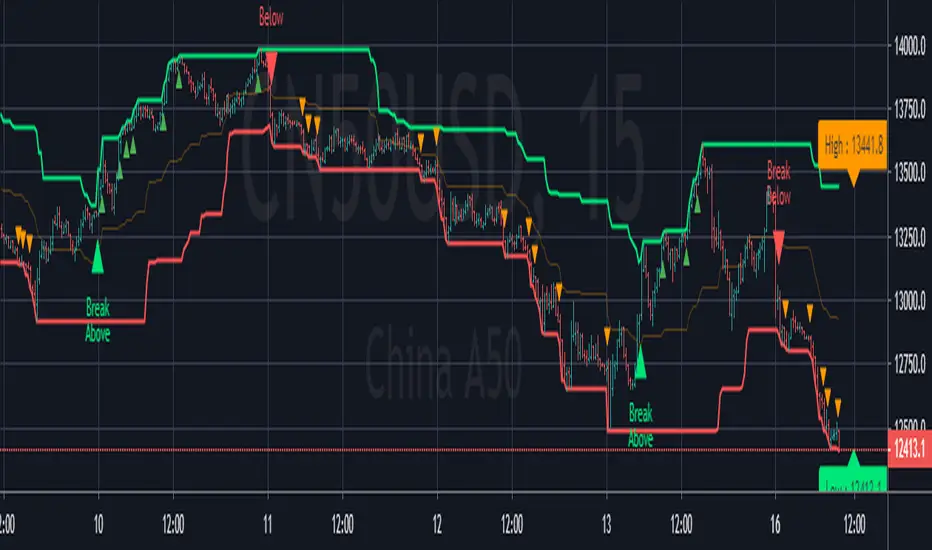
[Zekis]Donchian Price Channels Strategy with AlertsClassic Donchian(Price) Channels, I added alerts for entries and re-entries and labels for upper and lower bands of the channel.
# Investopedia
" What are Donchian Channels?
Donchian Channels are three lines generated by moving average calculations that comprise an indicator formed by upper and lower bands around a mid-range or median band. The upper band marks the highest price of a security over N periods while the lower band marks the lowest price of a security over N periods. The area between the upper and lower bands represents the Donchian Channel.
The indicator seeks to identify bullish and bearish extremes that favor reversals as well as breakouts, breakdowns and emerging trends, higher and lower.
The Formula for Donchian Channels Is:
UC = Highest High in Last N Periods
Middle Channel=((UC−LC)/2)
LC = Lowest Low in Last N periods
where:
UC = Upper channel
N = Number of minutes, hours, days, weeks, months...
Period = Minutes, hours, days, weeks, months...
LC=Lower channel
What Do Donchian Channels Tell You?
Donchian Channels identify comparative relationships between current price and trading ranges over predetermined periods. Three values build a visual map of price over time, similar to Bollinger Bands, indicating the extent of bullishness and bearishness for the chosen period. The top line identifies the extent of bullish energy, highlighting the highest price achieved for the period through the bull-bear conflict. The center line identifies the median or mean reversion price for the period, highlighting the middle ground achieved for the period through the bull-bear conflict. The bottom line identifies the extent of bearish energy, highlighting the lowest price achieved for the period through the bull-bear conflict.
Limitations of Using Donchian Channels
Markets move according to many cycles of activity. An arbitrary or commonly used N period value for Donchian Channels may not reflect current market conditions, generating false signals that can undermine trading and investment performance
"
Pine Script®指標
⚛WPZO - Wave Period Zone Oscillator by Cryptorhythms⚛WPZO - Wave Period Zone Oscillator by Cryptorhythms
Intro
Based upon Akram El Sherbini's article "Time Cycle Oscillators" published in IFTA journal 2018.
Companion indicator to the Wave Period Oscillator, this is simply a transformation to display in a familiar manner like an RSI. Occasionally WPO can exceed the upper and lower boundary lines in strong moves. With WPZO, it will never go below -80 or above +80.
Description
In the Authors words....
"The wave period zone oscillator (WPZO) is a bounded oscillator for the wave period oscillator (WPO) and calculates the period of the market’s cycle. In other words, the wave period refers to the time taken by buyers or sellers to complete one cycle. The oscillator moves within a range of -100 to 100 percent.
The WPZO has overbought and oversold levels at +40 and -40 respectively. At extreme periods, the oscillator may reach the levels of +60 and -60. The zero level demonstrates an equilibrium between the periods of bulls and bears. The WPZO oscillates between +40 and -40. The crossover at those levels creates buy and sell signals. In an uptrend, the WPZO fluctuates between 0 and +40 where the bulls are controlling the market.
On the contrary, the WPZO fluctuates between 0 and -40 during downtrends where the bears control the market. Reaching the extreme level of -60 in an uptrend is a sign of weakness. Mostly, the oscillator will retrace from its centerline rather than the upper boundary of +40. On the other hand, reaching +60 in a downtrend is a sign of strength, and the oscillator will not be able to reach its lower boundary of -40.
During an ideal uptrend, the WPZO does not reach the lower boundary of -40 and usually rebounds from a higher level than -40. This means that the bulls have taken control earlier. Hence, a zeroline crossover generates a buy signal. The WPZO crosses the upper boundary at +40, then pulls back again below +40 to generate a sell signal. During sideways, the WPZO fluctuates between the lower and upper boundaries of -40 and +40. This tactic is also used in an uptrend where corrections are strong enough to drive the WPZO line below the lower boundary. During downtrends, the WPZO fails to reach the upper boundary and oscillates between the 0 and -40 levels.
The bears enter early, indicating an obvious weakness in the market. Therefore, crossing the zero level generates a sell signal. The exit at weakness tactic is used during uptrend reversals and downtrends. The WPZO oscillates between the centerline and the lower boundary of -40. The bears are controlling the market and move in wide cycle periods, while the bull’s strength is almost absent. An exit signal is triggered once the WPZO crosses -40. When prices decline, the WPZO may cross its extreme lower boundary at -60. Therefore, a swift exit signal is triggered once the WPZO crosses -40.
The WPZO gives an insight about the relation between time and price movements. In this article, we used the oscillator to differentiate between the time taken by bulls and bears to complete one cycle. Due to the boundaries effect, the WPZO may diverge less than the WPO with prices."
TL:DR
More strategy discussed above, but heres the short version:
Bullish signals are generated when WPZO crosses over 0
Bearish signals are generated when WPZO crosses under 0
OverBought level is 40
OverSold level is -40
ExtremeOB level is 60
ExtremeOS level is -60
👍 Enjoying this indicator or find it useful? Please give me a like and follow! I post crypto analysis, price action strategies and free indicators regularly.
💬 Questions? Comments? Want to get access to an entire suite of proven trading indicators? Come visit us on telegram and chat, or just soak up some knowledge. We make timely posts about the market, news, and strategy everyday. Our community isn't open only to subscribers - everyone is welcome to join.
For Trialers & Chat: t.me
Pine Script®指標
[BoTo] ATH/2 OverlayThan this indicator is useful?
Can help you to understand this indicator who main in the market now. Bulls or bears.
How it works
All-Time-High ('ATH') - the highest point in price that a cryptocurrency has been in history.
Step 1: The 'ATH' line is drawn
Step 2: 'ATH/2' line is drawn.
Step 3: If the price became more than 'ATH' it means the market bulls have taken, and the price it will be more probable to increase. And vice versa. If the price became less than 'ATH/2' it means that the market was taken by bears, and the price it will be more probable to fall.
Step 4: If it is the bull market, then the green background is drawn. And vice versa. If it is the bear market, then the red background is drawn. If the market has changed, then the background will be gray color. Only one candle.
How to use it
It is possible to use any timeframes, and any symbol.
It is possible to use chart type only the japanese candles, the line or bars. Don't use Kagi, Renko or Haiken Ashi!
The background can be not shown. You can make 1 or 2 lines. If you have chosen only 1 line, then in the bull market you will see only 'ATH/2' line. And vice versa. In the bear market you will see only the 'ATH' line.
You need just to turn on this indicator once to understand what to wait in this market, big falling or big rockets for. And to switch off it that he didn't prevent to analyze.
It is the good help for long-term investments (the position can be longer than 1 year)
For an example
'Ethereum'
'Ripple'
We tried for you. We want to receive your like for good work.
Pine Script®指標
Bill Williams Divergent BarsBill William Bull/Bear divergent bars
See: Book, Trading Chaos by Bill Williams
Coded by polyclick
A bullish (green) divergent bar, signals a trend switch from bear -> bull
-> The current bar has a lower low than the previous bar, but closes in the upper half of the candle.
-> This means the bulls are pushing from below and are trying to take over, potentially resulting in a trend switch to bullish.
-> We also check if this bar is below the three alligator lines to avoid false positives.
A bearish (red) divergent bar, signals a trend switch from bull -> bear
-> The current bar has a higher high than the previous bar, but closes in the lower half of the candle.
-> This means the bears are pushing the price down and are taking over, potentially resulting in a trend switch to bearish.
-> We also check if this bar is above the three alligator lines to avoid false positives.
Best used in combination with the Bill Williams Alligator indicator.
Pine Script®指標
lib_bar_strengthBig bar breakout detection for multi-timeframe trading systems.
Identifies significant ("big") bars where the range exceeds a configurable ATR multiple. Classifies them as Bull Break, Bear Break, Possible Bull, or Possible Bear. Tracks the most recent strong bar's high, low, midpoint, and ATR multiple for use in key signal notes.
**Event types:** 0=None, 1=Bull Break, 2=Bear Break, 3=Possible Bull, 4=Possible Bear
**Exports:** `detect()` — returns event type, high, low, midpoint, ATR multiple, and recent strong bar data.
Used by: TCD - Trade Consistent & Disciplined (indicator)
Pine Script®腳本庫
Isotonic Regression [LuxAlgo]The Isotonic Regression indicator provides a monotonic fit to price data, ensuring the resulting line is either non-decreasing or non-increasing over a specified lookback period. This tool is particularly useful for identifying underlying trends and significant price plateaus without the lagging or "overshooting" common in standard moving averages or linear regressions.
Note: This indicator calculates its values based on a historical lookback window, which means the regression line will repaint as new bars are added and the window shifts.
🔶 USAGE
Isotonic regression is used to find the best-fitting line to a set of data points under the constraint that the line must move in a specific direction (always up or always down). This creates a "staircase" effect where the model alternates between trending segments and flat plateaus.
🔹 Direction Modes
The indicator offers three ways to determine the fit direction:
Auto: Automatically detects the trend by comparing the start and end prices of the lookback period. If the end price is higher, it fits a non-decreasing line; otherwise, it fits a non-increasing line.
Non-Decreasing: Forces the fit to only move upwards or stay flat, ideal for analyzing bullish structures.
Non-Increasing: Forces the fit to only move downwards or stay flat, ideal for analyzing bearish structures.
🔹 Flat Period Extensions
One of the most powerful features of isotonic regression is the identification of "blocks" or price levels where the trend pauses. When the duration of such a plateau exceeds the Flat Period Threshold , the indicator extends a dashed horizontal line to the current bar, highlighting potential support or resistance levels derived from the regression model.
🔶 DETAILS
The script implements the Pool Adjacent Violators Algorithm (PAVA) , which is the standard method for computing isotonic regression.
The algorithm works by partitioning the data into "blocks." If a subsequent data point violates the monotonicity constraint (e.g., price drops in a "non-decreasing" fit), the algorithm pools the current block with the previous one and calculates a weighted average. This process repeats until the entire sequence is monotonic.
For performance efficiency, the indicator utilizes the polyline.new() function to render the regression line as a single continuous object rather than hundreds of individual line segments.
🔶 SETTINGS
Lookback Length: The number of bars used to calculate the isotonic fit.
Source: The price data used for the calculation (default is Close).
Direction: Sets the monotonicity constraint (Auto, Non-Decreasing, or Non-Increasing).
Flat Period Threshold: The minimum number of bars a price plateau must last to be highlighted with an extension line.
🔹 Style
Fit Bullish/Bearish: Colors for the regression line based on the detected trend.
Fit Style/Width: Controls the visual representation (Solid, Dashed, Dotted) and thickness of the main regression line.
Ext Bullish/Bearish: Colors for the flat period extension levels.
Ext Style/Width: Controls the visual representation and thickness of the plateau extensions.
Pine Script®指標
Volume Footprint SR Zones//@version=5
indicator("Volume Footprint S&R Zones", overlay=true, max_boxes_count=500)
// Input Settings
int lookback = input.int(20, "Lookback Periods", minval=1)
color bullColor = input.color(color.new(color.green, 80), "Support Zone Color")
color bearColor = input.color(color.new(color.red, 80), "Resistance Zone Color")
// Function to find the High Volume Level (POC approximation)
get_poc() =>
float max_vol = 0.0
float poc_level = 0.0
// Dividing the bar into 10 segments to find the highest volume concentration
for i = 0 to 9
float level_price = low + (high - low) * (i / 10.0)
if volume > max_vol
max_vol := volume
poc_level := level_price
poc_level
// Logic for 30-Minute Timeframe
is_30m = timeframe.isintraday and timeframe.multiplier == 30
var box zoneBoxes = array.new_box()
if is_30m
float poc = get_poc()
bool is_bull = close > open
// Create a new zone box based on the POC of the 30m candle
color zone_col = is_bull ? bullColor : bearColor
// Define the zone (approx 2 ticks wide for visibility)
float zone_top = poc + (syminfo.mintick * 5)
float zone_bottom = poc - (syminfo.mintick * 5)
new_box = box.new(left=bar_index, top=zone_top, right=bar_index + 10, bottom=zone_bottom,
bgcolor=zone_col, border_color=color.new(zone_col, 50))
array.push(zoneBoxes, new_box)
// Clean up old boxes to maintain performance
if array.size(zoneBoxes) > lookback
box.delete(array.shift(zoneBoxes))
Pine Script®指標
Yoda Oscillator [R2D2] v1.0Yoda Oscillator : The Sentiment GPS
(c)R2D2_4Life
-------------------------------------------------------------------------------------------------------------------
Introduction
The Yoda Oscillator is the advanced companion to the Yoda 10-in-1 Strategy . While the main Yoda indicator acts as your "Speedometer" (showing current direction), this oscillator acts as your "GPS" —revealing the strength, momentum, and hidden weakness of a trend before price even moves.
Designed for the professional trader, it aggregates 11 distinct market indicators into a single Net Sentiment Score (-100% to +100%) . It visualizes the "internal struggle" between Bulls and Bears, helping you distinguish between a true breakout and a fragile fake-out.
Why Use This? (The Value Add)
Using the Yoda 10-in-1 table alone gives you a snapshot of right now . Adding the Yoda Oscillator unlocks the "4th Dimension" of time and momentum.
Spot "Trend Lock": When the histogram hits +100% and stays flat, it confirms a "Trend Lock." This is the safest time to hold, preventing early exits during strong moves.
Detect "Internal Decay": The unique "Momentum Decay" coloring (Lime vs. Dark Green) shows you when a trend is getting tired inside the 100% zone, often bars before the price drops.
Gold Signal Line: This moving average filters out noise. If the histogram drops below the Gold Line, momentum is fading—a critical "Take Profit" signal that price action alone often hides.
The Mathematics Behind the Magic
This is not a simple "vote counter." It uses a Weighted Probability Engine based on institutional reliability rankings. The 11 indicators are weighted by tiers:
Tier 1 (The Heavyweights - 45%):
RSI (15%) + SuperTrend (15%) + EMA (15%): These provide the foundational trend direction. If these are bearish, it is mathematically very difficult for the score to turn positive.
Tier 2 (The Confirmation - 30%):
MACD (10%) + VWAP (10%) + ADX (10%): These confirm momentum and volume.
Tier 3 (The Specialists - 25%):
MFI, TTM Squeeze, ATR, Stoch RSI, PSAR (5% each): These sensitive indicators help refine the score, catching early reversals or volatility squeezes.
The Net Sentiment Formula:
Net Score = (Bullish Weight) - (Bearish Weight)
Result: A score of +80% doesn't just mean "Up"—it means 90% of the weighted indicators are in agreement. A score of 0% represents a perfectly neutral/choppy market.
Visual Guide & How to Use
1. The Histogram Colors
Bright Lime: Strong Bullish. Sentiment is positive and rising/holding.
Dark Green: Bullish Decay. Sentiment is positive, but weaker than the previous candle. Caution advised.
Bright Red: Strong Bearish. Sentiment is negative and falling/holding.
Dark Maroon: Bearish Decay. Sentiment is negative, but improving. Potential bottom forming.
2. The Gold Signal Line
The "True North" of momentum.
Bullish Crossover: When the Histogram crosses above the Gold Line, momentum is accelerating.
Bearish Divergence: If Price makes a higher high, but the Histogram drops below the Gold Line, the trend is hollow. Prepare to exit.
3. Squeeze Dots (White Radar)
White Dots on Zero Line: Indicates a TTM Squeeze is active. Volatility is crushed; a massive explosive move is imminent. Do not trade chop; wait for the breakout.
Best Setup & Strategy
Timeframe: Works on all timeframes, but highly calibrated for 4H (Swing Trading) and Daily (Trend Following).
Trend Following:
Enter: Net Score crosses above 0% (confirmed by Gold Line).
Hold: Histogram remains Bright Lime or pegged at +100 .
Exit: Histogram turns Dark Green AND drops below the Gold Signal Line.
Contra-Trend (Reversals):
Look for "Extreme Exhaustion." If the score hits -100% and then prints a Dark Maroon bar (Decay), it is a high-probability aggressive entry for a bounce.
Risk Warning: This tool gauges probability, not certainty. Always use proper risk management.
-------------------------------------------------------------------------------------------------------------------
May the Trades Be With You.
Pine Script®指標
Multi Divergence WALLDEMThe Multi Divergence Indicator is designed to identify price-oscillator divergences across eight common technical oscillators (RSI, MACD, Stochastic, CCI, Momentum, Williams %R, Awesome Oscillator, and OBV), helping traders spot potential reversals or continuations. The original version effectively draws lines and labels for detected divergences but lacks outputs compatible with TradingView's Pine Screener, leading to the error: "The indicator misses plots or alert conditions, have access restrictions, or another issue." This stems from Pine Screener's requirements for at least one plot() or alertcondition() to enable filtering and scanning across symbols.
To resolve this, the fixed version incorporates several enhancements while maintaining the core logic of pivot detection using ta.pivotlow() and ta.pivothigh() with user-defined lookback periods (default: 5 left/right). Divergences are now separated into regular and hidden types for both bullish and bearish cases, aligning more closely with advanced divergence screeners like the provided example from Trendoscope. This separation uses distinct colors (green/lime for bullish regular/hidden, red/orange for bearish) and tooltips listing contributing oscillators.
Detailed Changes and Rationale
The updates focus on compatibility, usability, and granularity:
Overlay Setting: Changed to overlay=false to treat it as a non-overlay indicator suitable for screeners (similar to the example). Drawings (lines/labels) use force_overlay=true to ensure they appear on the main chart pane.
Divergence Separation: Instead of a single bull_count or bear_count, we now calculate:
Regular bullish: Price makes lower low, but oscillator makes higher low.
Hidden bullish: Price makes higher low, but oscillator makes lower low.
Regular bearish: Price makes higher high, but oscillator makes lower high.
Hidden bearish: Price makes lower high, but oscillator makes higher high.
This is checked per oscillator if enabled via inputs, incrementing separate counters and building dedicated tooltips.
Alert Conditions: Added alertcondition() calls when a divergence type's count > 0. This creates selectable alert conditions in TradingView's alert dialog and satisfies screener requirements. Messages include the tooltip for context (e.g., which oscillators contributed).
Plots for Screening: Four new plot() statements output the counts (0 if no detection) with display = display.data_window. These appear in the data window and enable screener filters like "value > 0" or "value >= 3" (for strong signals from multiple oscillators). Plots are hidden from the chart to avoid clutter.
No Impact on Performance: Calculations remain efficient, only triggering on confirmed pivots (delayed by lbR bars for accuracy). The max distance (maxDist) prevents outdated pivot comparisons.
Oscillator-Specific Logic
Each oscillator's divergence check uses its respective value (e.g., MACD histogram for MACD, smoothed %D for Stochastic). Users can toggle calculations via boolean inputs, reducing computation if not needed. Here's a table summarizing the oscillators and their roles:
Pine Script®指標
EOB Area - Enhanced Order Block TheoryWhat is this tool?
The EOB Area indicator identifies "Extreme Body Break" (EOB) setups—a particularly strong variation of the classic Engulfing pattern that signals an immediate shift in momentum. Unlike a standard engulfing pattern, an EOB requires the body of the current candle to close beyond the wick (extreme high/low) of the previous candle.
In addition to the signal, the tool automatically draws Support & Resistance Zones based on the broken candle structure. These zones are now fully dynamic and adjustable to fit your trading style (e.g., focusing only on the wick or the entire body).
How does the strategy work?
An EOB (Extreme Body Break) occurs when the market reverses with high volume and conviction:
📈 Bullish EOB: A green candle closes with its Body above the High of the previous red candle.
📉 Bearish EOB: A red candle closes with its Body below the Low of the previous green candle.
This behavior signals that buyers (or sellers) have taken full control, overcoming even the most extreme price levels of the previous period.
Key Features & Settings
1. Zone Display Mode (New!)
You can now control exactly how the Order Block / Zone is drawn based on your strategy:
Entire Candle: Marks the full range (High to Low) of the previous candle. Best for conservative stop placements.
Body + Wick (Default): Marks the area from the Wick to the Body.
Bullish: Previous High to Close.
Bearish: Previous Close to Low.
Wick Only: Marks only the wick area. Ideal for precise "sniper" entries on re-tests.
2. Violation Filter (Auto-Cleanup)
To keep your chart clean, the indicator features a "Violation" logic (Hide Violated EOB Zones).
If enabled: Once price breaks through the opposite side of a drawn zone (invalidating it), the box is automatically deleted from the chart. You only see zones that are still fresh and respected.
3. Integrated Alerts
The indicator is fully integrated with TradingView's alert system. When creating an alert, you can specifically choose:
Only Bullish Signals
Only Bearish Signals
All Signals (Bull & Bear)
How to use this in trading
Reversals: Look for EOB signals at key higher-timeframe Support/Resistance levels.
Trend Continuation: An EOB forming in the direction of the trend after a pullback is a high-probability continuation signal.
Re-Tests: The boxes drawn by the indicator often act as magnets. Price frequently returns to "test" these zones before continuing, offering excellent entry opportunities.
Disclaimer:
This tool is for educational purposes and technical analysis only. Past performance does not guarantee future results. Always use proper risk management.
Pine Script®指標
TS vs Previous Candle (TSC/TSD) This indicator detects **Turtle Soup (TS) reversal triggers** using a strict **previous-candle reference** and prints signals **only on bar close** (non-repainting intrabar).
* **TS Bull:** the current bar **sweeps below the prior low** (liquidity grab) and then **closes back above the prior low**.
* **TS Bear:** the current bar **sweeps above the prior high** and then **closes back below the prior high**.
An optional strict mode can require the close to remain **inside the previous candle’s range** for cleaner mean-reversion structure.
Each signal is further classified as:
* **TSC (Clean):** candle body aligns with the TS direction (bull body for TS Bull, bear body for TS Bear).
* **TSD (Dirty):** candle body contradicts the TS direction (or doji), highlighting weaker/less “clean” reversals.
Use it to map **liquidity sweeps + reversal closes** and to separate higher-quality TS setups (TSC) from more ambiguous ones (TSD) for further filtering (trend, levels, sessions, risk rules).
Pine Script®指標
NPR21 Ultimate Confluence Dashboard v7.0NPR21 ULTIMATE CONFLUENCE DASHBOARD v7.0
Three-Tier Trend Analysis with Dual Layout, Scalper Mode & Heat Gauge
Author: NPR21 | Version: 7.0 | February 2026
License: Mozilla Public License 2.0
OVERVIEW
The Ultimate Confluence Dashboard (UCD) is a non-overlay trend analysis dashboard that organizes market conditions into three independent trend tiers — LONG, MEDIUM, and SHORT — each using different analytical methods and timeframes. The goal is simple: show you the full picture of what the market is doing right now, across multiple dimensions, in one compact display.
Each tier operates independently. LONG TREND uses Linear Regression Channel slopes across Daily, 4-Hour, and 1-Hour timeframes to establish macro directional bias. MEDIUM TREND scores six confluence components (Hull MA, SMI, Pivot Reversals, EMA/WMA Scalper Cross, HOHO Squeeze, and Mobo Bands) for intermediate trend confirmation. SHORT TREND measures five micro-momentum components with a 0-100 Heat Gauge for real-time momentum intensity.
When all three tiers agree, you have high-confidence directional bias. When they diverge, you have a built-in warning to exercise caution. The dashboard shows the condition — you decide when and how to trade it.
LAYOUT MODES
UCD v7.0 offers two display modes you can switch between instantly via a single dropdown in settings.
Vertical (Classic)
The traditional stacked column layout. All enabled trend sections stack vertically into a single table positioned anywhere on the chart (Top Right, Bottom Left, etc.). Each section has its own independent text size control (tiny through huge) so you can emphasize the sections you watch most. Sections can be collapsed to show only the directional summary or hidden entirely.
Horizontal (Thin Strip)
A space-saving layout that splits the three trend sections into separate tables arranged across the bottom of the chart. All three tables are the same height (2 rows) for a uniform look.
LONG TREND → Bottom Left. Row 0: header and direction. Row 1: Daily, 4-Hour, and 1-Hour trend votes (hidden when collapsed). Content uses extra spacing for a wider footprint that avoids the TradingView logo.
MEDIUM TREND → Bottom Center. Row 0: header, direction, score, grade, and HOHO status. Row 1: Hull, SMI, Reversal, Scalper votes, and MOBO status (hidden when collapsed). All cells filled — no empty spaces.
SHORT TREND → Bottom Right. Row 0: header, direction, score, grade, and Heat Gauge (merged wide). Row 1: all five component scores plus consensus vote. Score and grade display in separate cells with distinct colors for instant readability.
Switching between Vertical and Horizontal is instant — one dropdown, no reconfiguration needed. In Horizontal mode, all three tables share a single unified size control.
SIZE CONTROLS
Vertical Mode
Three independent text size controls — one each for Long Trend, Medium Trend, and Short Trend sections. Each uses a two-tier sizing hierarchy: direction labels and key values display one step larger than detail cells, creating a natural visual emphasis on what matters most.
Horizontal Mode
One unified Horizontal Strip Size control scales all three bottom tables together. The same two-tier hierarchy applies: headers and direction text are one step larger than component details, so your eye catches the big picture first.
WHAT MAKES THIS DIFFERENT
Most dashboards show you a wall of numbers or a single composite score. UCD separates trend analysis into three independent tiers that agree, disagree, or show mixed signals — giving you context, not just a number.
Key distinctions: Dual layout modes (Vertical column or Horizontal strip) with instant switching. Three independent trend tiers with different analytical methods. Per-section and per-layout independent text size controls. 0-100 Heat Gauge with color-coded temperature zones. Scalper Mode that shifts component weights toward faster signals. Instant Flip detection for rapid directional changes. Letter grades (A+ through C) for quick quality assessment. Five-component consensus voting system. Non-repainting signals across all components.
─────────────────────────────────────
LONG TREND TIER
Establishes macro directional bias using Linear Regression Channel slopes across three higher timeframes: Daily, 4-Hour, and 1-Hour. When all three timeframes agree on direction, the overall LONG TREND label reflects that consensus. When they disagree, you get a lean direction (LEAN LONG or LEAN SHORT) indicating the weight of evidence rather than unanimous agreement.
Direction labels: LONG (all three bullish), SHORT (all three bearish), LEAN LONG (majority bullish), LEAN SHORT (majority bearish), NEUTRAL (no clear majority).
The Long Trend tier can be collapsed to show only the direction summary, or hidden entirely if you only trade short-term setups.
─────────────────────────────────────
MEDIUM TREND TIER
Scores intermediate trend strength by aggregating six independent confluence components, each casting a directional vote. The composite score (0-100) and letter grade reflect how many components agree and how strongly.
Components
Hull MA Direction — Fast-responding moving average that tracks trend direction with minimal lag. Votes LONG when rising, SHORT when falling.
SMI (Stochastic Momentum Index) — Momentum oscillator measuring where price sits within its recent range. Votes LONG above zero, SHORT below.
Pivot Reversals — Detects swing high/low pivot points to identify structural trend changes. Votes based on most recent confirmed pivot direction.
EMA/WMA Scalper Cross — Fast EMA vs. slow WMA crossover system tuned for shorter-term directional shifts. Votes based on cross direction.
HOHO Squeeze — Bollinger Bands inside Keltner Channel detection. When active, indicates a volatility compression that often precedes a significant move. Displays SQUEEZE when active, NEUTRAL when not.
Mobo Bands (Momentum Breakout) — Momentum envelope system that identifies breakout conditions. Displays BULLISH, BEARISH, BULL TURN, BEAR TURN, or NEUTRAL based on momentum state.
─────────────────────────────────────
SHORT TREND TIER
The most granular tier, measuring real-time micro-momentum across five weighted components. Each component produces a directional vote and an individual score. The composite total (0-100) is normalized and graded.
Components
Momentum (MOM) — Rate of change measurement. Detects whether price momentum is accelerating or decelerating in the current direction.
Candle (CNDL) — Multi-bar candle pattern analysis. Reads body-to-wick ratios, engulfing patterns, and directional candle sequences.
Trend (TRND) — Micro-trend structure using short-period moving average alignment and price position relative to dynamic support/resistance.
Acceleration (ACC) — Second derivative of momentum. Shows whether momentum itself is increasing (ACCEL) or decreasing (DECEL), providing early warning of trend exhaustion.
Volume Buy/Sell (VOL) — Analyzes buying vs. selling volume pressure. Votes based on which side is dominant in the current bar sequence.
Heat Gauge (0-100)
A real-time temperature reading of overall SHORT TREND momentum intensity. The gauge is color-coded by zone:
0-20: ICE (deep blue) — Extreme cold. Momentum is virtually absent.
21-35: COLD (blue) — Weak momentum. Trend is struggling.
36-50: COOL (teal) — Below average. Trend present but not convincing.
51-65: WARM (orange) — Above average. Trend has legs.
66-80: HOT (red-orange) — Strong momentum. High-confidence trend.
81-100: FIRE (red) — Extreme heat. Maximum momentum intensity.
Grades
A+ (85-100) — Elite setup. All components firing in agreement.
A (70-84) — Strong setup. Most components aligned.
B (50-69) — Moderate. Mixed signals, use caution.
C (0-49) — Weak. Components conflicting, high risk.
Consensus Vote
All five SHORT TREND components cast a directional vote. The consensus displays as a ratio (e.g., +5/5 means all five vote bullish, -3/5 means three vote bearish). This gives you a quick read on whether the components agree or are split.
─────────────────────────────────────
SCALPER MODE
Toggle Scalper Mode to shift component weights toward faster-responding signals. In Standard mode, all components contribute equally. In Scalper mode, Momentum and Candle components receive higher weight, making the score more responsive to the most recent 1-3 bars — ideal for MNQ, MES, and other micro futures on 1-5 minute charts.
─────────────────────────────────────
INSTANT FLIP DETECTION
When the SHORT TREND direction reverses from the previous bar (BULLISH → BEARISH or vice versa), the direction label appends a flip indicator. This flags rapid directional changes that often signal the start of a new short-term move or a failed breakout reversal.
─────────────────────────────────────
ALERTS
Five built-in alert conditions, all compatible with TradingView's alert system:
Instant Bull Flip — SHORT TREND flips to bullish from bearish.
Instant Bear Flip — SHORT TREND flips to bearish from bullish.
Strong Bullish — Consensus ≥ +3/5 AND score ≥ 70.
Strong Bearish — Consensus ≤ -3/5 AND score ≥ 70.
A+ Setup — Score ≥ 85 regardless of direction.
─────────────────────────────────────
RECOMMENDED USAGE
Scalping (1-5 min): Enable all three tiers. Use Horizontal layout for maximum chart visibility. Enable Scalper Mode. Focus on SHORT TREND score, Heat Gauge, and Instant Flips for entries. Use LONG and MEDIUM for directional filter — only take trades in their direction.
Day Trading (5-15 min): Enable all three tiers. Either layout works. Standard mode recommended. Use MEDIUM TREND grade as your primary bias filter. Enter on SHORT TREND confirmation when it aligns with MEDIUM.
Swing Trading (1H-4H): LONG TREND is your primary filter. MEDIUM TREND for entry timing. SHORT TREND optional — can be hidden or collapsed to reduce noise.
─────────────────────────────────────
DISCLAIMER
This indicator is a visual analysis tool, not a trading signal generator. It does not produce buy/sell signals and should not be treated as a standalone trading system. All trading decisions are yours. Past performance of any analytical method does not guarantee future results. Use proper risk management on every trade.
Pine Script®指標
BTC Cycle Navigator v2 - Phase DCA + Yield Deploy GuidanceOverview
BTC Cycle Navigator v2 is a phase-based guidance indicator built on smoothed RSI with self-adjusting linear regression bands (adapted from Zeiierman's open-source work). It identifies eight distinct cycle phases and provides real-time DCA sizing, sell rotation signals, and yield deployment suggestions — all displayed in an on-chart table.
What It Does
Detects cycle phases: Deep Bear → Bear Recovery → Early Bull → Bull Building → Bull Confirmed → Mature Bull → Distribution → Weakening
Post-peak awareness: after RSI crosses the overbought level, Bull Confirmed becomes Distribution and Bull Building becomes Weakening — with tapered DCA (0.5x and 0.25x)
Two-stage sell rotation: FIRST_SELL (20%) and SECOND_SELL (40%) triggered by confirmed RSI midline breakdowns after an overbought cycle
Plunge guard: if RSI collapses to the lower band after FIRST_SELL, the second sell is locked out to prevent selling into a crash
Hybrid yield deployment model: suggests weekly capital deployment from a yield basket during deep bear phases using time-ramped, drawdown-scaled, pool-capped logic
How To Use
Apply to BTCUSD on the 1W (weekly) timeframe
Set your Start Date to the beginning of the cycle you want to track
Enter your Base DCA amount (the 1x weekly amount in USD)
Enter your Yield Basket size and target keep % for deployment guidance
Read the on-chart table for current phase, DCA amount, sell status, and yield deploy suggestion
Set alerts for phase changes and sell signals
Phase → DCA Multiplier
Deep Bear: 5x | Bear Recovery: 3x | Early Bull: 2x | Bull Building: 1x | Bull Confirmed: 1x | Mature Bull: 0x (paused) | Distribution: 0.5x | Weakening: 0.25x
Attribution
RSI + self-adjusting linear regression band structure adapted from Zeiierman's open-source indicator. Post-peak phase logic, DCA taper model, plunge guard, sell sequencing, and hybrid yield deployment are original additions.
Disclaimer
This indicator provides informational guidance only. It does not constitute financial advice. Past RSI patterns do not guarantee future performance. Always do your own research.
Pine Script®指標
Smart Krypto Futures Daytrade Suite Here is the complete **Strategy & User Guide** for your **"Smart Crypto Futures Daytrade Suite (Final)"** in English.
---
# 📘 Smart Crypto Futures Daytrade Suite – User Guide
### 1. Overview
This suite is an all-in-one institutional-grade tool designed for **Scalping and Daytrading** cryptocurrencies (Bitcoin, Ethereum, Altcoins). It combines high-timeframe trends with lower-timeframe entry triggers, liquidity levels, and a real-time market dashboard.
### 2. The Visual Legend (What is what?)
#### A) Trend & Momentum (The "Traffic Light")
* **🟣 Daily EMA 50 (Neon Violet):** The **Macro Trend**.
* *Price Above:* Bullish Bias (Look for Longs).
* *Price Below:* Bearish Bias (Look for Shorts).
* **🟢 4h EMA 50 (Neon Green):** The **Swing Trend**. Ideally, price is above both the Violet and Green lines for a strong trend.
* **🔵 WMA 200 (Royal Blue):** The **"Last Line of Defense"**. A weighted moving average often respected by algorithms as major dynamic support or resistance.
* **💠 VWAP (Cyan/Light Blue):** The **Session Anchor**.
* *Bullish Day:* Price stays above VWAP.
* *Bearish Day:* Price stays below VWAP.
* **🟡 EMA 9 (Yellow):** The **Entry Trigger**. Use this for timing. Enter when a candle closes above/below this line after a pullback.
#### B) Market Structure & Zones
* **🟥 / 🟩 Boxes (Solid):** **Supply & Demand Zones** (1h Timeframe). These are major reversal areas.
* **⬜ FVG Boxes (Transparent):** **Fair Value Gaps**. Imbalances in the market that price often wants to fill ("mitigate") before continuing the trend.
#### C) Liquidity & Targets
* **🟡 POC Line (Gold):** **Point of Control** (Yesterday’s highest volume price).
* *Rule:* Use as a **Take Profit** target. Price acts like a magnet to this level.
* **⚪ PDH / PDL (Grey Dashed):** **Previous Day High / Low**.
* *Strategy:* Watch for "Fakeouts" (Liquidity Grabs) at these levels to take a reversal trade.
---
### 3. The Dashboard (Head-Up Display)
Located in the top right corner, this panel gives you an instant overview of the market health without switching charts.
**Columns:**
1. **ASSET:** Monitors BTC, ETH, Bitcoin Dominance (BTC.D), and Tether Dominance (USDT.D).
2. **TREND (15m):** Compares Price vs. EMA 50 (15m timeframe).
* **🟢 BULL:** Short-term trend is Up.
* **🔴 BEAR:** Short-term trend is Down.
3. **RSI (15m):** Relative Strength Index (14).
* **🟢 < 30:** Oversold (Potential Bounce / Long opportunity).
* **🔴 > 70:** Overbought (Potential Pullback / Short opportunity).
* **⚪ 30-70:** Neutral.
**Correlations to watch:**
* If **BTC.D** is BULL (Green), money is flowing into Bitcoin (Altcoins might bleed).
* If **USDT.D** is BULL (Green), traders are fleeing to cash (Crypto prices usually drop).
---
### 4. Trading Strategy Blueprints
#### Setup A: The "Trend Pullback" (High Probability)
1. **Context:** Price is above **Daily EMA (Violet)** and **4h EMA (Green)**.
2. **Pullback:** Price drops down to test the **WMA 200 (Royal Blue)** or **VWAP (Cyan)**.
3. **Confluence:** Ideally, there is a **Green Demand Zone** or an **FVG** at the same level.
4. **Trigger:** Wait for a candle to close back above the **EMA 9 (Yellow)**.
5. **Target:** The **POC (Gold)** or **PDH (Grey)**.
#### Setup B: The "Liquidity Sweep" (Reversal)
1. **Context:** Price shoots up rapidly.
2. **Event:** Price breaks the **PDH (Previous Day High)** but fails to close above it (leaves a long wick).
3. **Dashboard Check:** RSI is red (> 70).
4. **Entry:** Short when price falls back below the PDH.
5. **Target:** Back to the **VWAP** or **POC**.
---
### 5. Risk Management Rules
* **No Man's Land:** Do not trade when price is far away from all EMAs and VWAP. Wait for a return to value.
* **The Chop:** If the EMAs are flat and weaving through price, the market is ranging. Reduce position size or wait.
* **VWAP Rule:** In a strong trend, the VWAP often acts as the "floor" (Longs) or "ceiling" (Shorts). If price breaks VWAP with volume, the day's trend might be changing.
**Enjoy the suite! Simplicity is the ultimate sophistication.**
Pine Script®指標
Trend Master Bundle (5x EMA, DEMA & VWAP) |MouryaThe Trend Master Bundle is a high-performance trend-following tool that combines multiple exponential layers with volume-weighted analysis. This indicator is specifically designed to identify "Perfect Trend Alignment"—a state where all short, medium, and long-term moving averages align in a specific sequence to signal explosive momentum.
The "Ascending Order" Strategy
The core power of this indicator lies in its ability to detect when the market is in a state of extreme momentum:
Extremely Bullish: Identified when the price is above the EMAs, and they are stacked in perfect order: 5 > 10 > 20 > 50 > 100 DEMA > 200. When the "5" is at the top and the "200" is at the bottom, the trend is considered extremely strong.
Extremely Bearish: Identified when the price is below the EMAs, and they are stacked in descending order: 5 < 10 < 20 < 50 < 100 DEMA < 200.
Smart Components
100-Period DEMA (Pink): The Double Exponential Moving Average (DEMA) reacts faster to price than a standard EMA, acting as a "lead" indicator for the long-term trend.
VWAP with Standard Deviation Bands: The Volume Weighted Average Price (VWAP) represents the true "Fair Value" of the session.
Continuation: If the price is trending and pulls back to the VWAP line, it often acts as a high-probability bounce zone.
Reversal: If price hits the outer VWAP bands (Bands #2 or #3), it suggests the market is overextended, and a reversal or mean-reversion move is likely.
Key Features
Real-time Trend Dashboard: A clean visual label in the top-right corner instantly tells you if the trend is "Extremely Bullish," "Extremely Bearish," or "Neutral."
Fully Adjustable: Every length (5, 10, 20, 50, 200, 100) and colour is fully customizable in the settings menu.
Optimised UI: Clean, inline inputs to save space in your settings panel.
Alert Ready: Includes built-in alert conditions to notify you the moment a "Perfect Alignment" trend starts.
How to Trade with it
Wait for Alignment: Only look for "Long" entries when the Dashboard says "Extremely Bullish."
The Pullback: In a bullish trend, look for the price to touch the 20 EMA or the VWAP for an entry.
The Exhaustion: Watch the outer VWAP bands for signs of a reversal to take profits. The Trend Master Bundle is a high-performance trend-following tool that combines multiple exponential layers with volume-weighted analysis. This indicator is specifically designed to identify "Perfect Trend Alignment"—a state where all short, medium, and long-term moving averages align in a specific sequence to signal explosive momentum.
The "Ascending Order" Strategy
The core power of this indicator lies in its ability to detect when the market is in a state of extreme momentum:
Extremely Bullish: Identified when the price is above the EMAs, and they are stacked in perfect order: 5 > 10 > 20 > 50 > 100 DEMA > 200. When the "5" is at the top and the "200" is at the bottom, the trend is considered extremely strong.
Extremely Bearish: Identified when the price is below the EMAs, and they are stacked in descending order: 5 < 10 < 20 < 50 < 100 DEMA < 200.
Smart Components
100-Period DEMA (Pink): The Double Exponential Moving Average (DEMA) reacts faster to price than a standard EMA, acting as a "lead" indicator for the long-term trend.
VWAP with Standard Deviation Bands: The Volume Weighted Average Price (VWAP) represents the true "Fair Value" of the session.
Continuation: If the price is trending and pulls back to the VWAP line, it often acts as a high-probability bounce zone.
Reversal: If price hits the outer VWAP bands (Bands #2 or #3), it suggests the market is overextended, and a reversal or mean-reversion move is likely.
Key Features
Real-time Trend Dashboard: A clean visual label in the top-right corner instantly tells you if the trend is "Extremely Bullish," "Extremely Bearish," or "Neutral."
Fully Adjustable: Every length (5, 10, 20, 50, 200, 100) and colour is fully customizable in the settings menu.
Optimised UI: Clean, inline inputs to save space in your settings panel.
Alert Ready: Includes built-in alert conditions to notify you the moment a "Perfect Alignment" trend starts.
How to Trade with it
Wait for Alignment: Only look for "Long" entries when the Dashboard says "Extremely Bullish."
The Pullback: In a bullish trend, look for the price to touch the 20 EMA or the VWAP for an entry.
The Exhaustion: Watch the outer VWAP bands for signs of a reversal to take profits.
Pine Script®指標
4-Color Candlestick4-Color Candlestick classifies each candle into a clear market regime, so you can instantly tell whether the market is worth attacking, managing, or avoiding.
One overlay. Four states. No second guessing.
Market regimes
Neutral (Grey) — Price or trend momentum near the baseline.
Consolidation or transition; patience is often rewarded.
Strong Bull (Green) — Confirmed uptrend with strong bullish participation
(expansion candle or gap-up). High conviction environment.
Bull (Orange) — Uptrend remains intact, but momentum is moderate.
Favor continuation with risk control.
Bear (Red) — Bearish structure or trend deterioration.
Defensive or short-biased conditions.
Why traders use it
Decision clarity at a glance
No need to cross-check multiple indicators—candle color reflects the market regime.
Stable and final signals
No repainting, no higher-timeframe dependencies. What you see is what it is.
Consistent across markets
One logic works on stocks, forex, indices, and crypto—build repeatable habits.
Who it’s for
Discretionary traders who want a clean read of trend and strength
Systematic traders using regime filters for entries or position sizing
Anyone who prefers one meaningful overlay instead of many studies
How it works (high level)
Each candle is classified in a fixed order:
Neutral → Strong Bull (including gap-ups) → Bull → Bear.
One candle, one state—no overlap, no ambiguity.
Pine Script®指標
Options Strategy ChartsOptions Strategy Charts(Nifty) - Multi-Strategy Analysis Tool
Analyze NIFTY option strategies (Straddle, Strangle, Spreads, Iron Condor) with built-in technical indicators, real-time data table, and comprehensive alerts.
Overview
**Option Strategy Charts** is a comprehensive technical analysis tool designed specifically for traders working with NIFTY index options on NSE. This indicator transforms complex multi-leg option strategies into clean, chartable price series with built-in technical analysis tools.
What This Indicator Does
This indicator creates a **synthetic price chart** from your selected option strategy, allowing you to:
- Visualize option strategy performance as candlestick or line charts
- Apply technical analysis to option strategy price movements
- Monitor individual strike prices within complex strategies
- Receive real-time alerts on strategy signals
- Track key technical indicators in an organized data table
Supported Strategies
1. **Straddle** - Long ATM Call + Long ATM Put (volatility play)
2. **Strangle** - Long OTM Call + Long OTM Put (lower cost volatility)
3. **Call Spread** - Long Call + Short Call (bullish directional)
4. **Put Spread** - Long Put + Short Put (bearish directional)
5. **Iron Condor** - 4-leg range-bound strategy
6. **Iron Butterfly** - Tight range credit strategy
7. **Custom** - Build any 4-leg strategy with customizable quantities
Key Features
1. Strategy Price Chart
- **Candlestick or Line display** - Choose your preferred visualization
- **Real-time OHLC data** - Built from actual NSE option prices
- **Proper price scaling** - Shows actual ₹ premium values
- **Multiple chart modes** - Standard candle coloring or trend-based
2. Built-in Technical Indicators
**VWAP (Volume Weighted Average Price)**
- Customizable anchor periods: Session, Week, Month, Quarter, Year
- Source selection: Close, HL2, HLC3, OHLC4
- Standard deviation bands for volatility analysis
- Shaded band area for visual clarity
**Supertrend**
- ATR-based trend identification
- Adjustable period and multiplier
- Visual trend direction with color-coded lines
- Signal displayed in data table
**Moving Averages (Up to 3)**
- EMA or SMA selection for each
- Customizable periods (default: 9, 21, 50)
- Independent toggle for each MA
- Color customization via Style tab
3. Real-Time Data Table
The data table displays:
- **Strategy LTP** - Current combined premium value
- **Individual Strike Prices** - Shows each leg's current price
- **RSI** - Momentum indicator with color coding
- **ADX** - Trend strength measurement
- **+DI / -DI** - Directional movement indicators
- **ATR** - Volatility measurement
- **Supertrend Signal** - Current trend status (Bullish/Bearish)
Table customization:
- Position: Top-left, Top-right, Bottom-left, Bottom-right
- Font size: Tiny, Small, Normal, Large, Huge
- Color-coded values for quick interpretation
4. Comprehensive Alert System
**Available Alerts:**
1. **Supertrend Signals**
- Bullish: Trend changes to uptrend
- Bearish: Trend changes to downtrend
2. **RSI Extremes**
- Overbought: RSI crosses above 70
- Oversold: RSI crosses below 30
3. **Moving Average Crossovers**
- Bullish: MA1 crosses above MA2
- Bearish: MA1 crosses below MA2
4. **VWAP Crosses**
- Price above VWAP
- Price below VWAP
5. **ADX Trend Strength**
- Strong trend: ADX crosses above 25
- Weak trend: ADX crosses below 25
6. **Confluence Signals**
- Strong Buy: Supertrend bullish + RSI < 50
- Strong Sell: Supertrend bearish + RSI > 50
How to Use
Step 1: Configure Your Strategy
1. Set the **expiry date** (YY-MM-DD format)
2. Select your **strategy type**
3. Enter the **strike prices** for your chosen strategy
Step 2: Enable Indicators (Optional)
All indicators are **disabled by default**. Enable only what you need:
- Toggle VWAP, Supertrend, or Moving Averages in settings
- Customize parameters to match your trading style
- All indicator colors can be adjusted in the Style tab
Step 3: Configure Data Table
- Choose table position on chart
- Adjust font size for readability
- Set RSI, ADX, and ATR periods
Step 4: Set Up Alerts
- Click the Alert button (clock icon)
- Choose from available alert conditions
- Customize alert messages
- Set notification preferences
Trading Applications
**For Volatility Traders (Straddle/Strangle)**
- Monitor combined premium movement
- Use RSI to identify oversold entry points
- Track VWAP for mean reversion signals
- Set alerts on price breakouts
**For Directional Traders (Spreads)**
- Analyze spread value trends with Supertrend
- Use moving averages for trend confirmation
- Monitor ADX for trend strength
- Get alerted on MA crossovers
**For Range Traders (Iron Condor/Butterfly)**
- Watch premium decay with time-based analysis
- Use VWAP bands to stay within range
- Monitor RSI to avoid trending markets
- Alert on Supertrend changes (range breakdown)
**For Custom Strategies**
- Build ratio spreads (1:2, 1:3)
- Create unbalanced butterflies
- Test exotic combinations
- Track performance with standard indicators
Technical Specifications
- **Platform**: TradingView
- **Version**: Pine Script v6
- **Type**: Indicator (overlay=false)
- **Data Source**: NSE NIFTY Options (real-time request.security calls)
- **Update Frequency**: Real-time (based on TradingView data feed)
- **Maximum Legs**: 4 (2 Calls + 2 Puts in Custom mode)
### Important Notes
1. **Data Accuracy**: This indicator fetches real-time option prices from NSE via TradingView. Ensure your data subscription includes NSE options.
2. **Expiry Format**: Enter expiry as YY-MM-DD (e.g., "26-02-10" for 10th Feb 2026)
3. **Strike Availability**: Ensure the strikes you enter exist in NSE option chain. Invalid strikes will show no data.
4. **Analysis Only**: This is an analysis tool. Actual trade execution must be done through your broker.
5. **Performance**: The indicator makes multiple security calls (2-4 depending on strategy). Performance is optimized but may vary based on connection speed.
6. **Custom Strategy Quantities**:
- Positive values = Buy/Long position
- Negative values = Sell/Short position
- Zero = Don't use this leg
Best Practices
1. **Start Simple**: Begin with Straddle or Strangle before exploring complex strategies
2. **Enable Indicators Gradually**: Start with one indicator, understand its signals, then add more
3. **Backtest Your Setups**: Use TradingView's bar replay feature to test indicator combinations
4. **Combine Multiple Timeframes**: Use different timeframes to confirm signals
5. **Use Alerts Wisely**: Set alerts for key signals to avoid constant monitoring
6. **Monitor Individual Strikes**: Use the data table to see which leg is moving the most
7. **Adjust for Market Conditions**: Different indicators work better in trending vs ranging markets
Limitations
- Cannot execute trades directly (analysis tool only)
- Requires manual expiry date input
- Limited to NIFTY options (not BANKNIFTY or other instruments)
- Maximum 4 legs in Custom mode
- Dependent on TradingView's NSE data feed quality
Support & Updates
This indicator is actively maintained. Updates may include:
- Additional strategy types
- New technical indicators
- Enhanced alert conditions
- Performance optimizations
Disclaimer
This indicator is provided for **educational and analytical purposes only**. It is not financial advice. Users should:
- Conduct their own analysis before trading
- Understand the risks of options trading
- Use proper risk management
- Consult with a qualified financial advisor
- Paper trade before using real money
Options trading involves substantial risk and is not suitable for all investors. Past performance of any trading system or methodology is not indicative of future results.
Pine Script®指標
Momentum - MOM🎯 Overview
This is an advanced Momentum - MOM indicator that measures absolute price change over time, combined with dynamic moving average filtering. Unlike basic MOM implementations, this version features gradient momentum zones, multiple color themes, and a clear signal dashboard for precise price momentum identification.
🧩 Core Components
1. ⚙️ Technical Foundation
📊 Primary Calculation: Uses TradingView's built-in ta.mom() function which calculates absolute price difference between current price and price N periods ago
📈 Dual Analysis Components:
MOM Line: Absolute price change oscillator (unbounded range based on price)
MA Filter: Customizable moving average acting as momentum baseline
Momentum Zones: Gradient fills for strong positive and negative momentum extremes
⚡ Absolute Change Measurement: Unique ability to quantify the actual price movement in points/currency units
2. 🎛️ Configuration Parameters
📏 MOM Length: Default 14 periods (standard momentum setting)
🔄 MA Filter Settings:
Length: Customizable (default 365 periods)
Type: 6 options available (EMA, SMA, RMA, WMA, VWMA, HMA)
🎨 Color Themes: 5 visual schemes consistent with your indicator suite:
Classic, Modern, Robust, Accented, Monochrome
📊 Signal Interpretation:
🟢 BULLISH: MOM > MA Filter (price momentum above baseline)
🔴 BEARISH: MOM < MA Filter (price momentum below baseline)
🚀 STRONG BULLISH: (extreme positive momentum)
📉 STRONG BEARISH: (extreme negative momentum)
3. 🎨 Visual Elements
🚨 Gradient Zones:
Strong Bullish zone : Green gradient intensifying toward higher values
Strong Bearish zone : Red gradient intensifying toward lower values
📋 Dashboard Display: Top-right status indicator showing "⬆️ Bullish" or "⬇️ Bearish"
📊 Dynamic Coloring: MOM line changes color based on position relative to MA
⚡ Midline Reference: Subtle 50-level reference line for scale orientation
⚡ Trading Applications
📈 Primary Uses:
🎯 Absolute Momentum Measurement:
MOM > MA = Bullish price momentum
MOM < MA = Bearish price momentum
MOM = 0 = No net price change over period
💪 Momentum Strength in Price Terms:
Shows actual points/currency gained or lost
Useful for position sizing and risk management
More intuitive than percentages for some traders
🚨 Extreme Momentum Signals:
Extreme Bullish: (major price appreciation)
Extreme Bearish: (major price depreciation)
📊 Zone Analysis:
🟢 Strong Bullish Zone :
Green gradient fills
Indicates substantial price gains over the period
Often signals strong trend continuation or potential exhaustion
🔴 Strong Bearish Zone :
Red gradient fills
Indicates substantial price losses over the period
Often signals strong downtrend or potential reversal
🟡 Equilibrium: Yellow MA line acts as momentum baseline filter
🎨 Customization Options
👁️ Display Features:
📊 Dual Components: Always shows both MOM line and MA filter
🎨 Gradient Visualization: Automatic fill for extreme momentum conditions
📋 Status Dashboard: Clear bullish/bearish momentum indication
📈 Customizable MA: Choose from 6 different moving average types
📏 Wide Dynamic Range: ±15,000 levels accommodate various asset price ranges
🎨 Visual Themes: (Consistent suite)
🎨 Classic: Green/Red (traditional momentum colors)
🚀 Modern: Cyan/Purple (contemporary)
💪 Robust: Amber/Deep Purple (high contrast)
🌈 Accented: Purple/Magenta (vibrant)
⚫⚪ Monochrome: Light Gray/Dark Gray (minimalist)
🔔 Alert System
🟢 LONG Alert: Triggers when MOM crosses above MA
🔴 SHORT Alert: Triggers when MOM crosses below MA
📧 Format: Includes ticker symbol for tracking
⚡ Key Advantages
✅ Strengths:
🎯 Price-Based Analysis: Measures actual price movement in understandable units
💪 Absolute Value Interpretation: Shows exact points gained/lost over period
👁️ Clear Trend Momentum: MA filter separates noise from meaningful momentum
🔄 Flexible Across Assets: Works equally well with stocks, crypto, forex, etc.
📊 Professional Dashboard: Immediate momentum status recognition
📊 Optimal Settings:
⚡ Short-term Trading: MOM Length 10-14, MA Length 20-50
📊 Medium-term Trading: MOM Length 14-20, MA Length 50-100
📈 Long-term Trading: MOM Length 20-30, MA Length 100-365
🏆 Unique Features:
🎯 Absolute Price Measurement: Shows exact price change, not percentages
📊 Extreme Thresholds: ±15,000 levels for major momentum identification
🎨 Consistent Design: Matches your indicator family aesthetics
📋 Momentum Dashboard: Quick visual confirmation of price momentum
🔧 Direct Price Analysis: No conversion needed - shows actual market movement
🔄 Trading Strategies
1. Price Momentum Strategy:
Go LONG when MOM crosses above MA with positive values
Go SHORT when MOM crosses below MA with negative values
Strong signals when MA crossover aligns with extreme zones
2. Momentum Divergence:
Price makes higher high, MOM makes lower high → Bearish divergence (momentum weakening)
Price makes lower low, MOM makes higher low → Bullish divergence (selling pressure decreasing)
3. Trend Strength Assessment:
Large positive MOM values = Strong uptrend momentum
Large negative MOM values = Strong downtrend momentum
MOM near zero = Consolidation or trend change
📈 Performance Tips
Asset-Specific Thresholds: Adjust ±15,000 levels based on typical price ranges
Zero Line Significance: MOM crossing zero often precedes trend changes
Extreme Readings: Very high/low MOM values may indicate exhaustion moves
Multiple Timeframes: Compare MOM values across timeframes for confirmation
Combine with Volume: Add volume analysis to confirm momentum moves
This enhanced Momentum indicator provides professional-grade price-based momentum analysis with intuitive visualization, allowing traders to measure exact price movements, identify momentum trends in absolute terms, and filter signals through the customizable moving average for precise momentum-based trading decisions! 📊📈
Pine Script®指標
Rate of Change - ROC🎯 Overview
This is an advanced Rate of Change - ROC indicator that measures percentage price movement over time, combined with dynamic moving average filtering. Unlike basic ROC implementations, this version features gradient momentum zones, multiple color themes, and a clear signal dashboard for precise momentum velocity identification.
🧩 Core Components
1. ⚙️ Technical Foundation
📊 Primary Calculation: Uses TradingView's built-in ta.roc() function which calculates percentage change between current price and price N periods ago
📈 Dual Analysis Components:
ROC Line: Percentage change oscillator
MA Filter: Customizable moving average acting as momentum trend line
Momentum Zones: Gradient fills for strong positive and strong negative momentum
⚡ Velocity Measurement: Unique ability to quantify the speed of price movement as a percentage
2. 🎛️ Configuration Parameters
📏 ROC Length: Default 35 periods (optimized for momentum detection)
🔄 MA Filter Settings:
Length: Customizable (default 365 periods)
Type: 6 options available (EMA, SMA, RMA, WMA, VWMA, HMA)
🎨 Color Themes: 5 visual schemes consistent with your indicator suite:
Classic, Modern, Robust, Accented, Monochrome
📊 Signal Interpretation:
🟢 BULLISH: ROC > MA Filter (momentum accelerating upward)
🔴 BEARISH: ROC < MA Filter (momentum accelerating downward)
🚀 STRONG BULLISH: ROC > 40% (extreme positive momentum)
📉 STRONG BEARISH: ROC < -20% (extreme negative momentum)
3. 🎨 Visual Elements
🚨 Gradient Zones:
Strong Bullish zone : Green gradient intensifying toward higher percentages
Strong Bearish zone : Red gradient intensifying toward lower percentages
📋 Dashboard Display: Top-right status indicator showing "⬆️ Bullish" or "⬇️ Bearish"
📊 Dynamic Coloring: ROC line changes color based on position relative to MA
⚡ Zero Line Reference: Natural equilibrium at 0% change
⚡ Trading Applications
📈 Primary Uses:
🎯 Momentum Velocity Measurement:
ROC > MA = Accelerating bullish momentum
ROC < MA = Accelerating bearish momentum
💪 Momentum Strength Quantification:
Higher positive percentages = Stronger uptrend acceleration
Lower negative percentages = Stronger downtrend acceleration
Measures rate of change rather than just direction
🚨 Extreme Momentum Signals:
Strong Bullish: (rapid price appreciation)
Strong Bearish: (rapid price depreciation)
📊 Zone Analysis:
🟢 Strong Bullish Zone :
Green gradient fills
Indicates rapid price acceleration upward
Often precedes consolidation or pullback
🔴 Strong Bearish Zone :
Red gradient fills
Indicates rapid price acceleration downward
Often precedes bounce or reversal
🟡 Equilibrium: Yellow MA line acts as momentum trend filter
🎨 Customization Options
👁️ Display Features:
📊 Dual Components: Always shows both ROC line and MA filter
🎨 Gradient Visualization: Automatic fill for extreme momentum conditions
📋 Status Dashboard: Clear bullish/bearish momentum acceleration indication
📈 Customizable MA: Choose from 6 different moving average types
📏 Adjustable Thresholds: 40% and -20% levels optimized for ROC analysis
🎨 Visual Themes: (Consistent suite)
🎨 Classic: Green/Red (traditional momentum colors)
🚀 Modern: Cyan/Purple (contemporary)
💪 Robust: Amber/Deep Purple (high contrast)
🌈 Accented: Purple/Magenta (vibrant)
⚫⚪ Monochrome: Light Gray/Dark Gray (minimalist)
🔔 Alert System
🟢 LONG Alert: Triggers when ROC crosses above MA
🔴 SHORT Alert: Triggers when ROC crosses below MA
📧 Format: Includes ticker symbol for tracking
⚡ Key Advantages
✅ Strengths:
🎯 Velocity-Based Analysis: Measures speed of price movement, not just direction
💪 Percentage-Based: Provides intuitive understanding of momentum strength
👁️ Trend Acceleration Identification: MA filter shows when momentum is accelerating/decelerating
🔄 Flexible Timeframes: 35-period default optimized for momentum detection
📊 Professional Dashboard: Immediate momentum acceleration status
📊 Optimal Settings:
⚡ Short-term Momentum: ROC Length 10-20, MA Length 20-50
📊 Medium-term Momentum: ROC Length 20-35, MA Length 50-100
📈 Long-term Momentum: ROC Length 35-50, MA Length 100-365
🏆 Unique Features:
🎯 Percentage-Based Measurement: Shows exact rate of price change
📊 Asymmetric Thresholds: 40% bullish / -20% bearish (reflects typical market asymmetry)
🎨 Consistent Design: Matches your indicator family aesthetics
📋 Momentum Dashboard: Quick visual confirmation of acceleration/deceleration
🔧 Speed Analysis: Focuses on velocity rather than just position
🔄 Trading Strategies
1. Momentum Acceleration Strategy:
Go LONG when ROC crosses above MA with ROC > 0%
Go SHORT when ROC crosses below MA with ROC < 0%
Strong signals when crossing occurs in extreme zones
2. Velocity Divergence:
Price makes higher high, ROC makes lower high → Momentum divergence (trend weakening)
Price makes lower low, ROC makes higher low → Momentum divergence (downtrend losing steam)
3. Trend Acceleration Detection:
Rising ROC above MA = Uptrend accelerating
Falling ROC below MA = Downtrend accelerating
Flat ROC near MA = Trend consolidation
📈 Performance Tips
Context Matters: High ROC during strong trends is normal, during ranges may signal exhaustion
Zero Line Cross: ROC crossing 0% often signals trend change
Extreme Readings: ROC > 40% often precedes consolidation, ROC < -20% often precedes bounce
Timeframe Alignment: Use consistent periods across charts for comparable readings
Confirmation: Combine with price structure and volume for highest probability trades
This enhanced ROC indicator provides professional-grade momentum velocity analysis with intuitive visualization, allowing traders to quantify the speed of price movements, identify acceleration/deceleration phases, and filter signals through the customizable moving average for precise momentum-based trading decisions! 📊⚡
Pine Script®指標
TREND PULL BACK BUY SELL//@version=5
indicator("Clean Signal Bot 24/7 ($250 SL)", overlay=true)
// ===== SETTINGS =====
riskDollars = 250.0
pointValue = syminfo.pointvalue
// ===== INDICATORS =====
fastEMA = ta.ema(close, 9)
slowEMA = ta.ema(close, 21)
rsi = ta.rsi(close, 14)
// ===== TREND =====
bullTrend = fastEMA > slowEMA
bearTrend = fastEMA < slowEMA
// ===== PULLBACK =====
pullbackLong = close < fastEMA and close > slowEMA
pullbackShort = close > fastEMA and close < slowEMA
// ===== CANDLE CONFIRM =====
bullCandle = close > open
bearCandle = close < open
// ===== ENTRY SIGNALS =====
buySignal = bullTrend and pullbackLong and bullCandle and rsi > 50
sellSignal = bearTrend and pullbackShort and bearCandle and rsi < 50
// ===== TRADE STATE =====
var bool inLong = false
var bool inShort = false
var float entry = na
var float stop = na
riskPoints = riskDollars / pointValue
// ===== ENTER =====
if buySignal
inLong := true
inShort := false
entry := close
stop := entry - riskPoints
if sellSignal
inShort := true
inLong := false
entry := close
stop := entry + riskPoints
// ===== EXIT =====
exitLong = inLong and (close <= stop or bearTrend)
exitShort = inShort and (close >= stop or bullTrend)
if exitLong
inLong := false
if exitShort
inShort := false
// ===== CANDLE HIGHLIGHT =====
barcolor(
buySignal ? color.lime :
sellSignal ? color.red :
exitLong or exitShort ? color.yellow :
na)
// ===== LABELS =====
if buySignal
label.new(bar_index, low, "BUY", style=label.style_label_up, color=color.lime, textcolor=color.black)
if sellSignal
label.new(bar_index, high, "SELL", style=label.style_label_down, color=color.red, textcolor=color.white)
if exitLong or exitShort
label.new(bar_index, close, "EXIT", style=label.style_label_left, color=color.yellow, textcolor=color.black)
// ===== ALERTS =====
alertcondition(buySignal, "BUY ENTRY", "BUY SIGNAL")
alertcondition(sellSignal, "SELL ENTRY", "SELL SIGNAL")
alertcondition(exitLong or exitShort, "EXIT TRADE", "EXIT SIGNAL")
Pine Script®指標
Veritas Algo {xqweasdzxcv}
Creator’s Notes
Developer: xqweasdzxcv or x²
Current Version: 2.0.4
Telegram: t.me
Access: DM for access requests
Veritas Algo - Elite Trading System
Veritas Vigilantia - Truth Through Vigilance
Transform your trading with the most comprehensive, institutional-grade indicator available to private traders. Veritas Algo isn't just another indicator—it's a complete trading ecosystem that gives you unprecedented market clarity.
🎯 DUAL-STRATEGY MARKET FILTER SYSTEM
Choose Your Analysis Method:
Trend Analysis Mode
Perfect for traders who want to ride major market movements. This mode excels at filtering out noise and identifying sustainable trends that offer the best risk/reward opportunities. Ideal for swing traders and position traders who prefer clarity over constant signals.
Volume Analysis Mode
Designed for traders who understand that volume precedes price. This mode analyzes market activity patterns to identify where smart money is positioned, giving you insights into accumulation and distribution phases before they become obvious.
Adjustable Sensitivity: Fine-tune the Market Range filter from conservative (fewer, higher-quality signals) to aggressive (more opportunities in volatile markets). One slider gives you complete control over signal frequency.
📍 PRECISION ENTRY & EXIT SYSTEM
Crystal-Clear Directional Signals:
Up Trend Signals - Identify the exact moment bullish momentum confirms
Down Trend Signals - Catch bearish moves before the crowd panics
Each signal appears only when multiple confirmation factors align
Optional Heikin Ashi candle analysis for smoother trend detection
Smart Take Profit System (Game-Changing Feature):
The indicator doesn't just tell you when to enter—it tells you exactly when to secure profits:
TP1 (First Target) - Early profit-taking zone for conservative exits
TP2 (Second Target) - Optimal profit zone where most moves exhaust
Peak Profit Signals - Rare signals indicating extreme profit opportunities
What makes this revolutionary: The TP signals only appear when you're actually in a position. No clutter, no confusion—you see Long TP signals only when you're long, Short TP signals only when you're short. It's like having a professional trader telling you exactly when to take money off the table.
Advanced Reversal Detection:
Three levels of reversal sensitivity (mild, moderate, strong)
Catch market turning points before they appear on traditional indicators
Each reversal level has increasing confidence—more intense signals = higher probability
Re-Entry Opportunity Signals:
Many traders struggle with when to add to winning positions. Veritas Algo shows you:
Safe re-entry points while maintaining your existing position
Confirmation that your original trade thesis remains valid
Opportunities to scale in without excessive risk
🛡️ PROFESSIONAL RISK MANAGEMENT SUITE
Automated Stop Loss & Take Profit Levels:
Never guess where to place your stops again. The system automatically calculates and displays:
Stop Loss Levels - Based on actual market structure (swing highs/lows), not arbitrary percentages
Entry Price Markers - Know exactly where you entered for perfect position tracking
TP1 & TP2 Levels - Calculated using customizable risk/reward ratios
How It Works for You:
When a signal appears, you instantly see:
Where to enter (Entry line)
Where to protect yourself (SL line)
Where to take profits (TP1 and TP2 lines)
All lines extend forward and update in real-time as price moves
Customizable Risk/Reward:
Set your TP1 ratio (default 0.5:1, adjustable 0.1-10.0)
Set your TP2 ratio (default 1:1, adjustable 0.1-10.0)
Perfect for different trading styles: conservative, balanced, or aggressive
Visual Clarity:
Entry lines in clean silver/white
Stop loss in your bearish color (high visibility for protection)
Take profits in your bullish color (celebrate your targets)
All labels show exact price levels—no guessing, no calculation needed
🏆 WHY VERITAS ALGO SURPASSES TRADE AND RELAX
TRADE AND RELAX is popular, but here's what it doesn't tell you:
What TRADE AND RELAX Gives You:
Entry signals
Basic stop loss and take profit levels
"Set it and forget it" mentality
The Problem:
Markets don't stay static. That single TP level might be hit in 10 minutes or never. You're locked into rigid levels with no adaptation, no re-entry opportunities, and no awareness of changing market structure.
What VERITAS ALGO Gives You:
✅ Dynamic Exit Strategy - Not just one TP, but TP1, TP2, AND Peak Profit signals that adapt to actual market momentum
✅ Position-Aware Intelligence - TP signals only appear when YOU'RE in a trade (Long TPs for longs, Short TPs for shorts)
✅ Re-Entry Signals - Scale into winners safely—TRADE AND RELAX can't tell you this
✅ Market Structure Context - See BOS, CHoCH, swing points, FVGs—understand WHY price is moving
✅ Reversal Warnings - Know when your "relax" mode needs to end before it's too late
✅ Multi-Strategy Options - Choose Trend or Volume analysis; TRADE AND RELAX locks you into one approach
NOTE:-
TRADE AND RELAX gives you static levels and hope.
VERITAS ALGO gives you dynamic guidance and knowledge.
You can relax when you have COMPLETE information—not just entry and exit lines.
🏗️ INSTITUTIONAL MARKET STRUCTURE ANALYSIS
Break of Structure (BOS) Detection:
Identify when price breaks through key levels in the direction of the trend. These are high-probability continuation signals that professional traders wait for before committing capital.
Change of Character (CHoCH) Detection:
Catch the exact moment market behavior shifts. CHoCH signals often precede major reversals, giving you advance warning that the trend may be exhausting.
CHoCH+ (Enhanced Change of Character):
The most powerful reversal signal in market structure analysis. When you see CHoCH+, the market is screaming that a significant move is likely imminent.
Swing vs. Internal Structure:
Swing Structure - Major trend changes on higher timeframes (customizable lookback)
Internal Structure - Micro-level changes for precise entries/exits (customizable lookback)
View both simultaneously or focus on one based on your trading timeframe
Dynamic Structure Mode:
Revolutionary feature that automatically adjusts structure sensitivity based on current market volatility. In ranging markets, it tightens detection; in trending markets, it loosens to avoid false signals. Or switch to Manual mode for complete control.
Swing Point Labeling:
HH (Higher High) - Uptrend confirmation
HL (Higher Low) - Uptrend structure remains intact
LH (Lower High) - Downtrend confirmation
LL (Lower Low) - Downtrend structure remains intact
Know exactly where you are in the market cycle at all times.
Equal Highs & Equal Lows (EQH/EQL):
Advanced feature that identifies when price creates equal swing points—often areas where liquidity is targeted before major moves. Professional traders use these levels as magnets for price action.
Fair Value Gap (FVG) Detection:
Identify imbalance zones where price moved too quickly, leaving "gaps" that price often returns to fill. These become:
High-probability support/resistance zones
Ideal entry/exit areas
Profit target locations
Features:
Configurable number of FVGs to display (1-20)
Multi-timeframe FVG analysis
Auto-extension to show future significance
Separate bullish/bearish gap tracking
🎨 PREMIUM VISUALIZATION & CUSTOMIZATION
Three Professional Color Schemes:
xqwe Scheme (Signature)
Bullish: Electric Cyan (#00ffff)
Bearish: Deep Crimson (#cc0041)
Modern, high-contrast, easy on the eyes during long trading sessions
Classic Scheme
Bullish: Pure Green (#00ff00)
Bearish: Pure Red (#ff0000)
Traditional, instantly recognizable, perfect for presentations
Diamond Scheme
Bullish: Aqua Diamond (#00FAC8)
Bearish: Ruby Diamond (#F03264)
Premium, sophisticated, stands out from standard indicators
Full Custom Color Control:
Don't like presets? Enable custom colors and choose any combination you want. Every element of the indicator adapts to your choices—from signals to structure lines to candles.
Intelligent Candle Coloring (Four Modes):
Market Range Mode
Candle's color is based on the Range Filter direction. Instantly see if you're in bullish or bearish territory without checking any lines.
Market Structure Mode
Candles reflect the current market structure state (BOS, CHoCH, etc.). Know at a glance if the structure is bullish, bearish, or transitional.
Market Trend Mode
Advanced EMA-based trend coloring that shows:
Pure bullish color when all EMAs are stacked perfectly bullish
Pure bearish color when all EMAs are stacked perfectly bearish
50% transparency colors during consolidation/transition phases
Helps you avoid choppy markets and focus on trending conditions
Keep standard candle coloring if you prefer clean charts
📊 WHAT MAKES VERITAS ALGO DIFFERENT
1. Complete System, Not Just Signals
Most indicators give you entry signals and nothing else. Veritas Algo gives you:
Entry confirmation
Stop loss placement
Multiple profit targets
Re-entry opportunities
Reversal warnings
Market structure context
2. Smart Position Awareness
The indicator "knows" when you're in a trade. TP signals only appear when relevant to your current position. No screen clutter, no confusion about which signals apply to you.
3. Multi-Layered Confirmation
Every signal is the result of multiple factors aligning:
Price action analysis
Market structure confirmation
Momentum indicators
Volume/trend analysis
4. Professional-Grade Market Structure
Most retail traders trade blind. Veritas Algo shows you what institutional traders see:
Where smart money is positioned
Which levels are likely to hold
When the structure is breaking down
Where liquidity pools exist
5. Adaptable to Any Style
Scalpers: Increase sensitivity, focus on internal structure
Day Traders: Balanced settings, use both structure types
Swing Traders: Lower sensitivity, focus on swing structure
Position Traders: Volume analysis mode, major structure only
💼 PRACTICAL USE CASES
Scenario 1: The Trend Trader
You enable Trend Analysis mode with moderate sensitivity. An Up Trend signal appears at support. The indicator shows:
Entry at current price
Stop loss below recent swing low
TP1 at 0.5R, TP2 at 1R
Price moves up. When you're up 30%, a TP1 signal appears—you take partial profits. Price continues. At 80% gain, TP2 signal appears—you take more profits. Then a Peak Profit signal flashes—you exit completely just before a reversal. Result: Maximum profit extraction with zero guessing.
Scenario 2: The Structure Trader
You're watching market structure. Price breaks a CHoCH level with a Down Trend signal. You enter short. The indicator shows your SL above the CHoCH level. As price falls, you see a BOS confirming trend continuation. No TP signals yet—you stay in. Finally, a reversal signal appears at a major support zone. You exit. Result: Rode the entire move with confidence from structure confirmation.
Scenario 3: The Reversal Hunter
Price has been trending down for days. You see a strong reversal signal appear, followed by an Up Trend signal. You enter long. The Market Structure shows a CHoCH+—major character change. You add to your position on a Re-Entry signal. The trend develops, and you exit on TP signals. Result: Caught the bottom with multiple confirmations and scaled in safely.
Scenario 4: The Risk Manager
You're not great at placing stops. Every Up Trend signal automatically shows you where the stop should go based on actual swing structure—not random percentages. You never have to calculate risk/reward; it's displayed visually. Your trading becomes consistent because your risk is always defined before entry. Result: Professional risk management without the math.
🎓 WHO THIS IS FOR
✅ Perfect For:
Traders who are tired of lagging indicators and false signals
Anyone who wants to see market structure like professionals do
Traders who struggle with profit-taking and letting winners run
People who want one comprehensive system instead of 10 indicators
Serious traders ready to invest in their edge
Anyone trading Forex, Crypto, Stocks, Indices, or Commodities
❌ Not For:
Gamblers looking for "always-win" signals (they don't exist)
Traders unwilling to learn proper risk management
People expecting to get rich overnight with zero effort
Those who won't follow a systematic approach
🔒 EXCLUSIVE INVITE-ONLY ACCESS
Not sold publicly. Not available to everyone.
You’re seeing this because you’ve been shortlisted for access to Veritas Algo, a professional-grade trading intelligence system normally reserved for institutional desks and high-capital traders.
This is the kind of analysis people pay thousands for through Bloomberg terminals and private platforms.
What’s Included:
Full Veritas Algo indicator for TradingView
Complete settings optimization guide
Access to future updates and improvements
Priority support for setup and configuration
Community access (limited to invite holders only)
Markets Supported:
Forex (all pairs)
Cryptocurrencies (Bitcoin, Ethereum, Altcoins)
Stocks (US, International)
Indices (S&P 500, NASDAQ, DAX, etc.)
Commodities (Gold, Silver, Oil, etc.)
Any tradeable asset on TradingView
All Timeframes:
Works seamlessly from 1-minute charts to monthly charts. Use it for scalping or investing—the system adapts.
⚡ THE VERITAS ADVANTAGE
Stop Trading Blind.
See exactly where smart money is positioned
Know where to enter, where to protect, where to profit
Understand market structure in real-time
Get confirmation before committing capital
Stop Leaving Money on the Table.
Multiple TP levels ensure you capture maximum profit
Peak Profit signals catch the extremes
Re-Entry signals help you scale winners
Never exit too early or hold too long again
Stop Guessing.
Every signal has multiple confirmation factors
Risk management is automatic and visual
Structure analysis removes emotion
Clear rules eliminate indecision
Trade Like a Professional.
See the market through institutional eyes
Access analysis typically reserved for hedge funds
Make decisions based on structure, not hope
Build consistency through systematic trading
🎁 FINAL WORD
Most traders fail because they lack three things:
Clarity - They can't see what the market is really doing
Confidence - They second-guess every decision
Consistency - They have no systematic approach
Veritas Algo solves all three.
It gives you clarity through advanced market structure analysis.
It gives you confidence through multi-layered signal confirmation.
It gives you consistency through automated risk management and systematic rules.
This is more than an indicator. It's a complete transformation in how you interact with markets.
The question isn't whether Veritas Algo works.
The question is: Are you ready to trade at the next level?
Veritas Vigilantia - Truth Through Vigilance
Your invitation is waiting. Will you accept it?
Pine Script®指標
LTF FVG + IFVG + HTF Liquidity + SessionsWhat this indicator does
This is a precision execution tool around Fair Value Gaps (FVG) and Inverted FVG (IFVG) with optional higher-timeframe confluence, HTF liquidity levels and session levels (Asia / London / Yesterday’s High–Low / Daily 50%).
By default it keeps things clean:
ON by default:
LTF FVG (nearest bullish & bearish)
LTF IFVG (inverted gaps that stay on the chart and freeze on second break)
OFF by default (you enable if you want):
HTF1 & HTF2 FVG layers
HTF liquidity levels (HTF swing highs/lows)
Asia & London session highs/lows
Yesterday’s high/low
Daily 50% line (D 50%)
Everything is time-anchored with xloc=bar_index, clamped to bar_index + 500, and trimmed by age / count so behaviour is stable in replay and on reload.
1. LTF FVG + IFVG (core engine)
Detection
Uses a 3-bar ICT-style pattern:
Bullish FVG: low > high and close > high
Bearish FVG: high < low and close < low
Runs on a Lower Timeframe (LTF):
Default: current chart timeframe
Optional: override via input.
Lifetime model
FVG lifetime is not hardcoded; it’s based on the timeframe:
Short TF → shorter lifetime in bars
Higher TF → proportionally longer lifetime
When lifetime is reached or price fully closes through the gap, the FVG is frozen:
Right edge stops where it should (expiry or break).
Zone is kept as historical structure, not deleted.
IFVG (Inverted FVG)
When an LTF FVG is broken back through:
It can spawn an Inverted FVG (IFVG) in the same price range.
Source must be younger than N LTF bars (configurable, default max age = 15).
Behaviour:
IFVGs are drawn with their own length (in bars) and color.
They stay on the chart even after being broken again.
On the next break in the opposite direction, the right side is cut:
The IFVG stops extending at that bar (second break = freeze).
Total number of IFVG boxes is capped for performance.
Visibility logic (LTF)
Indicator continuously tracks:
Nearest bearish FVG above price
Nearest bullish FVG below price
Only those two active LTF FVGs are visually highlighted (if enabled):
All other still-alive FVGs are tracked internally but muted.
Colours:
Bullish LTF zone color
Bearish LTF zone color
Separate color for IFVGs.
Result: You always see the closest upside and downside LTF imbalance + all IFVGs frozen where they were created and finally broken.
2. HTF1 & HTF2 FVG (optional)
Two higher-timeframe FVG layers for confluence:
HTF1
Timeframe:
Auto-mapped from the chart TF (e.g. 1m → 5m, 5m → 15m, 15m → 1h, 1h → 4h, 4h → Daily, etc.).
Manual override available.
Detection:
Same 3-bar FVG logic, but calculated on HTF and projected down.
Lifetime based on HTF bars, not LTF bars.
Visibility:
Only one bullish and one bearish HTF1 FVG is shown:
Nearest bearish above current price
Nearest bullish below current price
All others are tracked and culled by age/count.
HTF2
Second, higher layer (e.g. 1m → 1h, 5m → 1h, 1h → Daily, 4h → Weekly, etc.).
Same behaviour as HTF1:
FVG detection on HTF2
Lifetime in HTF2 bars
Only nearest bullish and bearish zones are drawn.
HTF visuals
HTF1
Bullish: yellow, ~20% opacity (subtle background)
Bearish: purple, ~20% opacity
HTF2
Bullish: yellow, ~40% opacity (stronger)
Bearish: purple, ~40% opacity
HTF HUD
Small two-column HUD at the bottom center:
Shows active TF for HTF1 and HTF2, e.g.
HTF1 FVG 15 | HTF2 FVG 60
If a layer is turned off, it shows HTF1 FVG: off / HTF2 FVG: off.
3. HTF Liquidity (pivot highs/lows) – optional
A separate module to track HTF liquidity levels:
HTF selection:
Auto-select HTF (mapping similar to FVG)
Or manual HTF via input.
Detection:
Uses pivot highs/lows with configurable left/right strength.
All pivots are pulled via request.security(..., lookahead_off) and anchored correctly on the LTF chart with xloc=bar_index.
Each liquidity level stores:
Price
Whether it’s a high or low
Creation bar index
Sweep status and sweep bar index.
Sweeps
A level is marked as swept when price wicks through it:
High level swept when high >= level price
Low level swept when low <= level price
Once swept:
The line is extended for a limited number of bars (configurable) and then frozen.
Sweep history:
High sweeps and low sweeps stored in arrays.
History is trimmed by bars back, not by random count – deterministic behaviour on reload.
You can turn the entire HTF Liquidity module on/off with LIQ: Show HTF Levels.
4. Sessions: Asia, London, Y-High/Y-Low, D 50% (optional)
All session features are OFF by default – you only enable what you actually want.
Asia & London highs/lows
Two time windows in Europe/Copenhagen time:
Asia session
London session
During each session:
Script tracks the session high and low plus their bar indices.
When a session ends and Show Asia/London High/Low is enabled:
A line is drawn from the session’s high/low with a label:
“Asia high”, “Asia low”, “London high”, “London low”.
Lines are anchored with xloc=bar_index, right side clamped.
Sweep behaviour
On the first sweep:
If price trades through a session high/low:
The line’s right edge is frozen at the sweep bar.
The label is also locked to that bar.
Line style switches to dashed, indicating the level has been taken.
Before sweep:
Lines & labels extend live with the chart (following the latest bar).
Yesterday’s High / Low
Tracks current day’s high & low, then rolls them into Y-high and Y-low at the new daily open.
When Show Y-high/Y-low is enabled:
Lines + labels for Y-high/Y-low are drawn from the rollover bar.
On sweep:
First touch through Y-high or Y-low:
Line is frozen at sweep bar and set to dashed.
Label is locked at that bar.
Before sweep, they extend live.
Daily Mid (D 50%)
Optional midpoint of the daily range ((dayHigh + dayLow) / 2).
Drawn as a dashed line with a “D 50%” label.
Always extends to the latest bar; not sweep-gated.
Session shading (debug)
Optional background shading when current bar is inside:
Asia session
London session
Purely visual; no effect on logic.
5. Design, performance & behaviour
All drawings are:
xloc = bar_index (sticky with scroll/zoom).
Right-clamped to bar_index + 500 to avoid runaway extensions.
Arrays and objects are trimmed:
FVG/IFVG, HTF FVG, HTF liquidity and session objects are all capped by bars back or max count.
This keeps the script stable even on long histories and in replay mode.
HTF data:
All HTF feeds use request.security(..., lookahead_off) for non-repainting behaviour.
Only preview/visual elements (HUD etc.) depend on last bar state.
TL;DR
You get:
A clean, non-spammy LTF FVG/IFVG engine that:
Shows only the nearest bullish and bearish LTF gaps,
Freezes IFVGs on second break instead of deleting them.
Optional HTF1 & HTF2 FVG context (nearest zones per direction).
Optional HTF liquidity from higher-timeframe pivot highs/lows.
Optional Asia/London session highs/lows, Yesterday’s High/Low, and D 50%, all with proper sweep freezing.
Turn on only the modules you actually trade with – the default setup is just FVG + IFVG, ready for intraday execution.
Pine Script®指標